Powerlevel10k: [Feature] show list of each running job
I'm not sure whether this repo innovates on P9K other than on speed, or whether you just merge 9k changes, so sorry if this is unwanted.
Having a jobs icon or number is well and good, but for two-line prompts, there's sometimes lots of space to spare. It would be cool to have a taskmanager-style section there that shows eg nvim | nvim | less | curl if you have those 4 background jobs.
 BlueDrink9
All 23 comments
I'm not sure whether this repo innovates on P9K other than on speed, or whether you just merge 9k changes
Powerlevel10k has many extra features compared to p9k. Type p10k configure for a taste.
The last p9k commit was over 8 months ago, so there is not much to merge.
Having a jobs icon or number is well and good, but for two-line prompts, there's sometimes lots of space to spare. It would be cool to have a taskmanager-style section there that shows eg
nvim | nvim | less | curlif you have those 4 background jobs.
Does this do what you want?
POWERLEVEL9K_BACKGROUND_JOBS_CONTENT_EXPANSION='${${(j: | :)${(@)jobtexts%% *}}//\%/%%}'
 romkatv
on 23 Jan 2020
romkatv
on 23 Jan 2020
Yup, perfect. I would expect an option to customize the separator, if this was a supported section.
Also I would hope for the ability for the middle section to hide if there isn't enough space for it (if this is possible).
BlueDrink9
on 24 Jan 2020
Yup, perfect. I would expect an option to customize the separator, if this was a supported section.
POWERLEVEL9K_BACKGROUND_JOBS_CONTENT_EXPANSION is a supported parameter. If you want to use some other character instead of | as delimiter, replace it in this parameter's value.
Also I would hope for the ability for the middle section to hide if there isn't enough space for it (if this is possible).
You can implement some static shortening rule -- this isn't too difficult. For example, if there are more than 3 jobs, display | … at the end.
POWERLEVEL9K_BACKGROUND_JOBS_CONTENT_EXPANSION='${${(j: | :)${(@)${(@v)jobtexts}[1,3]%% *}}//\%/%%}${${(@v)jobtexts}[4]:+ | …}'
For more complex formatting logic it's better to use a function similarly to how it's done with my_git_formatter in ~/.p10k.zsh produced by p10k configure.
Truncation when there is not enough space is difficult because dir already does it when you run p10k configure.
romkatv
on 25 Jan 2020
Regarding truncation, how does the right prompt do it then? That hides components automatically, right?
Also, can you direct me to documentation showing how to add new sections? I assume it isn't just copy and paste into my config...
BlueDrink9
on 25 Jan 2020
Regarding truncation, how does the right prompt do it then? That hides components automatically, right?
The whole right prompt gets hidden when it would otherwise overlap with left prompt or with command line. This always works and will continue working even if you define extra parameters.
Also, can you direct me to documentation showing how to add new sections? I assume it isn't just copy and paste into my config...
What do you mean by new section? What would you like to add to your prompt?
romkatv
on 25 Jan 2020
The jobs list you provided
BlueDrink9
on 25 Jan 2020
POWERLEVEL9K_BACKGROUND_JOBS_CONTENT_EXPANSION is a parameter. You can define it together with the other POWERLEVEL9K_* parameters. If you have ~/.p10k.zsh, this is the place to put all POWERLEVEL9K_* parameters in.
romkatv
on 25 Jan 2020
Oh, it's automatically picked up? Thank you
BlueDrink9
on 25 Jan 2020
Yes, POWERLEVEL9K_* parameters are automatically picked up by powerlevel10k the same way they get picked up by powerlevel9k. This specific parameter -- POWERLEVEL9K_BACKGROUND_JOBS_CONTENT_EXPANSION -- affects background_jobs prompt segment. Other parameters affect other prompt segments.
romkatv
on 25 Jan 2020
Oh, thank you for clarifying. Is there a way to add a 3rd 'middle' section if using multiline prompts?
BlueDrink9
on 25 Jan 2020
Oh, thank you for clarifying. Is there a way to add a 3rd 'middle' section if using multiline prompts?
Middle section? Perhaps it would be easier for me to understand if you post a screenshot of your prompt and explain what you want to get added to it and where?
romkatv
on 25 Jan 2020
Does this make it clearer?
First prompt section: ~/dir  MASTER>---< middle section  | Job | job >---<right prompt 25/01/20 1922
$
Do you want the list of background jobs displayed precisely in the middle of the screen? Is that what you mean?
+---------------------------------------------------------+
| ~/dir master         job1 | job2          25/01/20 1922 |
| $                                                       |
+---------------------------------------------------------+
Yeah. Potentially with powerline markers delimiting it, but that isn't vital. It's how I've got tmux set up, and it matches a taskbar aesthetic
BlueDrink9
on 25 Jan 2020
Can you post a screenshot of your tmux?
romkatv
on 25 Jan 2020
Not at a unix computer atm sorry. What part is unclear?
I don't think it's too relevant, the box you created fits the bill pretty well.
BlueDrink9
on 25 Jan 2020
What part is unclear?
This :point_down:
Potentially with powerline markers delimiting it
romkatv
on 25 Jan 2020
Oh, I see. I can show you a gvim screenshot and hopefully that'll clarify

The text scratch is in the middle section. So it's like the box above, but there are triangular powerline markers after the first section and before the last. Sorry, I see why that was probably unclear.
BlueDrink9
on 25 Jan 2020
Oh, you've added extra information by editing the last comment. I only noticed it accidentally. GitHub doesn't send notifications on edits, so it's better to post a new comment in circumstances like this.
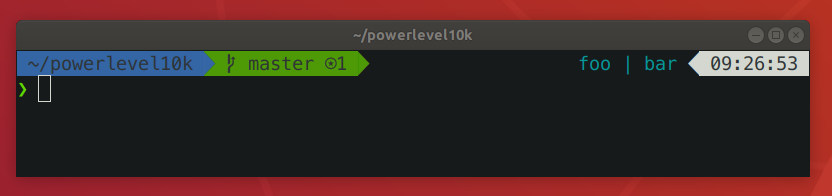
Your screenshot shows scratch on the right side but with different styling from the other segments. You can do this in p10k. Here's an example config:
POWERLEVEL9K_LEFT_PROMPT_ELEMENTS=(dir vcs newline prompt_char)
POWERLEVEL9K_RIGHT_PROMPT_ELEMENTS=(background_jobs time)

# Show the list of background jobs separated by ' | '.
POWERLEVEL9K_BACKGROUND_JOBS_CONTENT_EXPANSION='${${(j: | :)${(@)jobtexts%% *}}//\%/%%}'
# Background jobs on transparent background.
POWERLEVEL9K_BACKGROUND_JOBS_BACKGROUND=
# No powerline triangle after background jobs.
POWERLEVEL9K_BACKGROUND_JOBS_RIGHT_SEGMENT_SEPARATOR=
# No icon next to the list of background jobs.
POWERLEVEL9K_BACKGROUND_JOBS_VISUAL_IDENTIFIER_EXPANSION=

# These parameters are unrelated. They make prompt_char look better.
# I've simply copied them from the standard configs that `p10k configure`
# generates.
POWERLEVEL9K_PROMPT_CHAR_BACKGROUND=
POWERLEVEL9K_PROMPT_CHAR_OVERWRITE_STATE=true
POWERLEVEL9K_PROMPT_CHAR_LEFT_PROMPT_LAST_SEGMENT_END_SYMBOL=
POWERLEVEL9K_PROMPT_CHAR_LEFT_PROMPT_FIRST_SEGMENT_START_SYMBOL=
POWERLEVEL9K_PROMPT_CHAR_LEFT_LEFT_WHITESPACE=
POWERLEVEL9K_PROMPT_CHAR_LEFT_RIGHT_WHITESPACE=
This is how it looks:
romkatv
on 30 Jan 2020
Excellent! I should have clarified one last thing: Can I center foo | bar in the blank space it occupies? Between those two inward-pointing triangles?
BlueDrink9
on 30 Jan 2020
While I'm here, my generated configs use typeset -g rather than straight assignment. From the zsh man, I can't tell why. Do they need to be global?
BlueDrink9
on 30 Jan 2020
Can I center
foo | barin the blank space it occupies? Between those two inward-pointing triangles?
Nope, powerlevel10k cannot do this. It's technically possible to implement this feature but it's a lot of work.
While I'm here, my generated configs use
typeset -grather than straight assignment. From the zsh man, I can't tell why. Do they need to be global?
Please use typeset -g. Technically, typeset is only necessary when setting multiple parameters with a single command by means of brace expasion. For example, you have this in ~/.p10k.zsh:
typeset -g POWERLEVEL9K_PROMPT_CHAR_{OK,ERROR}_VICMD_CONTENT_EXPANSION='❮'
This line sets POWERLEVEL9K_PROMPT_CHAR_OK_VICMD_CONTENT_EXPANSION and POWERLEVEL9K_PROMPT_CHAR_ERROR_VICMD_CONTENT_EXPANSION. If you remove typeset -g from it, it won't work.
The config uses typeset -g everywhere for consistency and to avoid confusion. It's easier to use typeset -g with all parameters than to remember when it's safe to omit it.
romkatv
on 30 Jan 2020
Excellent, thank you for all your support!
BlueDrink9
on 30 Jan 2020
Related issues
 rpathak38
·
4Comments
rpathak38
·
4Comments
 alex-popov-tech
·
4Comments
alex-popov-tech
·
4Comments
 bwoodruff
·
6Comments
bwoodruff
·
6Comments
 lucascosti
·
5Comments
lucascosti
·
5Comments
 barthalion
·
3Comments
barthalion
·
3Comments