Powerlevel10k: [feature] Don't show full path when in (git) repo.
Say, I have /home/user/Projects/work/whatever/myrepo. I would like to not see the part '~/Projects/work/whatever' after cd to myrepo. Is it possible to do now and I've just missed it? If no, can I request for it as a new feature?
 ftpd
ftpd
All 23 comments
Try adding this to your ~/.zshrc.
function zsh_directory_name() {
  emulate -L zsh
  [[ $1 == d ]] || return
  while [[ $2 != / ]]; do
    if [[ -e $2/.git ]]; then
      typeset -ga reply=(${2:t} $#2)
      return
    fi
    2=${2:h}
  done
  return 1
}
Does it do what you want?
 romkatv
on 21 Jan 2020
romkatv
on 21 Jan 2020
Almost - I have:
~[myrepo]/something.
How to delete ~[] part?
ftpd
on 21 Jan 2020
That ~[...] signifies that the current directory is a Dynamic Named Directory. It's a zsh feature that's not specified to Powerlevel10k.
What's the output of typeset -pm POWERLEVEL9K_SHORTEN_STRATEGY? If it's not truncate_to_unique, it's possible to remove ~[...] (not that I recommend it). If it is truncate_to_unique, I would need to change p10k code to support this.
romkatv
on 21 Jan 2020
It's truncate_to_unique, but I can change it to whatever else - I have default settings, as other options are not anywhere in the comments and I didn't know what's possible here.
Except for the git repo I like truncating and I don't care is it 'shortest possible to complete' or just first letter of the directory.
Why wouldn't you recommend removing ~[...]? I can live it if I must ;-) It basically gives me what I wanted to have, even with annoying ~ on the beginning.
Edit: when I'm in root directory of repo, I don't mind [...], but to be honest it looks weird when it's [myrepo]/somesubdir.
ftpd
on 21 Jan 2020
It's truncate_to_unique, but I can change it to whatever else
If you set POWERLEVEL9K_SHORTEN_STRATEGY=truncate_from_right, then you'll be able to manually remove ~[...] with POWERLEVEL9K_DIR_CONTENT_EXPANSION='${P9K_CONTENT/#(#b)\~\[([^\/]#)\]/$match[1]}'.
I have default settings, as other options are not anywhere in the comments and I didn't know what's possible here.
Except for the git repo I like truncating and I don't care is it 'shortest possible to complete' or just first letter of the directory.
Other options are almost uniformly worse. They are supported for backward compatibility but other than that provide virtually no value.
When you replace truncate_to_unique with anything else, you aren't just changing how directory is truncated. Lots of features get turned off as well. The most important is "responsive truncation", shortens the directory only when it's necessary to avoid prompt overflowing to the next line or overlapping right prompt. See demo. The description in this cast should make it easier to understand how this works. So truncate_to_unique also implies "truncate when necessary". With all other truncation strategies you have to decide in advance how directories are shortened, and this prescription cannot depend on the width of the terminal, the number of parent directories, the length of each parent directory or the content of other prompt segments.
Why wouldn't you recommend removing ~[...]?
It's just a personal preference. I think it's nice when the directory in your prompt is a real directory that you can copy-paste and cd into. This is true with the default settings (you can TAB-expand the shortened directory thanks to the contraction being reversible). With ~[...] this isn't quite true. The displayed directory looks like a real directory but shortening isn't reversible. This is easy to fix though. Once you make shortening reversible, you'll be able to treat ~[myrepo] the same way as ~ (shortcut for $HOME). That is, all of these will just work:
cd ~[myrepo]
ls ~[myrepo]/foo
cat ~[myrepo]/<TAB>
Edit: when I'm in root directory of repo, I don't mind [...], but to be honest it looks weird when it's [myrepo]/somesubdir.
It looks weird if you encounter dynamic named directories for the first time. As I mentioned above, they are a part of core zsh. That's how they look. There are also static named directories. These are much simpler and much more popular. See this post of mine. If you have only a few Git repositories that you frequently work on, static named directories is the way to go. They also give you a more general tool as you can use them to alias any directory, not just Git repos.
So, let me know what you'd like to have. I can add a parameter to p10k to truncate dir when in a Git repo. I can also write the reverse transformation to go with the forward dynamic named directory transformation I posted earlier. My personal opinion is that static named directories or ~[...] (even if not reversible) is the best solution here but I won't try to force this opinion on you.
romkatv
on 21 Jan 2020
Thanks for the detailed explanation.
Dynamic named directories (and static, too) seem cool, but the truth is, I don't need to use them. The only reason I've created this issue is pure aesthetic ;-)
- I don't care about 'how much of my terminal space left' - I have my
dirsection in the first line and it's empty for the most of the time - only (short) git info and k8s/aws things, which stay hidden unless I'm using right command (killer feature, btw. - thanks for that); - I don't care about right prompt - I hate right prompt, as I'm pasting from my terminal often and with right prompt pasted text looks like a mess;
- I don't care about using things like
cd ~[myrepo]from anywhere outside - I cancdwith full path, I'm used to it since last 10+ years, so no problem to solve here ;-) - I don't care if what shows as my path is a real path I can copy or reuse in any way - in my ideal world it would be something fully truncated like
~/p/p/r/myrepoor not truncated at all (so~/projects/project_name/repos/myrepoand I don't like the idea of leaving one letter of first dir, two letters of the second, once again one for third part and four letters of the fourth (I hope you can understand what I mean here?) (xxx) - I don't care about what happens with my prompt when I'm resizing my terminal - I never resize it ;-)
So, I just wanted to have my reponame as first segment of the dir part, without anything else - despite functionalities these 'else' things could give me. If it's not possible or hard to add to powerlevel10k, or even if you simply don't share my vision and think it's a bad/stupid/not worthy idea - it's totally ok for me, I will live with what I have for now ;-) I've spent last two weeks searching for the best prompt for my new needs and this project fits me really, really well.
(xxx) - bonus question: how to disable truncating completely? By setting POWERLEVEL9K_DIR_MAX_LENGTH to something unreal like '800000' for example, or is there more elegant way?
Btw. setting POWERLEVEL9K_SHORTEN_STRATEGY=truncate_from_right and POWERLEVEL9K_DIR_CONTENT_EXPANSION='${P9K_CONTENT/#(#b)\~\[([^\/]#)\]/$match[1]}' doesn't work for me - with or without modified zsh_directory_name().
ftpd
on 22 Jan 2020
I added a new parameter. Please update powerlevel10k and give it a try:
typeset -g POWERLEVEL9K_DIR_TRUNCATE_BEFORE_MARKER=true
(I assume all dir options are set at their default values in ~/.p10k.zsh.)
romkatv
on 23 Jan 2020
Great, works like a charm. Thank you very much.
I'm closing this issue as fixed.
ftpd
on 23 Jan 2020
Great, works like a charm. Thank you very much.
Thanks for verifying.
I hate right prompt, as I'm pasting from my terminal often and with right prompt pasted text looks like a mess
POWERLEVEL9K_TRANSIENT_PROMPT=always might be useful to you. It works like this:

romkatv
on 23 Jan 2020
I've tried it for a short while - not for me ;-) I'm a bit traditionalist here.
ftpd
on 23 Jan 2020
I've tried it for a short while - not for me ;-) I'm a bit traditionalist here.
Yeah, it can be a bit too minimalist. You can truncate prompt less dramatically. For example, remove only right prompt:
typeset -g POWERLEVEL9K_TRANSIENT_PROMPT=off

function p10k-on-post-prompt() { p10k display '*/(right|right_frame|gap)'=hide }
function p10k-on-pre-prompt()  { p10k display '*/(right|right_frame|gap)'=show }
These p10k-* functions get called by powerlevel10k if they are defined: p10k-on-post-prompt right before retiring prompt and p10k-on-pre-prompt before rendering new prompt. p10k display hides/unhides parts of the prompt. It's documented in p10k help display.
romkatv
on 23 Jan 2020
Hi, I have been meaning to request this feature for a couple of months, so I was pleasantly surprised to find that it is now released! I had this in my previous prompt before I migrated to p10k because I hacked together a function to do it, but it had a small differences:
When in the root of a git repo, it still shows the full path. Only when navigating to a subdir of the marker dir does it truncate.
normal: ~/foo/bar/git_repo
p10k: git_repo
mine: ~/foo/bar/git_repo
normal: ~/foo/bar/git_repo/baz
p10k: git_repo/baz
mine: git_repo/baz
Is there a way this can be achieved?
Another thought, could it only be abbreviated on small column widths (but still use truncate_to_unique if it needs to be further abbreviated)?
 CallumHoward
on 3 Feb 2020
CallumHoward
on 3 Feb 2020
@CallumHoward It's possible to implement both features you are asking for and it's not terribly difficult. The primary problem is coming up with reasonable configuration parameters that can be comprehended by others. Explosion of the number of parameters also has its costs. I didn't expose POWERLEVEL9K_DIR_TRUNCATE_BEFORE_MARKER through the standard ~/.p10k.zsh because the value added by this parameter doesn't seem worth an extra line. The extra parameters you are requesting appear even less useful for the typical user. Their effect is just too small. Where they do cause a difference, it's rather surprising.
If you've already solved your problem by writing a custom function, can you continue using it?
romkatv
on 3 Feb 2020
That's fair enough, I can definitely understand that extra parameters add complexity. The custom function I wrote was for another zsh theme based on the Oh-my-zsh theme "ys". It was very hackey:
(most relevant part is the else clause)
# vcs_info config
zstyle ':vcs_info:git*' formats "%r/%S"

# Directory info.
local current_dir='$(ys_cd_info)'
ys_cd_info() {
    local shortpath

    if [[ $COLUMNS -lt 80 ]]; then
        shortpath="${YS_PWD_PROMPT_PREFIX2}%1~"
    elif [[ $COLUMNS -lt 100 ]]; then
        shortpath="%(5~|%-2~/.../%2~|%3~)"
    elif [[ $COLUMNS -lt 120 ]]; then
        shortpath="%(6~|%-3~/.../%2~|%5~)"
    else
        if [[ "${vcs_info_msg_0_}" != "" ]] && [[ "${vcs_info_msg_0_%/.}" != "${PWD##*/}" ]]; then
            shortpath="${vcs_info_msg_0_%/.}"
        else
            shortpath=${${PWD}/"$HOME"/"~"}
        fi

        if [[ "$shortpath" =~ "/" ]]; then
            shortpath="${shortpath%/*}/${YS_PWD_PROMPT_PREFIX2}${shortpath##*/}"
        fi
    fi

    printf "%s%s%s" ${YS_PWD_PROMPT_PREFIX1} ${shortpath} ${YS_PWD_PROMPT_SUFFIX}
}
As you can see, column widths were hard coded, not calculated properly like in p10k. With p10k I also get the very nice truncate_to_unique behaviour.
Truncating on small column widths is a feature I can definitely live without. It makes for a more minimal prompt in any case. But in the case of displaying the whole PWD when at the root level, perhaps I could make the argument that this is a better default? When inside a subdir of a repository, I am most interested in knowing where I am relative to the root, but when I am at the root, just printing the name of the repository doesn't give me too much information. Better to know the full path of where the repo is located in this case?
CallumHoward
on 3 Feb 2020
I cannot say what's better as I don't use this option myself.
I can only tell you that this option was requested by two p10k users who both wanted the current behavior. In addition, p10k has inherited truncate_with_package_name from p9k that follows the same logic but in slightly different circumstances. Lastly, when you are in ~/foo/bar/git_repo, Git status shows in prompt while in ~/foo/bar it doesn't. It's consistent and intuitive for POWERLEVEL9K_DIR_TRUNCATE_BEFORE_MARKER to kick in when and only when Git status shows.
I could add POWERLEVEL9K_DIR_SHORTEN_BEFORE_MARKER which would maximally shorten the path before the root of Git repo. ~/foo/bar will stay as ~/foo/bar while ~/foo/bar/git_repo/baz/qux will become ~/f/b/git_repo/baz/qux even if there is space for the whole thing.
This doesn't do exactly what you want but has the advantage of producing valid path with no information loss (the truncation logic still abides by truncate_to_unique).
Would you use this?
romkatv
on 3 Feb 2020
That makes sense. That compromise is nice, however I think I would prefer to use what I have now, truncate_to_unique and POWERLEVEL9K_DIR_TRUNCATE_BEFORE_MARKER - this behaviour is pretty close to perfect anyhow, I'm just being fussy with the git root thing. Perhaps you could point out to me how I could change the behaviour and I could patch it?
CallumHoward
on 3 Feb 2020
For all prompt segments except dir you always have the choice of building your own segment on top of p10k segment API if you cannot make the stock implementation do what you want. Unfortunately, dir is special because of its ability to truncate based on the content of other prompt segments on the same line. This is impossible to implement outside of powerlevel10k.
If you want the current behavior of dir (including responsive truncation) with some tweaks, the only way to get there is to fork powerlevel10k and patch it. This is not for the fainthearted as powerlevel10k source code is virtually impenetrable. The relevant part of the code you would need to change is here: https://github.com/romkatv/powerlevel10k/blob/1a9c8d126c97fe87f9754b9011f442798bc9b0ae/internal/p10k.zsh#L1761-L1849
I cannot in good faith recommend that you attempt it. It can be a fun experience for rare individuals but frustration is a far more likely outcome for most.
romkatv
on 3 Feb 2020
Right, and I love that about p10k. I spent some time customising it to get the features of my old prompt with the amazing performance of p10k. I'm very pleased with where I have it (here if you care to see), and POWERLEVEL9K_DIR_TRUNCATE_BEFORE_MARKER was the last big thing that was missing.
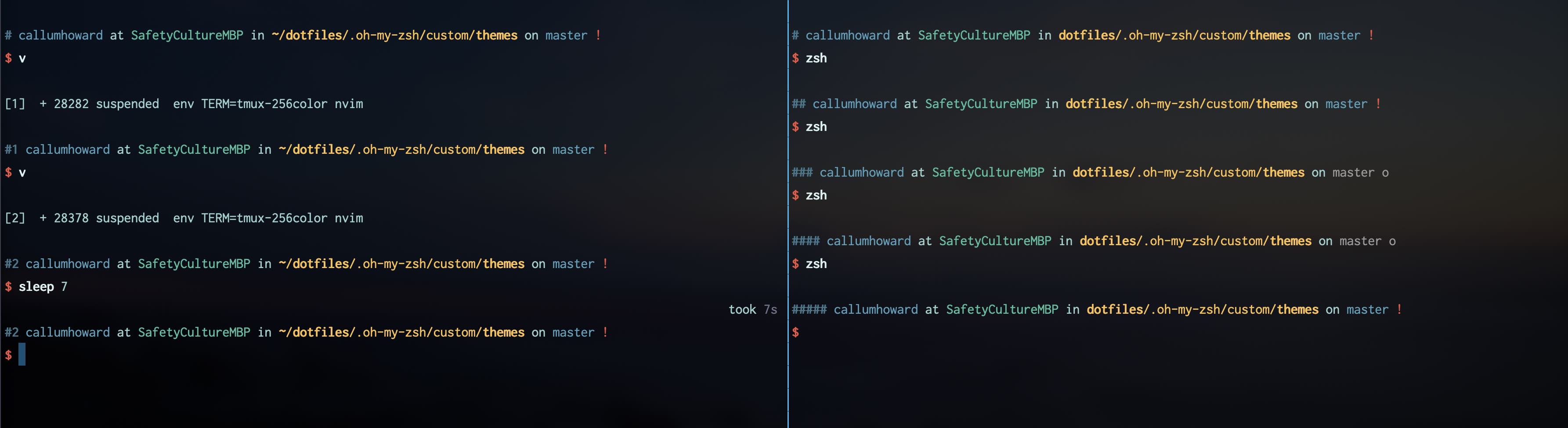
(some of the customisation demonstrated)
Modifying that code does seem pretty daunting. I think what I will do is stick with what I've got and try it out. If I don't get used to it and happen to have a free weekend I might revisit it.
Off topic but related to what you mentioned, I thought what I would try next is hiding prompt elements based on hard coded column widths. That's also something my old prompt did, though it was hackey. Sometimes on small width terminals my prompt wraps a couple of lines, even with truncated directory - sometimes caused by a long git branch name.
Anyhow, thanks for humouring me with my odd request!
CallumHoward
on 3 Feb 2020
I get OCD when I see forks in prompt. I sent you https://github.com/CallumHoward/dotfiles/pull/1.
romkatv
on 3 Feb 2020
Thanks!
CallumHoward
on 3 Feb 2020
I thought what I would try next is hiding prompt elements based on hard coded column widths.
This is fairly easy. No crazy expansions are necessary for this.
function p10k-on-pre-prompt() {
  if (( COLUMNS < 80 )); then
    p10k display '*/context'=hide
  else
    p10k display '*/context'=show
  fi
}
This API is public and stable but doesn't have proper documentation yet. You can read about it here (second part, below the horizontal line). It's very powerful and very fast.
... sometimes caused by a long git branch name
Your config already truncates long git branch names but the logic doesn't depend on $COLUMNS. It's easy to change it.
A better solution would be to implement truncation priorities in powerlevel10k so that you could specify what should be done when prompt doesn't fit.
POWERLEVEL9K_TRUNCATION_ORDER=(
  dir:truncate
  context:drop
  # etc
)
The demand for this is very low though. The overlap between users who occasionally work in narrow terminal windows and those who prefer verbose prompt style is tiny.
romkatv
on 3 Feb 2020
P10k has become much leaner and clutterfree than p9k. I'm finally ready to consider changing to P10k from the classic robbyrussell theme. Thanks!
Just came here to say that the following configuration made my directory path short and sweet:
  typeset -g POWERLEVEL9K_DIR_TRUNCATE_BEFORE_MARKER=true

  local anchor_files=(
    .git
    .shorten_folder_marker
  )
By having only .git in anchor_files works well in a monorepo where any subdir may contain eg. .node-version or .ruby-version. In such a case eg. REPONAME/folder/app would become just app due to REPONAME/folder/app/.node-version. Using .git as the anchor will display REPONAME/folder/app instead.
I cloned p10k yesterday, but POWERLEVEL9K_DIR_TRUNCATE_BEFORE_MARKER wasn't yet present in the example config.
With typeset -g POWERLEVEL9K_DIR_HYPERLINK=true in iTerm2, I can still cmd-click the short (non-existent) directory name to open the actual directory in Finder. By default iTerm2 will underline the directory name, but this may be removed from Settings > Advanced > Underline OSC 8 hyperlinks = "no". Beautiful!
Thank for p10k!
 pre
on 4 Feb 2020
pre
on 4 Feb 2020
...
POWERLEVEL9K_DIR_TRUNCATE_BEFORE_MARKERwasn't yet present in the example config.
It is now.
romkatv
on 6 Feb 2020
Related issues
 sanathkumarbs
·
3Comments
sanathkumarbs
·
3Comments
 gibfahn
·
5Comments
gibfahn
·
5Comments
 barthalion
·
3Comments
barthalion
·
3Comments
 stevenguh
·
6Comments
stevenguh
·
6Comments
 zemuldo
·
4Comments
zemuldo
·
4Comments