Powerlevel10k: Transient prompt feedback
Thanks for sharing this link!
https://www.reddit.com/r/zsh/comments/dsh1g3/new_powerlevel10k_feature_transient_prompt/
It's a very cool concept! Especially to copy-paste some set of commands, just awesome. I want to clarify some things.
(If you can't repro some of them, just let me know, I will prepare minimal steps to reproduce, I don't want to waste your time too much, and I don't have a good perception yet of which issues can be caused by prezto and which not).
POWERLEVEL9K_PROMPT_ADD_NEWLINEis not being respected anymore, there is no new line between the "old" commands, there is a new line separating all the old commands and the current prompt but I don't think it's enough.Is it possible to integrate better with
Ctrl+Dto exit root shell? This is the result of exitingsudo -susingexitcommand andCtrl+D, you can see that in the latter case the "full" prompt is still being visible.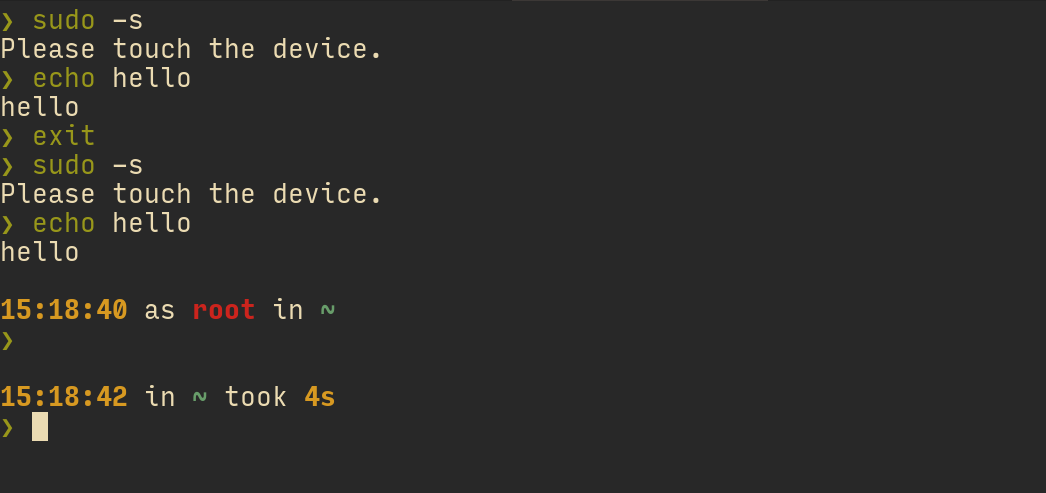
Ctrl+Lto clear screen adds a new line on the top of the prompt (typels<Enter><Ctrl-L>, can we get rid of it?Do I understand correctly that you are planning to integrate "transient prompt gist" directly in the prompt (the one I use to show kubectl and azure context only when corresponding commands are typed right now)? If you need an early testing, let me know, but I'd appreciate some pointers on how to set it up 🙂
This infrastructure also allows you to say that you want kubernetes context displayed only when the current command you are typing is kubectl. Or to bind a key that will instantly hide/show different parts of your prompt (individual segments, right prompt, etc.). The API of this infrastructure layer is still in flux, so it's not ready for prime time. Stay tuned.
 maximbaz
All 7 comments
POWERLEVEL9K_PROMPT_ADD_NEWLINEis not being respected anymore, there is no new line between the "old" commands, there is a new line separating all the old commands and the current prompt but I don't think it's enough.
Once transient prompt enters the picture, we essentially have two prompts but still only one set of parameters. Should POWERLEVEL9K_PROMPT_ADD_NEWLINE apply to transient prompts? If yes, it would be impossible to have no empty lines between old prompts while having an empty line before the current prompt. If no, then it's impossible to have empty lines between old prompts. I've made a judgement call there.
If you are up for some early adopter thrill, you cat try the experimental API. It gives you full control over two prompts.
- Set
POWERLEVEL9K_TRANSIENT_PROMPT=off. - Add these two functions to
~/.p10k.zsh:
function p10k-on-pre-prompt() { p10k display '1'=show }
function p10k-on-post-prompt() { p10k display '1'=hide }
p10k-on-post-prompt is called right before a prompt is retired. It says "hide the first line". p10k-on-pre-prompt is called right before rendering prompt. It undoes what p10k-on-post-prompt did.
This will keep empty lines the way you want (I suppose).
Here's how POWERLEVEL9K_TRANSIENT_PROMPT=always works under the hood.
function p10k-on-pre-prompt() {
  # Show empty line if it's the first prompt in the TTY.
  [[ $P9K_TTY == old ]] && p10k display 'empty_line'=show
  # Show the first prompt line.
  p10k display '1'=show
}

function p10k-on-post-prompt() {
  # Hide the empty line and the first prompt line.
  p10k display 'empty_line|1'=hide
}
The thing before = is a pattern. Try typing into your terminal: p10k display '*'=hide and then p10k display '*'=show. There is documentation in p10k help display. Also this is helpful to show the current state of all prompt parts that you can show and hide:
p10k display -a '*' && printf '%-32s = %q\n' ${(@kv)reply} | sort
Here's something you might like. It'll add timestamps to old prompts before the prompt char.
- Add
timetoPOWERLEVEL9K_LEFT_PROMPT_ELEMENTSright beforeprompt_char. Keep the othertimewhere it is. (You'll have twotimesegments. This is intentional.) - Set
POWERLEVEL9K_TIME_UPDATE_ON_COMMAND=true. - Add this:
function p10k-on-pre-prompt() { p10k display '1'=show '2/left/time'=hide }
function p10k-on-post-prompt() { p10k display '1'=hide '2/left/time'=show }
This one has the nice property of keeping command on the same line when retiring prompts.
function p10k-on-pre-prompt() { p10k display '1'=show 'empty_line'=hide }
function p10k-on-post-prompt() { p10k display '1'=hide 'empty_line'=show }
The downside of this config is the lack of separation between the last command output and the current prompt. You can use prompt gap to mitigate.
typeset -g POWERLEVEL9K_MULTILINE_FIRST_PROMPT_GAP_CHAR='·'
typeset -g POWERLEVEL9K_MULTILINE_FIRST_PROMPT_GAP_FOREGROUND=238
typeset -g POWERLEVEL9K_LEFT_PROMPT_LAST_SEGMENT_END_SYMBOL=' '
typeset -g POWERLEVEL9K_RIGHT_PROMPT_FIRST_SEGMENT_START_SYMBOL=' '
typeset -g POWERLEVEL9K_EMPTY_LINE_LEFT_PROMPT_FIRST_SEGMENT_END_SYMBOL='%{%}'
typeset -g POWERLEVEL9K_EMPTY_LINE_RIGHT_PROMPT_FIRST_SEGMENT_START_SYMBOL='%{%}'
(These parameters are set by p10k configure when you choose "dotted" connection.)
You can also call p10k from zle. See an example in p10k help display.
- Is it possible to integrate better with
Ctrl+Dto exit root shell?
function my-ctrl-d() {
  zle || exit 0
  [[ -n $BUFFER ]] && return
  typeset -g precmd_functions=(my-ctrl-d)
  zle accept-line
}
zle -N my-ctrl-d
bindkey '^D' my-ctrl-d
setopt ignore_eof
Ctrl+Lto clear screen adds a new line on the top of the prompt (typels<Enter><Ctrl-L>, can we get rid of it?
If you set POWERLEVEL9K_TRANSIENT_PROMPT=off and define p10k hooks as I described above, this won't happen.
The default behavior of POWERLEVEL9K_TRANSIENT_PROMPT=always is to hide empty_line when retiring prompts. An empty line can be hidden only if it's a part of zsh prompt. It cannot be hidden if it's simply printed to the terminal. When you press Ctrl-L, you'll see everything that is a part of your prompt.
See the description of print vs show in p10k help display.
- Do I understand correctly that you are planning to integrate "transient prompt gist" directly in the prompt (the one I use to show kubectl and azure context only when corresponding commands are typed right now)?
That's right. It'll look like this in user configs:
function p10k-on-pre-prompt() {
  # Hide kubecontext segment when a new prompt is being rendered.
  p10k display '*/kubecontext'=hide
}

function p10k-on-post-widget() {
  # If the command in $BUFFER invokes kubectl or terraform, show
  # kubecontext segment. Otherwise hide it.
  local z=$'\0'
  if (( $P9K_COMMANDS[(I)(|*[/$z])(kubectl|terraform)] )); then
    p10k display '*/kubecontext'=show
  else
    p10k display '*/kubecontext'=hide
  fi
}
Array parameter P9K_COMMANDS contains all commands from $BUFFER (your current command line). Each element is a nul-separated list. The last component is the actual command (kubectl, foo/bar, grep, etc.). The previous components are precommands (sudo, nice,nohup, etc.) . For example:
( exec sudo -u user =ls /etc ) && foo/bar
... results in the following P9K_COMMANDS:
P9K_COMMANDS=(
  $'exec\0sudo\0/bin/ls'
  'foo/bar'
)
p10k-on-post-widget doesn't get called yet, so don't try using this.
Edit: it does get called now. However, the same result can be achieved with just POWERLEVEL9K_KUBECONTEXT_SHOW_ON_COMMAND=kubectl. The value of this parameter is a pattern, so you can list several commands there: kubectl|helm|kubens|kubectx|oc|istioctl|kogito.
FYI: the gist is now using p10k display.
If you need an early testing, let me know, but I'd appreciate some pointers on how to set it up slightly_smiling_face
Thanks for the offer! It might take some time. First, I'm not satisfied with the API. Second, I've some other stuff on my plate right now.
For now I'm super interested to know what kind of prompt you come up by using the two hooks I described here. Let me know if there anything that looks, cool or interesting. Also if anything is crappy or missing.
 romkatv
on 8 Nov 2019
romkatv
on 8 Nov 2019
Wow this is extremely impressive! 🎉
Once transient prompt enters the picture, we essentially have two prompts but still only one set of parameters.
I foresee this might become something you'd want to improve, you are right there are some configuration variables but it is no longer clear if they apply to both prompt or only to one of them (and which one).
Two examples that instantly come to my mind where I would want to configure them independently:
Adding new lines (what we discussed before and what you showed how to solve by defining
p10k-on-pre/post-prompt)Configuring sections differently depending whether they are in recycled or fresh prompt (e.g. say I want
timeto be present, but maybe I want the color to be dim in the recycled prompt but bright yellow in the active prompt).
By the way, this snippet below behaves _exactly_ as I expected it to work, very happy with it:
function p10k-on-pre-prompt() { p10k display '1'=show }
function p10k-on-post-prompt() { p10k display '1'=hide }
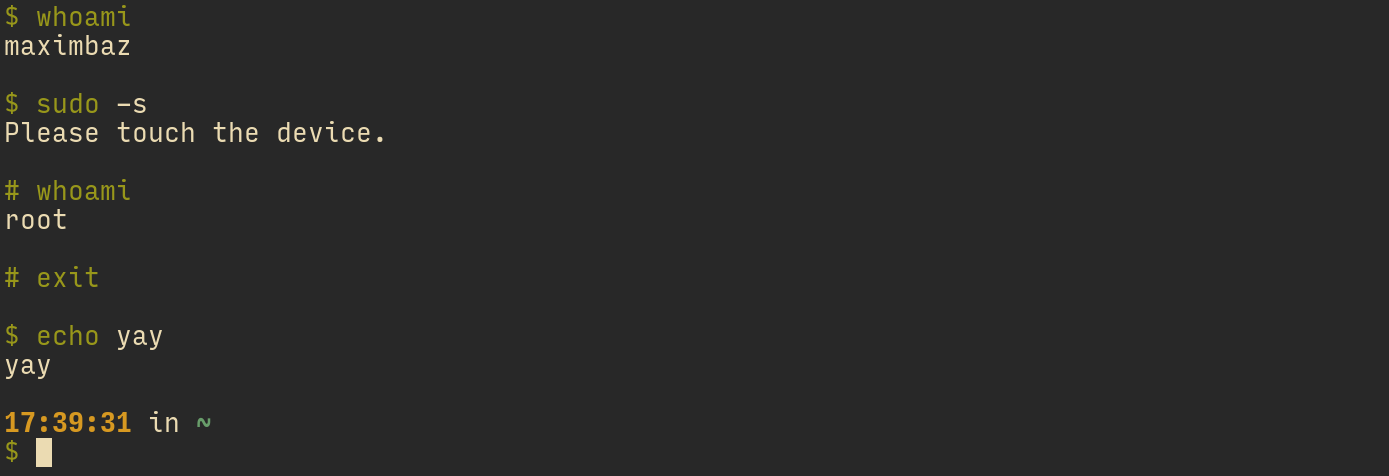
I also realized that it becomes important to differentiate prompt characters for regular vs root user, because the user segment is not shown in the recycled prompt, and it is again just simpler to copy-paste the recycled prompt if prompt characters are $ and #. I ended up with the following config:
typeset -g POWERLEVEL9K_PROMPT_CHAR_CONTENT_EXPANSION='${${${EUID:#0}:+$}:-#}'
Check this out, 100% copy-paste'able for sharing with someone:
function my-ctrl-d() {...
Thanks for the snippet! I will have to make it work with prezto, but I see the general direction of where to look at.
p10k-on-buffer-change doesn't get called yet, so don't try using this.
Gotcha! But it will be very nice, and very simple for users to use, I like!
FYI: the gist is now using p10k display.
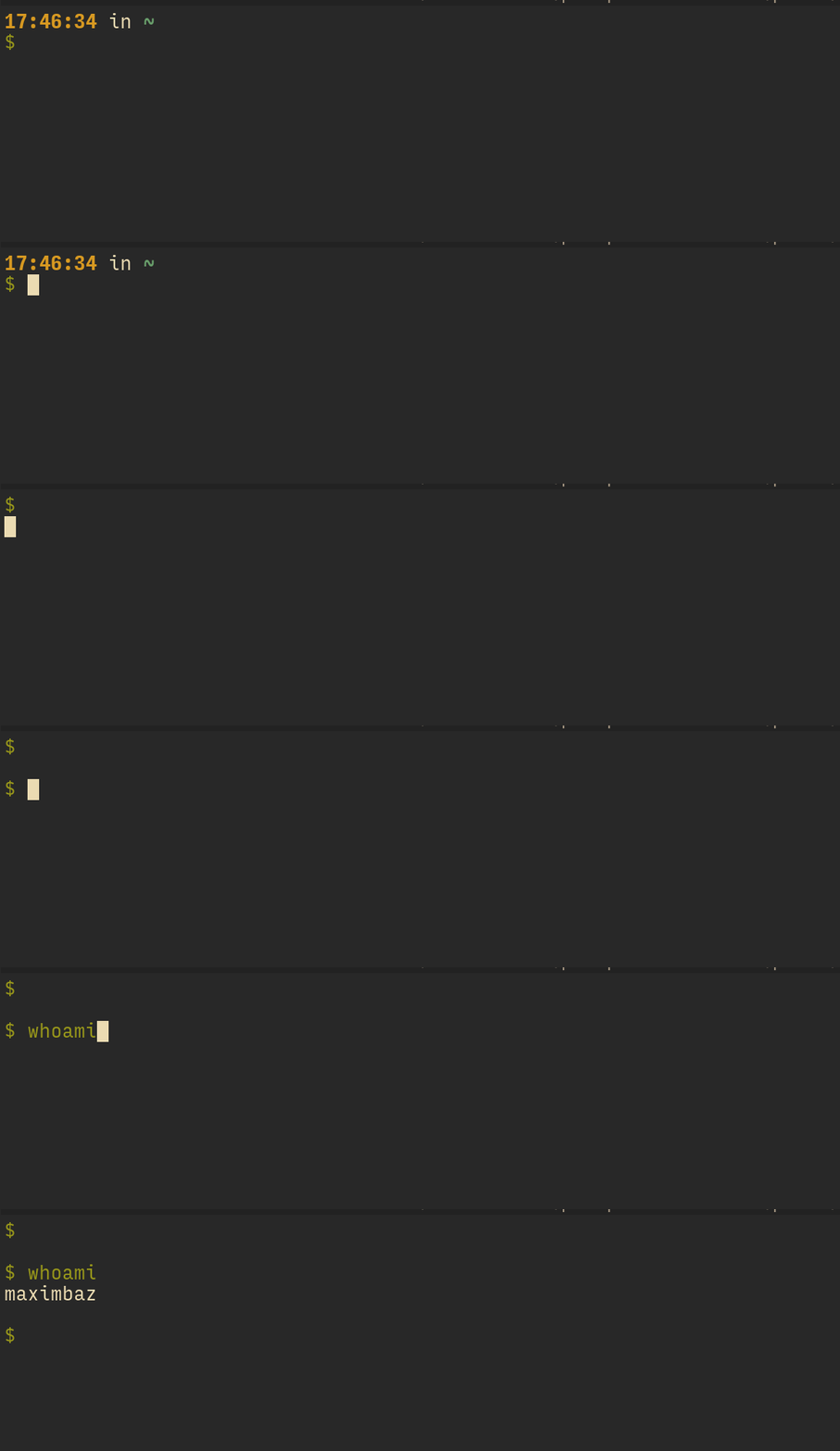
Nice, the gist becomes smaller and smaller! 🙂 Although it perhaps isn't compatible with p10k-on-pre/post-prompt way of configuring things, i.e. if I configure POWERLEVEL9K_TRANSIENT_PROMPT=always then everything works as expected, but if I configure POWERLEVEL9K_TRANSIENT_PROMPT=always and define
function p10k-on-pre-prompt() { p10k display '1'=show }
function p10k-on-post-prompt() { p10k display '1'=hide }
Pressing Enter removes all the segments like so:
Thanks for the offer! It might take some time. First, I'm not satisfied with the API. Second, I've some other stuff on my plate right now.
No worries, take your time 🙂
For now I'm super interested to know what kind of prompt you come up by using the two hooks I described here. Let me know if there anything that looks, cool or interesting. Also if anything is crappy or missing.
👍 👍
All in all, really nice work!
maximbaz
on 8 Nov 2019
I foresee this might become something you'd want to improve, you are right there are some configuration variables but it is no longer clear if they apply to both prompt or only to one of them (and which one).
Even though you can logically think of there being two prompts, there is in fact just one, so there is no confusion as to which parameters apply. They all do.
Forget for a moment about POWERLEVEL9K_TRANSIENT_PROMPT. What we have is a single prompt and an API for changing visibility of its parts. If you hide some parts when a prompt is being retired, and unhide them for a new prompt, you could make it look like you have two different prompt. This metaphor of having two prompts is rather weak and it breaks down as soon as you introduce more interesting behavior. For example, you might decide that prompts that get retired while you are root should look different (they should retain dir or something). Or maybe the very first prompt in the terminal (or in interactive session) should be retired in its full glory. Or add a key shortcut to manually hide/show right prompt. Now it's difficult to talk about two different prompts and much easier to see the prompt for what it is -- a sequence of parts, with a subset of them being shown when a prompt is rendered.
The ability to show/hide prompt parts gives you more freedom than it may appear at first. You can define several completely independent prompts by putting them on different lines and then hiding/showing appropriate lines. Here's an example:
POWERLEVEL9K_LEFT_PROMPT_ELEMENTS=(
  # Prompt A (note that it takes two lines)
  dir vcs newline prompt_char
  # Prompt B
  dir prompt_char
  # Prompt C
  time
)
Switch between the 3 prompts:
p10k display '<->'=hide '1|2'=show  # Prompt A
p10k display '<->'=hide   '3'=show  # Prompt B
p10k display '<->'=hide   '4'=show  # Prompt C
(<-> is a pattern that matches non-negative integers.)
How does POWERLEVEL9K_TRANSIENT_PROMPT fit into this picture? This option simply defines p10k-on-{pre,post}-prompt with some specific implementation that I chose. It doesn't combine with user-defined hooks -- you can use either one or the other. Before I release the hook API publicly, I'll add a warning that will trigger if you define both. Right now there is no warning and you get undefined behavior if you use both POWERLEVEL9K_TRANSIENT_PROMPT and the hooks. This is why in my instructions I said to set POWERLEVEL9K_TRANSIENT_PROMPT=off.
POWERLEVEL9K_PROMPT_ADD_NEWLINE and POWERLEVEL9K_SHOW_RULER are somewhat similar to POWERLEVEL9K_TRANSIENT_PROMPT as they can also be replaced with appropriate p10k display calls from hooks. They, however, combine naturally with user-defined hooks. For example, POWERLEVEL9K_PROMPT_ADD_NEWLINE=true is equivalent to running the following code at the beginning of p10k-on-pre-prompt:
if [[ $P9K_TTY == old ]]; then
  p10k display 'empty_line'=print
fi
- Configuring sections differently depending whether they are in recycled or fresh prompt (e.g. say I want
timeto be present, but maybe I want the color to be dim in the recycled prompt but bright yellow in the active prompt).
Indeed, hide/show doesn't allow you to configure the same prompt segment differently in different prompts. My preliminary solution (not implemented yet but fairly easy to):
POWERLEVEL9K_LEFT_PROMPT_ELEMENTS=(time1 time2)

POWERLEVEL9K_TIME1_FOREGROUND=red
POWERLEVEL9K_TIME2_FOREGROUND=blue
Note how all features are generic and orthogonal:
- If you define
p10k-on-*hooks, p10k will call them. You can do whatever you want in them. p10k displayallows you to hide/show different prompt parts. You can call it from anywhere, including (but not limited to)p10k-on-*hooks.- You can put more than one instance of the same segment in your prompt (e.g.,
time). - You can customize two instances of the same segment differently by tagging them with numbers (e.g.,
time1andtime2).
Not everything from this list currently works but that's how I see it.
typeset -g POWERLEVEL9K_PROMPT_CHAR_CONTENT_EXPANSION='${${${EUID:#0}:+$}:-#}'
Simpler: %(#.#.$). Or with canonical zsh style ($ is from bash): %#.
Thanks for the snippet! I will have to make it work with prezto, but I see the general direction of where to look at.
It doesn't work for you out of the box? What's the observed behavior?
Nice, the gist becomes smaller and smaller! Although it perhaps isn't compatible with
p10k-on-pre/post-promptway of configuring things, i.e. if I configurePOWERLEVEL9K_TRANSIENT_PROMPT=alwaysthen everything works as expected, but if I configurePOWERLEVEL9K_TRANSIENT_PROMPT=alwaysand define
The gist defines p10k-on-pre-prompt, which overrides your own function. This is easily fixable but I don't want to spend time on compatibility between two unofficial and unsupported APIs. You can keep using the old version of the gist until there is official support in p10k for this stuff.
romkatv
on 9 Nov 2019
Thanks for the explanation and all the hints! 🙂
It doesn't work for you out of the box? What's the observed behavior?
Pressing Ctrl+D would show suggestions, as if I started to type a command and pressed Tab.
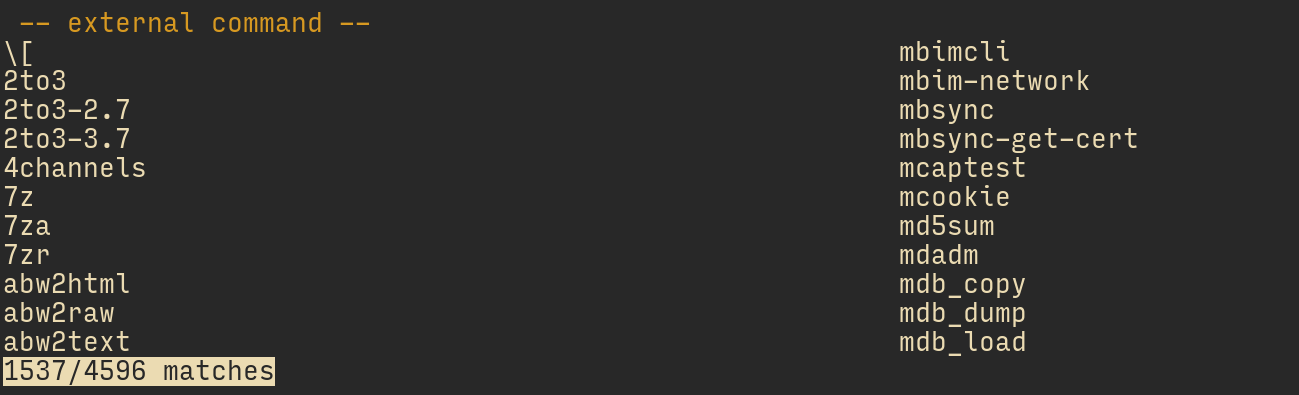
However I noticed that it matters where I put your snippet, if I place it next to p10k configs then Ctrl+D would give me suggestions, but if I place it after antigen apply then it would behave as expected.
It sounds like a conflict with something, but I haven't figured out with what exactly, doesn't seem to be prezto or any of the plugins I use.
Unless you have a quick idea on what might be the cause, I'm fine dropping it since it's just a matter of placing the snippet in the right place in the config.
Other than that, after a couple days of using this mode I'm very happy with it, it's so liberating! 👍 I'm ok with closing this ticket as well now, will of course report if I find something else.
maximbaz
on 10 Nov 2019
Thanks for the feedback.
I don't intend to make that ctrl-d code snippet a part of p10k, so I'm not keen to figure out why it works in some cases but not in others. Since you've found a way to make it work for you, that's good enough.
romkatv
on 10 Nov 2019
@romkatv I have this mostly working. I just want to get rid of the multiline chars on old transient prompts.
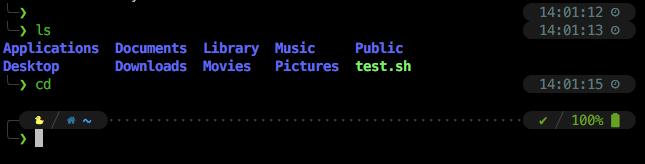
config:
  typeset -g POWERLEVEL9K_TRANSIENT_PROMPT=off

  function p10k-on-pre-prompt() {
    # Show empty line if it's the first prompt in the TTY.
    [[ $P9K_TTY == old ]] && p10k display 'empty_line'=show
    # Show the first prompt line.
    p10k display '1'=show '2/right/time'=hide
  }

  function p10k-on-post-prompt() {
    # Hide the empty line and the first prompt line.
    p10k display 'empty_line|1'=hide '2/right/time'=show
  }
nvm got it
  function p10k-on-pre-prompt() {
    # Show empty line if it's the first prompt in the TTY.
    [[ $P9K_TTY == old ]] && p10k display 'empty_line'=show
    # Show the first prompt line.
    p10k display '1|*/left_frame'=show '2/right/time'=hide
  }

  function p10k-on-post-prompt() {
    # Hide the empty line and the first prompt line.
    p10k display 'empty_line|1|*/left_frame'=hide '2/right/time'=show
  }
 hipstersmoothie
on 18 Feb 2020
hipstersmoothie
on 18 Feb 2020
Those are 2/left_frame. p10k help display is your reference for this stuff.
romkatv
on 18 Feb 2020
Related issues
 ImKifu
·
3Comments
ImKifu
·
3Comments
 sanathkumarbs
·
3Comments
sanathkumarbs
·
3Comments
 dylanjm
·
3Comments
dylanjm
·
3Comments
 barthalion
·
3Comments
barthalion
·
3Comments
 bwoodruff
·
6Comments
bwoodruff
·
6Comments
Most helpful comment
Once transient prompt enters the picture, we essentially have two prompts but still only one set of parameters. Should
POWERLEVEL9K_PROMPT_ADD_NEWLINEapply to transient prompts? If yes, it would be impossible to have no empty lines between old prompts while having an empty line before the current prompt. If no, then it's impossible to have empty lines between old prompts. I've made a judgement call there.If you are up for some early adopter thrill, you cat try the experimental API. It gives you full control over two prompts.
POWERLEVEL9K_TRANSIENT_PROMPT=off.~/.p10k.zsh:p10k-on-post-promptis called right before a prompt is retired. It says "hide the first line".p10k-on-pre-promptis called right before rendering prompt. It undoes whatp10k-on-post-promptdid.This will keep empty lines the way you want (I suppose).
Here's how
POWERLEVEL9K_TRANSIENT_PROMPT=alwaysworks under the hood.The thing before
=is a pattern. Try typing into your terminal:p10k display '*'=hideand thenp10k display '*'=show. There is documentation inp10k help display. Also this is helpful to show the current state of all prompt parts that you can show and hide:Here's something you might like. It'll add timestamps to old prompts before the prompt char.
timetoPOWERLEVEL9K_LEFT_PROMPT_ELEMENTSright beforeprompt_char. Keep the othertimewhere it is. (You'll have twotimesegments. This is intentional.)POWERLEVEL9K_TIME_UPDATE_ON_COMMAND=true.This one has the nice property of keeping command on the same line when retiring prompts.
The downside of this config is the lack of separation between the last command output and the current prompt. You can use prompt gap to mitigate.
(These parameters are set by
p10k configurewhen you choose "dotted" connection.)You can also call p10k from zle. See an example in
p10k help display.If you set
POWERLEVEL9K_TRANSIENT_PROMPT=offand define p10k hooks as I described above, this won't happen.The default behavior of
POWERLEVEL9K_TRANSIENT_PROMPT=alwaysis to hideempty_linewhen retiring prompts. An empty line can be hidden only if it's a part of zsh prompt. It cannot be hidden if it's simply printed to the terminal. When you press Ctrl-L, you'll see everything that is a part of your prompt.See the description of
printvsshowinp10k help display.That's right. It'll look like this in user configs:
Array parameter
P9K_COMMANDScontains all commands from$BUFFER(your current command line). Each element is a nul-separated list. The last component is the actual command (kubectl,foo/bar,grep, etc.). The previous components are precommands (sudo,nice,nohup, etc.) . For example:... results in the following
P9K_COMMANDS:p10k-on-post-widgetdoesn't get called yet, so don't try using this.Edit: it does get called now. However, the same result can be achieved with just
POWERLEVEL9K_KUBECONTEXT_SHOW_ON_COMMAND=kubectl. The value of this parameter is a pattern, so you can list several commands there:kubectl|helm|kubens|kubectx|oc|istioctl|kogito.FYI: the gist is now using
p10k display.Thanks for the offer! It might take some time. First, I'm not satisfied with the API. Second, I've some other stuff on my plate right now.
For now I'm super interested to know what kind of prompt you come up by using the two hooks I described here. Let me know if there anything that looks, cool or interesting. Also if anything is crappy or missing.