Powerlevel10k: Background zsh processes with stable CPU usage in WSL
Hi @romkatv! When I have no terminals open I still have background zsh processes with stable CPU usage:
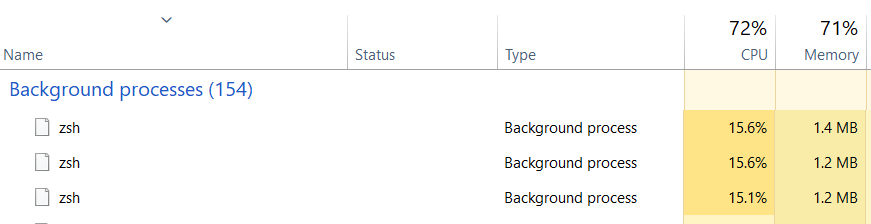
I've noticed this by intensity work of processor coolers on my notebook.
 anki-code
All 10 comments
Do you believe this issue is related to powerlevel10k? If so, why?
What's the output of pstree -alpT? You might need to run sudo apt install -y pstree or the equivalent on your distro to install pstree.
What's the output of top?
 romkatv
on 25 Sep 2019
romkatv
on 25 Sep 2019
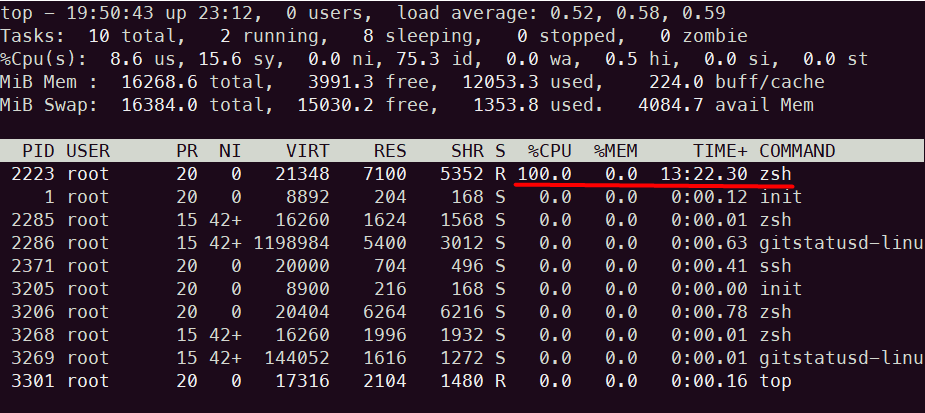
I've reboot the OS. Then I worked several hours. Then I closed all bash.exe terminals with p10k (around 4). After it I see one active process with stable CPU use:

top:
❯ pstree -alpT
init,1
  ├─init,3205
  │   └─zsh,3206
  │       └─pstree,3303 -alpT
  ├─ssh,2371
  ├─zsh,2223
  ├─zsh,2285 -dfxc \012      echo $$\012      /root/.oh-my-zsh/custom/themes/powerlevel10k/gitstatus/bin/gitstatusd-linux-x86_64 --lock-fd=3 --parent-pid=2223 --num-threads=16 --max-num-staged=-1 --max-num-unstaged=-1 --max-num-conflicted=-1 --max-num-untracked=-1 --dirty-max-index-size=-1 --log-level=INFO\012      if [[ $? != (0|10) && $? -le 128 &&\012            -z '' &&\012            -f /root/.oh-my-zsh/custom/themes/powerlevel10k/gitstatus/bin/gitstatusd-linux-x86_64-static ]]; then\012        /root/.oh-my-zsh/custom/themes/powerlevel10k/gitstatus/bin/gitstatusd-linux-x86_64-static --lock-fd=3 --parent-pid=2223 --num-threads=16 --max-num-staged=-1 --max-num-unstaged=-1 --max-num-conflicted=-1 --max-num-untracked=-1 --dirty-max-index-size=-1 --log-level=INFO\012      fi\012      echo -nE $'bye\\x1f0\\x1e'
  │   └─gitstatusd-linu,2286 --lock-fd=3 --parent-pid=2223 --num-threads=16 --max-num-staged=-1 --max-num-unstaged=-1 --max-num-conflicted=-1 --max-num-untracked=-1 --dirty-max-index-size=-1 --log-level=INFO
  └─zsh,3268 -dfxc \012      echo $$\012      /root/.oh-my-zsh/custom/themes/powerlevel10k/gitstatus/bin/gitstatusd-linux-x86_64 --lock-fd=3 --parent-pid=3206 --num-threads=16 --max-num-staged=-1 --max-num-unstaged=-1 --max-num-conflicted=-1 --max-num-untracked=-1 --dirty-max-index-size=-1 --log-level=INFO\012      if [[ $? != (0|10) && $? -le 128 &&\012            -z '' &&\012            -f /root/.oh-my-zsh/custom/themes/powerlevel10k/gitstatus/bin/gitstatusd-linux-x86_64-static ]]; then\012        /root/.oh-my-zsh/custom/themes/powerlevel10k/gitstatus/bin/gitstatusd-linux-x86_64-static --lock-fd=3 --parent-pid=3206 --num-threads=16 --max-num-staged=-1 --max-num-unstaged=-1 --max-num-conflicted=-1 --max-num-untracked=-1 --dirty-max-index-size=-1 --log-level=INFO\012      fi\012      echo -nE $'bye\\x1f0\\x1e'
      └─gitstatusd-linu,3269 --lock-fd=3 --parent-pid=3206 --num-threads=16 --max-num-staged=-1 --max-num-unstaged=-1 --max-num-conflicted=-1 --max-num-untracked=-1 --dirty-max-index-size=-1 --log-level=INFO
From the output of top we can see that PID of the rogue zsh process is 2223. From pstree we can see that this is interactive zsh that you presumed to have exited but in fact it's still running. We can also see that's it's been orphaned. This usually happens when you kill a parent process in a gruesome way. The parent process of interactive shells is init, so you it appears that you've killed init instead of exiting zsh.
Then I closed all bash.exe terminals...
How exactly do you close them?
P.S.
What you call stable CPU use is simply a CPU core full throttle.
romkatv
on 26 Sep 2019
I close them by exit command or Ctrl+D hotkey. No one closed unexpectedly. I was not faced with behaviour like that before trying p10k. I'm going to try vanilla zsh for comparing.
anki-code
on 26 Sep 2019
I close them by exit command or Ctrl+D hotkey. No one closed unexpectedly.
This sounds implausible because that rogue zsh process is the interactive shell. It's not some background process, it's the shell that you exit by typing exit. If for some reason an interactive zsh doesn't exit, its terminal window wouldn't close.
I managed to reproduce this problem by orphaning an interactive zsh and closing its terminal. The orphaned zsh starts eating 100% CPU if it had any handlers installed with zle -F. I'll dig deeper tomorrow to try to understand where zsh is spinning.
romkatv
on 26 Sep 2019
The culprit is a bug in zsh. I've sent a patch: https://www.zsh.org/mla/workers//2019/msg00820.html. You can also see it in https://github.com/romkatv/zsh/tree/fix-hup-infinite-loop.
It's possible to implement a workaround for this bug in powerlevel10k but I'm not eager to do it. As long as you exit zsh before destroying TTY, the bug won't trigger.
romkatv
on 27 Sep 2019
Great! Thanks! I'm going to close this.
anki-code
on 27 Sep 2019
There is no PPA for zsh and the release version is stuck on 5.4.2 for 18.04 LTS in WSL. So building from the source is the only solution?
 johnyoonh
on 17 Sep 2020
johnyoonh
on 17 Sep 2020
@johnyoonh You can install it from zsh-bin. Copy-paste the following command and you are good to go:
(
  curl -fsSLo /tmp/install-zsh https://raw.githubusercontent.com/romkatv/zsh-bin/master/install
  sudo sh /tmp/install-zsh -d /usr/local
  if ! grep -qxF '/usr/local/bin/zsh' /etc/shells; then
    sudo tee -a /etc/shells <<</usr/local/bin/zsh >/dev/null
  fi
  sudo chsh -s /usr/local/bin/zsh "$USER"
)
This installs Zsh 5.8 to /usr/local/bin/zsh and makes it your login shell. Zsh 5.4.1 will still be available as /bin/zsh.
romkatv
on 17 Sep 2020
@romkatv Wow, this is awesome. Thank you so much!
johnyoonh
on 18 Sep 2020
Related issues
 ImKifu
·
3Comments
ImKifu
·
3Comments
 zemuldo
·
4Comments
zemuldo
·
4Comments
 barthalion
·
3Comments
barthalion
·
3Comments
 rpathak38
·
4Comments
rpathak38
·
4Comments
 Mystic8b
·
4Comments
Mystic8b
·
4Comments
Most helpful comment
The culprit is a bug in zsh. I've sent a patch: https://www.zsh.org/mla/workers//2019/msg00820.html. You can also see it in https://github.com/romkatv/zsh/tree/fix-hup-infinite-loop.
It's possible to implement a workaround for this bug in powerlevel10k but I'm not eager to do it. As long as you exit zsh before destroying TTY, the bug won't trigger.