I've recently become a convert to zsh and powerlevel10k from being a long time bash guy. I was trying to set a variable dynamically before the prompt is constructed based on the width of my terminal. Specifically, I am changing POWERLEVEL9K_SHORTEN_DIR_LENGTH to ensure that the directory doesn't wrap around by using the number of columns displayed in my terminal.
I set this using a hook in the precmd_functions list for zsh, but I realized it wouldn't take effect on the next prompt, it would take an additional prompt before the variable took effect (i.e. I would resize the terminal, hit enter, no effect. I hit enter again and it took effect). I realized that powerlevel10k is "rendering" the prompt before the precmd_functions are called.
Is there a hook that I can use to set a variable before the prompt is rendered? This isn't a big deal, but it is a slight inconsistency that would be nice to not have.
Thanks for great work on this repo!
 albertmichaelj
All 27 comments
Powerlevel10k doesn't support changing options after the first prompt is rendered. All option changes require shell restart. The popular way to do this is by typing exec zsh. It'll reinitialize zsh without forking.
There is currently no way to achieve exactly what you want. I might offer you a substitute if you could share your config (all parameters that start with POWERLEVEL9K).
 romkatv
on 5 Jun 2019
romkatv
on 5 Jun 2019
A few more questions.
What would the examples of directories that are long enough to require shortening?
Is type exec zsh after resizing your terminal a viable option?
romkatv
on 5 Jun 2019
This certainly does work after the first prompt is rendered (at least it is working for me). The code I am using is below (and I'm using a very slightly modified pure power config linked to in the powerlevel10k readme):
function my_pre_prompt_command {
let fillsize=${COLUMNS}-22
typeset -g POWERLEVEL9K_SHORTEN_DIR_LENGTH=$fillsize
}
precmd_functions+=(my_pre_prompt_command)
The issue is that it doesn't work for the next prompt, it works for the prompt after that. Does this make sense?
albertmichaelj
on 5 Jun 2019
If you set a POWERLEVEL9K parameter after the first prompt is rendered, the change may be applied, it may be ignored, or the whole prompt may fall apart. Moreover, the exact effect may differ once you update to the newest version. This is what I meant by "not supported".
If relying on unsupported features is acceptable, you can simply put your own precmd hook before p10k's.
romkatv
on 5 Jun 2019
That was exactly my problem. I was appending to precmd_functions which was after your function was being run, and that's why it was taking two prompts. When I prepend, it works perfectly.
I definitely understand this isn't a supported feature, but for my use case, I'd be surprised if it breaks since the prompt always has to reevaluate the directory string since it doesn't know which directory it will be in. If it does break, that's okay with me, and I understand it is not supported. I'll close this issue.
albertmichaelj
on 5 Jun 2019
I'd be surprised if it breaks
I wouldn't be. In fact, it's only thanks to the recent changes that it works. There is a lot of caching in p10k and right now it just so happens that this part of the code is not cached. But it could be. The prompt can store the whole formatted dir segment the first time you visit a directory, so the next time you are in this directory this segment will come from the cache. Which things do and don't get cached is unspecified, hence the behavior changes.
My offer to find an alternative solution still stands (see my first two comments where I've mention which info I would need). You are the first person I know to attempt what you are attempting. It's likely that you aren't using the usual patterns that others have settled on. They might work for you if you knew them.
romkatv
on 5 Jun 2019
Sorry I ignored the initial offers of help, and I really appreciate you taking the time to think about this. Rather than giving the complete config, I've included the diff of the .purepower file that you link to in the readme with my modified version (diff -c .purepower .my_purepower).
*** .purepower 2019-06-05 15:49:49.000000000 -0400
--- .dotfiles/zsh_custom/purepower.zsh 2019-06-05 14:04:58.000000000 -0400
***************
*** 164,173 ****
fi
typeset -ga POWERLEVEL9K_LEFT_PROMPT_ELEMENTS=(
! dir vcs)
typeset -ga POWERLEVEL9K_RIGHT_PROMPT_ELEMENTS=(
! status command_execution_time background_jobs custom_rprompt context)
local ins=$(_pp_s '>' '❯')
local cmd=$(_pp_s '<' '❮')
--- 164,173 ----
fi
typeset -ga POWERLEVEL9K_LEFT_PROMPT_ELEMENTS=(
! time dir vcs)
typeset -ga POWERLEVEL9K_RIGHT_PROMPT_ELEMENTS=(
! status command_execution_time background_jobs custom_rprompt anaconda context)
local ins=$(_pp_s '>' '❯')
local cmd=$(_pp_s '<' '❮')
***************
*** 191,197 ****
fi
typeset -g POWERLEVEL9K_PROMPT_ON_NEWLINE=true
! typeset -g POWERLEVEL9K_RPROMPT_ON_NEWLINE=false
typeset -g POWERLEVEL9K_MULTILINE_FIRST_PROMPT_PREFIX=
typeset -g POWERLEVEL9K_MULTILINE_LAST_PROMPT_PREFIX="%(?.$ok.$err) "
--- 191,198 ----
fi
typeset -g POWERLEVEL9K_PROMPT_ON_NEWLINE=true
! # typeset -g POWERLEVEL9K_RPROMPT_ON_NEWLINE=false
! typeset -g POWERLEVEL9K_RPROMPT_ON_NEWLINE=true
typeset -g POWERLEVEL9K_MULTILINE_FIRST_PROMPT_PREFIX=
typeset -g POWERLEVEL9K_MULTILINE_LAST_PROMPT_PREFIX="%(?.$ok.$err) "
***************
*** 253,257 ****
--- 254,277 ----
typeset -g POWERLEVEL9K_CONTEXT_{DEFAULT,REMOTE_SUDO,REMOTE,SUDO}_FOREGROUND=$(_pp_c 007 244)
typeset -g POWERLEVEL9K_CONTEXT_ROOT_FOREGROUND=$(_pp_c 003 011)
+
+ # -------------------------------------------------------------------------------------------
+ # These are my customizations
+ typeset -g POWERLEVEL9K_TIME_FORMAT='%D{%H:%M:%S}'
+ typeset -g POWERLEVEL9K_TIME_BACKGROUND=none
+ typeset -g POWERLEVEL9K_TIME_FOREGROUND=$(_pp_c 007 244)
+
+ # These fix the colors for anaconda indications
+ typeset -g POWERLEVEL9K_ANACONDA_BACKGROUND=none
+ typeset -g POWERLEVEL9K_ANACONDA_FOREGROUND=$(_pp_c 007 244)
+
+ # This keeps the directory from getting too long
+ typeset -g POWERLEVEL9K_SHORTEN_STRATEGY="truncate_absolute_chars"
+ # typeset -g POWERLEVEL9K_SHORTEN_STRATEGY="truncate_to_unique"
+ # typeset -g POWERLEVEL9K_SHORTEN_DIR_LENGTH=50
+
+ # This corrects a hostname problem on the mac
+ typeset -g POWERLEVEL9K_CONTEXT_TEMPLATE="%n@$SHORT_HOST"
+
unfunction _pp_c _pp_s
} "$@"
I'm doing this because I both a) have some really long directories that I regularly work in (also, sometimes I use very narrow prompts), so I am truncating them with the truncate_absolute_chars strategy. I also use terminals that regularly change the number of columns (often by splitting panes in tmux or resizing an Apple Terminal window for use on an external monitor). I really dislike the prompt wrapping around, so I have to truncate the long directories.
I would really prefer to use the truncate_to_unique combined with truncate_from_right where only the directories that need to be truncated in order to keep things from wrapping are (starting from the leftmost directory), but I don't intend to start hacking enough into powerlevel10k to make that work.
Please let me know if there is more information that would be helpful to you. The real goal is just to avoid wrapping the line. I'll open this issue back up in case it is helpful to you, but if it's not, feel free to go ahead and close it.
Thanks again!
albertmichaelj
on 5 Jun 2019
I can make several suggestions.
First, use named directories. This is a fantastic feature of ZSH that allows you to shorten your prompt and to save on typing. You know how ZSH automatically expands ~ to $HOME in certain contexts and performs the reverse transformation when displaying your current directory in the prompt? You can define more mappings of this kind. For example, add this to your ~/.zshrc.
hash -d w=$HOME/projects/work
Now there is a bidirectional mapping between ~w and $HOME/projects/work and it works just like the mapping between ~ and $HOME. Unlike alias that allows you to save on typing when executing commands, with named directories you don't have to remember that you've made this mapping when you are typing cd ... with muscle memory. No matter how you'll end up under $HOME/projects/work you prompt will display ~w as the first path segment. With time you'll start typing cd ~w/foo. It also works with tab completions, etc.
My second advice is to remove time segment. You likely already have clock in your taskbar, so you know the current time. Plus, this segment effectively shows the completion time of the previous command rather than the start time of the next command. It could be useful to know when commands have finished when you scroll up your history but fc -li is better for this.
Lastly, I've added POWERLEVEL9K_DIR_MAX_LENGTH that solves two problems you are having with a single parameter. From the docs:
# Stop shortening the directory once its length is no greater than this. The value can be either
# absolute (e.g., '50') or a percentage of terminal width (e.g, '50%').
#
# Currently only applied when POWERLEVEL9K_SHORTEN_STRATEGY=truncate_to_unique. If you want to use
# it with another shortening strategy, open an issue.
set_default POWERLEVEL9K_DIR_MAX_LENGTH 0
Try setting POWERLEVEL9K_SHORTEN_STRATEGY=truncate_to_unique and POWERLEVEL9K_DIR_MAX_LENGTH=60% and see how you like the result.
Keep in mind other parameters that affect truncate_to_unique.
- Removed directory parts are replaced with
POWERLEVEL9K_SHORTEN_DELIMITER. It defaults to*so that you can copy the path and tab-expand it. Other reasonable options are empty string andF{grey}*(you can use any style you like here). - Only parts that are longer than
POWERLEVEL9K_SHORTEN_DELIMITER_LENGTHare removed. It defaults to the length of$POWERLEVEL9K_SHORTEN_DELIMITER. Other reasonable values are _greater_ than the default (less than the default makes no sense). For example, if your delimiter is*, by default it's allowed to shortenabctoa*because 2 characters have been replaced with 1. WithPOWERLEVEL9K_SHORTEN_DELIMITER_LENGTH=2this replacement won't happen because now each replacement is required to save at least 2 characters. - The last
POWERLEVEL9K_SHORTEN_DIR_LENGTHdirs don't get shortened. The default is 1. You can even set it to 0 so that all directories can be shortened. - Directories that contain files matching
POWERLEVEL9K_SHORTEN_FOLDER_MARKERpattern don't get shortened. The default is(.shorten_folder_marker|.bzr|CVS|.git|.hg|.svn|.terraform|.citc). That is, root directories of repositories don't get shortened by default and you also can place.shorten_folder_markerin any directory to make sure it's not shortened.
Please let me know if these suggestions are satisfactory.
romkatv
on 6 Jun 2019
@Syphdias As a user of truncate_to_unique, you might find https://github.com/romkatv/powerlevel10k/issues/77#issuecomment-499526783 useful.
romkatv
on 6 Jun 2019
First of all, this is awesome! I'm super impressed by your commitment to this repo! I've been playing with the POWERLEVEL9K_DIR_MAX_LENGTH parameter and it really does almost all of what I'm looking for. Also, something else you changed fixed another issue I had where the wrapping was pushing the multiline prompt over (it seemed to be a missing newline character), which is a big reason I wanted to avoid wrapping (if it doesn't affect the second prompt placement, I don't mind it near as much).
I still intend to have the time in my prompt because I run a lot of self written simulations that don't have progress bars, and while the time is from when the prompt was drawn (not when the command was run), it is a very useful way to approximately see if the command has been running for 30 minutes or 3 hours (sometimes I forget). Also, the git status indicator is in the first prompt as well, so I can't guarantee that the directory has the entire space anyway.
That being said, I'm going to make a suggestion that a) I don't know how difficult this is and b) I don't know if you have any interest in this, so feel free to discard it. I've just been so impressed with your previous response that I figure I might as well ask. What I'd really like is to have POWERLEVEL9K_DIR_MAX_LENGTH set programmatically to something like ${COLUMNS} - $LENGTH_OF_WHATEVER_ELSE_IS_IN_PROMPT - $PADDING where PADDING is something the user can set. That way if I go into a git repo and the git status indicator comes up, it still doesn't wrap no matter what I set POWERLEVEL9K_DIR_MAX_LENGTH to. Setting it to a percentage doesn't achieve this because given that the rest of the elements are fixed lengths, the percentage I really want is different depending on a) the presence of the git status indicator and b) the width of the terminal. I don't know how easy it would be to calculate LENGTH_OF_WHATEVER_ELSE_IS_IN_PROMPT without messing up the speed of the prompt, so this may be completely infeasible. However, this is exactly the functionality that I think would be really awesome.
Again, thanks for your work on this repo! Feel free to close this issue if you feel like you've accomplished what you think is feasible/of interest.
albertmichaelj
on 7 Jun 2019
I run a lot of self written simulations that don't have progress bars, and while the time is from when the prompt was drawn (not when the command was run), it is a very useful way to approximately see if the command has been running for 30 minutes or 3 hours (sometimes I forget).
This sounds like command_execution_time, which you already have in your right prompt. Its purpose is to tell you how long each command took. It's pretty good at it.
That being said, I'm going to make a suggestion
Oooo, that's gonna be _really_ difficult to implement. I have to do it. It'll be the craziest piece of code in p10k, which is saying a lot. Thank you for this suggestion. Once implemented, I'll finally be able to enable directory shortening by default in Pure Power. It'll kick in only when the gap between the left and the right prompt (if there is right prompt on the same line as dir segment) is less than a configuration parameter, which again can be absolute or relative to COLUMNS. I'll set the default of this parameter to 1 character. Those who have the command line on the same line as dir will want to set it to 50% or so to have 50% of the line left for typing stuff.
I understand that the current config works OK for you? If so, I'll put this issue on backburner to think over the implementation details. I'll likely first have to implement another feature I've beeing thinking about that enables multi-line right prompt. Once that one is done, it'll be much easier to implement dynamic directory shortening.
romkatv
on 7 Jun 2019
This sounds like command_execution_time, which you already have in your right prompt. Its purpose is to tell you how long each command took. It's pretty good at it.
Unfortunately, command_execution_time is not quite what I need because sometimes I'm running a new simulation that I may have accidentally put an eternal loop into, so it is helpful to me to be able to estimate the time of a currently running command, not just see the completion time after it's done. That way, I generally can compare it to a similar simulation I remember and decide whether or not I think it is behaving correctly. Moreover, on the rare occasion that I implement some kind of progress bar (but maybe forget to include a time counter), I can estimate the time until completion by looking at where I am on the progress bar. So, it is really useful to have a roughly accurate "command start time" that I don't have to think about.
I understand that the current config works OK for you?
Yeah, the current config works great. This is a fantastic piece of work, and my suggestion is more "this would make it perfect me" than something that I expect anyone to take on. If you do end up implementing it, I'd be appreciative. Feel free to close this or leave it around as a reminder, whatever is most convenient for you.
Thanks again!
albertmichaelj
on 7 Jun 2019
Oh, I see what you mean about time. When you turn to your terminal and see that some program is running in it, you want to know whether it's been running for 10 minutes or 2 hours. By looking at its start time and comparing it to the system clock you can figure this out.
It's fairly easy to make the time update to the current time when you start a command. It's also easy to make time segment appear only when you start a command. This way it won't occupy valuable real estate in the prompt and will also show accurate start time for every command. Does this sound like what you need? Would you use both of these features?
romkatv
on 7 Jun 2019
I would likely use both features. Though with time appearing, it might depend on how often it causes the previous prompt to wrap for me. If it often caused the prompt to wrap, then I'd be inclined to leave it on all the time just because I assume it will always be there, unless there is a way to only have the start time show up after some kind of threshold amount of time so that the start time only shows for long running commands. Truth be told the command_execution_time could also benefit from some kind of threshold (I don't need to see that it took 0.01 seconds to cd to a new directory), though I'm not bothered by current behavior.
That being said, the current behavior is completely sufficient for my needs, so don't waste your time on this unless you think others may benefit as well/it's an interesting challenge.
albertmichaelj
on 7 Jun 2019
Though with time appearing, it might depend on how often it causes the previous prompt to wrap for me.
With auto-shrinking dir it might work well. We'll need to experiment and see.
Truth be told the command_execution_time could also benefit from some kind of threshold
That's POWERLEVEL9K_COMMAND_EXECUTION_TIME_THRESHOLD. It's in seconds.
don't waste your time on this unless you think others may benefit as well/it's an interesting challenge.
It's a hobby project with no prospect of pay ever. I just work on what's interesting. You described interesting features, so they go to the top of my TODO list.
romkatv
on 7 Jun 2019
Did not know about the POWERLEVEL9K_COMMAND_EXECUTION_TIME_THRESHOLD! Exactly what I was looking for.
Well then, happy hacking! And let me know if I can test anything for you.
albertmichaelj
on 7 Jun 2019
+1 for make the time update to the current time when you start a command
 r-richmond
on 13 Jul 2019
r-richmond
on 13 Jul 2019
@albertmichaelj @r-richmond You can now set POWERLEVEL9K_TIME_UPDATE_ON_COMMAND=true to make time update when you hit enter. This way prompts for the past commands will contain the start times of their commands as opposed to the default behavior where they contain the end times of their preceding commands.
romkatv
on 17 Jul 2019
Thanks for adding this. However, there seems to be a weird bug, see the picture:
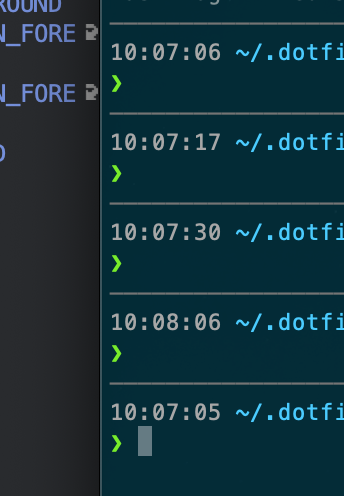
It updates the time on the previous prompt, but the time is always constant on the last prompt (and it is equal to the time the shell was opened). I think my relevant time related powerlevel10k config is below
# -------------------------------------------------------------------------------------------
# These are my customizations
# typeset -g POWERLEVEL9K_TIME_FORMAT='%D{%H:%M:%S}'
typeset -g POWERLEVEL9K_TIME_ICON=
typeset -g POWERLEVEL9K_TIME_BACKGROUND=none
typeset -g POWERLEVEL9K_TIME_FOREGROUND=$(_pp_c 007 244)
typeset -g POWERLEVEL9K_TIME_UPDATE_ON_COMMAND=true
I am more or less using the purepower.zsh config you have.
Thoughts on why this is?
albertmichaelj
on 17 Jul 2019
However, there seems to be a weird bug
Oops. Thanks for reporting it. Should be fixed now.
By the way, there is now more flexibility in terms of prompt segment placement. You can spread segments over several lines on the right, or you can add some contexts on the last left line before the prompt char. That prompt char can also now be specified in a non-hacky way. You can also define custom transformations for segment content. E.g., if you have some segments that have long content with low amount of information in them, you can specify they should be presented. E.g., another user had solutions1:admin:mongo-demo/mongo-demo for kubernetes context that he preferred to see as mongo-demo.
Maybe you'll find some of these features useful. You can see how they are used in https://github.com/romkatv/powerlevel10k/blob/master/config/p10k-lean.zsh.
romkatv
on 17 Jul 2019
As always, a super quick fix! Thanks!
I'll look at the new flexibility! Thanks!
albertmichaelj
on 17 Jul 2019
I've just pushed the changes necessary to support auto-shrinking of directory when it doesn't fit in your prompt. It works like this.
- If the full directory fits without left prompt wrapping around or overlapping with right prompt, show the whole thing.
- If it doesn't fit, start truncating segments from the left until it fits.
- If the whole prompt line still doesn't fit, drop right prompt.
- If the left prompt still doesn't fit, wrap it around to the next line.
The directory shrinks and expands dynamically when you are resizing your window. This is done without trapping signals, so it shouldn't break any plugins you might be using.
There are a few options that add give more control over this behavior.
- Some directory segments may be important and you might want them to never get shortened. You can instruct p10k to never shorten the last N segments. You can also instruct it to never shorten directory segments that contain
.gitor some other stuff of your choice. - Even if you have a very wide terminal window that allows the full directory to fit, it may be difficult to comprehend a 100+ character long path. There is an option to force shortening of the directory below the specified limit even if the directory would otherwise fit.
I've added new formatting options for directory. You can now specify style for shortened segments. This allows you to see what got shortened without injecting special symbols that defeat the purpose of shortening. You can also specify style for "anchor" directory segments. These are segments that never get shortened (see above).
If you are using a single-line prompt (or, more specifically, if you have dir on the last prompt line), you can instruct p10k to truncate directory so that you have at least N free columns for typing commands. That is, you can ensure you have at least N spaces between left and right prompt and/or at least M% of the terminal width.
Most of these new features work only with POWERLEVEL9K_SHORTEN_STRATEGY=truncate_to_unique.
Here are the parameters I'm using: https://github.com/romkatv/powerlevel10k/blob/78eee98250ee884fe4381be873736ad084679614/config/p10k-lean.zsh#L103-L134
These work well. They are well-documented to allow you to tune things to your linking. p10k-lean.zsh uses a different set of base configuration options from Pure Power, so if you decide to replace your DIR parameters with these, you'll need to add a couple more:
# No default dir icons.
typeset -g POWERLEVEL9K_DIR_VISUAL_IDENTIFIER_EXPANSION=
# No background.
typeset -g POWERLEVEL9K_DIR_BACKGROUND=
I encourage you, however, to rebase your config on p10k-lean.zsh. It's quite a bit simpler than Pure Power and has lots of useful options exposed and documented.
P.S.
The level of implementation complexity of this feature is staggering. Auto-shrinking directory based on the length of the left prompt before and after dir, as well as the length of right prompt, is a rather difficult task. For this reason, there may be bugs. If you notice anything odd or otherwise imperfect, please tell me.
romkatv
on 19 Jul 2019
It's a shame that you only document these nice feature additions in issues which are not easily accessible/findable. How about you copy paste such thing to a change log with a reference to the issue that initiated it for context?
 Syphdias
on 20 Jul 2019
Syphdias
on 20 Jul 2019
@Syphdias It would be useful but it's not free. My long-term plan is to have a well-documented config file (or several) where users will have access to the relevant documentation right next to the options they'll be tweaking. I'll also need a more formal reference but it's less important. https://github.com/romkatv/powerlevel10k/blob/master/config/p10k-lean.zsh is already in decent shape -- much better than Pure Power -- but still incomplete.
For your own benefit, here's how Powerlevel10k renders an icon for directory.
dirsegment wants to render a segment calledDIRwith stateNOT_WRITABLEand iconLOCK_ICON.- Need to resolve
LOCK_ICON.
- If
POWERLEVEL9K_DIR_NOT_WRITABLE_LOCK_ICONis defined, use it. - Fall back to
POWERLEVEL9K_DIR_LOCK_ICON. - Fall back to
POWERLEVEL9K_LOCK_ICON. - Fall back to
$icons[LOCK_ICON].
- If
- Icon is resolved to its bytes. Now pass it through an expansion.
- If
POWERLEVEL9K_DIR_NOT_WRITABLE_VISUAL_IDENTIFIER_EXPANSIONis defined, use it. - Fall back to
POWERLEVEL9K_DIR_VISUAL_IDENTIFIER_EXPANSION. - Fall back to
POWERLEVEL9K_VISUAL_IDENTIFIER_EXPANSION.
- If
- If the result is empty and content is empty (content goes through a similar process), don't render anything. Otherwise render the segment.
Parameters like POWERLEVEL9K_DIR_LOCK_ICON allow you control how LOCK_ICON is rendered by different segments. You can also use this mechanism to render VCS_BRANCH_ICON differently in CLEAN and UNTRACKED state.
Expansions are crazy powerful. With a single parameter you can add brackets around every segment. Or make all content bold. Or disable all icons. Or define that dir should use x as icon regardless of its state and which icon it decides to print. Or specify that context shouldn't be shown in state DEFAULT.
I've used content expansions in p10k-lean.zsh to define vcs content from scratch. It's much easier than adding a million small configuration options.
romkatv
on 20 Jul 2019
There is a decent introduction to directory shortening in https://www.reddit.com/r/zsh/comments/cfpe5t/responsive_directory_truncation_in_powerlevel10k/.
romkatv
on 20 Jul 2019
This is awesome! I've just gotten a chance to try it out (and I did rebase my config on p10k-lean.zsh which is definitely nicer than purepower), and so far, everything seems perfect. If I find bugs, I'll definitely let you know! Feel free to close this issue as far as I'm concerned.
Thanks for all of your work on this project!
albertmichaelj
on 21 Jul 2019
@albertmichaelj Thanks for trying it out!
romkatv
on 21 Jul 2019
Related issues
 kensang248
·
4Comments
kensang248
·
4Comments
 barthalion
·
3Comments
barthalion
·
3Comments
 debo
·
5Comments
debo
·
5Comments
 alex-popov-tech
·
4Comments
alex-popov-tech
·
4Comments
 Mystic8b
·
4Comments
Mystic8b
·
4Comments
Most helpful comment
I've just pushed the changes necessary to support auto-shrinking of directory when it doesn't fit in your prompt. It works like this.
The directory shrinks and expands dynamically when you are resizing your window. This is done without trapping signals, so it shouldn't break any plugins you might be using.
There are a few options that add give more control over this behavior.
.gitor some other stuff of your choice.I've added new formatting options for directory. You can now specify style for shortened segments. This allows you to see what got shortened without injecting special symbols that defeat the purpose of shortening. You can also specify style for "anchor" directory segments. These are segments that never get shortened (see above).
If you are using a single-line prompt (or, more specifically, if you have
diron the last prompt line), you can instruct p10k to truncate directory so that you have at least N free columns for typing commands. That is, you can ensure you have at least N spaces between left and right prompt and/or at least M% of the terminal width.Most of these new features work only with
POWERLEVEL9K_SHORTEN_STRATEGY=truncate_to_unique.Here are the parameters I'm using: https://github.com/romkatv/powerlevel10k/blob/78eee98250ee884fe4381be873736ad084679614/config/p10k-lean.zsh#L103-L134
These work well. They are well-documented to allow you to tune things to your linking.
p10k-lean.zshuses a different set of base configuration options from Pure Power, so if you decide to replace yourDIRparameters with these, you'll need to add a couple more:I encourage you, however, to rebase your config on
p10k-lean.zsh. It's quite a bit simpler than Pure Power and has lots of useful options exposed and documented.P.S.
The level of implementation complexity of this feature is staggering. Auto-shrinking directory based on the length of the left prompt before and after
dir, as well as the length of right prompt, is a rather difficult task. For this reason, there may be bugs. If you notice anything odd or otherwise imperfect, please tell me.