Postgresapp: Selecting the server version - Only server version 12 is available.
I downloaded "Postgres.app with all currently supported PostgreSQL versions" v2.3.5, with a view to running against a 9.6 server version. I see absolutely no option to select any server version other than 12 and I see no documentation at all about selecting which server version to run against. What am I missing here?
 tomjmul
All 4 comments
(comment was edited)
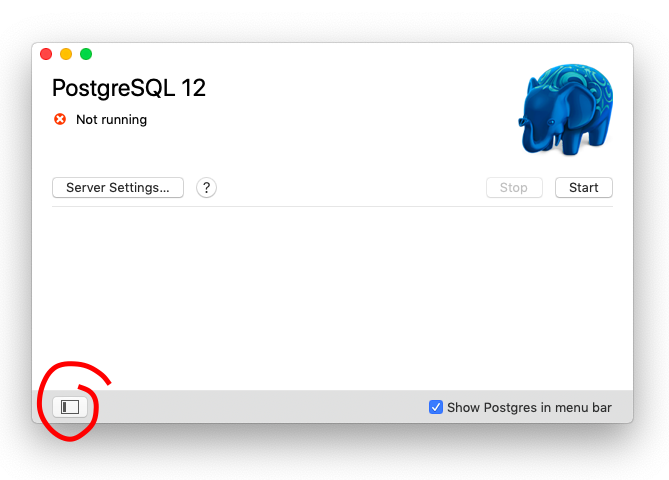
Show the drawer using this button:
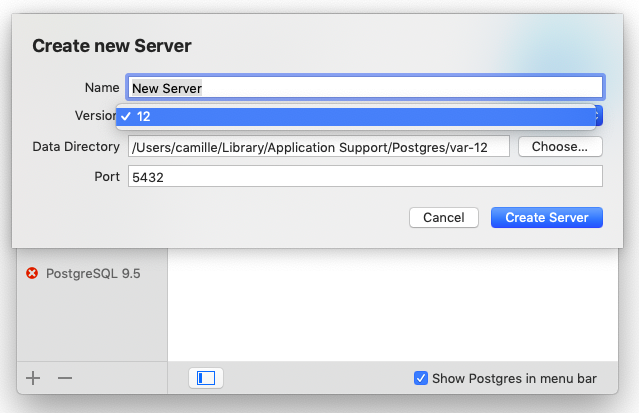
Click the + to create a new server

then you should have different versions in this dropdown:
 cappert
on 19 May 2020
cappert
on 19 May 2020
Thanks very much for taking the the time for me @cappert....I thought I was going insane there for a while! 😄
So directly after installation, I had to find the reveal side-bar button in order to find the plus button. It might be an idea to just have the sidebar open by default? It's not exactly a hugely complex screen with space at an absolute premium.
tomjmul
on 19 May 2020
We discussed this several times before, the idea is to keep the UI as simple as possible for the majority of users only interested in running a single instance. But as this issue has been confusing people in the past several times (see #388, #422, #429, #484, #523) we should finally improve this. There ideas for this discussed in the open cases https://github.com/PostgresApp/PostgresApp/issues/445#issuecomment-385428585 and https://github.com/PostgresApp/PostgresApp/issues/399#issuecomment-316660460
Beside improvements to documentation, esp. on upgrades, my proposal for the App's behaviour would be:
- On first run(*) create a new server-entry with latest version if either
- no server / data directory is existing at all
- no server exists with the latest version _(not sure about this one - alternatively the next)_
- all configured servers require binaries that are not provided by the installed package
- On each start of the application create a new server-entry with latest version if
- no server is existing at all (existing behaviour)
- On each start of the application, automatically open the sidebar if either
- multiple servers are already configured (existing behaviour)
- the only configured server is not initialised and the installed package has multiple binary versions available
- the only configured server requires binaries that are not provided by the installed package
(*): we currently can only detect the first run in total, not per release, IIRC. At this, potentially existing data dirs are scanned and server-entries for them created.
Does this sound useful or is it to complicated? The simpler proposal from https://github.com/PostgresApp/PostgresApp/issues/399#issuecomment-316660460 I would read as:
- Always start with expanded sidebar
- On each start create a server with latest version if no such exists
To me this defeats the concept of an expandable sidebar in general and may annoy people intentionally running an older version.
 tbussmann
on 20 May 2020
tbussmann
on 20 May 2020
I think you need to start tracking and surfacing the versions in the UI, without falling into the slippery slope of upgrading users' data for them, which I think is too difficult and error prone.
I made a very quick mockup.

Some thoughts unrelated to the mockup:
I think the closed drawer pattern is too "old-school" and most apps start with a sidebar launch with it open by default (from the top of my head- Slack, VSCode, Garageband, Whatsapp), following web UI trends. If there's only one server it's just empty space.
There's the risk of confusion between creative a server and creating a database though.
One other problem is that the error message "The binaries for the PostgreSQL server were not found" is too generic and cryptic.
Maybe you need to show somewhere what are the capabilities of the installed Postgres.app, now that you have different flavors (12, 12+11+10, etc.). I feel it's a big source of confusion.
cappert
on 20 May 2020
Related issues
 booleanbetrayal
·
7Comments
booleanbetrayal
·
7Comments
 JacobEvelyn
·
10Comments
JacobEvelyn
·
10Comments
 Kontributer
·
10Comments
Kontributer
·
10Comments
 wellsoliver
·
4Comments
wellsoliver
·
4Comments
 elpop
·
7Comments
elpop
·
7Comments
Most helpful comment
(comment was edited)
Show the drawer using this button:

Click the + to create a new server

then you should have different versions in this dropdown:
