Postgresapp: Installing PostgresApp 2.1 and postgresql 10 is not active
i install version 2.1 and...
$ psql --version
psql (PostgreSQL) 10.0
$psql template1
psql (10.0, server 9.6.5)
Type "help" for help.
template1=# select version();
version
PostgreSQL 9.6.5 on x86_64-apple-darwin14.5.0, compiled by Apple LLVM version 7.0.0 (clang-700.1.76), 64-bit
(1 row)
how switch server to version 10.0?
the symbolic link on /Applications/Postgres.app/Contents/Versions/latest -> 10
but only start 9.6.5 version
 elpop
elpop
All 7 comments
Same problem here on OS X 10.11.6.
 vnnw
on 6 Oct 2017
vnnw
on 6 Oct 2017
umm, the code signature on
/Applications/Postgres.app/Contents/_CodeSignature/CodeResources
only has the keys and hash of 9.6 version.
I don't know if this signatures must match the right version to allow postgresql 10 start.
elpop
on 6 Oct 2017
Postgres.app does not automatically update your server to version 10. If you want to upgrade, you need to do the following:
1) Create a dump of your server:
pg_dumpall --quote-all-identifiers | gzip >postgresapp.sql.gz
2) Stop the old server. Disable "Automatically Start Server" in settings
3) Create a new server with version 10
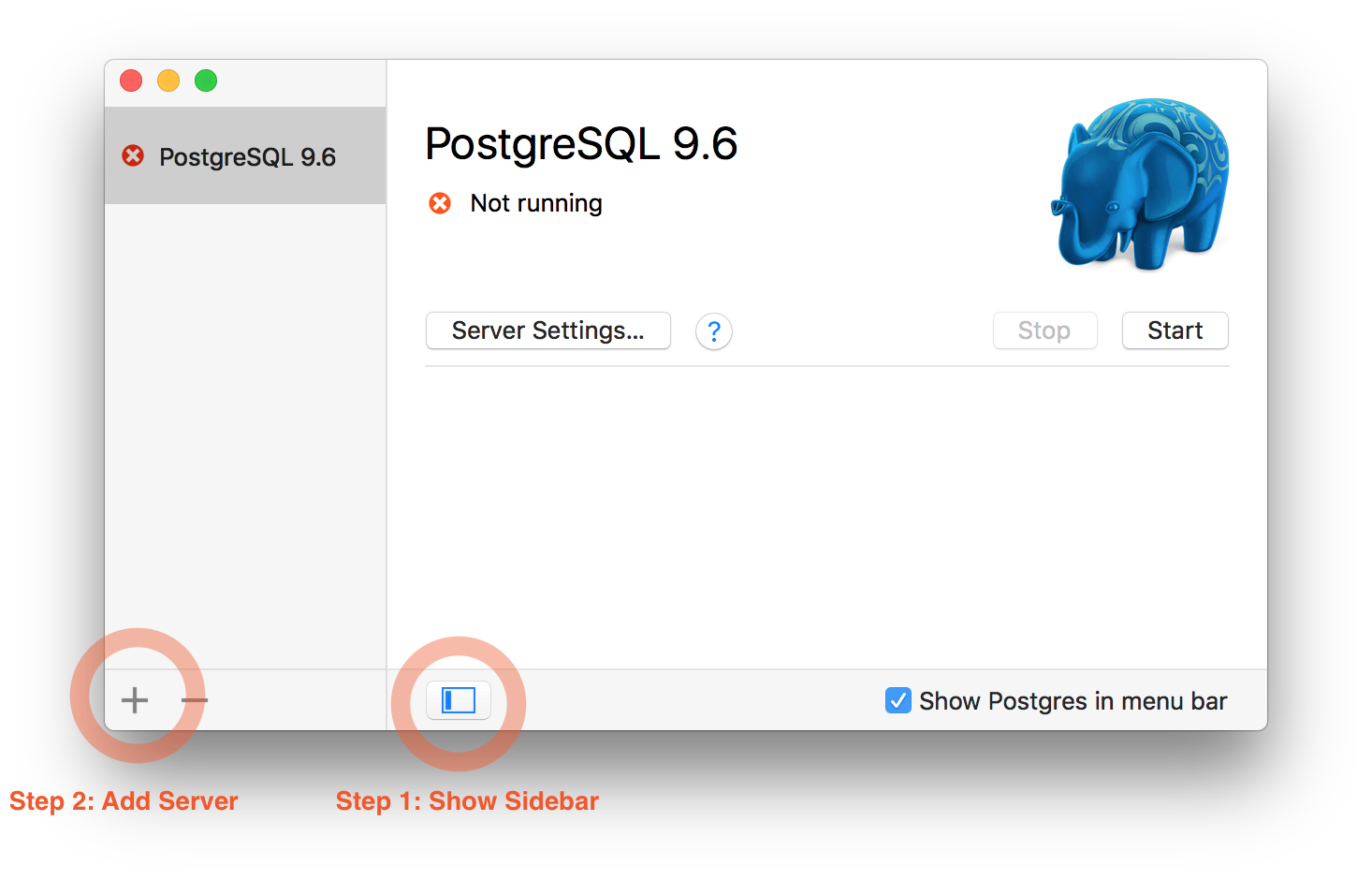
4) Restore the dump
gunzip <postgresapp.sql.gz | psql
Hope this helps!
For more info, see https://postgresapp.com/documentation/migrating-data.html
 jakob
on 6 Oct 2017
jakob
on 6 Oct 2017
New 2.1 app is great, but having issues using Postgres9.6. Always shows: psql (10.0, server 9.6.5)
Popular library psycopg is also just seeing 10.
 jasoncapriati
on 6 Oct 2017
jasoncapriati
on 6 Oct 2017
@jasoncapriati This just menas that you are using psql (client) version 10 with a server version 9.6. That's not a problem, the two versions are compatible.
But if for some reason you do want to use psql 9.6 instead of psql 10, you 'll have to change your path. If you followed the docs on the home page, the path should be configured in /etc/paths.d/postgresapp. Just change latest to 9.6, and you should be ready to go!
jakob
on 6 Oct 2017
That helped! Thank you!
jasoncapriati
on 6 Oct 2017
Thanks Jakob, thats all i need to know :)
elpop
on 6 Oct 2017
Related issues
 booleanbetrayal
·
7Comments
booleanbetrayal
·
7Comments
 chrispysoft
·
9Comments
chrispysoft
·
9Comments
 mashaalmemon
·
3Comments
mashaalmemon
·
3Comments
 songproducer
·
10Comments
songproducer
·
10Comments
 JoeFryer
·
6Comments
JoeFryer
·
6Comments
Most helpful comment
Postgres.app does not automatically update your server to version 10. If you want to upgrade, you need to do the following:
1) Create a dump of your server:

pg_dumpall --quote-all-identifiers | gzip >postgresapp.sql.gz2) Stop the old server. Disable "Automatically Start Server" in settings
3) Create a new server with version 10
4) Restore the dump
gunzip <postgresapp.sql.gz | psqlHope this helps!
For more info, see https://postgresapp.com/documentation/migrating-data.html