Polaris-react: The Autocomplete component's options popup doesn't show as expected.
Issue summary
I'm using autocomplete component to display data from remote API. After getting some items, options popup doesn't show up until focus input again, as the gif below.
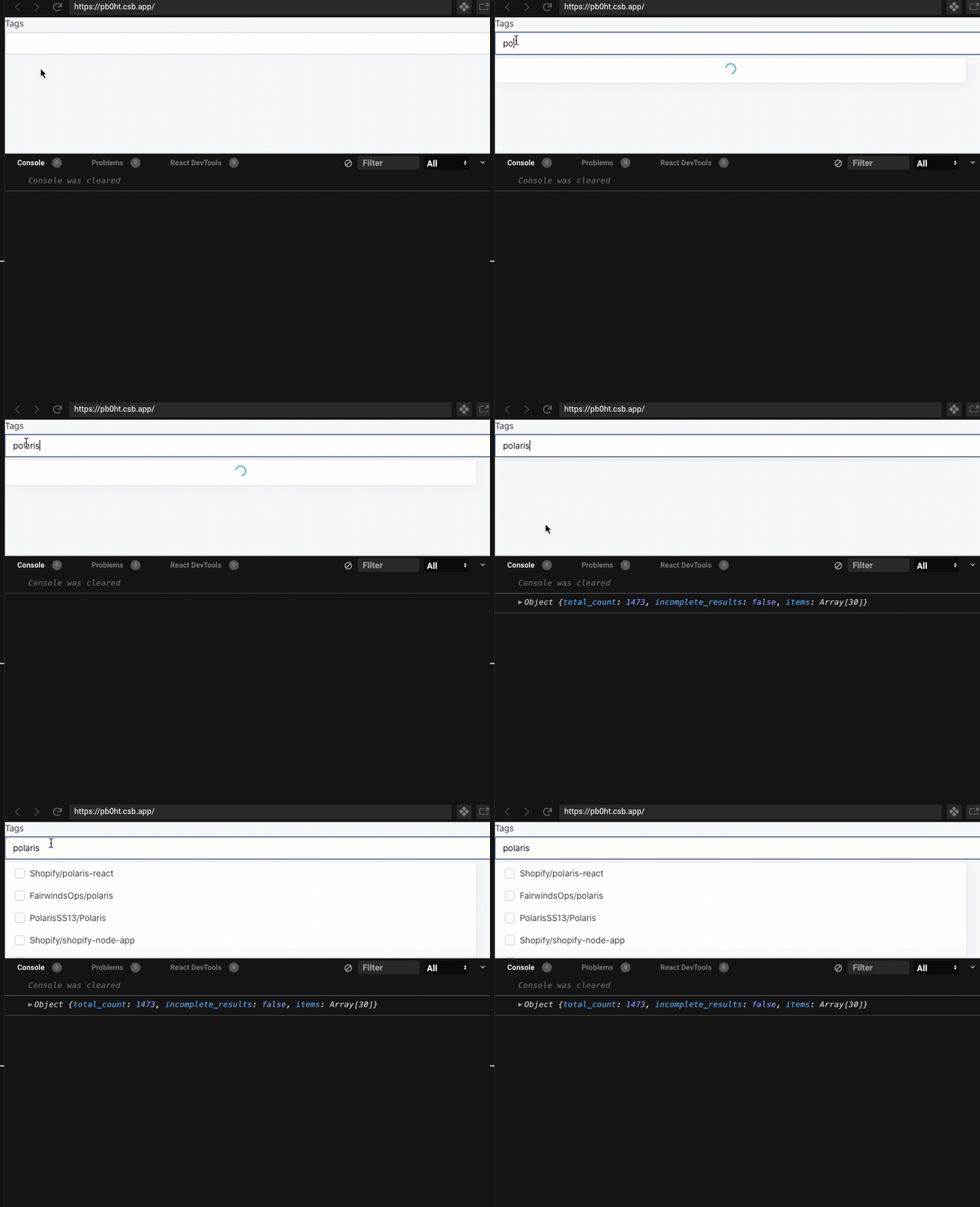
Expected behavior
options props changed, but popup does not show up
      <Autocomplete
        allowMultiple={true}
        options={state.options}
        selected={state.selectedCreators}
        onSelect={handleSelectionChange}
        loading={state.loading}
        textField={
          <Autocomplete.TextField
            label="something"
            onChange={handleTermChange}
            value={state.term}
          />
And using a debounce to avoid request too much.
const useDebounce = (value, delay) => {
  const [debouncedValue, setDebouncedValue] = useState(value);

  useEffect(() => {
    const handler = setTimeout(() => {
      setDebouncedValue(value);
    }, delay);

    return () => {
      clearTimeout(handler);
    };
  }, [value, delay]);

  return debouncedValue;
};
If I use 'real' input value rather than 'debouncedValue', something works fine, but in production, it won't go with the input value.
Actual behavior
The popup doesn't show up until focus input again.
Steps to reproduce the problem
- Go to the sandbox, https://codesandbox.io/s/priceless-jackson-pb0ht?file=/App.js.
- Type something in input box.
- Results should not show up until you focus input again.
Reduced test case
Specifications
- Are you using the React components? (Y/N):Y
- Polaris version number: ^4.20.1
- Browser: Google Chrome 84.0.4147.105
- Device: MacOS
- Operating System: MacOS 10.15.5
 keidarcy
All 3 comments
Bump, we are also affected by this issue in Polaris 5.1.0. Thank you for the excellent writeup @keidarcy. Interestingly, this did not appear to be an issue for us in Polaris 4.21.0.
 jlyon
on 4 Sep 2020
jlyon
on 4 Sep 2020
duplicate of https://github.com/Shopify/polaris-react/issues/3048
 jonpulsifer
on 9 Sep 2020
jonpulsifer
on 9 Sep 2020
I should have closed this when mentioning it's a duplicate. So i'm doing that now.
jonpulsifer
on 23 Dec 2020
Related issues
 wmceff
·
3Comments
wmceff
·
3Comments
 alex-page
·
3Comments
alex-page
·
3Comments
 nemoeric
·
3Comments
nemoeric
·
3Comments
 andrewpye
·
3Comments
andrewpye
·
3Comments
 HYPD
·
3Comments
HYPD
·
3Comments
Most helpful comment
Bump, we are also affected by this issue in Polaris 5.1.0. Thank you for the excellent writeup @keidarcy. Interestingly, this did not appear to be an issue for us in Polaris 4.21.0.