Polaris-react: Toast isn't being displayed inside AppProvider if api_key is specified
Issue summary
I'm trying out this Toast example from Polaris documentation. I am adding it to an embedded app.
The problem is that the toast is not showing altogether, iif I specify apiKey={apiKey} in the AppProvider wrapper.
      // When apiKey is specified, Toast is NOT being shown
      <AppProvider apiKey={apiKey}>
          <Frame>
            <Page title="Toast example">
              <Button onClick={this.toggleToast}>Show Toast</Button>
              {toastMarkup}
            </Page>
          </Frame>
      </AppProvider>
Without apiKey it works perfectly.
      // When apiKey is NOT specified, Toast is being shown fine
      <AppProvider>
            ...the rest is exactly the same
      </AppProvider>
When it doesn't work (with apiKey specified), I don't see any warnings in the console, and nothing else suspicious is happening, the whole app with other Polaris components seems to work well.
Expected behavior
When I have a toast inside the AppProvider with apiKey specified, toasts should be displayed in my app. As well as without apiKey.
Actual behavior
Toasts are not being displayed in my app when I have apiKey specified in AppProvider.
Steps to reproduce the problem
- Take the toast example from the Polaris documentation.
- Add it to the embedded app.
- Open the app as embedded app in Shopify.
- Click on "Show toast" button.
=> Toast works.
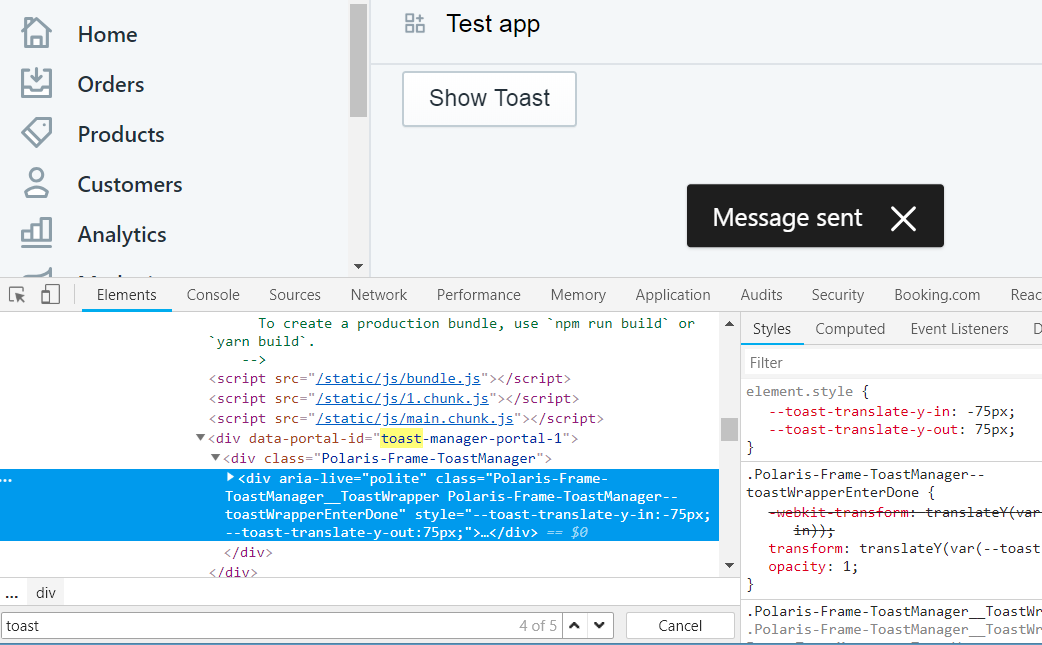
Now, change
<AppProvider>to<AppProvider apiKey={your_apiKey}>.- Reload the app page.
- => Toast is not being shown.

Reduced test case
Here is my source code (please rename to App.js, of course).
App.txt
Specifications
- Are you using the React components? (Y/N):
- Toast
- AppProvider
- Frame
- Polaris version number:
- "@shopify/polaris": "^3.3.0",
- Browser:
- Chrome 71.0.3578.98 on Windows
- Operating System:
- Windows 8
Thank you!
 ice-lenor
All 10 comments
I just found out that two nested AppProviders, one with apiKey and one without, let both toasts and Bridge functionality work fine. Order of AppProviders is important. Would that be a "normal" solution?
      <AppProvider apiKey={apiKey}>
        <AppProvider>
          <Frame>
            {page_with_toasts_working}
          </Frame>
        </AppProvider>
      </AppProvider>
By Bridge functionality I mean, for example, redirecting to the embedded app page (inside Shopify frame) from the "standalone" app page.
ice-lenor
on 12 Jan 2019
@ice-lenor in regards to your latest comment that's because AppProvider without the apiKey is the closest provider. Keep in mind that Toast component delegates to app-bridge in an embedded environment. Can you confirm if you have the latest version of @shopify/app-bridge installed? Also I thought <Frame /> was for stand-alone apps. Can you also try to set forceRedirect={false} in <AppProvider /> and see if the toast opens? In an embedded environment I would avoid using <Frame />
 sam-cnet
on 17 Jan 2019
sam-cnet
on 17 Jan 2019
Had a chance to implement toast in my embedded app and it works, but only when loaded in an iFrame. If the app does not redirect back to shopify admin I've noticed the modal and toast components may not 'show'
sam-cnet
on 17 Jan 2019
Thank you for your reply, sam-cnet.
I'm using bridge 0.7.3.
- I also thought frame was only for stand-alone apps, but the app breaks without it.
This is what happens if I have two AppProviders, and the innermost is without the apiKey, and I don't have a Frame, and the app is embedded:
      <AppProvider apiKey={apiKey}>
        <AppProvider>
            {page}
        </AppProvider>
      </AppProvider>
TypeError: Cannot read property 'showToast' of undefined
  16664 | var appBridge = props.polaris.appBridge;
  16665 |
  16666 | if (appBridge == null) {
> 16667 |   context.frame.showToast(Object.assign({ <---------on this line here
        | ^  16668 |     id: id
  16669 |   }, props));
  16670 | } else {


md5-33969dd51f601c5ccf7571d0bc06f496


      <AppProvider apiKey={apiKey} forceRedirect={false}>
            {page_with_toast}
      </AppProvider>


md5-ecf654db8c9a615c283a0572642085ca


      <AppProvider apiKey={apiKey} forceRedirect={false}>
        <AppProvider>
          <Frame>
            {page}
          </Frame>
        </AppProvider>
      </AppProvider>
If I remove forceRedirect from this last scenario, this will be my current setup. The standalone app redirects to shopify admin, shows up as embedded, and the toast works.
I hope it isn't too confusing :). Thank you once again.
ice-lenor
on 19 Jan 2019
Not confusing. The first thing that comes to mind after reading is to go to your shopify partner dashboard > your app extensions > shopify admin tab > manage embedded app, then enable and disable “Embed your app”.
Sent from my iPhone
sam-cnet
on 19 Jan 2019
@ice-lenor I notice you're using app-bridge actions to create and open the Toast. Try something like below and see if you can get it to work.
<AppProvider apiKey={apiKey} shopOrigin={shopOrigin} forceRedirect={true}>
  <App />
 </AppProvider>
class App extends React.Component {
  constructor(){
    super();
    this.state = {
      showToast: false
    };
  }

  render(){
    <Page>
      {{showToast()}}
      <Button onClick={() => {this.setState({showToast: true}) } />
    </Page>
  }

  showToast(){
    return (
      <Toast content="You toasted!" onDismiss={() => this.setState({showToast: false})} />
    );
  }
}
Best of luck!
sam-cnet
on 20 Jan 2019
Thank you for your reply, sam-cnet.
I tried disabling and enabling "embed your app". (My original state was "enabled", as I want my app to be displayed inside shopify admin). In both states toasts are not being shown, if I'm using a single AppProvider with apiKey.
I tried your example. No luck as well.
Although I'm not sure how it is different from what I tried originally (I enclosed an App.txt file to the original post).
For both cases, stacked AppProviders and a frame work well, as before.
ice-lenor
on 20 Jan 2019
@tmlayton Any chance you can look into this?
 ry5n
on 29 Jan 2019
ry5n
on 29 Jan 2019
Are you sure your "App URL" matches the URL where the app is actually loaded from? I had exactly the same behavior, but it turned out there was a mismatch between the "App URL" and the origin of the postMessage the AppBridge was sending. Please see this issue: https://github.com/Shopify/polaris-react/issues/1332
 marguskoiduste
on 17 Apr 2019
marguskoiduste
on 17 Apr 2019
👋 apologies for the delay in getting to this issue! @ice-lenor remove the Frame component, the Frame is only for stand-alone apps, not embedded apps.
Based on your shared App.js code, it should look like this:
import React, { Component } from 'react';
- import {Frame, Page, AppProvider, Toast, Button} from '@shopify/polaris';
+ import {Page, AppProvider, Toast, Button} from '@shopify/polaris';

class App extends Component {
  state = {
    showToast: false,
  };

  render() {
    const {showToast} = this.state;
    const toastMarkup = showToast ? (
      <Toast content="Message sent" onDismiss={this.toggleToast} />
    ) : null;

    // When apiKey is specified in AppProvider, toast is NOT being shown
    // When AppProvider doesn't have apiKey, toast works
    const apiKey = process.env.REACT_APP_API_KEY;
+  // Whatever you want to call this env variable and constant
+  const shopOrigin = process.env.REACT_APP_SHOP_ORIGIN;

    return (
-      <AppProvider apiKey={apiKey}>
+     <AppProvider apiKey={apiKey} shopOrigin={shopOrigin}>
        <div style={{height: '250px'}}>
          <link rel="stylesheet" href="https://sdks.shopifycdn.com/polaris/3.3.0/polaris.min.css" />
-          <Frame>
            <Page title="Toast example">
              <Button onClick={this.toggleToast}>Show Toast</Button>
              {toastMarkup}
            </Page>
-          </Frame>
        </div>

      </AppProvider>
    );
  }

  toggleToast = () => {
    this.setState(({showToast}) => ({showToast: !showToast}));
  };
}

export default App;
 tmlayton
on 16 May 2019
tmlayton
on 16 May 2019
Related issues
 vilav
·
3Comments
vilav
·
3Comments
 cgenevier
·
3Comments
cgenevier
·
3Comments
 wmceff
·
3Comments
wmceff
·
3Comments
 danrosenthal
·
3Comments
danrosenthal
·
3Comments
danrosenthal
·
3Comments
danrosenthal
·
3Comments
Most helpful comment
@tmlayton Any chance you can look into this?