Polaris-react: ResourcePicker non functional. (was AppProvider breaks Page)
Issue summary
Under Polaris v3.1.1
An AppProvider with a apiKey argument stops Page actions and titles "working"
Expected behavior
A Page with a title and primary or secondary actions, should show the title and primary secondary actions when the AppProvider has an apiKey argument
Actual behavior
Page Title and Action Buttons do not appear
<AppProvider apiKey={apiKey}>
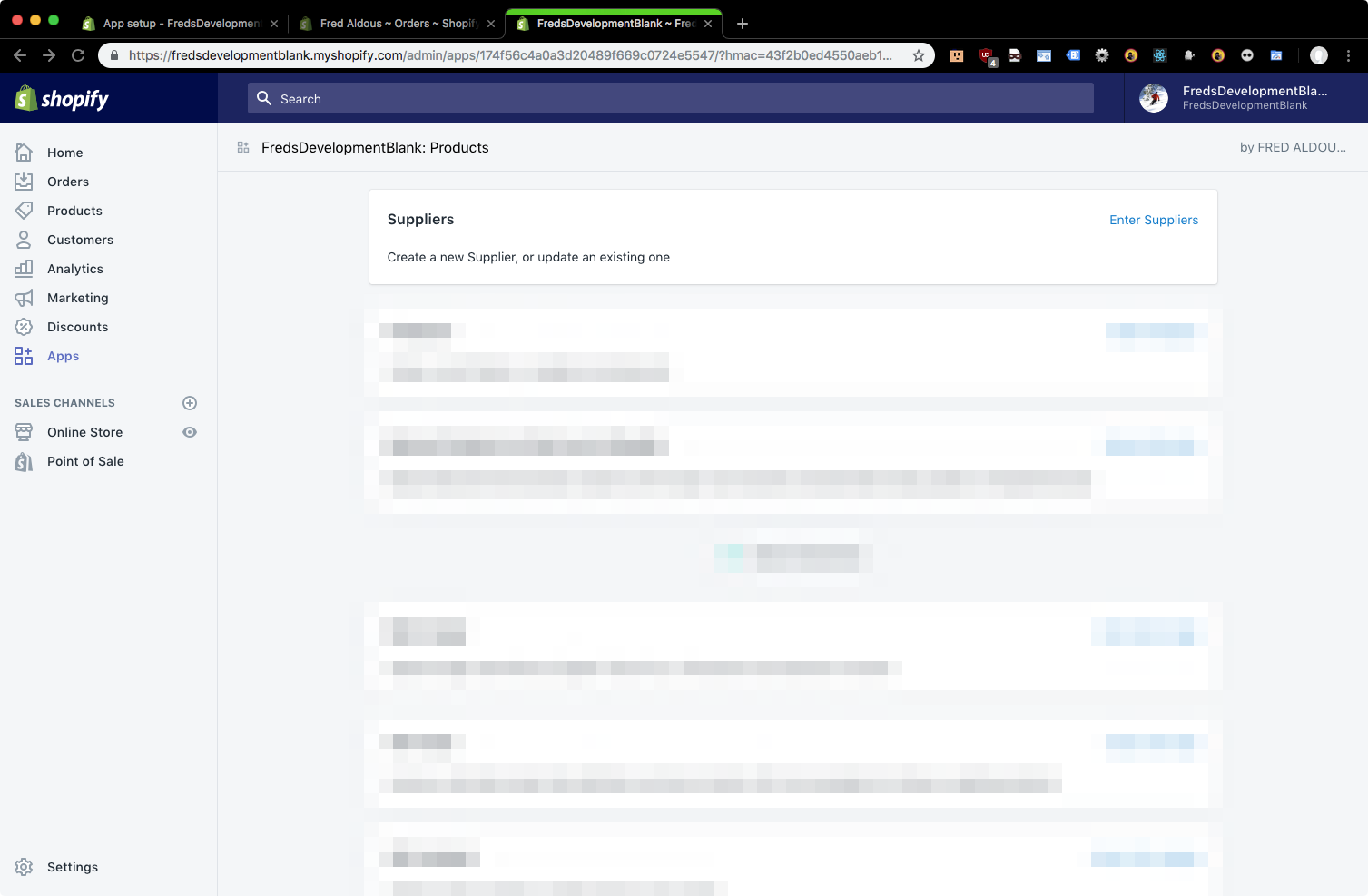
<AppProvider>

Steps to reproduce the problem
Give AppProvider an apiKey. apiKey does not need to be valid.
apiKey="cake"
Will cause the issue also
Reduced test case
import * as React from 'react';
import { render } from 'react-dom';
import { AppContainer } from 'react-hot-loader';
import App from './App';

import '@shopify/polaris/styles.css';
import { AppProvider } from '@shopify/polaris';

function renderApp() {
    const { apiKey } = window;

    render(
        <AppContainer>
            <AppProvider apiKey={apiKey}>
                    <Page
                        title="What would you like to do today?"
                        primaryAction={{
                            content: 'Index',
                            onAction: () => {
                                //snip
                            }
                        }}
                        secondaryActions={
                            [
                                {
                                    content: 'Index',
                                    onAction: () => {
                                       // snip
                                    }
                                }
                            ]
                        }
                    >
                        <p>Test</p>
                    </Page>
            </AppProvider>
        </AppContainer>,
        document.getElementById('root')
    );
}

renderApp();

if (module.hot) {
    module.hot.accept();
}
Specifications
- Are you using the React components? (Y/N): Y
- Polaris version number: 3.1.1 (present also in 3.1.0)
- Browser: Chrome 70.0.3538.102
- Device: Mac
- Operating System: Sierra 10.12.6
 BarryCarlyon
All 21 comments
Hi @BarryCarlyon! The Polaris team is looking into this. We'll let you know once we know more.
 dpersing
on 20 Nov 2018
dpersing
on 20 Nov 2018
In addition, ResourceLists are broken. When I try to pass a apiKey to AppProvider. And they don't work without a APIKey anyway
BarryCarlyon
on 21 Nov 2018
@BarryCarlyon, from what I can glean from this issue, it appears that your problem with Page is expected, and not, in fact, a bug. It is the result of us not being clear enough in documentation. I've got a work in progress PR up to address that.
So the issue is that we have combined the former EmbeddedPage component into the existing Page component. When you pass an API key to AppProvider, that acts as a signal to tell Page to delegate to the Shopify App Bridge. So what you're seeing is Page rendering as intended in an embedded app context.
We will also need to take some steps to clarify which props are and are not supported in this context, as not all props will align 1:1 with the embedded implementation of Page.
Regarding your problem with ResourceList, could you please expand on what you mean by broken? What isn't working for you?
 danrosenthal
on 21 Nov 2018
danrosenthal
on 21 Nov 2018
So there is no method to put buttons in the top bar any more? Buttons being the Page actions (and the title/etc)
I will need to rebuild my entire navigation/UI.
Sorry I mean ResourcePicker but wrote list instead
ResourcePicker will not open under Polaris 3.
                                    <ResourcePicker
                                        resourceType="Collection"
                                        allowMultiple
                                        open={this.state.openCollectionPicker}
                                        onCancel={() => this.setState({openCollectionPicker: false})}
                                        onSelection={(resources) => {
                                            this.setState({openCollectionPicker: false});
                                            //snip
                                        }}
                                    />
@markiiikram would you mind taking a look?
danrosenthal
on 22 Nov 2018
Hi @BarryCarlyon , Yes, you can still put buttons in the "top bar" for embedded apps. See the screenshot below, they now appear in a second row below the App name and your company name.

As Dan said, include a valid API Key in the AppProvider apiKey prop, and use the Page component.
Also, it may be of interest to you that the app bar now includes a navigation component which works in conjunction with the Page component.

As for the ResourcePicker I'd recommend taking a look at the CHANGELOG
Changes that jump out for me are:
- Moved embedded ResourcePicker, Modal, and Page to the main bundle and removed the embedded bundle. Imports from '@shopify/polaris/embedded' will no longer work, use '@shopify/polaris' instead.
- Removed title prop from ResourcePicker as setting a title is no longer supported by the Shopify App Bridge
- Removed products prop from ResourcePicker, use resourceType="Product" instead
 markiiikram
on 22 Nov 2018
markiiikram
on 22 Nov 2018
Yup I switched to "ResourcePicker" from '@Shopify/polaris'
I don't use it's title anyway
And I'm using resourceType="Collection" as I'm after the collections rather than products
as documented at https://polaris.shopify.com/components/overlays/resource-picker
I'm not getting any console or webpack errors, it just does nothing at all.
I will take a look at Page/Navigation.
BarryCarlyon
on 22 Nov 2018
Hey @BarryCarlyon, I believe we may have made a typo. Can you please try import { ResourcePicker } from '@shopify/polaris'; (lowercase S on Shopify). If that's not the issue, can you let me know if
      <ResourcePicker
        resourceType="Product"
works for you?
markiiikram
on 22 Nov 2018
Same issue with the ResourcePicker.
 tomnewton
on 23 Nov 2018
tomnewton
on 23 Nov 2018
import { ResourcePicker, TextField, Checkbox, Select, Button, Tooltip } from '@shopify/polaris';

// snip

                                    <ResourcePicker
                                        resourceType="Collection"
                                        allowMultiple
                                        open={true}
                                        onCancel={() => this.setState({openCollectionPicker: false})}
                                        onSelection={(resources) => {
                                            this.setState({openCollectionPicker: false});
                                        }}
                                    />
A change to
                                    <ResourcePicker
                                        resourceType="Product"
                                        allowMultiple
                                        open={true}
                                        onCancel={() => this.setState({openCollectionPicker: false})}
                                        onSelection={(resources) => {
                                            this.setState({openCollectionPicker: false});
                                        }}
                                    />
same result. No picker
BarryCarlyon
on 23 Nov 2018
Hi @BarryCarlyon , Yes, you can still put buttons in the "top bar" for embedded apps. See the screenshot below, they now appear in a second row below the App name and your company name.

screen shot 2018-11-14 at 10 26 23 am

As Dan said, include a valid API Key in the AppProvider apiKey prop, and use the Page component.
That doesn't work:
                    <Page
                        title="Products"
                        secondaryActions={
                            [
                                {
                                    content: 'Index',
                                    onAction: () => {
                                        this.props.resetView()
                                    }
                                }
                            ]
                        }
                    >
I have no button… Which was the original issue of this thread…
BarryCarlyon
on 23 Nov 2018
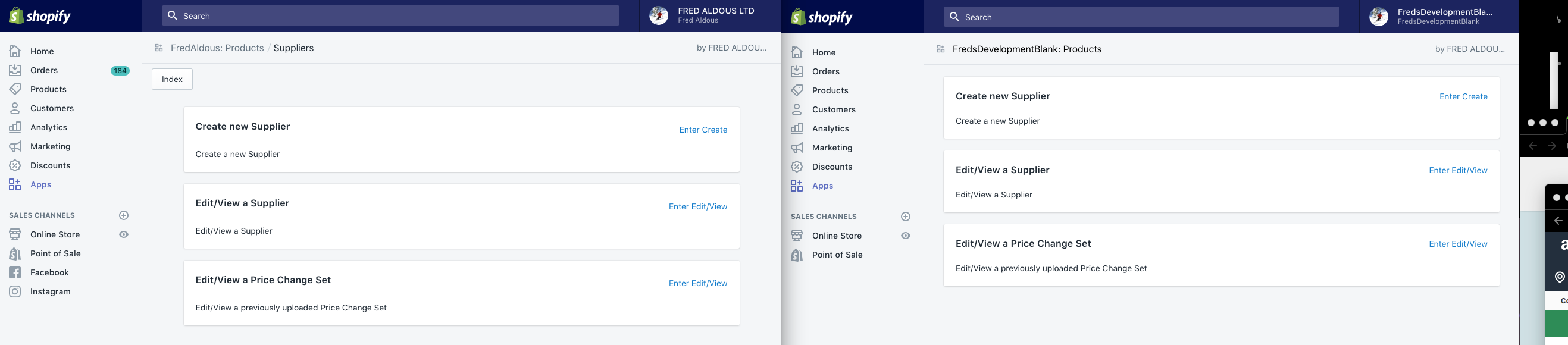
Same code.
Left is live with Polaris 2x right is Dev with Polaris 3x
The <Page does nothing
BarryCarlyon
on 23 Nov 2018
Hey @BarryCarlyon, are you still using the legacy EASDK anywhere in your code outside of Polaris?
We saw another issue with similar symptoms to this recently and it turns out they were using both the new App Bridge in Polaris 3 and the legacy EASDK, which was interfering with the App Bridge setup.
In that case they were calling ShopifyApp.init somewhere in their app. Any chance you have the same?
 dfmcphee
on 23 Nov 2018
dfmcphee
on 23 Nov 2018
Nope. This is a pure react/Polaris app
No need to include EASDK if you/Polaris is doing it all for me.
Edit: I went to look, seems I do have a EASDK call… TESTING
Edit: The extra EASDK call has been Removed. My "navigation"/page now works, ResourcePicker is still broken. No console errors
BarryCarlyon
on 23 Nov 2018
@BarryCarlyon Are you server-side rendering?
markiiikram
on 23 Nov 2018
Yeah should be.
I'm based off a older nodeJS/express/webpack template shopify had kicking about
BarryCarlyon
on 26 Nov 2018
This could be related: https://github.com/Shopify/app-bridge/issues/538
danrosenthal
on 27 Nov 2018
Also related https://github.com/Shopify/polaris-react/issues/669
cc @davekilljoy, @markiiikram does either of you have historical context on why the title in embedded app should be in the top bar rather than in page?
 michenly
on 27 Nov 2018
michenly
on 27 Nov 2018
@katbuilt would have the most context on the embedded app top bar.
 davekilljoy
on 27 Nov 2018
davekilljoy
on 27 Nov 2018
I confirm that neither Page nor Resource pickers shows... :(
 orbanbotond
on 6 Dec 2018
orbanbotond
on 6 Dec 2018
Hello all! A fix for this has been as part of version 3.2.1 (see the release info for details). I'll close this issue, but please let us know if problems persist.
dpersing
on 7 Dec 2018
Related issues
 cgenevier
·
3Comments
cgenevier
·
3Comments
 wmceff
·
3Comments
wmceff
·
3Comments
 alex-page
·
3Comments
alex-page
·
3Comments
 shahab65
·
3Comments
shahab65
·
3Comments
 andrewpye
·
3Comments
andrewpye
·
3Comments
Most helpful comment
So there is no method to put buttons in the top bar any more? Buttons being the Page actions (and the title/etc)
I will need to rebuild my entire navigation/UI.
Sorry I mean
ResourcePickerbut wrote list insteadResourcePickerwill not open under Polaris 3.