Polaris-react: [Date picker] Keep arrow position consistent
Issue summary
Issues found by @loic-d:
Hey! I noticed something a bit annoying with the React DatePicker.
In Polaris Rails, we were able to quickly navigate between months using the arrows. The arrows are always staying in the same position so you can just quickly click. (See GIF)
In React, it's not consistent and sometimes the arrows 'jump', depending on how many days we have in a month. So you need to move the mouse on the arrow again and click. It's a bit frustrating when you want to select dates in the past or future.
Polaris atc @markiiikram,
Expected behavior
Want the arrows to stay in the same position, when clicking through months
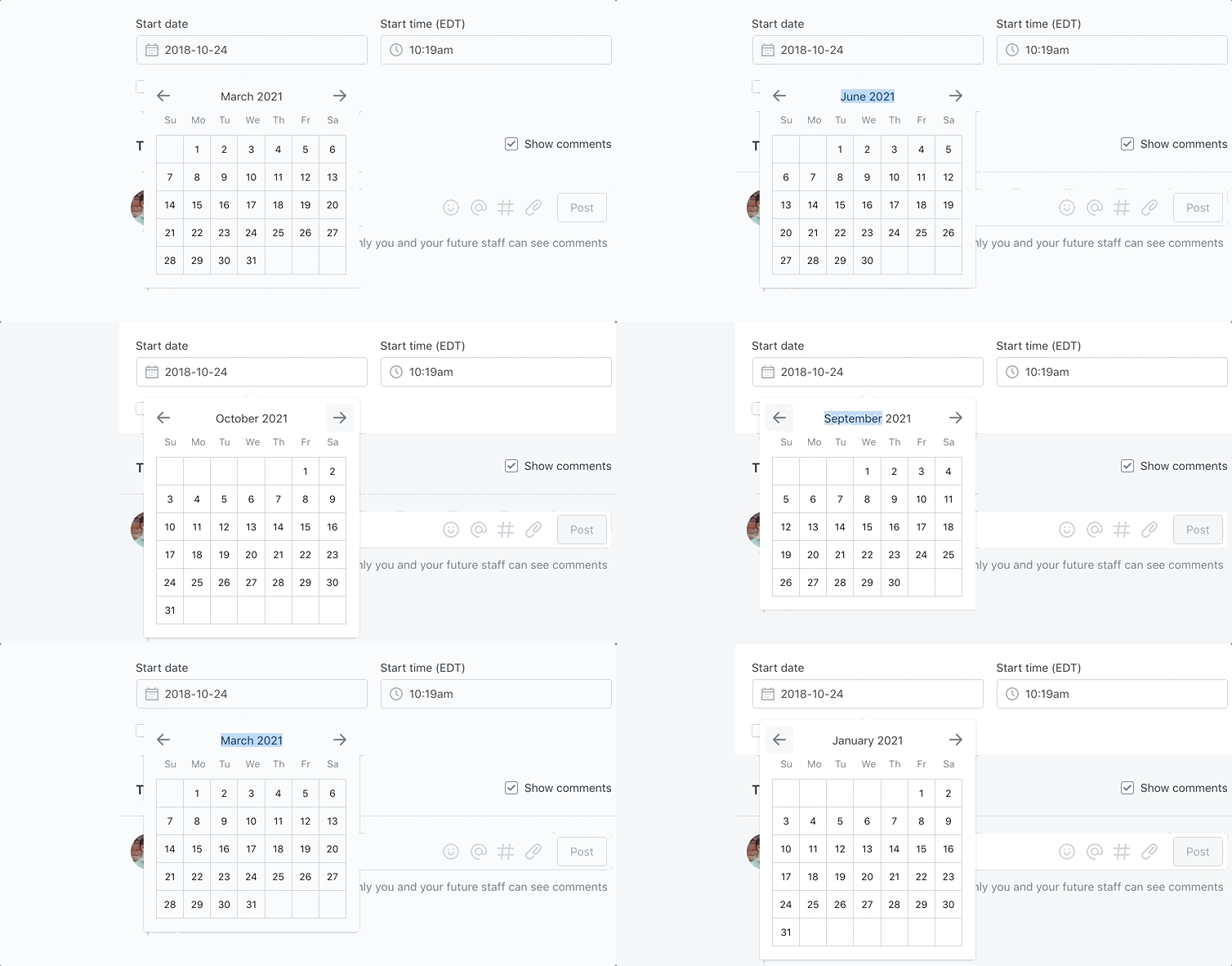
Actual behavior
Date picker jumps around depending on number of days in a month
Specifications
- Are you using the React components? (Y/N):
- Polaris version number: 2
- Browser: guessing chrome
- Device: guessing macbook pro
- Operating System: guessing high sierra
⚓️ We’re not accepting pull requests at this time
🗒 We _are_ accepting issue reports and feature requests
🌟 Feature requests that we can’t get to right away will be closed. However, we track all requests and will use it to set priorities. See the contribution guidelines for more information.
 markiiikram
All 5 comments
This issue has been inactive for 180 days and labeled with Icebox. It will be closed in 7 days if there is no further activity.
![probot-shopify[bot] picture](https://avatars2.githubusercontent.com/in/10530?v=4&s=40) probot-shopify[bot]
on 23 Apr 2019
probot-shopify[bot]
on 23 Apr 2019
@markiiikram @loic-d I tried reproducing this issue, but had trouble, do you have any more information on how to reproduce?

 ruairiphackett
on 25 Apr 2019
ruairiphackett
on 25 Apr 2019
The issue is only reproducible when the DatePicker is displayed in a Popover (on top of the activator) I believe.
You can see it in production on the automatic discounts creation page admin/discounts/automatic/new.
 loic-d
on 25 Apr 2019
loic-d
on 25 Apr 2019
@loic-d It looks like it might be due to the position in which the DatePicker is shown, i.e. either above or below the date input, and not down to different behaviour in react vs. rails.
I rendered admin/discounts/automatic/new in rails and had the same issue:

It looks like there's a comment section in the 'expected behaviour' example above that means there is enough space for the DatePicker to appear below the date input & when this happens the height of the Popover extends down (instead of up) when it needs more space to display the dates, meaning the arrows don't move when changing months.
Here's an example rendered in react where the Popover has enough space to be displayed below the input:

ruairiphackett
on 26 Apr 2019
Thanks for looking into it. Let's close the issue since it's not directly related to DatePicker.
loic-d
on 29 Apr 2019
Related issues
 andrewpye
·
3Comments
andrewpye
·
3Comments
 MateusJabour
·
3Comments
MateusJabour
·
3Comments
 grandelc
·
3Comments
grandelc
·
3Comments
 wmceff
·
3Comments
wmceff
·
3Comments
 shahab65
·
3Comments
shahab65
·
3Comments
Most helpful comment
The issue is only reproducible when the
DatePickeris displayed in aPopover(on top of the activator) I believe.You can see it in production on the automatic discounts creation page
admin/discounts/automatic/new.