Polaris-react: DataTable row heights do not recalculate when row content changes
Issue summary
If the data backing a DataTable changes, the table updates to display the new content, but the row heights don't recalculate resulting in issues like this:

The code for the above GIF is here - when the button is pressed, the first row's title is made significantly longer, the third row's title is made shorter, and a new row is pushed into the table.
Expected behavior
Row heights update when table content changes.
Actual behavior
Row heights do not update when table content changes, potentially leaving rows too tall/short for their content.
Steps to reproduce the problem
Update the rows array backing the DataTable.
Specifications
- Are you using the React components? (Y/N): Y
- Polaris version number: 2.5.0
- Browser: Chrome Version 67.0.3396.99 (Official Build) (64-bit)
- Device: MacBook Pro
- Operating System: macOS Sierra Version 10.12.6 (16G29)
⚓️ We’re not accepting pull requests at this time
🗒 We _are_ accepting issue reports and feature requests
🌟 Feature requests that we can’t get to right away will be closed. However, we track all requests and will use it to set priorities. See the contribution guidelines for more information.
 andrewpye
All 16 comments
Thanks @andrewpye. On it!
 ry5n
on 31 Jul 2018
ry5n
on 31 Jul 2018
FYI, another example of this behavior can be seen here: https://codesandbox.io/s/32v3llnjv1.
Just add some new lines to the TextField, and see that the first column's cell doesn't get its height recomputed.
 silvainSayduck
on 5 Aug 2018
silvainSayduck
on 5 Aug 2018
@ry5n are there any workaround for this?
I am building a shopify app and it really needed this feature. Don't want to to use a custom table component.
 Nisthar
on 11 Sep 2018
Nisthar
on 11 Sep 2018
This has been fixed and will be in our next release.
 solonaarmstrong-zz
on 11 Oct 2018
solonaarmstrong-zz
on 11 Oct 2018
This seems to still not work in v 3.4.0
@solonaarmstrong which release did you refer to?
 gerwinbrunner
on 9 Jan 2019
gerwinbrunner
on 9 Jan 2019
This is from the latest release 3.4.0. (Sorry, the video recording is too big to upload. This screenshot is taken after pressing the button from the original issue).

Are you able to provide something to reproduce the trouble you're running into, @gerwinbrunner ?
solonaarmstrong-zz
on 10 Jan 2019
Hello @solonaarmstrong
I'm using version 3.4 but I think I'm having the same issue. See this images:
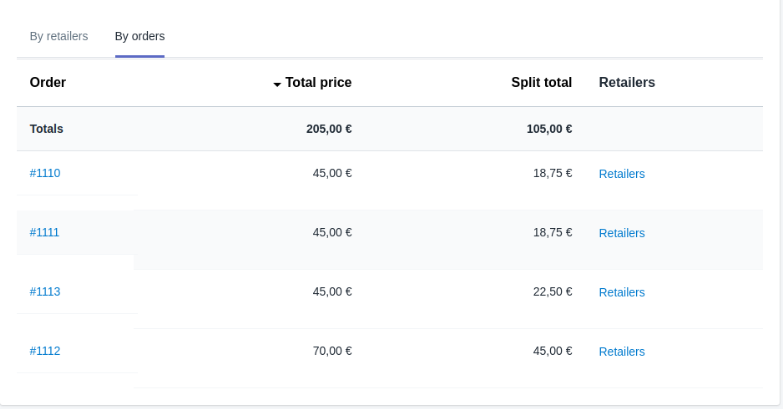
And when you click the last button that has a Collapsible with a TextContainer is even worst:
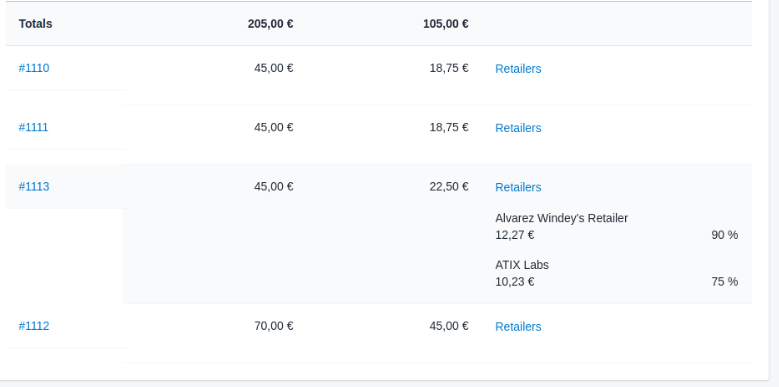
I'm not sure if it is the same issue or if I'm not usign DataTable component correctly. The column types are (from left to right)
- Polaris
<Link>component. - String
- String
- More complex component, but basically is:
     <Stack vertical>
        <Button>
          Retailers
        </Button>
        <Collapsible>
          <TextContainer>
            ...
          </TextContainer>
        </Collapsible>
      </Stack>
I will be grateful if you can help me :)
Regards,
Ariel
PS: I also try to put the column with long height first and I got this result:

 arieljaw12
on 10 Jan 2019
arieljaw12
on 10 Jan 2019
@arieljaw12 I'm not able to reproduce the problem. I'm wondering what you're using as your columnContentTypes for the link and stack components? It only accepts text or numeric. Would you be able to create a reduced test case with the code you're using? Thank you.
solonaarmstrong-zz
on 14 Jan 2019
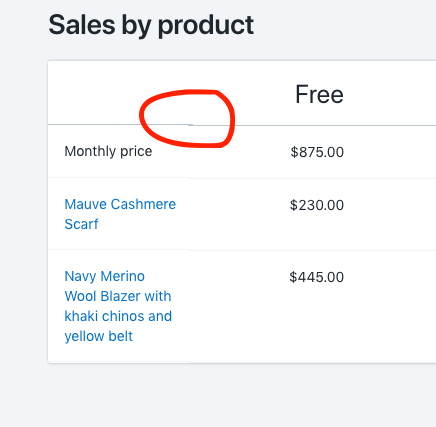
anyone got this bug css like me?
polaris: 3.5.0
chrome browser
mac osx
 fchienvuhoang
on 22 Jan 2019
fchienvuhoang
on 22 Jan 2019
I get the same error sometimes.
On Tue, Jan 22, 2019 at 3:16 PM chien vu hoang notifications@github.com
wrote:
[image: screen shot 2019-01-22 at 4 44 43 pm]
https://user-images.githubusercontent.com/4451749/51526554-3dddff80-1e65-11e9-95e6-922a2acd7fd9.png
anyone got this bug css like me?—
You are receiving this because you commented.
Reply to this email directly, view it on GitHub
https://github.com/Shopify/polaris-react/issues/387#issuecomment-456335668,
or mute the thread
https://github.com/notifications/unsubscribe-auth/ALcELVn0wq_mDVfaoksB0-Gyjo8Dyggpks5vFt4PgaJpZM4VoVgh
.
Nisthar
on 22 Jan 2019
@fchienvuhoang Interesting. I've created a separate issue. https://github.com/Shopify/polaris-react/issues/913
solonaarmstrong-zz
on 22 Jan 2019
@arieljaw12 I'm not able to reproduce the problem. I'm wondering what you're using as your
columnContentTypesfor the link and stack components? It only acceptstextornumeric. Would you be able to create a reduced test case with the code you're using? Thank you.
Hello @solonaarmstrong
I'm using text for both, the Link and the Stack component. I create an example of my code with harcoded data, you can see here: https://codesandbox.io/s/kkrr9z275r
As you see I'm experimenting the same issue when I give the table more screen width:

You can see that the highlighted row get different row's height at the Link column
Regards,
Ariel
arieljaw12
on 23 Jan 2019
@arieljaw12 The screenshot you have there is not what renders in the sandbox. The row borders don't render, so something's breaking. I was able to strip it down and recreate it locally. One thing stands out:
headings={[
          <Heading>Order</Heading>,
          <Heading>Total price</Heading>,
          <Heading>Split total</Heading>,
          <Heading>Retailers</Heading>
        ]}
The headings are typed as an array of strings string[].
Moving forward we've talked about making data table more flexible so it can accept headings and row links, but I don't have a clear timeline on when that will happen.
solonaarmstrong-zz
on 23 Jan 2019
@solonaarmstrong Hello, thanks for the reply and your time. I think that you have to resize the screen on sandbox to see the row highlighted. With the default size the highlight is not rendered. I replaced the Heading components with plain strings but I'm still get the same:
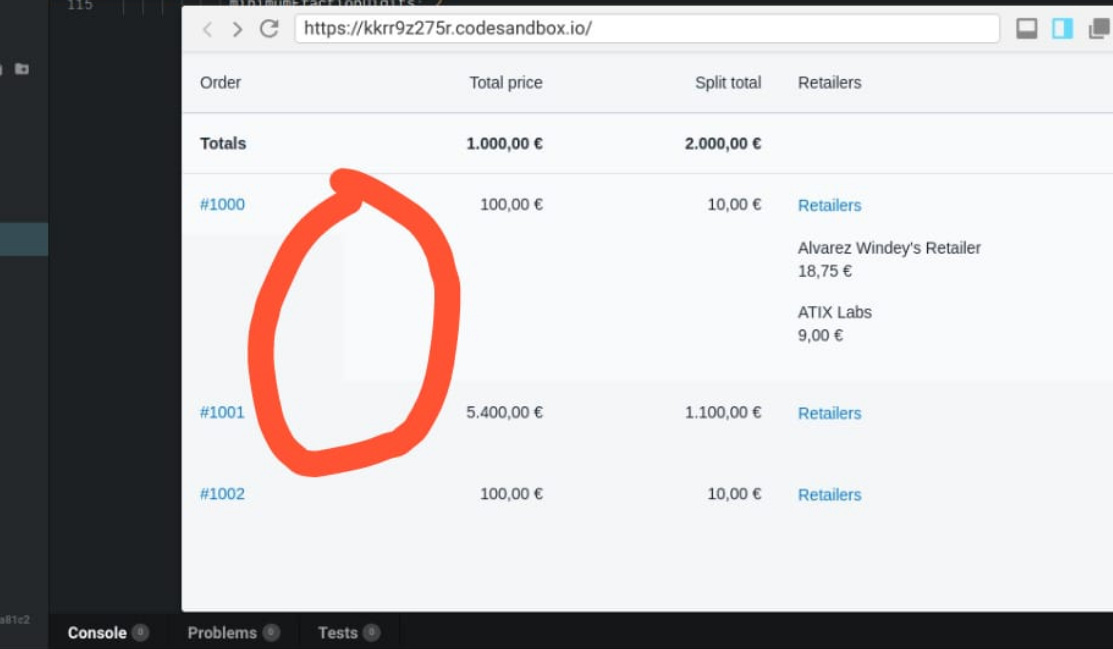
See that my screen is larger than the default. Maybe the in the image you can not appreciate the row highlighted because its quality (it's light gray).
Regards,
Ariel
arieljaw12
on 24 Jan 2019
@arieljaw12 It just occurred to me that by "highlighted" you meant hover. I can see the issue now when I hover over a given row. I will look as soon as I have a chance.
solonaarmstrong-zz
on 24 Jan 2019
This issue has been inactive for 180 days and labeled with Icebox. It will be closed in 7 days if there is no further activity.
![probot-shopify[bot] picture](https://avatars2.githubusercontent.com/in/10530?v=4&s=40) probot-shopify[bot]
on 15 Oct 2019
probot-shopify[bot]
on 15 Oct 2019
Related issues
 alex-page
·
3Comments
alex-page
·
3Comments
 wmceff
·
3Comments
wmceff
·
3Comments
 HYPD
·
3Comments
HYPD
·
3Comments
 shahab65
·
3Comments
andrewpye
·
3Comments
shahab65
·
3Comments
andrewpye
·
3Comments
Most helpful comment
Thanks @andrewpye. On it!