Polaris-react: useLinkComponent undefined
This is the first time I'm opening an issue in my short career as a dev!
Importing useLinkComponent and console logging it returns undefined.
import {
  useLinkComponent
} from '@shopify/polaris';

console.log(useLinkComponent);
It stops working at version 2.0.0-beta.9 and above, but works on all versions prior.
 KelseyCooper
All 6 comments
Hi @Siic19 thanks for the issue. With the introduction of the AppProvider we've changed the way this behaves. The app provider takes a optional linkComponent prop that accepts the type ReactComponent, which will be a custom component for all polaris components to use
Here is an example of it's usage.
class ProviderLinkExample extends React.Component {
  render() {
    const CustomLinkComponent = ({children, url, ...rest}) => {
      return (
        <a
          href={url}
          onClick={() => console.log('Custom link clicked')}
          {...rest}
        >
          {children}
        </a>
      );
    };

    return (
      <AppProvider linkComponent={CustomLinkComponent}>
        <Page
          breadcrumbs={[{content: 'Products', url: '#'}]}
          title="Jar With Lock-Lid"
          primaryAction={{content: 'Save', disabled: true}}
          secondaryActions={[
            {content: 'Duplicate', url: '#'},
            {content: 'View on your store', url: '#'},
          ]}
        >
          <p>Page content</p>
        </Page>
      </AppProvider>
    );
  }
}
Let me know if this answers your question!
 AndrewMusgrave
on 13 Apr 2018
AndrewMusgrave
on 13 Apr 2018
This seems to work, but not when I provide the AppProvider with a shopOrigin and apiKey as well as the linkComponent the link component doesn't work properly and the look of my page changes completely.
<AppProvider
      linkComponent={CustomLinkComponent}
      >
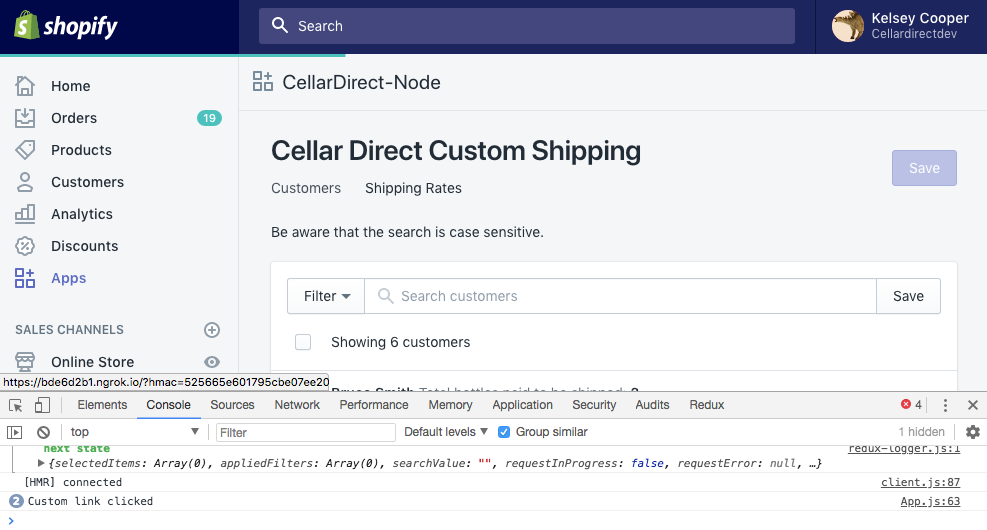
This works, the links appear under my title and when clicked the it triggers the console.log like expected.
<AppProvider
      shopOrigin={shopOrigin}
      apiKey={apiKey}
      linkComponent={CustomLinkComponent}
      >
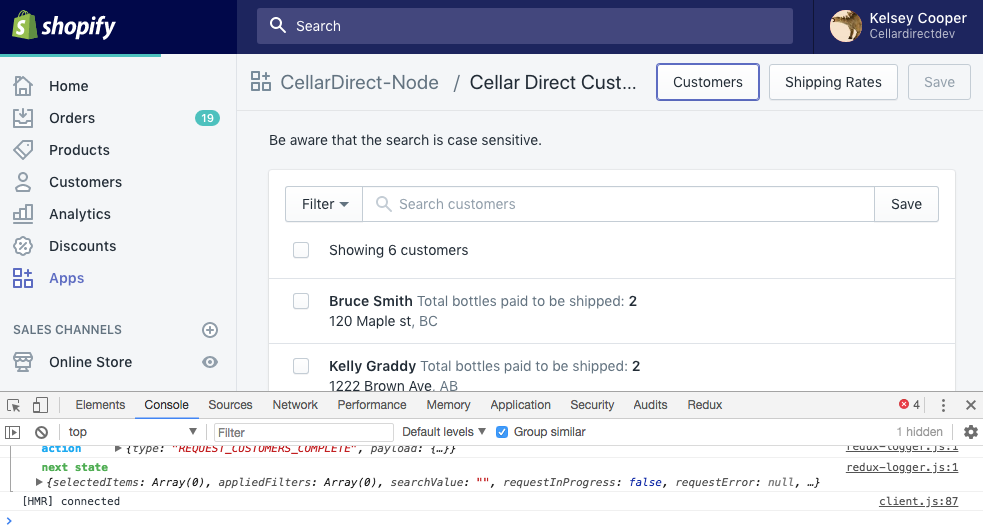
The links appear on the right of the title, and when they are clicked nothing happens.
I'm a bit confused as to what I could be doing wrong. I am using 2.0.0-beta.17
KelseyCooper
on 14 Apr 2018
@Siic19 The page component will work inside or outside an embedded app. The pages have different layouts, which is why providing shopOrigin and apiKey change the layout.
There was a bug in the way we handled linkComponent but a fix is in progress. We're hoping to include the fix in the next beta release. Regardless I'll keep you posted!
AndrewMusgrave
on 18 Apr 2018
Just as a quick update a fix has been merged and will be included in the next beta release!
AndrewMusgrave
on 26 Apr 2018
Great news!
KelseyCooper
on 26 Apr 2018
This should be resolved as of v2.0.0-rc.1.
 dfmcphee
on 1 May 2018
dfmcphee
on 1 May 2018
Related issues
 artyrcheek
·
3Comments
artyrcheek
·
3Comments
 shahab65
·
3Comments
shahab65
·
3Comments
 danrosenthal
·
3Comments
danrosenthal
·
3Comments
 grandelc
·
3Comments
grandelc
·
3Comments
 janklimo
·
3Comments
janklimo
·
3Comments
Most helpful comment
@Siic19 The page component will work inside or outside an embedded app. The pages have different layouts, which is why providing
shopOriginandapiKeychange the layout.There was a bug in the way we handled
linkComponentbut a fix is in progress. We're hoping to include the fix in the next beta release. Regardless I'll keep you posted!