Polaris-react: Handle Enter keypress event
Issue summary
Need to handle Enter keypress event on TextField.
Expected behavior
I wanted to build something like tag input field on product edit page with suggestions in a Popover as the component with multiple selection like Select does not exist in Polaris.
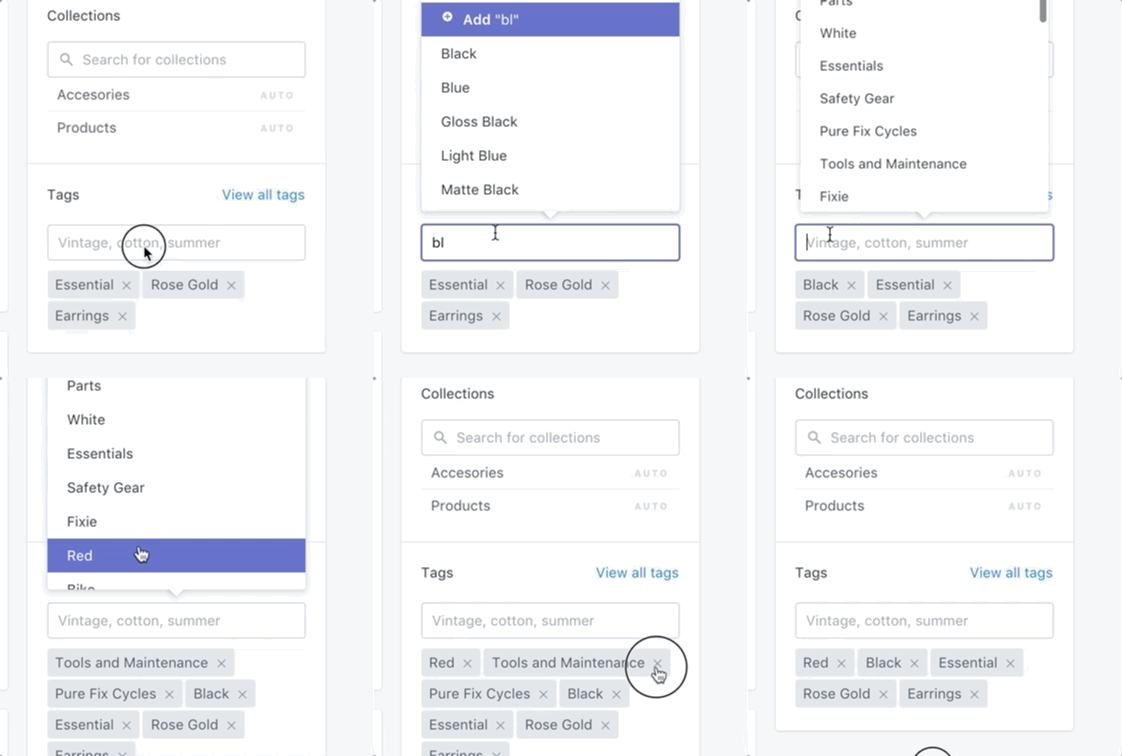
Actual behavior
At the moment, I can only use value and id of the TextField.
Specifications
- Polaris version: 1.10.2
- React version: 16.0.35
- Browser: Google Chrome latest
- Device: MacBook Pro
- Operating System: macOS
 meecrobe
All 2 comments
Hey @meecrobe, sorry for the delayed response! You can handle the key press within your text field type-select implementation by capturing the bubbled up event on a parent element.
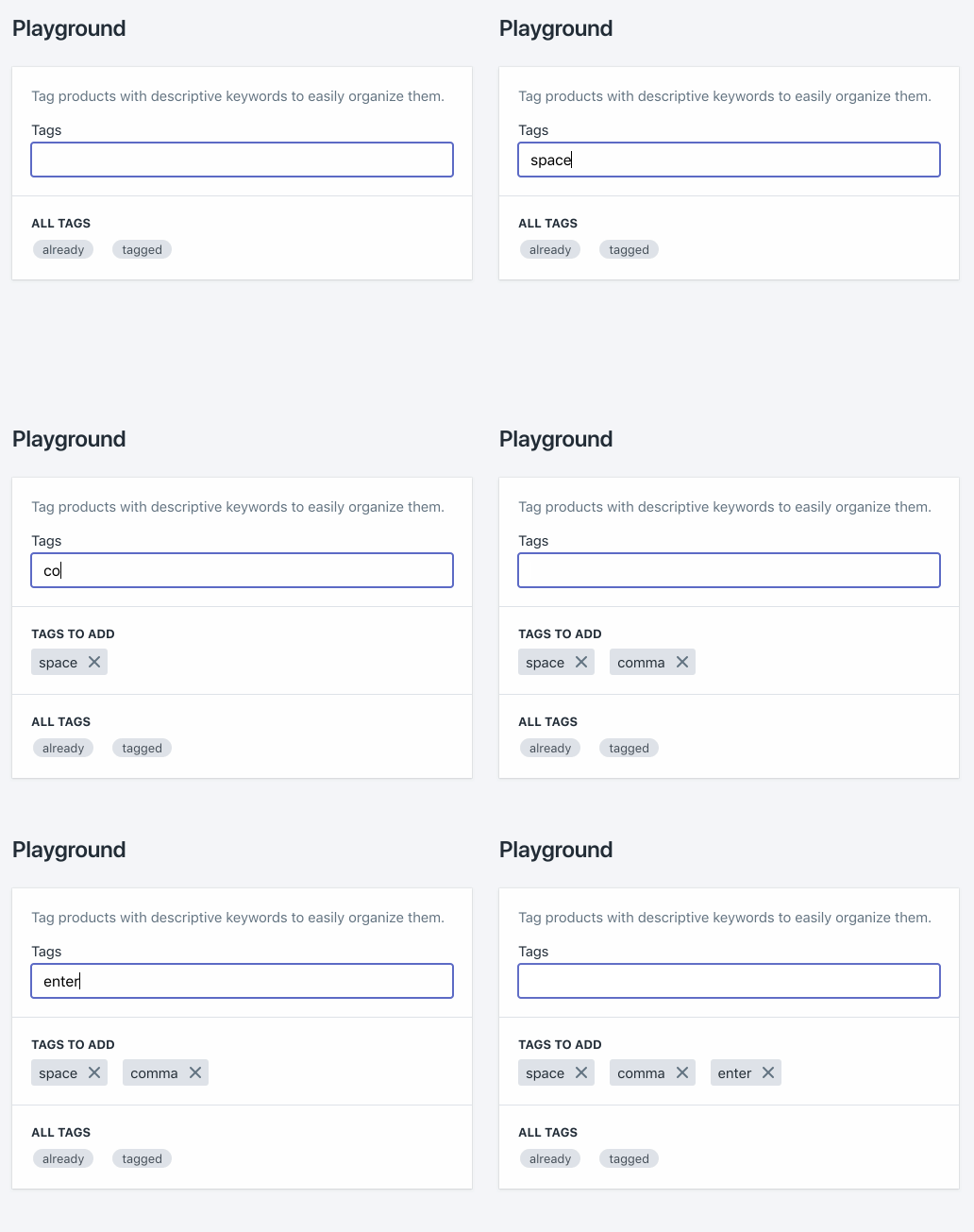
Here's an example of that event being captured by a div wrapping a text field (I can update the example to be more relevant if you post a code snippet from your screenshot):
import * as React from 'react';
import {Page, FormLayout, Card, TextStyle, TextField, Stack, Tag, Badge} from '@shopify/polaris';

export default class Playground extends React.Component {

  state = {
    tags: ['already', 'tagged'],
    newTags: [],
    pendingTag: '',
  }

  handleKeyPress = (event) => {
    const enterKeyPressed = event.keyCode === 13;
    if (enterKeyPressed) {
      event.preventDefault();
      this.addNewTag(this.state.pendingTag);
    }
  }

  handleChange = (value) => {
    const lastChar = value.charAt(value.length - 1);
    if (lastChar === ',' || lastChar === ' ') {
      return this.addNewTag(value.slice(0, -1));
    }

    this.setState({pendingTag: value});
  }

  addNewTag = (tag) => {
    const tags = new Set(this.state.newTags);
    const newTags = [...tags.add(tag)];
    this.setState({newTags, pendingTag: ''});
  }

  render() {
    const {tags, newTags} = this.state;
    const allTags = tags.map((tag) => <Badge key={tag}>{tag}</Badge>);
    let tagsToAddMarkup = null;

    if (newTags.length > 0) {
      const tagsToAdd = newTags.map((tag) => <Tag key={tag}>{tag}</Tag>);
      tagsToAddMarkup = (
        <Card.Section title="Tags to add">
          <Stack>{tagsToAdd}</Stack>
        </Card.Section>
      );
    }

    return (
      <Page title="Playground">
        <Card>
          <Card.Section>
            <form>
              <FormLayout>
                <TextStyle variation="subdued">
                  Tag products with descriptive keywords to easily organize them.
                </TextStyle>
                <div onKeyDown={this.handleKeyPress}>
                  <TextField
                    id="pendingTag"
                    label="Tags"
                    value={this.state.pendingTag}
                    onChange={this.handleChange}
                  />
                </div>
              </FormLayout>
            </form>
          </Card.Section>
          {tagsToAddMarkup}
          <Card.Section title="All tags">
            <Stack>{allTags}</Stack>
          </Card.Section>
        </Card>
      </Page>
    );
  }
}
 chloerice
on 14 Mar 2018
chloerice
on 14 Mar 2018
👍7
🎉3
This is fantastic @chloerice, thanks for taking the time to put that demo together.
 dominiceden
on 26 Apr 2019
dominiceden
on 26 Apr 2019
Was this page helpful?
0 / 5 - 0 ratings
Related issues
 HYPD
·
3Comments
HYPD
·
3Comments
 andrewpye
·
3Comments
andrewpye
·
3Comments
 mbaumbach
·
3Comments
mbaumbach
·
3Comments
 nemoeric
·
3Comments
nemoeric
·
3Comments
 zarubiak
·
3Comments
zarubiak
·
3Comments
Most helpful comment
Hey @meecrobe, sorry for the delayed response! You can handle the key press within your text field type-select implementation by capturing the bubbled up event on a parent element.
Here's an example of that event being captured by a
divwrapping a text field (I can update the example to be more relevant if you post a code snippet from your screenshot):