I've installed fresh new installation but I didn't see any widgets. So the app is not ready to be delivered to users...
bug
 nesporfilip
All 4 comments
I'm having the same problem. I'm here because I was checking if they were available for download. All I have are the default Mac OS widgets.
Never mind, after a few tries of re-installing the Default Widgets, it's working!
 danhrahal
on 7 Jun 2021
danhrahal
on 7 Jun 2021
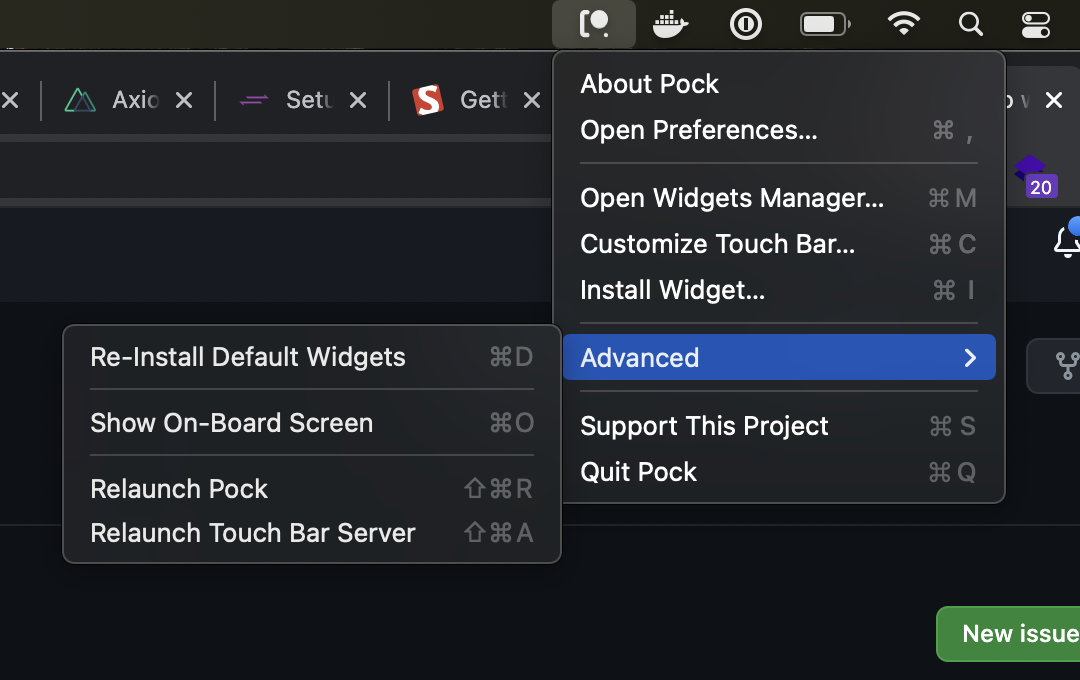
I got a same problem and I did re-install default widgets and it works again.
 januarfonti
on 11 Jun 2021
januarfonti
on 11 Jun 2021
🎉2
I am facing this same issue :(
MacOS 11.4 (20F71) / Big Sur
 mccannt
on 14 Jun 2021
mccannt
on 14 Jun 2021
I am facing this same issue :(
MacOS 11.4 (20F71) / Big Sur
Make sure you have Pock enabled for 'Accessibility' in Security & Privacy System Settings, then go to the 'Re-install default widgets' as screenshotted above. This fixed my problem as I didn't enable access during original install.
 nickmanderfield
on 23 Jun 2021
nickmanderfield
on 23 Jun 2021
Was this page helpful?
0 / 5 - 0 ratings
Related issues
 jeremyjh
·
6Comments
jeremyjh
·
6Comments
 molbrown
·
5Comments
molbrown
·
5Comments
 LyuShiWang
·
5Comments
LyuShiWang
·
5Comments
 Darktortue
·
7Comments
Darktortue
·
7Comments
 kylehotchkiss
·
3Comments
kylehotchkiss
·
3Comments
Most helpful comment
I got a same problem and I did
re-install default widgetsand it works again.