Pnpframework: [BUG] KeepPageCreationModificationInformation switch causing error on publishingpage transformation using ConvertTo-PnPClientSidePage
Thank you for reporting a bug. We appreciate your feedback - to help the team to understand your needs, please complete the below template to ensure we have the necessary details to assist you. Thanks!
Problem Area
[X ] Page Transformation: Error during the use of page transformation from PnP PowerShell
[ ] Page Transformation: Error during the use of page transformation from .Net
[ ] Page Transformation: Page is not looking correct after transformation
[ ] Modernization Scanner: something went wrong...
Expected or Desired Behavior
Published news article hosted in classic site in SharePoint online converted to client side page in communication site on same tenant using the KeepPageCreationModificationInformation switch to maintain the original author, editor, created and modified information.
Observed Behavior
command failed with the error message:
_The property or field has not been initialized. It has not been requested or the request has not been executed. It may need to be explicitly requested.   at Microsoft.SharePoint.Client.ListItem.GetFieldValue(String fieldName)
   at SharePointPnP.Modernization.Framework.Transform.BasePageTransformator.StoreSourcePageInformationToKeep(ListItem sourcePage)
   at SharePointPnP.Modernization.Framework.Publishing.PublishingPageTransformator.Transform(PublishingPageTransformationInformation publishingPageTransformationInformation)_
When the _KeepPageCreationModificationInformation_ switch is removed the page is converted successfully but the author and editor information is not migrated which is causing us a problem.
Steps to Reproduce
ConvertTo-PnPClientSidePage `
-Identity '************page.aspx' `
-PublishingPage `
-KeepPageCreationModificationInformation `
-PostAsNews `
-Overwrite `
-LogVerbose -LogType File -LogFolder c:\temp\Logs `
-TargetWebUrl https://***************.sharepoint.com/sites/news01 `
-PageLayoutMapping 'C:\Temp\custompagelayoutmapping.xml'
SharePointPnPPowerShellOnline version
3.26.2010.0
Modernization Summary Report
Date | Duration | Source Page | Target Page Url | Status
------------- | ------------- | ------------- | ------------- | -------------
26/11/2020 13:03:14 | 00:00:01 | | | A issue prevented successful transformation
Critical Errors during transformation
26/11/2020 13:03:16 -
_The property or field has not been initialized. It has not been requested or the request has not been executed. It may need to be explicitly requested. at Microsoft.SharePoint.Client.ListItem.GetFieldValue(String fieldName)
at SharePointPnP.Modernization.Framework.Transform.BasePageTransformator.StoreSourcePageInformationToKeep(ListItem sourcePage)
at SharePointPnP.Modernization.Framework.Publishing.PublishingPageTransformator.Transform(PublishingPageTransformationInformation publishingPageTransformationInformation)_
Individual Page details
Transformation Details:
- Report date: 26/11/2020 13:03:14
- Transform duration: 00:00:01
- Transforming from site: https://*.sharepoint.com/news
- Cross-Site transfer mode to site: https://*.com/sites/News01
- A critical error occurred - transformation did not complete
Page Transformation Settings
Property | Setting
------------- | -------------
Engine version | 1.0.2010.0
Overwrite | True
Target Page Name |
Target Page Folder |
Target Page Folder Overrides Default Folder | False
Keep Page Specific Permissions | True
Remove Empty Sections And Columns | True
Handle Wiki Images And Videos | True
Add Table List Image As Image Web Part | True
Keep Page Creation Modification Information | True
Publish Created Page | True
Post As News | True
Disable Page Comments | False
Skip Url Rewrite | False
Skip Default Url Rewrite | False
Url Mapping File |
Term Mapping File |
Skip Term Store Mapping | False
Skip User Mapping | False
User Mapping File |
L D A P Connection String |
Skip Telemetry | False
Transformation Operation Details
Date | Operation | Actions Performed
------------- | ------------- | -------------
26/11/2020 13:03:15 | _Input Validation_ | _Validation checks complete_
26/11/2020 13:03:15 | _SharePoint Connection_ | _Loading client context objects_
26/11/2020 13:03:15 | _SharePoint Connection_ | _Loading target client context object_
 phil-maynard
All 14 comments
Hi @phil-maynard , this is for a transformation in the same tenant or are you transforming classic pages from tenant A and create the modern page in tenant B?
 jansenbe
on 30 Nov 2020
jansenbe
on 30 Nov 2020
Hi @jansenbe The sites are on the same SPO tenant. The first is a subsite of the current root site collection. The second use a new communication site. We're migrating our old classic publishing intranet site content to new communications sites. Thanks. P
phil-maynard
on 1 Dec 2020
I'm having similar problems with one transformation project. I do not however get any errors when transforming the pages. It seems that some pages do get the original authors, but some pages only have the user performing the transformation in both modified by and created by columns. Also created and modified timestamps are not correctly set for most pages (those show current time and date when transformation happened). Most annoyingly the pages do not get published but remain in draft state, even though those are published in the source. I'm performing the transformation inside SharePoint Online tenant. The pages are set to be published as news via the switch. I have also the latest version to date of the PnP PowerShell installed.
Any ideas?
 TuomasPakkanen
on 9 Dec 2020
TuomasPakkanen
on 9 Dec 2020
@TuomasPakkanen : it feels like the code to set the author and do the publishing is never reached...can you try to transform one of those pages with verbose logging enabled and share that log here (after you've anonymized the urls).
jansenbe
on 9 Dec 2020
@TuomasPakkanen : it feels like the code to set the author and do the publishing is never reached...can you try to transform one of those pages with verbose logging enabled and share that log here (after you've anonymized the urls).
Thanks @jansenbe. Figured it out. The pages that have this issue have creators whose accounts no longer exist on Azure AD. Interestingly the creator does show in the page itself under the news post title. I think for this case the created by and modified by information is not that important, but the original created date is something that should be kept. I did read up on the docs that you can do a user mapping, but there are thousands of pages and probably hundreds of different editors, so it would be quite of an effort to create such mapping. Or can I somehow specify a mapping if a user is not found? It would also be fine in this case to only copy the original dates and not the authors.
"Warning: [Article page handling] There was a non critical issue during page update/publish. Returned error message: The specified user i:0#.f|membership|XXXXXXXX could not be found."
Thanks for your help so far.
TuomasPakkanen
on 9 Dec 2020
@TuomasPakkanen : At this point we don't have an option to define a global "user not found" override, but that's a good idea. For now user mapping is the best option.
jansenbe
on 14 Dec 2020
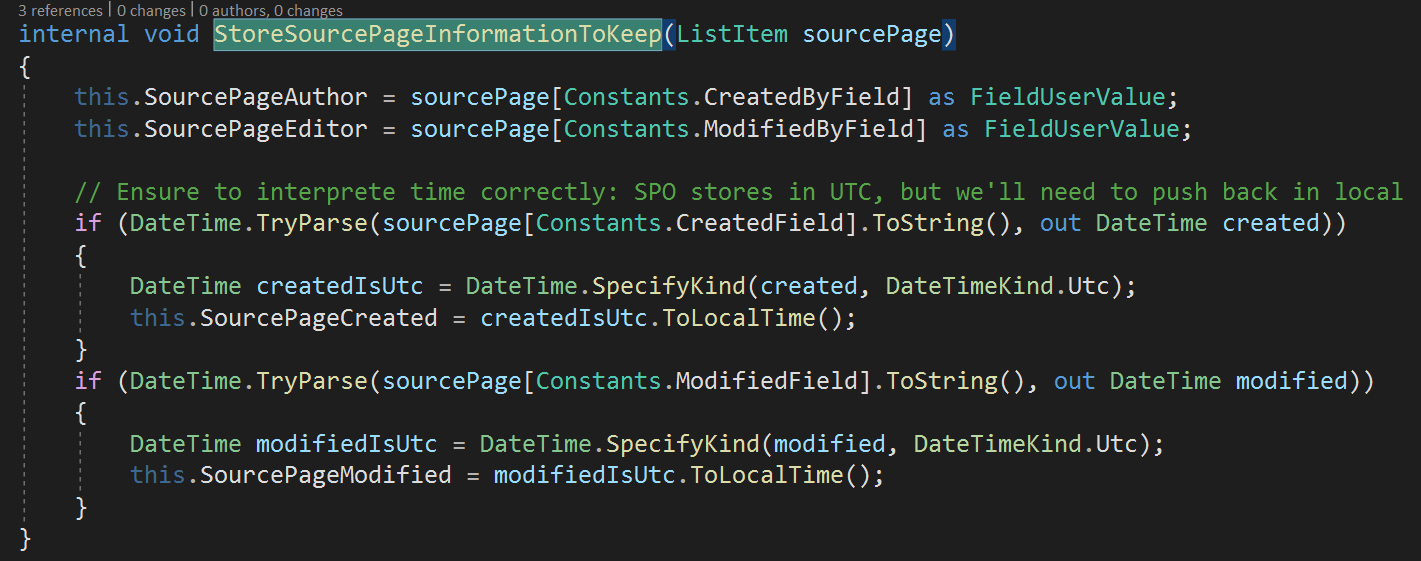
@phil-maynard : apologies for the delayed response, the code that fails is below. Can you cross check in the page that fails if the Editor, Modified, Author and Created page properties are set?
jansenbe
on 14 Dec 2020
@TuomasPakkanen : At this point we don't have an option to define a global "user not found" override, but that's a good idea. For now user mapping is the best option.
Any idea or timeline to give if this sort of option could be released in the future? Also option to copy just the original created/modified times would be great. I think in this case creating the user mapping is quite a big effort, unless I could easily export the list of all current users in the source site modified/created columns. There's not really huge time pressure for this specific case and I know this is kind of a long shot perhaps, not knowing how actively this project is developed. Might be that others will hit the same issue too though.
TuomasPakkanen
on 18 Dec 2020
Hi @jansenbe thanks for getting back to me. I suspect there's a weird issue with the Author field in the Pages library. The Pages library contains published news pages that use a heavily modified custom page layout. It was created a long time ago by a consultancy that helped set up the original SharePoint Intranet. One of the reasons I suspect the Author field is that I get the following error when attempting to map the Author and Editor fields in the page layout mapping file:
14/12/2020 19:06:39 | **Copying page metadata** | **You specified field Author in your page layout mapping, but that field is not available in the source page.**
Anyway, in case it's useful for anyone else, I looked into the Editor, Author, Modified, and Created fields and have added the findings below. The summary is that the fields existed in the library and had values populated for the pages we're trying to transform.
Script run to get field details
Connect-PnPOnline -Url https://a*********n.sharepoint.com/news -UseWebLogin

$valuesToLookFor = @(
    'Author',
    'Editor',
    'Created',
    'Modified')
$Fields = Get-PnPField -List "Pages"
$Fields | Where-Object {$valuesToLookFor -contains $_.InternalName} | Format-Table

$itemFields=(Get-PnPListItem -List "Pages" -id 3028).FieldValues
$itemObj=$(foreach ($ht in $itemFields) {new-object PSObject -Property $ht})
$itemObj | Select-Object -Property `
Title,`
ID,`
GUID,`
Created,`
Modified,`
Author,`
Editor,`
@{N='Author ID'; E={$_.Author.LookupID}},`
@{N='Author TypeID'; E={$_.Author.TypeID}},`
@{N='Author Email'; E={$_.Author.Email}},`
@{N='Author Name'; E={$_.Author.LookupValue}},`
@{N='Editor ID'; E={$_.Editor.LookupID}},`
@{N='Editor TypeID'; E={$_.Editor.TypeID}},`
@{N='Editor Email'; E={$_.Editor.Email}},`
@{N='Editor Name'; E={$_.Editor.LookupValue}}`
| format-list`
Output from above
Title       InternalName Id
-----       ------------ --
Modified    Modified     28cf69c5-fa48-462a-b5cd-27b6f9d2bd5f
Modified By Editor       d31655d1-1d5b-4511-95a1-7a09e9b75bf2
Created By  Author       1df5e554-ec7e-46a6-901d-d85a3881cb18
Created     Created      8c06beca-0777-48f7-91c7-6da68bc07b69

Title         : We deliver One Health message at two forums
ID            : 3028
GUID          : 99362338-fd8e-4255-a87f-d0caeb4c946f
Created       : 11/12/2020 09:46:48
Modified      : 15/12/2020 11:43:43
Author        : Microsoft.SharePoint.Client.FieldUserValue
Editor        : Microsoft.SharePoint.Client.FieldUserValue
Author ID     : 1592
Author TypeID : {c956ab54-16bd-4c18-89d2-996f57282a6f}
Author Email  : G***aB***h@w**********n.org
Author Name   : G***a B***h
Editor ID     : 847
Editor TypeID : {c956ab54-16bd-4c18-89d2-996f57282a6f}
Editor Email  : C****sH***d@w**********n.org
Editor Name   : C***s H***d
@TuomasPakkanen : At this point we don't have an option to define a global "user not found" override, but that's a good idea. For now user mapping is the best option.
Any idea or timeline to give if this sort of option could be released in the future? Also option to copy just the original created/modified times would be great. I think in this case creating the user mapping is quite a big effort, unless I could easily export the list of all current users in the source site modified/created columns. There's not really huge time pressure for this specific case and I know this is kind of a long shot perhaps, not knowing how actively this project is developed. Might be that others will hit the same issue too though.
@jansenbe any update?
TuomasPakkanen
on 18 Jan 2021
@phil-maynard : we've moved this code base into PnP Framework and will maintain it from there on. There will be no new "classic" PnP PowerShell releases anymore, so the only way to possibly fix this is by reproducing this in PnP Framework and the new PowerShell. I'll move this issue over to that repo for that reason.
@TuomasPakkanen : please create a new issue in PnP Framework to track your modernization feature ask. We do plan to rewrite the page transformation engine, so we can track that requirement when we start on that effort
jansenbe
on 22 Jan 2021
@phil-maynard : would it be possible to debug this from your side? When using the latest PnP Framework nuget package you can use our sourcelink support to easily debug this without having to pull down and build the source code. See https://pnp.github.io/pnpcore/using-the-sdk/basics-debug.html on how to configure visual studio to use sourcelink. See https://github.com/pnp/pnpframework/blob/dev/src/lib/PnP.Framework.Modernization.Test/Transform/Publishing/PublishingPageTests.cs#L38 as sample snippet doing a publishing page transformation from code
jansenbe
on 22 Jan 2021
@phil-maynard : alternatively you can also force the author/editor information via PowerShell: see https://github.com/pnp/powershell/discussions/158 for some thread on that (we did some changes to make this easier in PS).
If the issue is resolved for you then please let me know so the issue can be closed
jansenbe
on 28 Jan 2021
Closing per no activity anymore. If you feel the given guidance is insufficient or there's other input to help resolve the issue then please open a new one with the needed details. Thanks;
jansenbe
on 1 Feb 2021
Related issues
 MattiaBonanni
·
4Comments
MattiaBonanni
·
4Comments
 derhallim
·
5Comments
derhallim
·
5Comments
 KiranTalikoti
·
4Comments
KiranTalikoti
·
4Comments
 Swampen
·
3Comments
Swampen
·
3Comments
 diver7
·
6Comments
diver7
·
6Comments
Most helpful comment
@phil-maynard : we've moved this code base into PnP Framework and will maintain it from there on. There will be no new "classic" PnP PowerShell releases anymore, so the only way to possibly fix this is by reproducing this in PnP Framework and the new PowerShell. I'll move this issue over to that repo for that reason.
@TuomasPakkanen : please create a new issue in PnP Framework to track your modernization feature ask. We do plan to rewrite the page transformation engine, so we can track that requirement when we start on that effort