Pnpframework: Azure Functions: [A]PnPManifest cannot be cast to [B]PnPManifest
I load my PnP Template from a .pnp file, and this works without a problem when executing locally. If I deploy my Azure Function, I get the following error:
[Error] Error Message: [A]PnP.Framework.Provisioning.Connectors.OpenXML.Model.PnPManifest cannot be cast to [B]PnP.Framework.Provisioning.Connectors.OpenXML.Model.PnPManifest. Type A originates from 'PnP.Framework, Version=0.1.109.0, Culture=neutral, PublicKeyToken=null' in the context 'Default' at location 'C:\home\site\wwwroot\bin\PnP.Framework.dll'. Type B originates from 'PnP.Framework, Version=0.1.109.0, Culture=neutral, PublicKeyToken=null' in the context 'Default' at location 'C:\home\site\wwwroot\bin\PnP.Framework.dll'.
[Error] Error while processing dossier: [A]PnP.Framework.Provisioning.Connectors.OpenXML.Model.PnPManifest cannot be cast to [B]PnP.Framework.Provisioning.Connectors.OpenXML.Model.PnPManifest. Type A originates from 'PnP.Framework, Version=0.1.109.0, Culture=neutral, PublicKeyToken=null' in the context 'Default' at location 'C:\home\site\wwwroot\bin\PnP.Framework.dll'. Type B originates from 'PnP.Framework, Version=0.1.109.0, Culture=neutral, PublicKeyToken=null' in the context 'Default' at location 'C:\home\site\wwwroot\bin\PnP.Framework.dll'.
at PnP.Framework.Provisioning.Connectors.OpenXML.PnPPackage.GetXamlSerializedPackagePartValue[T](PackagePart part)
at PnP.Framework.Provisioning.Connectors.OpenXML.PnPPackage.get_Manifest()
at PnP.Framework.Provisioning.Connectors.OpenXML.PnPPackageExtensions.LoadPnPPackage(PnPPackage package)
at PnP.Framework.Provisioning.Connectors.OpenXML.PnPPackageExtensions.UnpackTemplate(MemoryStream stream)
at PnP.Framework.Provisioning.Connectors.OpenXMLConnector..ctor(String packageFileName, FileConnectorBase persistenceConnector, String author, X509Certificate2 signingCertificate, String templateFileName)
at ...
If I switch my code to run from .xml, it works in Azure Functions. Problem seems to happen in this method, but I don't see why. There are two casts happening...
https://github.com/pnp/pnpframework/blob/6b7b45166cf4fd17412fe3dff9ef14a6a1def35d/src/lib/PnP.Framework/Provisioning/Connectors/OpenXML/PnPPackage.cs#L315-L350
 YannickRe
All 26 comments
Hi Yannick,
Can you share the contents of the manifest.xml file with us? It's located in the .pnp file (which is just a zip file) in the root folder.
Thanks!
 erwinvanhunen
on 13 Jan 2021
erwinvanhunen
on 13 Jan 2021
Sure, this is it:
<PnPManifest Type="Full" xmlns="clr-namespace:PnP.Framework.Provisioning.Connectors.OpenXML.Model;assembly=PnP.Framework" />
@YannickRe : I think this is due to some conflict with already loaded assemblies (I will be really happy when the azure function team fixes this ~ https://techcommunity.microsoft.com/t5/apps-on-azure/net-5-support-on-azure-functions/ba-p/1973055).
Can you try to help the resolving continue with something like this: https://www.techmikael.com/2017/09/resolving-assemblies-when-using-pnp.html
 jansenbe
on 13 Jan 2021
jansenbe
on 13 Jan 2021
I will try that, but I am not sure this is the same issue. I currently use Azure Functions v3, and that fix from Mikael was necessary in v1. The Functions team supposedly fixed that problem in v3.
The error I'm now getting (see first post) is nothing similar to what I used to get in Functions v1. The weird part is that it says that it can't cast type A to type B, but references the same appdomain AND the exact same DLL on the same location.
I'll report back when I had a chance to test that assembly redirect.
YannickRe
on 13 Jan 2021
The assembly redirect doesn't fix this issue...
YannickRe
on 13 Jan 2021
This is the thread I found that made me recommend the assembly load override: https://github.com/pnp/PnP-Sites-Core/issues/1474. Do you have a simple repro to share?
jansenbe
on 14 Jan 2021
https://stackoverflow.com/questions/48901752/net-core-2-0-azure-function-exception-during-runtime-resolution-of-assembly might also be helpful
jansenbe
on 14 Jan 2021
I'll try and get a repro Azure Function v3 over the weekend! Biggest issue is that this only occurs in Azure, not when running the function locally. Otherwise I'd be able to easier debug.
YannickRe
on 14 Jan 2021
The Azure function is C# function or are you using a PowerShell function, as in PowerShell the solution is relatively simple: https://pnp.github.io/powershell/articles/azurefunctions.html
erwinvanhunen
on 14 Jan 2021
It is a C# function, so no luck...
YannickRe
on 14 Jan 2021
@YannickRe : did you manage to build a repro function?
jansenbe
on 21 Jan 2021
Not yet, I made a bit too many commitments. I'm sorry, but I'll get this asap!
YannickRe
on 21 Jan 2021
No rush...
jansenbe
on 21 Jan 2021
@jansenbe I have a repro on https://github.com/YannickRe/PnPFrameworkIssue91
- Adjust FunctionApp/Function1.cs, and provide values for
siteUrl,userNameandpassword - Deploy the Function App to Azure, on a v3 Function App Consumption Plan
- Trigger the function from the Azure Portal while watching the real time log stream
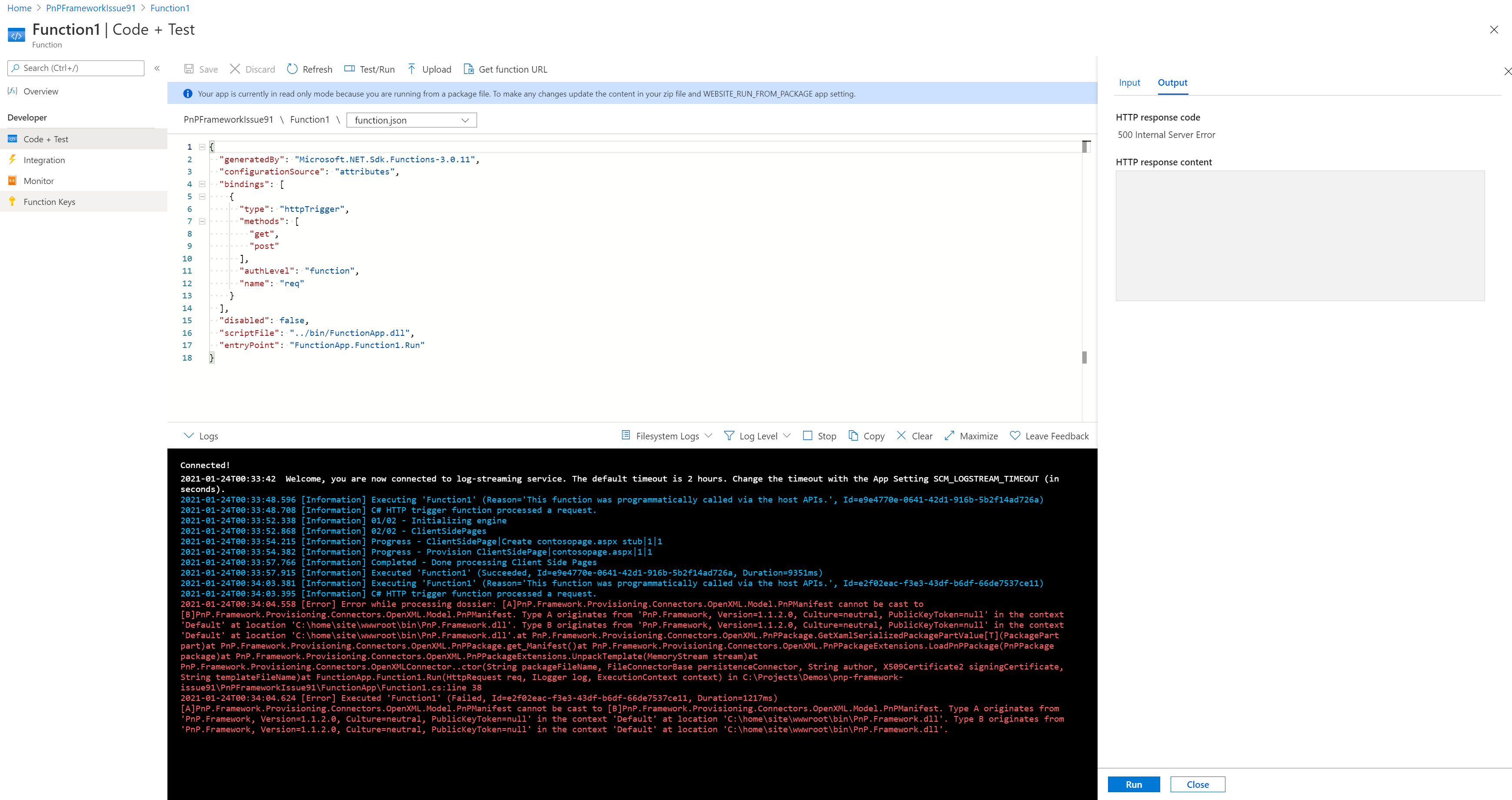
It might require multiple executions in a short timespan to get to the error message. As you can see in the screenshot my first execution worked but the second failed.
YannickRe
on 24 Jan 2021
Not sure if this can be fixed here, or is an Azure Functions issue since I just found this issue report too: https://github.com/Azure/azure-functions-host/issues/7028
YannickRe
on 24 Jan 2021
This issue is stale because it has been open 30 days with no activity. Remove stale label or comment or this will be closed in 5 days
![github-actions[bot] picture](https://avatars.githubusercontent.com/in/15368?v=4&s=40) github-actions[bot]
on 24 Feb 2021
github-actions[bot]
on 24 Feb 2021
Don’t feel like we should let this close automatically... 🙂
YannickRe
on 24 Feb 2021
Too many things on the todo list, but indeed let's not close this one
jansenbe
on 26 Feb 2021
Hi, you might try to change your csproj of the Azure Function and add this Line
"<_FunctionsSkipCleanOutput>true"
in here like this:
  <PropertyGroup>
    <TargetFramework>netcoreapp3.1</TargetFramework>
    <AzureFunctionsVersion>v3</AzureFunctionsVersion>
    <_FunctionsSkipCleanOutput>true</_FunctionsSkipCleanOutput>
  </PropertyGroup>
This usually helps to resolve conflicts with classes which the Azure Function Framework uses as well.
 czullu
on 2 Mar 2021
czullu
on 2 Mar 2021
@czullu Thanks for chiming in! Unfortunately, I already have that line in my csproj file and that doesn't resolve this issue (it did resolve some other problems tho).
YannickRe
on 2 Mar 2021
This issue is stale because it has been open 30 days with no activity. Remove stale label or comment or this will be closed in 5 days
github-actions[bot]
on 2 Apr 2021
@jansenbe Can we keep this alive?
YannickRe
on 2 Apr 2021
This issue is stale because it has been open 30 days with no activity. Remove stale label or comment or this will be closed in 5 days
github-actions[bot]
on 3 May 2021
bump
YannickRe
on 3 May 2021
@YannickRe : been way too busy...so did not have time for this. Feel free to keep bumping it
jansenbe
on 26 May 2021
No worries, I have a workaround now but it feels important enough to not let go stale.
YannickRe
on 27 May 2021
Related issues
YannickRe
·
6Comments
 StevieBleeds
·
10Comments
StevieBleeds
·
10Comments
 derhallim
·
5Comments
derhallim
·
5Comments
 mohammadamer
·
5Comments
mohammadamer
·
3Comments
mohammadamer
·
5Comments
mohammadamer
·
3Comments