Pnpframework: [BUG] Set-PnPMicrosoft365Group throwing intermittent errors in Azure Runbook
Reporting an Issue or Missing Feature
I'm currently using v1.2.0 of the PnP.PowerShell module in an Azure Runbook and running a provisioning script which intermittently throws an error when adding either a member or owner using the Set-PnPMicrosoft365Group cmdlet. It's been happening intermittently for the past two days. I hadn't seen this issue prior to the v1.1.0 release
I've built in pauses into my script to see if a delay helps between each call, but this doesn't appear to be helping much
Expected behavior
Members and Owners should be added to the Microsoft 365 Group
Actual behavior
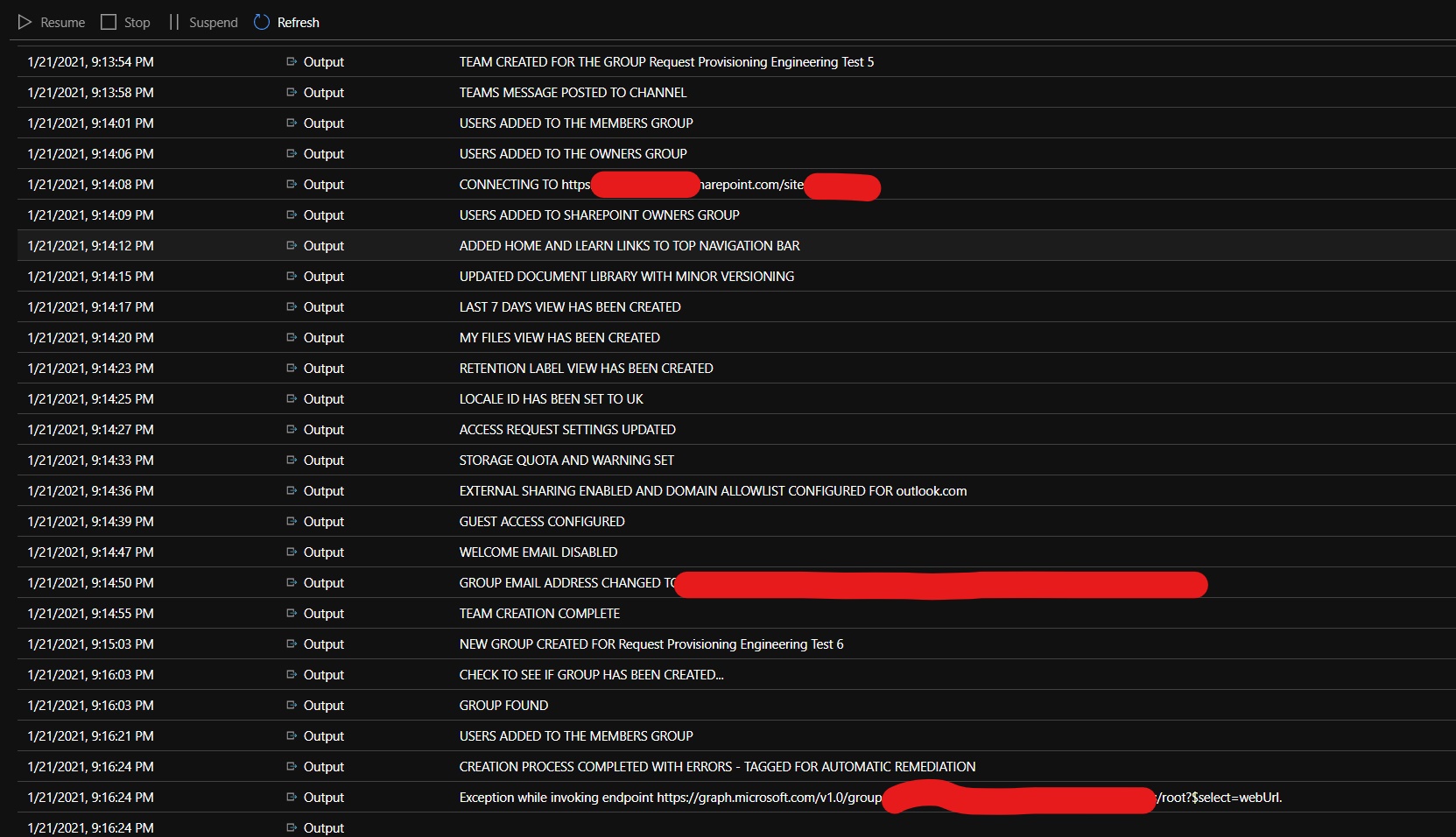
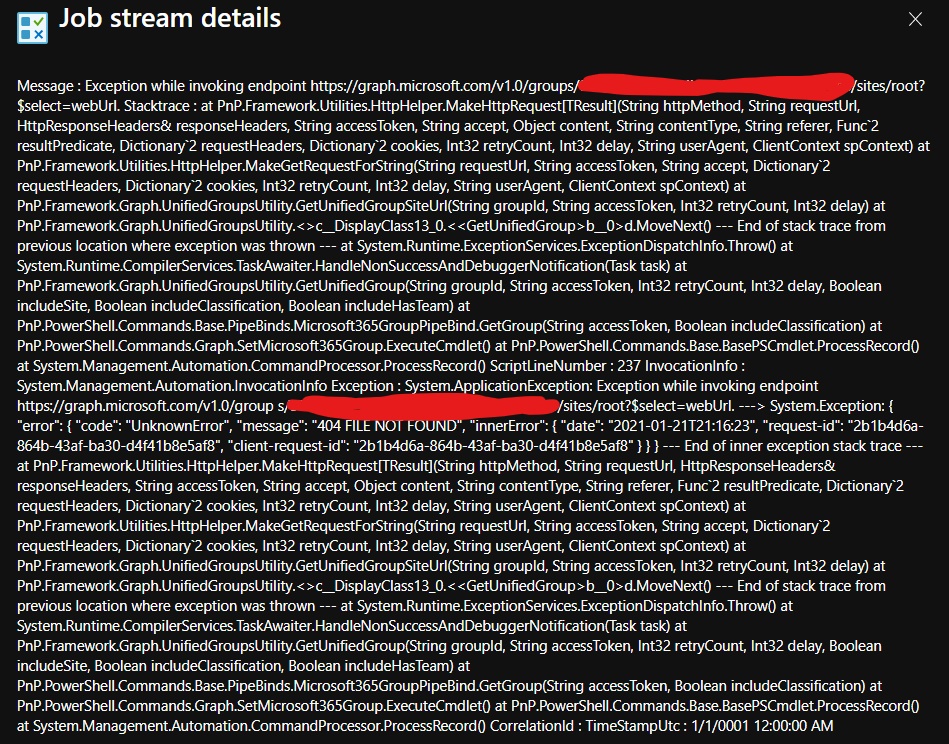
Steps to reproduce behavior
Create a Runbook in Azure Automation and add the following script;
        $Group = New-PnPMicrosoft365Group -DisplayName $siteName -Description $siteName -MailNickName $urlDisplayName -IsPrivate
        Write-Output("NEW GROUP CREATED FOR " + $Group.DisplayName)
        Start-Sleep -Seconds 60

        # Connect to the new site and ensure no more than 10 attempts are made
        $groupCounter = 0
        Do {

            Try {

                # Retrieve the context of the new group so we can proceed
                Write-Output("CHECK TO SEE IF GROUP HAS BEEN CREATED...")
                $groupExist = (Get-PnPMicrosoft365Group -Identity $Group.GroupId).GroupId
            }
            Catch {

                # Check every 60 seconds to see if the group has been provisioned
                $groupCounter++
                Start-Sleep -Seconds 60
                Write-Output("ATTEMPTING TO FIND GROUP... $groupCounter")

                if ($counter -eq 5) {
                    break;
                }
            }
        }
        Until ($groupExist)

        # If group is found, proceed with provisioning, otherwise terminate
        if ($groupExist) {
            Write-Output("GROUP FOUND")
        }
        else {
            Connect-PnPOnline -ClientId $appId -Thumbprint $appThumbprint -Url $appSite -Tenant $appAdTenant
            $updateListItem = Set-PnPListItem -List "Internal" -Identity $intItem -Values @{"Provisioned" = "Error" }
            Disconnect-PnPOnline
            Write-Output("PROVISIONING TERMINATED - TAGGED FOR AUTOMATIC REMEDIATION")
        }

            # Add the service account to post a message to the General channel
            Set-PnPMicrosoft365Group -Identity $Group.GroupId -Owners $appUsername
            Write-Output("SERVICE ACCOUNT ADDED")
            Start-Sleep -Seconds 1.5

            # Create a team using the newly created group
            Set-PnPMicrosoft365Group -Identity $Group.GroupId -CreateTeam
            Write-Output("TEAM CREATED FOR THE GROUP $siteName")
            Start-Sleep -Seconds 1.5

        # Add members to the group
        Set-PnPMicrosoft365Group -Identity $Group.GroupId -Members $siteOwner_0, $siteOwner_1, $siteOwner_2
        Write-Output("USERS ADDED TO THE MEMBERS GROUP")
        Start-Sleep -Seconds 2

        # Add owners to the group
        Set-PnPMicrosoft365Group -Identity $Group.GroupId -Owners $siteOwner_0, $siteOwner_1, $siteOwner_2
        Write-Output("SERVICE ACCOUNT REMOVED, USERS ADDED TO THE OWNERS GROUP")
        Start-Sleep -Seconds 2
What is the version of the Cmdlet module you are running?
1.2.0
Which operating system/environment are you running PnP PowerShell on?
- [ ] Windows
- [ ] Linux
- [ ] MacOS
- [ ] Azure Cloud Shell
- [ ] Azure Functions
- [x] Other : please specify - Azure Automation
 StevieBleeds
All 10 comments
Hi! Thank you for reporting this issue. As the exception is thrown in code from the PnP Framework I will move this issue over to that repository and we can continue on it there.
 erwinvanhunen
on 22 Jan 2021
erwinvanhunen
on 22 Jan 2021
Hi Erwin,
No problem at all, thank you for picking this up.
Best,
Steve
On 22 Jan 2021, at 08:43, Erwin van Hunen notifications@github.com wrote:
Hi! Thank you for reporting this issue. As the exception is thrown in code from the PnP Framework I will move this issue over to that repository and we can continue on it there.—
You are receiving this because you authored the thread.
Reply to this email directly, view it on GitHub, or unsubscribe.
StevieBleeds
on 22 Jan 2021
The exception you are seeing, 404 FILE NOT FOUND, is the way that SharePoint Online reports that the underlying site collection for the group does not exist yet. Creating the underlying site is an asynchronous process and will occur usually within seconds after creating the group, but it can take longer, depending on the load of the farm hosting the tenant. I checked the code behind the scenes and the Set-PnPMicrosoft365Group cmdlet tries to resolve the site collection. If the site collection is not there yet, it will fail with the exception you shared.
For most of the tasks (and actually all the tasks you perform in your script) we do not require the SiteUrl. I am updating PnP PowerShell as we speak to skip resolving the site url where not needed. But we also might have to update the PnP Framework to handle this exception more gracely.
erwinvanhunen
on 22 Jan 2021
As a positive side effect of the change to PnP PowerShell is that you will see that your scripts will run faster as resolving the site url takes its time.
erwinvanhunen
on 22 Jan 2021
I have committed the changes now to PnP PowerShell. It will be available in the next nightly build: 1.2.2-nightly.
erwinvanhunen
on 22 Jan 2021
Excellent, thanks for the prompt update Erwin, hugely appreciated 👍
StevieBleeds
on 22 Jan 2021
@StevieBleeds : please try with the new build and let us know so we (or you) can close this issue. Thx.
 jansenbe
on 22 Jan 2021
jansenbe
on 22 Jan 2021
We revisited your script that you posted, and we noticed that there is flaw in the logic. Assuming this is a straight copy of your script.
You are checking if the group exists, and if not, you log an error. However, straight after that you try to set the owners of the at that time non-existing group. That will obviously fail too. But again, this only applies if your code snippet is straight copy of your script.
erwinvanhunen
on 22 Jan 2021
Thanks Erwin, it is a snippet of the script. In short, the Runbook is retrieving a small number of requests that are located in a SharePoint list and it then spins up each one.
I'm using a Try/Catch block, so what I'm doing is if an error is thrown in the process, I write the failed request to an ErrorList in SP and the provisioning process is terminated for that request. It then moves onto the next one.
StevieBleeds
on 22 Jan 2021
Working absolutely fine this morning, thanks again. Spun up 20 groups without issue.
StevieBleeds
on 23 Jan 2021
Related issues
 diver7
·
6Comments
diver7
·
6Comments
 Swampen
·
3Comments
Swampen
·
3Comments
 svermaak
·
4Comments
svermaak
·
4Comments
 roberAlb
·
5Comments
roberAlb
·
5Comments
 Andy-Dawson
·
9Comments
Andy-Dawson
·
9Comments
Most helpful comment
I have committed the changes now to PnP PowerShell. It will be available in the next nightly build: 1.2.2-nightly.