Pnpframework: Invalid data has been used to update the list item with pnp:ClientSidePage
I am trying to deploy a page template as part of my provisioning template, however when I create a new instance of the the page template after provisioning a new site, am getting this error:
Invalid data has been used to update the list item. The field you are trying to update may be read only.
I have a page content type that inherits from Site Page, with no additional columns, deployed with my provisioning template, its ID is:
0x0101009D1CB255DA76424F860D91F20E6C411800CDB5E46C6094554D9A67815F1F98AB89
First, I have prepared everything in the site using the browser. I created a content type inheriting from "Site Page", then created a new page using this content type, and saved it as a template. The page template works fine in the original site when I try to create new instances, so I used Get-PnPProvisioningTemplate
The ClientSidePage XML looks like this, it gives me the error above, if I remove the ContentTypeID from the XML, it works fine:
<pnp:ClientSidePage PromoteAsNewsArticle="false" PromoteAsTemplate="true" Overwrite="true" Title="Custom Page Template" ContentTypeID="0x0101009D1CB255DA76424F860D91F20E6C411800CDB5E46C6094554D9A67815F1F98AB89" ThumbnailUrl="" PageName="Templates/MyPageTemplate.aspx">
<pnp:Header Type="Custom" ServerRelativeImageUrl="https://{fqdn}{site}/SiteAssets/custom/banner.jpg" TranslateX="51.7085751128304" TranslateY="42.1052631578947" LayoutType="FullWidthImage" TextAlignment="Center" ShowTopicHeader="false" ShowPublishDate="false" TopicHeader="" AlternativeText="" Authors="[]" AuthorByLine="[]" AuthorByLineId="-1" />
<pnp:Sections>
<pnp:Section Order="1" Type="OneColumn">
<pnp:Controls>
<pnp:CanvasControl WebPartType="Text" ControlId="9d15f343-b007-415c-b6e7-580e81dc234e" Order="1" Column="1">
<pnp:CanvasControlProperties>
<pnp:CanvasControlProperty Key="Text" Value="Sed ut perspiciatis unde omnis iste natus error sit voluptatem accusantium doloremque laudantium, totam rem aperiam, eaque ipsa quae ab illo inventore veritatis et quasi architecto beatae vitae dicta sunt explicabo. Nemo enim ipsam voluptatem quia voluptas sit aspernatur aut odit aut fugit, sed quia consequuntur magni dolores eos qui ratione voluptatem sequi nesciunt. Neque porro quisquam est, qui dolorem ipsum quia dolor sit amet, consectetur, adipisci velit, sed quia non numquam eius modi tempora incidunt ut labore et dolore magnam aliquam quaerat voluptatem. Ut enim ad minima veniam, quis nostrum exercitationem ullam corporis suscipit laboriosam, nisi ut aliquid ex ea commodi consequatur? Quis autem vel eum iure reprehenderit qui in ea voluptate velit esse quam nihil molestiae consequatur, vel illum qui dolorem eum fugiat quo voluptas nulla pariatur" />
</pnp:CanvasControlProperties>
</pnp:CanvasControl>
<pnp:CanvasControl WebPartType="ImageGallery" JsonControlData="{"id": "af8be689-990e-492a-81f7-ba3e4cd3ed9c", "instanceId": "76f685e6-c4f4-43b9-ab85-e0670b668c3d", "title": "Page Template", "description": "Using page template description", "dataVersion": "1.8", "properties": {"layout":4,"carouselSettings":{"autoplay":false,"autoplaySpeed":5,"dots":false,"lazyLoad":true,"metadata":true,"swipe":true},"gridSettings":{"imageSize":2,"imageCropping":1,"imageAspectRatio":1,"lightbox":false},"imageSourceType":1,"isRecursive":false,"isCdnEnabledForList":false,"hasDynamicModeEnabled":false,"maxImagesCount":10,"images":[],"canAlwaysSelectDocLibAsSource":false,"layoutComponentId":""}, "serverProcessedContent": {"htmlStrings":{},"searchablePlainTexts":{},"imageSources":{},"links":{}}, "dynamicDataPaths": {}, "dynamicDataValues": {}}" ControlId="af8be689-990e-492a-81f7-ba3e4cd3ed9c" Order="2" Column="1" />
</pnp:Controls>
</pnp:Section>
</pnp:Sections>
</pnp:ClientSidePage>
My Content Type that is included in the template looks like this:
<pnp:ContentType ID="0x0101009D1CB255DA76424F860D91F20E6C411800CDB5E46C6094554D9A67815F1F98AB89" Name="Custom CT" Description="" Group="Custom" NewFormUrl="" EditFormUrl="" DisplayFormUrl="">
          <pnp:FieldRefs>
            <pnp:FieldRef ID="c042a256-787d-4a6f-8a8a-cf6ab767f12d" Name="ContentType" UpdateChildren="true" />
            <pnp:FieldRef ID="5f47e085-2150-41dc-b661-442f3027f552" Name="SelectFilename" UpdateChildren="true" />
            <pnp:FieldRef ID="8553196d-ec8d-4564-9861-3dbe931050c8" Name="FileLeafRef" Required="true" UpdateChildren="true" />
            <pnp:FieldRef ID="8c06beca-0777-48f7-91c7-6da68bc07b69" Name="Created" Hidden="true" UpdateChildren="true" />
            <pnp:FieldRef ID="fa564e0f-0c70-4ab9-b863-0177e6ddd247" Name="Title" UpdateChildren="true" />
            <pnp:FieldRef ID="28cf69c5-fa48-462a-b5cd-27b6f9d2bd5f" Name="Modified" Hidden="true" UpdateChildren="true" />
            <pnp:FieldRef ID="822c78e3-1ea9-4943-b449-57863ad33ca9" Name="Modified_x0020_By" UpdateChildren="true" />
            <pnp:FieldRef ID="4dd7e525-8d6b-4cb4-9d3e-44ee25f973eb" Name="Created_x0020_By" UpdateChildren="true" />
            <pnp:FieldRef ID="82642ec8-ef9b-478f-acf9-31f7d45fbc31" Name="LinkTitle" UpdateChildren="true" />
            <pnp:FieldRef ID="7efc33c1-b56b-490e-9c9b-1097e971ba96" Name="ClientSideApplicationId" UpdateChildren="true" />
            <pnp:FieldRef ID="daef58d7-ccfd-43fc-b776-2e292cc66bba" Name="PageLayoutType" UpdateChildren="true" />
            <pnp:FieldRef ID="4966388e-6e12-4bc6-8990-5b5b66153eae" Name="CanvasContent1" UpdateChildren="true" />
            <pnp:FieldRef ID="5baf6db5-9d25-4738-b15e-db5789298e82" Name="BannerImageUrl" UpdateChildren="true" />
            <pnp:FieldRef ID="fb3259ac-bd07-4397-b7aa-03e885b0838e" Name="BannerImageOffset" UpdateChildren="true" />
            <pnp:FieldRef ID="3f155110-a6a2-4d70-926c-94648101f0e8" Name="Description" UpdateChildren="true" />
            <pnp:FieldRef ID="f5ad16a2-85be-46b2-b5f0-2bb8b4a5074a" Name="PromotedState" UpdateChildren="true" />
            <pnp:FieldRef ID="c84f8697-331e-457d-884a-c4fb8f30ea74" Name="FirstPublishedDate" UpdateChildren="true" />
            <pnp:FieldRef ID="261075db-0525-4fb8-a6ea-772014186599" Name="LayoutWebpartsContent" UpdateChildren="true" />
            <pnp:FieldRef ID="1a7348e7-1bb7-4a47-9790-088e7cb20b58" Name="_AuthorByline" UpdateChildren="true" />
            <pnp:FieldRef ID="d60d65ff-ff42-4044-a684-ac3f7a5e598c" Name="_TopicHeader" UpdateChildren="true" />
            <pnp:FieldRef ID="9de685c5-fdf5-4319-b987-3edf55efb36f" Name="_SPSitePageFlags" UpdateChildren="true" />
          </pnp:FieldRefs>
          <pnp:DocumentTemplate TargetName="/_layouts/15/CreateSitePage.aspx" />
</pnp:ContentType>
Whenever I create a new page out of this page template that's connected to this content type, it gives me the reported error.
 brittanyru
All 43 comments
Can you try without the <pnp:DocumentTemplate TargetName="/_layouts/15/CreateSitePage.aspx" /> line and see if that makes a difference?
 jansenbe
on 15 Dec 2020
jansenbe
on 15 Dec 2020
@jansenbe . I removed that part but still same error
brittanyru
on 15 Dec 2020
@jansenbe I think it's a bug. To reproduce it, I created a new communication site, created a content type inheriting from Site Page. Added this content type to the site pages library. I then created a page using this content type, and saved it as a template. I ran Get-PnPProvisioningTemplate -handlers all -IncludeAllClientSidePages, then applied this template to another site collection using pnp:Sequence, I got the same result when trying to create the page using this template. maybe @PaoloPia is aware of it?
brittanyru
on 15 Dec 2020
@jansenbe any idea how to work around this issue if I need to have custom page templates connected to custom content types in my provisioned site?
brittanyru
on 16 Dec 2020
We have the exact same problem or a very similar one that we are investigating. We know for a fact that it worked in both our test and production environment last Friday 11/12. On Monday we started to receive reports from editors that they can’t create pages anymore based on our custom page templates.
The page templates and connected CT are deployed through PnP provisioning and no updates have been made from our part in the production environment for weeks. Something must have been changed in our Tenants which affects ContentTypes and Page templates.
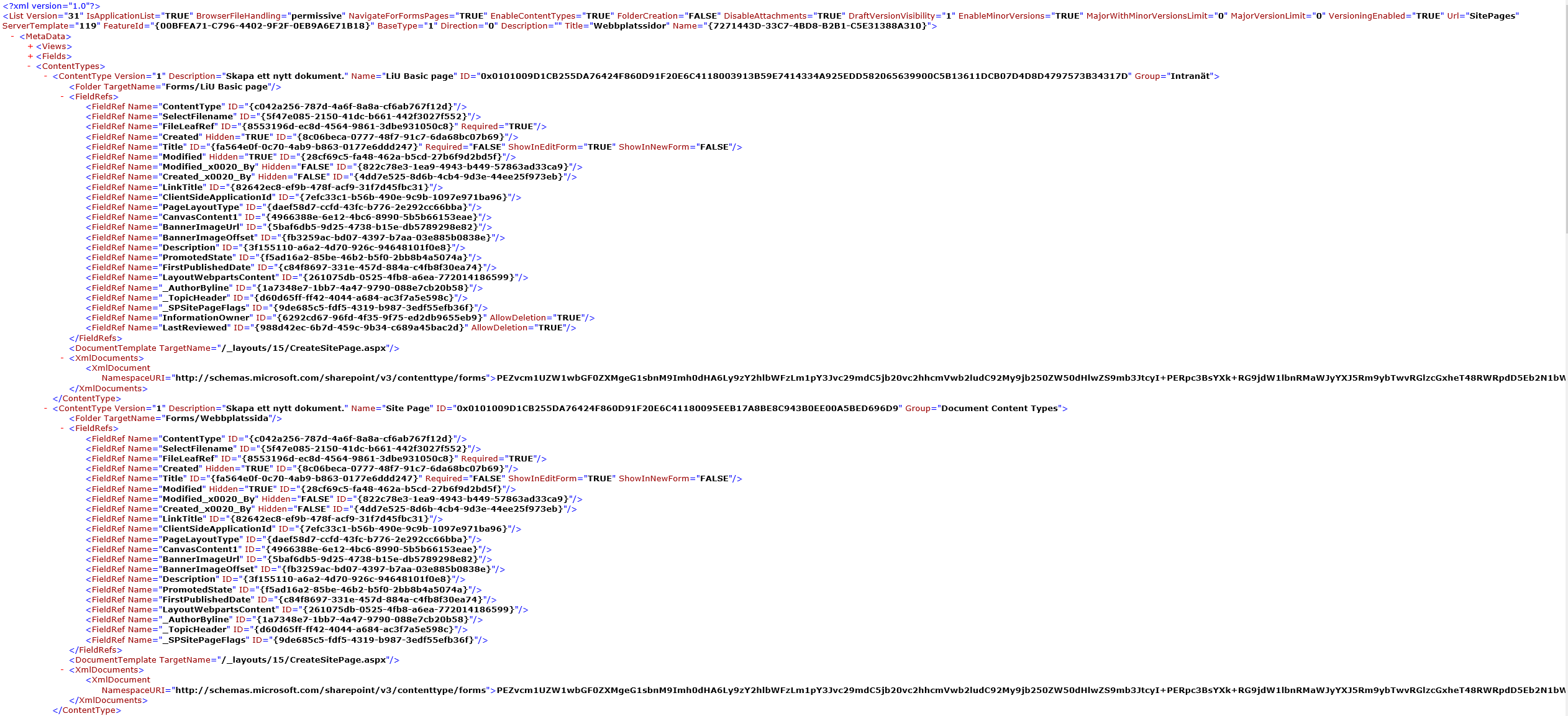
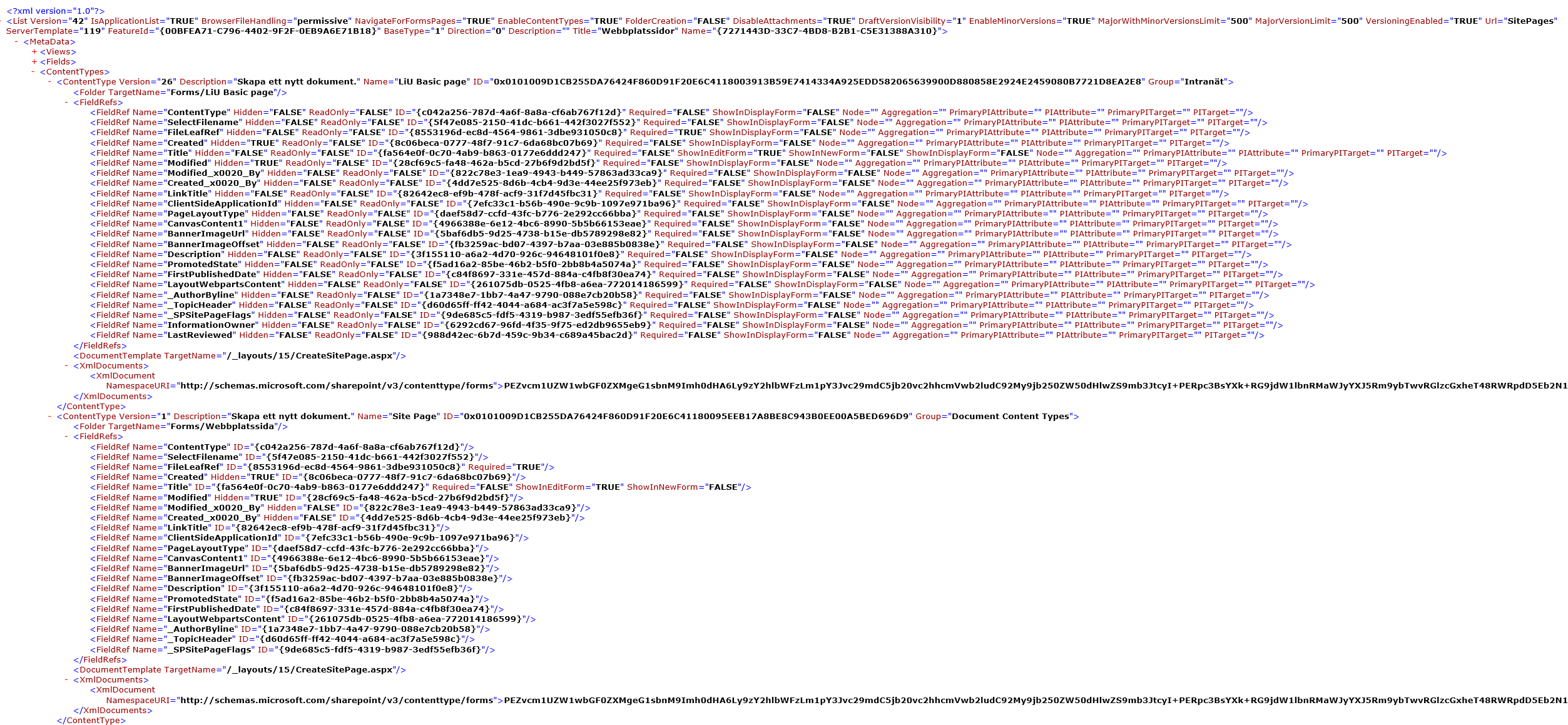
Early investigations show that there are some differences between the original content types and the ones deployed by the template. This may be related to the problem.
Original list content type:
List content type after provisioning:
I can replicate this issue through the following steps:
1.) Create a blank communication site.
2.) Add a custom site field.
3.) Add a custom site content type.
4.) Add the custom site filed to the content type.
5.) Add the content type to webpages library and make it default.
6.) Create a new blank page based on the new default content type.
7.) Save the new page as a template. The new template will work fine on the site.
8.) Export an new template: Get-PnPProvisioningTemplate -Out D:\temp\sample\basic_template_20201216_1.xml -Handlers Fields, ContentTypes, Lists, PageContents, Pages -IncludeAllClientSidePages -ListsToExtract Webbplatssidor
9.) Create a new blank communication site.
10.) Apply the template to the new site: Apply-PnPProvisioningTemplate -Path D:\temp\sample\basic_template_20201216_1.xml
11.) You will no longer be able to create new pages from the templates. It’s also not possible to create a new page template from the custom content type.
 b00johst
on 16 Dec 2020
b00johst
on 16 Dec 2020
@b00johst If you go to the library directly and create a page using that content type, it will work. The problem occurs when you create the page from that template using the New button on the homepage. It's like the page template itself gets corrupted maybe?
brittanyru
on 16 Dec 2020
@brittanyru Yes, that will allow me to create a page that I can edit and publish. However, if I try to save my new page as a template I get the same error once more. The exact same scenario applies if I create a page using the out of the box “Blank” page template, I can create the page, but not save it as a new template.
b00johst
on 16 Dec 2020
@brittanyru Thank you for posting this issue. Experiencing the same thing with our clients environments regarding our custom content types. Everything worked fine up until last Friday. Removing all of our custom fields from the CT and matching them 1 for 1 with site page, still gives us the same issue when creating a new page and saving: "Invalid data has been used to update the list item".
 SaltySweats
on 16 Dec 2020
SaltySweats
on 16 Dec 2020
@brittanyru - can you try the template as below and check ? Have placed the content type a bit differently inside the FieldValues node, maybe that can help ?
<pnp:ClientSidePage PromoteAsNewsArticle="false" PromoteAsTemplate="true" Overwrite="true" Title="Custom Page Template" ThumbnailUrl="" PageName="Templates/MyPageTemplate.aspx">
<pnp:Header Type="Custom" ServerRelativeImageUrl="https://{fqdn}{site}/SiteAssets/custom/banner.jpg" TranslateX="51.7085751128304" TranslateY="42.1052631578947" LayoutType="FullWidthImage" TextAlignment="Center" ShowTopicHeader="false" ShowPublishDate="false" TopicHeader="" AlternativeText="" Authors="[]" AuthorByLine="[]" AuthorByLineId="-1" />
<pnp:Sections>
<pnp:Section Order="1" Type="OneColumn">
<pnp:Controls>
<pnp:CanvasControl WebPartType="Text" ControlId="9d15f343-b007-415c-b6e7-580e81dc234e" Order="1" Column="1">
<pnp:CanvasControlProperties>
<pnp:CanvasControlProperty Key="Text" Value="Sed ut perspiciatis unde omnis iste natus error sit voluptatem accusantium doloremque laudantium, totam rem aperiam, eaque ipsa quae ab illo inventore veritatis et quasi architecto beatae vitae dicta sunt explicabo. Nemo enim ipsam voluptatem quia voluptas sit aspernatur aut odit aut fugit, sed quia consequuntur magni dolores eos qui ratione voluptatem sequi nesciunt. Neque porro quisquam est, qui dolorem ipsum quia dolor sit amet, consectetur, adipisci velit, sed quia non numquam eius modi tempora incidunt ut labore et dolore magnam aliquam quaerat voluptatem. Ut enim ad minima veniam, quis nostrum exercitationem ullam corporis suscipit laboriosam, nisi ut aliquid ex ea commodi consequatur? Quis autem vel eum iure reprehenderit qui in ea voluptate velit esse quam nihil molestiae consequatur, vel illum qui dolorem eum fugiat quo voluptas nulla pariatur" />
</pnp:CanvasControlProperties>
</pnp:CanvasControl>
<pnp:CanvasControl WebPartType="ImageGallery" JsonControlData="{"id": "af8be689-990e-492a-81f7-ba3e4cd3ed9c", "instanceId": "76f685e6-c4f4-43b9-ab85-e0670b668c3d", "title": "Page Template", "description": "Using page template description", "dataVersion": "1.8", "properties": {"layout":4,"carouselSettings":{"autoplay":false,"autoplaySpeed":5,"dots":false,"lazyLoad":true,"metadata":true,"swipe":true},"gridSettings":{"imageSize":2,"imageCropping":1,"imageAspectRatio":1,"lightbox":false},"imageSourceType":1,"isRecursive":false,"isCdnEnabledForList":false,"hasDynamicModeEnabled":false,"maxImagesCount":10,"images":[],"canAlwaysSelectDocLibAsSource":false,"layoutComponentId":""}, "serverProcessedContent": {"htmlStrings":{},"searchablePlainTexts":{},"imageSources":{},"links":{}}, "dynamicDataPaths": {}, "dynamicDataValues": {}}" ControlId="af8be689-990e-492a-81f7-ba3e4cd3ed9c" Order="2" Column="1" />
</pnp:Controls>
</pnp:Section>
</pnp:Sections>
<pnp:FieldValues>
<pnp:FieldValue Key="ContentType" Value="<Your-ContentType-Name>" />
</pnp:FieldValues>
</pnp:ClientSidePage>
 gautamdsheth
on 16 Dec 2020
gautamdsheth
on 16 Dec 2020
@jansenbe, do you have any insights in what MS changed as of Friday last week?
Browsing through the source of OfficeDevPnp.Core I noticed that there are a lot of changes made to the field links of content types when a template is provisioned. Since the standard behavior of extract pnp template is to include all fields including out of the box (OOB) ones this applies to these as well. My theory is that MS made some changes during the weekend and these changes expect the OOB fields to have some default settings or behave in a specific way. When we provisioned the template we changed that.
If I use a simple console application to create my field and content type it works as expected. However I only touch my custom fields and I do not change the field link in the content type.
`
            // add a custom field
            web.Fields.AddFieldAsXml(
                @"<Field    Type='Text'
                            Name='sample_basic_textfield'
                            DisplayName='Sample field'
                            ID='{3E4F706A-3D60-4373-8502-C70AC8D633E2}'
                            Group='sample'
                            Required='FALSE'
                            SourceID='{37b86df6-9e7d-4ad7-bd11-01e52a19db88}'
                            StaticName='sample_basic_textfield' />",
                false,
                AddFieldOptions.AddFieldInternalNameHint);

            // add contentType
            web.ContentTypes.Add(new ContentTypeCreationInformation
            {
                Name = "Custom Site Pages",
                //SitePage contentType 0x0101009D1CB255DA76424F860D91F20E6C4118 + 00 + 6328123706809B45A44EF41BAAD1B803
                Id = "0x0101009D1CB255DA76424F860D91F20E6C4118006328123706809B45A44EF41BAAD1B803",
                Group = "sample"
            });
            ctx.ExecuteQuery();

            // get new custom contentType and add fields
            ContentType customSitePagesCT = web.ContentTypes.GetById("0x0101009D1CB255DA76424F860D91F20E6C4118006328123706809B45A44EF41BAAD1B803");
            ctx.Load(customSitePagesCT);
            ctx.ExecuteQuery();

            Field basicTextField = web.Fields.GetByInternalNameOrTitle("sample_basic_textfield");
            customSitePagesCT.FieldLinks.Add(new FieldLinkCreationInformation
            {
                Field = basicTextField
            });

            customSitePagesCT.Update(true);
            ctx.ExecuteQuery();

            var pagesLibrary = web.Lists.GetByTitle("Webbplatssidor"); // SitePages
            ContentTypeCollection listContentTypes = pagesLibrary.ContentTypes;
            ctx.Load(pagesLibrary);
            ctx.Load(listContentTypes);
            ctx.ExecuteQuery();

            listContentTypes.AddExistingContentType(customSitePagesCT);
            pagesLibrary.Update();
            ctx.ExecuteQuery();`
@gautamdsheth i tried it. but it doesn't set the content type on the page
brittanyru
on 17 Dec 2020
If I cleanup my extracted pnp template and remove all non-custom fields from the contentType and apply the template to a new site it works as expected. The OOB-field are included automatically by inheritance and this way they are not modified.
Original pnp:ContentType:
<pnp:ContentType ID="0x0101009D1CB255DA76424F860D91F20E6C4118006328123706809B45A44EF41BAAD1B80302" Name="{resource:ContentType_LiUInformationPage_Name}" Description="Skapa ett nytt dokument." Group="Intranät" NewFormUrl="" EditFormUrl="" DisplayFormUrl="">
  <pnp:FieldRefs>
    <pnp:FieldRef ID="c042a256-787d-4a6f-8a8a-cf6ab767f12d" Name="ContentType" UpdateChildren="true" />
    <pnp:FieldRef ID="5f47e085-2150-41dc-b661-442f3027f552" Name="SelectFilename" UpdateChildren="true" />
    <pnp:FieldRef ID="8553196d-ec8d-4564-9861-3dbe931050c8" Name="FileLeafRef" Required="true" UpdateChildren="true" />
    <pnp:FieldRef ID="8c06beca-0777-48f7-91c7-6da68bc07b69" Name="Created" Hidden="true" UpdateChildren="true" />
    <pnp:FieldRef ID="fa564e0f-0c70-4ab9-b863-0177e6ddd247" Name="Title" UpdateChildren="true" />
    <pnp:FieldRef ID="28cf69c5-fa48-462a-b5cd-27b6f9d2bd5f" Name="Modified" Hidden="true" UpdateChildren="true" />
    <pnp:FieldRef ID="822c78e3-1ea9-4943-b449-57863ad33ca9" Name="Modified_x0020_By" UpdateChildren="true" />
    <pnp:FieldRef ID="4dd7e525-8d6b-4cb4-9d3e-44ee25f973eb" Name="Created_x0020_By" UpdateChildren="true" />
    <pnp:FieldRef ID="82642ec8-ef9b-478f-acf9-31f7d45fbc31" Name="LinkTitle" UpdateChildren="true" />
    <pnp:FieldRef ID="7efc33c1-b56b-490e-9c9b-1097e971ba96" Name="ClientSideApplicationId" UpdateChildren="true" />
    <pnp:FieldRef ID="daef58d7-ccfd-43fc-b776-2e292cc66bba" Name="PageLayoutType" UpdateChildren="true" />
    <pnp:FieldRef ID="4966388e-6e12-4bc6-8990-5b5b66153eae" Name="CanvasContent1" UpdateChildren="true" />
    <pnp:FieldRef ID="5baf6db5-9d25-4738-b15e-db5789298e82" Name="BannerImageUrl" UpdateChildren="true" />
    <pnp:FieldRef ID="fb3259ac-bd07-4397-b7aa-03e885b0838e" Name="BannerImageOffset" UpdateChildren="true" />
    <pnp:FieldRef ID="3f155110-a6a2-4d70-926c-94648101f0e8" Name="Description" UpdateChildren="true" />
    <pnp:FieldRef ID="f5ad16a2-85be-46b2-b5f0-2bb8b4a5074a" Name="PromotedState" UpdateChildren="true" />
    <pnp:FieldRef ID="c84f8697-331e-457d-884a-c4fb8f30ea74" Name="FirstPublishedDate" UpdateChildren="true" />
    <pnp:FieldRef ID="261075db-0525-4fb8-a6ea-772014186599" Name="LayoutWebpartsContent" UpdateChildren="true" />
    <pnp:FieldRef ID="1a7348e7-1bb7-4a47-9790-088e7cb20b58" Name="_AuthorByline" UpdateChildren="true" />
    <pnp:FieldRef ID="d60d65ff-ff42-4044-a684-ac3f7a5e598c" Name="_TopicHeader" UpdateChildren="true" />
    <pnp:FieldRef ID="9de685c5-fdf5-4319-b987-3edf55efb36f" Name="_SPSitePageFlags" UpdateChildren="true" />
    <pnp:FieldRef ID="287d1a1e-12d8-4755-810c-a1d982f682f2" Name="liu_InformationOwner" UpdateChildren="true" />´
    <pnp:FieldRef ID="0d6af127-787b-4af5-bedb-a4d700bd381e" Name="liu_LastReviewed" Hidden="true" UpdateChildren="true" />
    <pnp:FieldRef ID="a93af90d-fd4e-403d-8035-68f572411c95" Name="liu_LastReviewedHistory" Hidden="true" UpdateChildren="true" />
  </pnp:FieldRefs>
  <pnp:DocumentTemplate TargetName="/_layouts/15/CreateSitePage.aspx" />
</pnp:ContentType>
Modified pnp:ContentType:
<pnp:ContentType ID="0x0101009D1CB255DA76424F860D91F20E6C4118006328123706809B45A44EF41BAAD1B80302" Name="{resource:ContentType_LiUInformationPage_Name}" Description="Skapa ett nytt dokument." Group="Intranät" NewFormUrl="" EditFormUrl="" DisplayFormUrl="">
  <pnp:FieldRefs>
    <pnp:FieldRef ID="287d1a1e-12d8-4755-810c-a1d982f682f2" Name="liu_InformationOwner" UpdateChildren="true" />´
    <pnp:FieldRef ID="0d6af127-787b-4af5-bedb-a4d700bd381e" Name="liu_LastReviewed" Hidden="true" UpdateChildren="true" />
    <pnp:FieldRef ID="a93af90d-fd4e-403d-8035-68f572411c95" Name="liu_LastReviewedHistory" Hidden="true" UpdateChildren="true" />
  </pnp:FieldRefs>
  <pnp:DocumentTemplate TargetName="/_layouts/15/CreateSitePage.aspx" />
</pnp:ContentType>
To be more specific it seems to be the following fields that cause the issue. If either of them are present in pnp:FieldRefs it will not work when using templates.
<pnp:FieldRef ID="5f47e085-2150-41dc-b661-442f3027f552" Name="SelectFilename" UpdateChildren="true" />
<pnp:FieldRef ID="82642ec8-ef9b-478f-acf9-31f7d45fbc31" Name="LinkTitle" UpdateChildren="true" />
Unfortunately, this doesn’t solve any issues with existing sites. We need to create a migration script to fix our existing contentTypes.
b00johst
on 17 Dec 2020
@b00johst / @brittanyru / @SaltySweats :
Which version of PnP Sites Core or PnP Framework are you using?
jansenbe
on 17 Dec 2020
@jansenbe
Our production code (where we first experienced this issue) is running SharePointPnpCoreOnline 3.24.2008.1.
However, during test and troubleshooting I have used SharePointPnpCoreOnline 3.28.2012 and SharePointPnPPowerShellOnline 3.28.2012.0 with the same result.
I suspect that this issue applies to all versions including the new PnP Core SDK.
b00johst
on 17 Dec 2020
@b00johst ,
I'm looping in engineering for some insights (as there have been some possibly related changes). When I take a look at content types in my lab I see the ShowInDisplayForm property being TRUE for all OOB page content type fieldrefs whereas in your "after" schema view they're all FALSE. Since you mentioned that SelectFilename and LinkTitle seem to be the issue this probably is unrelated.
Can you confirm that if you take your original content type template and remove the SelectFilename and LinkTitle fieldsrefs everything works again?
jansenbe
on 17 Dec 2020
@jansenbe
Yes, I can verify that if I remove SelectedFileName and LinkTitle from the pnp:ContentTypes in our existing templates and create a new Site and provision the templates all ContentTypes and Page Templates works as expected.
Running my updated templates against an existing site will however not fix existing issues.
b00johst
on 17 Dec 2020
@jansenbe
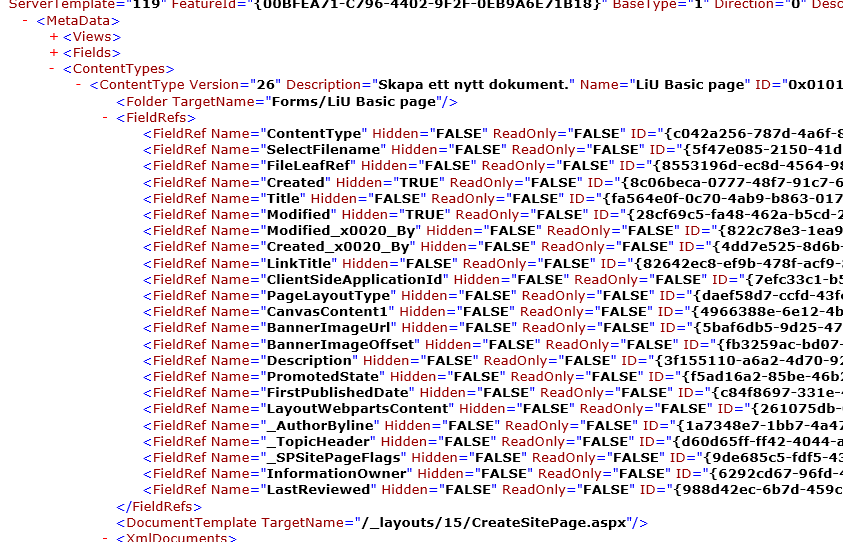
My colleague created a simple script for correcting broken ContentTypes on existing sites. The readonly field of the ContentTypes provisioned by our original templates is always false:
By looking at the original siteColumn the script updates the FieldRef with the original value for Hidden and Readonly making it possible to create pages using page templates again:
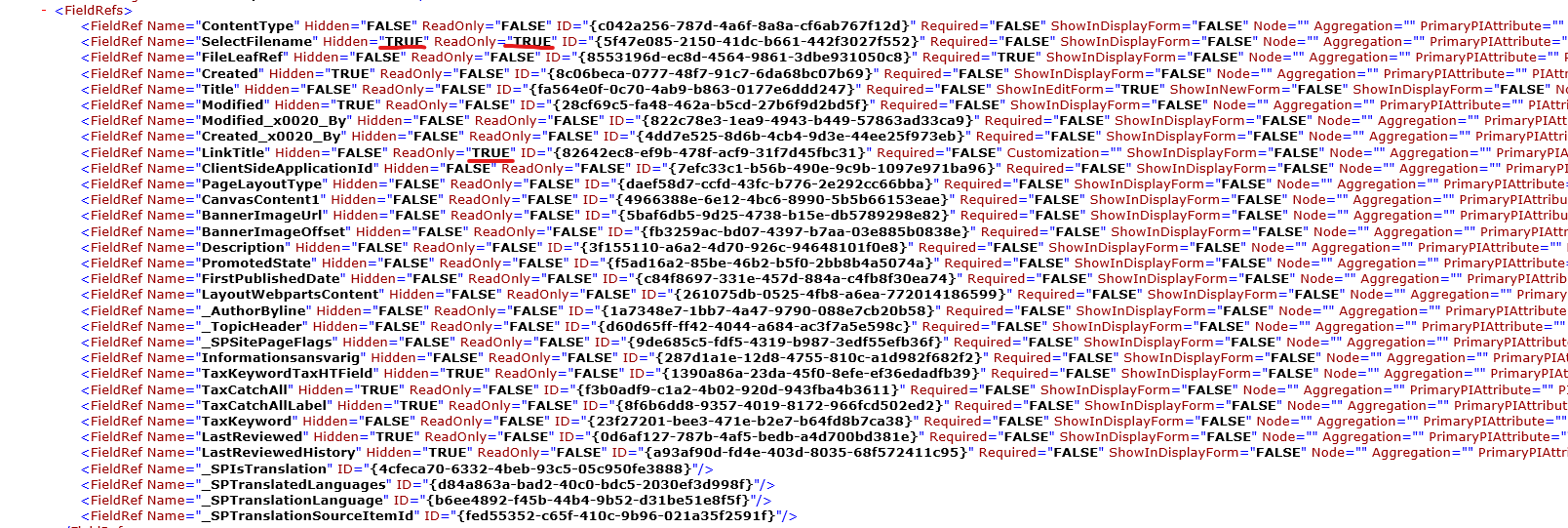
The readonly attribute of most OOB fields seems to be changed from true to false. At this point it’s only SelectFilename and LinkTitle that seems to cause any issues but I guess it’s only a matter of time before MS deploys other changes which expects the OOB fields to be left unchanged.
Param (
  [string] $siteurl,
  [string] $ctname = "LiU Informationssida"
)

Connect-PnPOnline -Url $siteurl

$fields = @(
"SelectFilename",
"LinkTitle"
)

$ct = Get-PnPContentType -Identity $ctname
$ref = Get-PnPProperty -ClientObject $ct -Property FieldLinks

ForEach($f in $fields) {

  Write-Host "Fixing $f"

  $field = Get-PnPField -Identity $f

  $fieldRef = $ct.FieldLinks | Where-Object { $_.Name -eq $f}
  $fieldRef.Hidden = $field.Hidden
  $fieldRef.ReadOnly = $field.ReadOnlyField

  $ct.Update($true)
  Invoke-PnPQuery
}
Thanks for the detailed research @b00johst, this helps
jansenbe
on 17 Dec 2020
@jansenbe SharePointPnPPowerShellOnline version is 3.26.2010.0
brittanyru
on 17 Dec 2020
@jansenbe @gautamdsheth As @b00johst suggested, removing both SelectFilename and LinkTitle from the content type xml seem to solve it. Is this the right fix?
brittanyru
on 17 Dec 2020
@brittanyru If this is causing you a major issue in your production environment, I would say that this is a solution/workaround.
However, the bigger issue is that you will still have a lot of content types in your Tentant with manipulated OOB fields. This time it was the SelectFilename and LinkTitle that caused the issue. Next time it may be one of the other 15+ fields.
Our current approach is to reset the field links on existing sites enabling our users to creating pages again. We have yet to decide what our long-term solution will be.
Our candidate solution is to cleanup all templates extracted with pnp and remove all fields except the ones created by us. This way there should be no changes to the OOB fields since they are only included through inheritance.
Before:
<pnp:ContentType ID="0x0101009D1CB255DA76424F860D91F20E6C4118006328123706809B45A44EF41BAAD1B80302" Name="{resource:ContentType_LiUInformationPage_Name}" Description="Skapa ett nytt dokument." Group="Intranät" NewFormUrl="" EditFormUrl="" DisplayFormUrl="">
  <pnp:FieldRefs>
    <pnp:FieldRef ID="c042a256-787d-4a6f-8a8a-cf6ab767f12d" Name="ContentType" UpdateChildren="true" />
    <pnp:FieldRef ID="5f47e085-2150-41dc-b661-442f3027f552" Name="SelectFilename" UpdateChildren="true" />
    (…)
    <pnp:FieldRef ID="d60d65ff-ff42-4044-a684-ac3f7a5e598c" Name="_TopicHeader" UpdateChildren="true" />
    <pnp:FieldRef ID="9de685c5-fdf5-4319-b987-3edf55efb36f" Name="_SPSitePageFlags" UpdateChildren="true" />
    <pnp:FieldRef ID="287d1a1e-12d8-4755-810c-a1d982f682f2" Name="liu_InformationOwner" UpdateChildren="true" />´
    <pnp:FieldRef ID="0d6af127-787b-4af5-bedb-a4d700bd381e" Name="liu_LastReviewed" Hidden="true" UpdateChildren="true" />
    <pnp:FieldRef ID="a93af90d-fd4e-403d-8035-68f572411c95" Name="liu_LastReviewedHistory" Hidden="true" UpdateChildren="true" />
  </pnp:FieldRefs>
  <pnp:DocumentTemplate TargetName="/_layouts/15/CreateSitePage.aspx" />
</pnp:ContentType>
After:
<pnp:ContentType ID="0x0101009D1CB255DA76424F860D91F20E6C4118006328123706809B45A44EF41BAAD1B80302" Name="{resource:ContentType_LiUInformationPage_Name}" Description="Skapa ett nytt dokument." Group="Intranät" NewFormUrl="" EditFormUrl="" DisplayFormUrl="">
  <pnp:FieldRefs>
    <pnp:FieldRef ID="287d1a1e-12d8-4755-810c-a1d982f682f2" Name="liu_InformationOwner" UpdateChildren="true" />´
    <pnp:FieldRef ID="0d6af127-787b-4af5-bedb-a4d700bd381e" Name="liu_LastReviewed" Hidden="true" UpdateChildren="true" />
    <pnp:FieldRef ID="a93af90d-fd4e-403d-8035-68f572411c95" Name="liu_LastReviewedHistory" Hidden="true" UpdateChildren="true" />
  </pnp:FieldRefs>
  <pnp:DocumentTemplate TargetName="/_layouts/15/CreateSitePage.aspx" />
</pnp:ContentType>
@jansenbe
Why is the default behavior of the pnp template engine to include all fields in a contentType without looking at inheritance and custom vs OOB fields (I suspect it difficult/impossible to determine if a field is custom or not)? Are there any issues with removing these?
Also, it would be great to get some insights to what has changed and if MS are planning to do something about this issue. Given the widespread usage of PnP and the fact that this probably affects all kinds of content types provisioned through pnp over the years there are plenty of room for future errors.
b00johst
on 18 Dec 2020
@b00johst but with the solution you described. I removed those 2 fields, added my own site columns to the content type, and it's working fine when creating new sites using this template. So far it's working just fine. I could find the results in search for these pages, and I could see my columns in crawled properties, so it wasn't corrupted with search. I am going to take your solution as the way to solve it at least for now.
brittanyru
on 18 Dec 2020
@b00johst : your approach to fix this is a good one, the initial backend change I suspected was actually not rolled out, so it's unclear to why this problem happened. You've a good suggestion on the content type extraction, but as you've mentioned it's hard to assess when a field has been customized or not.
@brittanyru : seems like the fix provided by @b00johst works for you as well, thanks for confirming that.
jansenbe
on 6 Jan 2021
Just wanted to drop some kudos to @b00johst for finding the needle in the haystack and confirm that his solution for both provisioning of new sites or fixing already damaged ones do work.
To avoid this issue again in the future, I'm also going to exclude non-custom fields from my provisioning workflow. Seems to be the only reliable solution so far.
 maps05
on 6 Jan 2021
maps05
on 6 Jan 2021
@b00johst / @maps05 / @brittanyru : would any of you happen to have also tried to create the content type using direct CSOM (so no PNP)?...looking for a PnP independent repro for internal investigation, some of you might have tried that as part of your debug/fix code, would be great if you can share if so. Thanks.
jansenbe
on 6 Jan 2021
@jansenbe thanks for providing some feedback to our solution.
I don’t have a repo but I have done some tests creating the content type using plain CSOM https://github.com/pnp/pnpframework/issues/53#issuecomment-746409016. As expected, this works fine since it doesn’t include any modified OOB fields.
b00johst
on 7 Jan 2021
@jansenbe i tried with csom directly and worked as @brittanyru mentioned but i am getting another issue which is, users can create new pages with the method mentioned, but the BannerImageUrl still points to the one in the template. i saw this when i try to provision page templates with pnp and with csom. @b00johst can you try to create a news page and pull one of these provisioned pages. will you see the right banner for the new page?
 JamesSH-bytes
on 7 Jan 2021
JamesSH-bytes
on 7 Jan 2021
@JamesSH-bytes : do you think the banner issue was introduced with the content type issue?
jansenbe
on 7 Jan 2021
@jansenbe yes if you create the content type and the page layouts without development, it works. First I had the issue with PnP, then I tried csom. it is something in code not doing what the browser is doing.
JamesSH-bytes
on 7 Jan 2021
@JamesSH-bytes are you referring to the thumbnail of the page (I believe that’s stored in the BannerImageUrl field)?

If I create a page from one of our templates I will get the thumbnail specified in the template (ThumbnailUrl=”…”). Unfortunately, this must be updated manually by our editors, but I believe this has been the case even before this issue appeared. I would prefer if it were more dynamic, but I guess if it’s manually set once there will be no logic to automatically set this thumbnail based on content of the page. Any thoughts @jansenbe
Template sample:
<pnp:ClientSidePage PromoteAsNewsArticle="false" PromoteAsTemplate="true" Overwrite="true" EnableComments="false" Title="Nyhet" ContentTypeID="0x0101009D1CB255DA76424F860D91F20E6C4118006328123706809B45A44EF41BAAD1B80301" ThumbnailUrl="https://{fqdn}/sites/intranet-resources/Style Library/template-thumbnails/nyhet-preview.png" PageName="Templates/Nyhet---standard.aspx">
          <pnp:Header Type="Custom" ServerRelativeImageUrl="/sites/intranet-resources/Style Library/template-images/Campus-Valla-vinterljus-LiU.jpg" TranslateX="50.0326583932071" TranslateY="64.8888888888889" LayoutType="NoImage" TextAlignment="Center" ShowTopicHeader="false" ShowPublishDate="false" TopicHeader="" AlternativeText="" Authors="[]" AuthorByLine="[]" AuthorByLineId="-1" />
          <pnp:Sections>
(…)
          </pnp:Sections>
        </pnp:ClientSidePage>
Please let me know if I have misunderstood your issue.
b00johst
on 11 Jan 2021
@b00johst my issue is when i apply the template to the page, the template will have the BannerImageUrl. If i create a new instance of the page, and change the banner url for that page, then use a highlighted content web part to show these pages, they will all have the same banner image url, the same one from the template. so internally the banner image url doesn't really change for these newly created pages. did you use highlighted content web part to show the newly created pages? do they have their own banner image urls? it's not an issue with the highlighted content web part as I could confirm this with search queries, and with CSOM when querying these pages.
JamesSH-bytes
on 11 Jan 2021
@JamesSH-bytes I can’t replicate your issue. If I create a new news page from my templates and update the thumbnail it shows correctly in both the news webpart and highlighted content webpart.
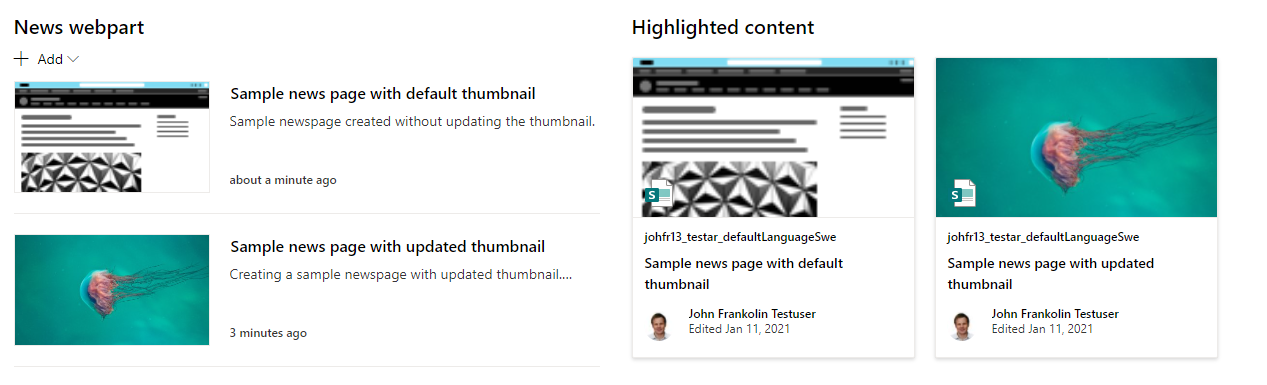
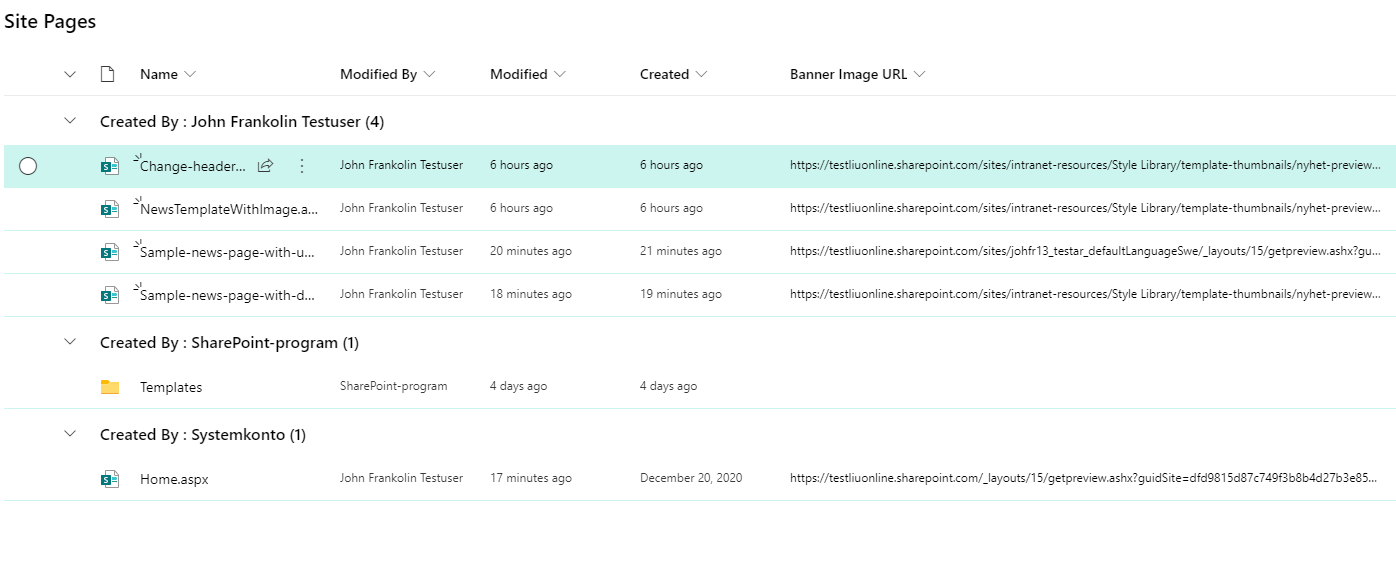
It sounds almost like your BannerImageUrl field is readonly. You can export the schema xml powershell or using some old legacy functionality through the following url: https://[tenatant].sharepoint.com/sites/[site]/_vti_bin/owssvr.dll?Cmd=ExportList&List=[listid]. Verify that your field is not marked as Readonly=”TRUE”.
<FieldRef ID="{5baf6db5-9d25-4738-b15e-db5789298e82}" Name="BannerImageUrl"/>
Another possible explanation would be that you changed the BannerImageUrl after it was first published. My experience is that it may take a long time before this kind of minor change is re-indexed. Try to mark the library for re-index.
If you include the BannerImageUrl in your list view. Can you se the value actually updating?
b00johst
on 11 Jan 2021
@b00johst how did you create the page templates and the content types? i do everything from SharePointOnlinePnPPowerShell module with .xml templates. i created the columns then content types in powershell, i deployed the page templates in xml then attached content types to these pages templates.
JamesSH-bytes
on 14 Jan 2021
@jansenbe to reproduce my bug, run Add-PnPContentType to add a new content type, with a guid that inherits from the site page content type ID, then run Add-PnPContentTypeToList and add it to the site pages library, finally run Set-PnPListItem to set the content type for the page template. next try to create a new page using this template it will not pick up the banner url.
JamesSH-bytes
on 14 Jan 2021
@brittanyru, @jansenbe, @b00johst: I am having a similar issue but with page description. I'm not getting any problem with the page images though. I am on PnP PowerShell Core and generated the template. Tried to apply the template with both Invoke-PnPSiteTemplate and using PnP.Framework in C#, ran into a similar problem which is creating pages using the page template caches the page description that's available in the page layout. So all newly created pages using that layout will have the same description when rolled out in the OTB WebParts or any custom WebPart.
Here's my provisioning xml: https://gist.github.com/derhallim/e47c4f02642bd7f076c5970aa9000e95
 derhallim
on 20 Jan 2021
derhallim
on 20 Jan 2021
@jansenbe for me it fails in ObjectClientSidePage.cs on fileAfterSave.ListItemAllFields.UpdateOverwriteVersion(); if i comment out line 895 and use just use Update() then it works to provision page with custom ct
 czullu
on 22 Jan 2021
czullu
on 22 Jan 2021
@czullu : think your issue is something else as this problem was about issues with users creating pages from page templates with custom content type provisioned via the provisioning engine. Can you create a new issue for your problem, ideally with a repro (e.g. a small template that on apply results in the issue) so that I can debug where it goes wrong.
jansenbe
on 22 Jan 2021
@jansenbe I think the problem comes from this Call in ObjectContentTypes since the Schema does not have the Properties for
ShowInDisplayForm and ReadOnly and therefore they will always be false. For PnP-Core i made a fix where i make all boolean nullable in order to use the extension from ObjectContentTypes with last 2 param set to null so i would ignore in AddFieldToContentType. This way it works for me again as then the Settings from the SiteColumn will remain.
web.AddFieldToContentType(existingContentType, field,
fieldRef.Required,
fieldRef.Hidden,
fieldRef.UpdateChildren,
fieldRef.ShowInDisplayForm,
fieldRef.ReadOnly);
czullu
on 26 Jan 2021
@czullu : can you create a PR for this?
jansenbe
on 26 Jan 2021
@czullu : can you create a PR for this?
Yes, https://github.com/pnp/pnpframework/pull/128
czullu
on 26 Jan 2021
@b00johst / @maps05 / @brittanyru : can any of you try the latest nightly and see if #128 created by @czullu fixes the original content type provisioning? Thanks;
jansenbe
on 28 Jan 2021
Folks, gonna close this one. Change #128 should help here, if you still have concerns around this then don't hesitate to start a new discussion/issue. Thanks.
jansenbe
on 3 Feb 2021
sorry for the late update. it's working fine now. thank you all!
brittanyru
on 5 Feb 2021
Related issues
 diver7
·
6Comments
diver7
·
6Comments
 MattiaBonanni
·
4Comments
MattiaBonanni
·
4Comments
 svermaak
·
4Comments
svermaak
·
4Comments
 kevmcdonk
·
7Comments
kevmcdonk
·
7Comments
 KiranTalikoti
·
4Comments
KiranTalikoti
·
4Comments
Most helpful comment
@brittanyru Thank you for posting this issue. Experiencing the same thing with our clients environments regarding our custom content types. Everything worked fine up until last Friday. Removing all of our custom fields from the CT and matching them 1 for 1 with site page, still gives us the same issue when creating a new page and saving: "Invalid data has been used to update the list item".