Pnpframework: sequencesitegroupid token missing
Hi,
Maybe a question and not a bug:
Has the sequencesitegroupid token been removed? When trying to use it with the preview nugget package in .NET core it doesn't seem to get resolved.
When trying with PnP PowerShell core, the token seems to be resolved.
<pnp:Team GroupId="{sequencesitegroupid:TEAM.SITE.01}" ....

 joelfmrodrigues
All 16 comments
No, the token is still available. PnP PowerShell Core makes use of the PnP Framework, e.g. it runs the same code.
 erwinvanhunen
on 7 Dec 2020
erwinvanhunen
on 7 Dec 2020
@erwinvanhunen Thanks, I was aware that it uses the same code behind the scenes but was wondering if PowerShell did some additional token replacement.
Not sure why I get the issue in .NET Core using the PnP Framework nuget package, but all works fine with PnP PowerShell. Any idea/thoughts? Could it be that the nuget package in .NET core (latest published) is older than the version in PnP PowerShell?
joelfmrodrigues
on 8 Dec 2020
Hey @joelfmrodrigues , when you talk about PnP PowerShell are you using the preview module (Install-Module PnP.PowerShell -AllowPrerelease) or the regular PnP PowerShell one? The later uses PnP Sites Core, the first uses PnP Framework.
The nightly release of PnP.PowerShell always uses the latest nuget package from PnP Framework, so you should be using the same code. PowerShell is not doing any additional token replacements. Could it be that you're loading different templates?
 jansenbe
on 9 Dec 2020
jansenbe
on 9 Dec 2020
Hi @jansenbe
Using PnP.PowerShell pre-release.
You just made me doubt my own sanity (😂) and I tried it again just now, to ensure the same template was used, but I got the same error in .NET core.
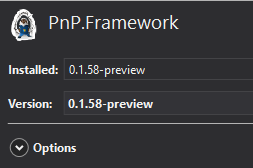
NuGet Package version:
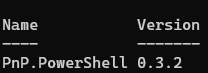
PnP.PowerShell version
joelfmrodrigues
on 9 Dec 2020
Can you try to upgrade to the latest nuget (https://www.nuget.org/packages/PnP.Framework) and see if that changes things.
jansenbe
on 9 Dec 2020
@jansenbe thanks for the heads up, was not aware that I was not running the latest preview. Should new versions not display as updates via NuGet? I had to install via console.
Same error after upgrading package:

joelfmrodrigues
on 11 Dec 2020
@joelfmrodrigues : can you share more of your code? Think your code is following a different approach then the one used in PowerShell: https://github.com/pnp/powershell/blob/dev/src/Commands/Provisioning/Tenant/InvokeTenantTemplate.cs#L367
jansenbe
on 16 Dec 2020
@jansenbe Comparing with the link that you shared, the first thing that stood out to me was the logic around the sequence.
I always pass null, and my template had a sequence. Will change the code to try to include the same logic as the link and confirm if that resolved the issue.
Many thanks
This is my code:
``` C#
using (var prov = new PnPProvisioningContext(
async (resource, scopes) =>
{
if (resource == "https://graph.microsoft.com/")
{
return (await AuthUtils.GetApplicationAuthenticatedClient(clientId, certThumprint, graphScopes, tenantId));
}
else
{
return (null);
}
}
))
{
                ProvisioningTemplateApplyingInformation applyingInformation = new ProvisioningTemplateApplyingInformation()
                {
                    ProgressDelegate = (message, progress, total) => log.LogInformation(string.Format("{0:00}/{1:00} - {2}", progress, total, message), null)
                };

                using (var tenantContext = new AuthenticationManager().GetAccessTokenContext(tenantUrl, accessTokenSP)) // new PnPClientContext(tenantUrl))
                {
                    var parameters = new Dictionary<string, string>()
                    {
                        { "Title", "Test Team "},
                        { "Alias", "testteam"},
                    };

                    ApplyConfiguration applyConfiguration = new ApplyConfiguration()
                    {
                        Parameters = parameters
                    };
                    var tenant = new Tenant(tenantContext);
                    //ApplyTenantTemplate
                    tenant.ApplyTenantTemplate(hierarchy, null, applyConfiguration);

                }
            }
```
joelfmrodrigues
on 18 Dec 2020
Hi @joelfmrodrigues , did you manage to fix your problem
jansenbe
on 30 Dec 2020
No chance to test yet, hoping to give it a try over the next days.
joelfmrodrigues
on 30 Dec 2020
@jansenbe sorry for taking so long to look into this...
I have now tested it by adding a simple condition like the below to handle sequences:
``` C#
if (hierarchy.Sequences.Count > 0)
{
foreach (var sequence in hierarchy.Sequences)
{
tenant.ApplyTenantTemplate(hierarchy, sequence.ID, applyConfiguration);
}
}
else
{
tenant.ApplyTenantTemplate(hierarchy, null, applyConfiguration);
}
Instead of the previous error, I now get a 401 Unauthorized error.
I assume the error is how I get/use the tenant context, but not sure what I am doing wrong. Checked the token used to create tenant context and it seems to be correct:
...
"aud": "https://XXXXXXXX-admin.sharepoint.com",
...
"roles": [
    "Sites.FullControl.All"
  ],
...


Code:
```C#
using (var tenantContext = new AuthenticationManager().GetAccessTokenContext(tenantUrl, accessTokenSP)) // new PnPClientContext(tenantUrl))
{
    var parameters = new Dictionary<string, string>()
    {
        { "Title", "Test Team "},
        { "Alias", "testteam"},
        { "OwnerUPN", "[email protected]" }
    };

    ApplyConfiguration applyConfiguration = new ApplyConfiguration()
    {
        Parameters = parameters
    };
    var tenant = new Tenant(tenantContext);
    //ApplyTenantTemplate

    if (hierarchy.Sequences.Count > 0)
    {
        foreach (var sequence in hierarchy.Sequences)
        {
            tenant.ApplyTenantTemplate(hierarchy, sequence.ID, applyConfiguration);
        }
    }
    else
    {
        tenant.ApplyTenantTemplate(hierarchy, null, applyConfiguration);
    }

}
Anything obviously wrong?
joelfmrodrigues
on 4 Jan 2021
@joelfmrodrigues : why are you creating a context for the tenant admin site, under covers PnP will clone the current context to an admin one when needed for admin operations. If the problem still persists, the let's continue the discussion, if not feel free to close this issue
jansenbe
on 29 Jan 2021
Hi @joelfmrodrigues , I'm closing this issue. If you're still stuck with this then please open a new issue/discussion with the current specific ask and we'll take it from there. Thx.
jansenbe
on 3 Feb 2021
@jansenbe Thanks, I wasn't really sure if my code was correct...
Happy to close, thank you for all the help
joelfmrodrigues
on 4 Feb 2021
@joelfmrodrigues How did you manage to resolve your issue?
 TomekPi
on 9 Apr 2021
TomekPi
on 9 Apr 2021
@TomekPi I didn't. this was for a proof-of-concept application but because of the error I switched to PnP PowerShell and that worked for me. Never really had the time to go back and investigate further
joelfmrodrigues
on 9 Apr 2021
Related issues
 luismanez
·
6Comments
luismanez
·
6Comments
 mohammadamer
·
3Comments
mohammadamer
·
3Comments
 kevmcdonk
·
7Comments
kevmcdonk
·
7Comments
 Andy-Dawson
·
9Comments
Andy-Dawson
·
9Comments
 derhallim
·
6Comments
derhallim
·
6Comments