Pnp-sites-core: Provisioning succeeds but parameters are not resolved in pnp templates
Category
[x] Bug
[ ] Enhancement
Environment
[x] Office 365 / SharePoint Online
[ ] SharePoint 2016
[ ] SharePoint 2013
Expected or Desired Behavior
When passing in parameters into a pnp template. The parameters should get resolved.
Observed Behavior
They are provisioned as is: for example:
Ends up in the provisioned list as /sites/{parameter:Name}
Steps to Reproduce
Provisiong a template and pass in a parameter.
template.Parameters.Add("Name", GlobalVars.ConnectionInfo.Name);
Use it in the template.
I am using version SharePointPnPCoreOnline.3.9.1905.1
 SimSpfx
All 14 comments
Thank you for reporting this issue. We will be triaging your incoming issue as soon as possible.
![msftbot[bot] picture](https://avatars.githubusercontent.com/in/26612?v=4&s=40) msftbot[bot]
on 16 May 2019
msftbot[bot]
on 16 May 2019
Hi,
It seems that the problem exists in the class: OfficeDevPnP.Core.Framework.Provisioning.ObjectHandlers.TokenParser - method ParseTemplate :
apparently, some parameters are not correctly matched with the regex:
private static readonly Regex ReToken = new Regex(@"(?:({(?:1??[^{]*?})))", RegexOptions.Compiled | RegexOptions.IgnoreCase);
e.g.: {termsetid:{parameter:TermGroupParamName}:{parameter:TermSetParamName}}
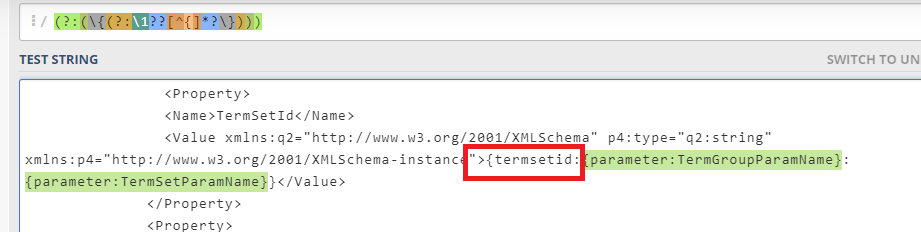
I think that the bug existed earlier but with the performance improvements made here:

 siata13
on 16 May 2019
siata13
on 16 May 2019
I'll take a look at this one, but won't be right away.
 wobba
on 16 May 2019
wobba
on 16 May 2019
Yes we are facing that since yesterday's update on 3.9.1905.1 (before we were on 3.4.1812.2).
Interestingly it partially does not resolve.
We hand in several parameters to write to a list item.
Simple text strings break and don't resolve.
{parameter:TextFieldContent}
Concatenations for TaxonomyFields work fine:
{parameter:TaxonomyFieldContentLabel}|{parameter:TaxonomyFieldContentGUID}
 mmsharepoint
on 16 May 2019
mmsharepoint
on 16 May 2019
Yes we are facing that since yesterday's update on 3.9.1905.1 (before we were on 3.4.1812.2).
Interestingly it partially does not resolve.
We hand in several parameters to write to a list item.
Simple text strings break and don't resolve.
{parameter:TextFieldContent}
Concatenations for TaxonomyFields work fine:
{parameter:TaxonomyFieldContentLabel}|{parameter:TaxonomyFieldContentGUID}
Same here, facing this issues this updating to may intermediate 3.9.1905.1
 chrriedel
on 16 May 2019
chrriedel
on 16 May 2019
We are working getting this resolved and are planning to push out .2 update for addressing this. This is not actually related on the .1 release the issue unfortunately already existed in the original May 2019 release, but apparently many updated on the 1905 version with the .1 update.
Regardless where it originates, it's clearly a breaking change which will be addressed as soon as possible to get existing solution unblocked. We'll update this thread as there are any updates.
 VesaJuvonen
on 16 May 2019
VesaJuvonen
on 16 May 2019
@siata13 @mmsharepoint do you have a minimalistic template I can download for debugging and testing?
wobba
on 16 May 2019
Yes, I could try to reduce mine. Of course you would need further adaptations as in my case I cannot hand over the Termsets used. But will send you one this afternoon. PM on twitter okay?
mmsharepoint
on 16 May 2019
Hi, if uploaded a simple template creating a list and adding 2 listitems with parameter Motto and Ziele.
Please provision it with
Apply-PnPProvisioningTemplate -Path C:DevProjectsSoenneckenSiteProvisioningEngineTemplate.xml -Parameters @{'Motto' = 'Some Text'; 'Ziele' = 'Some other Text'}
Then open
in the field "Inhalt" you well recognized the {parameter:Motto} and {parameter:Ziele} instead of the values "Some Text" and "Some other Text".
Hope this helps
Cheers
chrriedel
on 16 May 2019
We have identified the fix and checked it in the code base. We are working now on getting the .2 version out as CSOM NuGet and PnP PowerShell. Small but critical fix for the parameter handling.
VesaJuvonen
on 16 May 2019
Updated NuGet package is out and available from NuGet gallery for addressing the parameter issue introduced in the 1905 release. PowerShell coming soon as well.
VesaJuvonen
on 16 May 2019
Updated PnP PowerShell package is out (.2) fixing the parameter handling. You can get that easily from PowerShell Gallery.
Closing this issue as addressed now. Sorry for the inconvenience. There was quite a few unfortunate accidents cross multiple areas. Hopefully next week will be easier.
VesaJuvonen
on 16 May 2019
Hey,
Thanks for quick fix. The tokens are now correctly replaced within the fields/lists/etc., but it still doesn't work for DataRows. I have tracked another bug which is not related to parsing but to updating list items:
class ListItemUtilities, method UpdateListItem - the tokens are not replaced for some field types.
I have just created a PR.
siata13
on 16 May 2019
Hello,
Is there any chance to merge the PR above (#2248) in the near feature?
Thanks
 salascz
on 27 May 2019
salascz
on 27 May 2019
Related issues
 ndepaoli
·
6Comments
ndepaoli
·
6Comments
 TanmayDharmaraj
·
4Comments
TanmayDharmaraj
·
4Comments
 NPrice99
·
7Comments
NPrice99
·
7Comments
 Andrewsimmans
·
4Comments
Andrewsimmans
·
4Comments
 domedellolio
·
3Comments
domedellolio
·
3Comments
Most helpful comment
Updated NuGet package is out and available from NuGet gallery for addressing the parameter issue introduced in the 1905 release. PowerShell coming soon as well.