Pnp-sites-core: List View WebPart does not keep selected View when provisioned
_From @sivamsolai on February 16, 2018 10:8_
Hi Team
The list view part not maintaining selected view on Home page when provisioned. We added the calendar list view web part and “calendar” view is selected. But when provisioned not maintaining view.
Schema
<pnp:Provisioning xmlns:pnp="http://schemas.dev.office.com/PnP/2018/01/ProvisioningSchema">
Web part
<pnp:WebPart Title="Calendar" Row="1" Column="1">
<pnp:Contents>
<WebPart xmlns:xsd="http://www.w3.org/2001/XMLSchema" xmlns:xsi="http://www.w3.org/2001/XMLSchema-instance" xmlns="http://schemas.microsoft.com/WebPart/v2">
<Title>Calendar</Title>
<FrameType>Default</FrameType>
<Description />
<IsIncluded>true</IsIncluded>
<ZoneID>wpz</ZoneID>
<PartOrder>0</PartOrder>
<FrameState>Normal</FrameState>
<Height />
<Width />
<AllowRemove>true</AllowRemove>
<AllowZoneChange>true</AllowZoneChange>
<AllowMinimize>true</AllowMinimize>
<AllowConnect>true</AllowConnect>
<AllowEdit>true</AllowEdit>
<AllowHide>true</AllowHide>
<IsVisible>true</IsVisible>
<DetailLink>{site}/Lists/Calendar</DetailLink>
<HelpLink />
<HelpMode>Modeless</HelpMode>
<Dir>Default</Dir>
<PartImageSmall />
<MissingAssembly>Cannot import this Web Part.</MissingAssembly>
<PartImageLarge>/_layouts/15/images/itevent.png?rev=40</PartImageLarge>
<IsIncludedFilter />
<Assembly>Microsoft.SharePoint, Version=16.0.0.0, Culture=neutral, PublicKeyToken=71e9bce111e9429c</Assembly>
<TypeName>Microsoft.SharePoint.WebPartPages.ListViewWebPart</TypeName>
<WebId xmlns="http://schemas.microsoft.com/WebPart/v2/ListView">00000000-0000-0000-0000-000000000000</WebId>
<ListViewXml xmlns="http://schemas.microsoft.com/WebPart/v2/ListView"><View Name="{0F3CBEC0-0E7B-4328-A060-B2FD0EA9B84F}" Type="CALENDAR" Hidden="TRUE" RecurrenceRowset="TRUE" DisplayName="" Url="{site}/SitePages/Home.aspx" Level="1" BaseViewID="2" ContentTypeID="0x" MobileUrl="_layouts/15/mobile/viewdaily.aspx" ImageUrl="/_layouts/15/images/events.png?rev=44"><Toolbar Type="Standard" /><ViewHeader /><ViewBody /><ViewFooter /><ViewEmpty /><ParameterBindings><ParameterBinding Name="NoAnnouncements" Location="Resource(wss,noXinviewofY_LIST)" /><ParameterBinding Name="NoAnnouncementsHowTo" Location="Resource(wss,noXinviewofY_DEFAULT)" /></ParameterBindings><ViewFields><FieldRef Name="EventDate" /><FieldRef Name="EndDate" /><FieldRef Name="fRecurrence" /><FieldRef Name="EventType" /><FieldRef Name="WorkspaceLink" /><FieldRef Name="Title" /><FieldRef Name="Location" /><FieldRef Name="Description" /><FieldRef Name="Workspace" /><FieldRef Name="MasterSeriesItemID" /><FieldRef Name="fAllDayEvent" /></ViewFields><ViewData><FieldRef Name="Title" Type="CalendarMonthTitle" /><FieldRef Name="Title" Type="CalendarWeekTitle" /><FieldRef Name="Location" Type="CalendarWeekLocation" /><FieldRef Name="Title" Type="CalendarDayTitle" /><FieldRef Name="Location" Type="CalendarDayLocation" /></ViewData><Query><Where><DateRangesOverlap><FieldRef Name="EventDate" /><FieldRef Name="EndDate" /><FieldRef Name="RecurrenceID" /><Value Type="DateTime"><Month /></Value></DateRangesOverlap></Where></Query></View></ListViewXml>
<ListName xmlns="http://schemas.microsoft.com/WebPart/v2/ListView">{{listid:Calendar}}</ListName>
<ListId xmlns="http://schemas.microsoft.com/WebPart/v2/ListView">{listid:Calendar}</ListId>
<ViewFlag xmlns="http://schemas.microsoft.com/WebPart/v2/ListView">532493</ViewFlag>
<ViewFlags xmlns="http://schemas.microsoft.com/WebPart/v2/ListView">Html TabularView Hidden RecurrenceRowset Calendar</ViewFlags>
<ViewContentTypeId xmlns="http://schemas.microsoft.com/WebPart/v2/ListView">0x</ViewContentTypeId>
</WebPart>
</pnp:Contents>
</pnp:WebPart>
$templateFilename=Pnp-Feb-Demo.xml'
Apply-PnPProvisioningTemplate -path $templateFilename
Get-PnPProvisioningTemplate -Out $templateFilename
Expected behavior
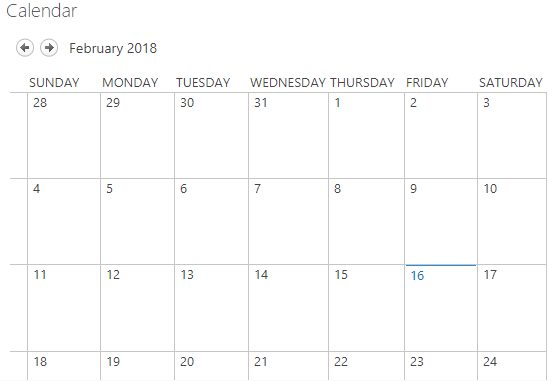
Actual behavior

Steps to reproduce behavior
Please include complete code samples in-line or linked from gists
Which version of the PnP-PowerShell Cmdlets are you using?
- [ ] PnP PowerShell for SharePoint 2013
- [ ] PnP PowerShell for SharePoint 2016
- [X ] PnP PowerShell for SharePoint Online
What is the version of the Cmdlet module you are running?
ModuleType Version Name -
Binary 2.23.18... SharePointPnPPowerShellOnline
How did you install the PnP-PowerShell Cmdlets?
- [X ] MSI Installed downloaded from GitHub
- [ ] Installed through the PowerShell Gallery with Install-Module
- [ ] Other means
_Copied from original issue: SharePoint/PnP-PowerShell#1379_
 erwinvanhunen
All 7 comments
Hi Team
Could you please share the update on this
 sivamsolai
on 27 Feb 2018
sivamsolai
on 27 Feb 2018
Is there an update on this?
 aizzy05
on 7 Dec 2018
aizzy05
on 7 Dec 2018
No update?
aizzy05
on 13 Dec 2018
Update, please!
 thargenediad
on 18 Dec 2018
thargenediad
on 18 Dec 2018
same issue... SP2013 Onprem.
Fix please
 jolscr
on 15 Jan 2019
jolscr
on 15 Jan 2019
Same issue (SharePoint online), such a shame!
 MattTheVV
on 17 May 2019
MattTheVV
on 17 May 2019
Seem to go wrong already at extraction -> ListView "Calendar" en ListView "Completed" are extracted with names to lower case, in the template the views displayname are now "calendar" and "completed". There are multiple views created "Calendar" already is created based on the list TemplateType. The provisioning code is now created a second view with the name "calendar" in lowercase. This view is created as a view with type "HTML" and not as a view with type "CALENDAR".
 StaffanNelemans
on 26 Jul 2019
StaffanNelemans
on 26 Jul 2019
Related issues
 cverhelst
·
7Comments
cverhelst
·
7Comments
 YannickRe
·
3Comments
YannickRe
·
3Comments
 Andrewsimmans
·
4Comments
Andrewsimmans
·
4Comments
 NPrice99
·
7Comments
NPrice99
·
7Comments
 Zouche
·
4Comments
Zouche
·
4Comments
Most helpful comment
Update, please!