Pnp-sites-core: Powershell Apply-PnPProvisioningTemplate broken after updating to 2.18.1709.1. "Apply-PnPProvisioningTemplate : The object specified does not belong to a list."
The powershell site specifically says to report issues with provisioning here.
Category
[X] Bug
[ ] Enhancement
Environment
[X] Office 365 / SharePoint Online
[ ] SharePoint 2016
[ ] SharePoint 2013
If SharePoint on-premises, what's exact CU version:
Expected or Desired Behavior
_If you are reporting a bug, please describe the expected behavior. If you are suggesting an enhancement please
describe thoroughly the enhancement, how it can be achieved, and expected benefit._
Trying to apply a composed look to a site was working perfectly prior to upgrading to SharePointPnPPowerShellOnline 2.18.1709.1 from 2.14.1704.0. The desired behaviour is that the composed look would be applied as before without the error I'm now receiving.
Observed Behavior
_If you are reporting a bug, please describe the behavior you expected to occur when performing the action. If you are making a suggestion, you can delete this section._
The behaviour I'm now receiving is that I'm getting the following error:
Apply-PnPProvisioningTemplate : The object specified does not belong to a list.
At line:1 char:1
+ Apply-PnPProvisioningTemplate -Path .\templates\NewInternalClientTemp ...
+ ~~~~~~~~~~~~~~~~~~~~~~~~~~~~~~~~~~~~~~~~~~~~~~~~~~~~~~~~~~~~~~~~~~~~~
    + CategoryInfo          : WriteError: (:) [Apply-PnPProvisioningTemplate], ServerException
    + FullyQualifiedErrorId : EXCEPTION,SharePointPnP.PowerShell.Commands.Provisioning.ApplyProvisioningTemplate
Steps to Reproduce
_If you are reporting a bug please describe the steps to reproduce the bug in sufficient detail to allow testing. Only way to fix things properly, is to have sufficient details to reproduce it. If you are making a suggestion, you can delete this section._
I also tried re-running Get-PnPProvisioningTemplate with and without the -ExcludeHandlers Publishing option that I saw in another issue. I get the same problem.
I tried to extract just the components from the xml template so that it just has the following sections:
.xml
<?xml version="1.0"?>
<pnp:Provisioning xmlns:pnp="http://schemas.dev.office.com/PnP/2017/05/ProvisioningSchema">
<pnp:Preferences Generator="OfficeDevPnP.Core, Version=2.18.1709.0, Culture=neutral, PublicKeyToken=removed" />
<pnp:Templates ID="CONTAINER-TEMPLATE-removed">
<pnp:ProvisioningTemplate ID="TEMPLATE-removed" Version="1" BaseSiteTemplate="STS#0" Scope="Web">
<pnp:WebSettings RequestAccessEmail="[email protected]" NoCrawl="false" WelcomePage="SitePages/Home.aspx" SiteLogo="/sites/Clients/ClientLogos/acme.jpg" AlternateCSS="" MasterPageUrl="{masterpagecatalog}/seattle.master" CustomMasterPageUrl="{masterpagecatalog}/seattle.master" />
<pnp:RegionalSettings AdjustHijriDays="0" AlternateCalendarType="None" CalendarType="Gregorian" Collation="25" FirstDayOfWeek="Sunday" FirstWeekOfYear="0" LocaleId="1033" ShowWeeks="false" Time24="false" TimeZone="2" WorkDayEndHour="5:00PM" WorkDays="62" WorkDayStartHour="8:00AM" />
<pnp:SupportedUILanguages>
<pnp:SupportedUILanguage LCID="1033" />
</pnp:SupportedUILanguages>
<pnp:PropertyBagEntries>
<pnp:PropertyBagEntry Key="_PnP_ProvisioningTemplateComposedLookInfo" Value="{"SiteLogo":null,"AlternateCSS":null,"MasterPage":null,"Name":"InternalClient","ColorFile":"{themecatalog}/15/InternalClient.spcolor","FontFile":"","BackgroundFile":"","Version":0}" Overwrite="false" />
<pnp:PropertyBagEntry Key="NoCrawl" Value="false" Overwrite="false" />
</pnp:PropertyBagEntries>
<pnp:Files>
<pnp:File Src="InternalClient.spcolor" Folder="{themecatalog}/15" Overwrite="true" Level="Draft" />
</pnp:Files>
<pnp:ComposedLook Name="InternalClient" ColorFile="{themecatalog}/15/InternalClient.spcolor" FontFile="" BackgroundFile="" Version="0" />
</pnp:ProvisioningTemplate>
</pnp:Templates>
</pnp:Provisioning>
Many thanks.
 darrenparkinson
All 9 comments
Running into the same issue for a different scenario.
We upgraded our release pipeline from 2.16.1706.1 to 2.17.1708.1 on this kind of schema.
<pnp:File Src="somefile.js" Folder="{SiteCollection}/Style Library" Overwrite="true" Level="Published" />
 baywet
on 26 Sep 2017
baywet
on 26 Sep 2017
Same issue is encountered using the PnP Core for C#. SharePoint 2016.
I have a PnP template with the following Files in it. It crashes only for Subsites. On root site collection level it works.
... Folder="{themecatalog}/15" src="Assets\\Themes\\myTheme.spcolor" ...
...Folder="{site}/SiteAssets" src="Assets\\Styles\\mySite.css" ...
The object specified does not belong to a list. Microsoft.SharePoint.Client.ServerException: The object specified does not belong to a list.
   at Microsoft.SharePoint.Client.ClientRequest.ProcessResponseStream(Stream responseStream)
   at Microsoft.SharePoint.Client.ClientRequest.ProcessResponse()
   at Microsoft.SharePoint.Client.ClientRequest.ExecuteQueryToServer(ChunkStringBuilder sb)
   at Microsoft.SharePoint.Client.ClientRequest.ExecuteQuery()
   at Microsoft.SharePoint.Client.ClientRuntimeContext.ExecuteQuery()
   at Microsoft.SharePoint.Client.ClientContext.ExecuteQuery()
   at Microsoft.SharePoint.Client.ClientContextExtensions.ExecuteQueryImplementation(ClientRuntimeContext clientContext, Int32 retryCount, Int32 delay, String userAgent)
   at Microsoft.SharePoint.Client.ClientContextExtensions.ExecuteQueryRetry(ClientRuntimeContext clientContext, Int32 retryCount, Int32 delay, String userAgent)
   at Microsoft.SharePoint.Client.FileFolderExtensions.EnsureFolderPath(Web web, String webRelativeUrl, Expression`1[] expressions)
   at OfficeDevPnP.Core.Framework.Provisioning.ObjectHandlers.ObjectFiles.ProvisionObjects(Web web, ProvisioningTemplate template, TokenParser parser, ProvisioningTemplateApplyingInformation applyingInformation)
   at OfficeDevPnP.Core.Framework.Provisioning.ObjectHandlers.SiteToTemplateConversion.ApplyRemoteTemplate(Web web, ProvisioningTemplate template, ProvisioningTemplateApplyingInformation provisioningInfo)
   at Microsoft.SharePoint.Client.WebExtensions.ApplyProvisioningTemplate(Web web, ProvisioningTemplate template, ProvisioningTemplateApplyingInformation applyingInformation)
This started happening when I upgraded the PnP framework from 2.15.1705.0 to 2.20.1711.0.
Paging @VesaJuvonen ;)
 hyankov
on 4 Dec 2017
hyankov
on 4 Dec 2017
Same issue here. In both PnP powershell as from C# using version 2.20.1711.0. Looks like the EnsureFolderPath doesn't transform the tokens to correct values or something. When you don't use the tokens in the Folder attribute, it looks like it is working.
Edit: I only get this error when I apply a template to a sub site. On root site collection it is working.
 rfjschouten
on 13 Dec 2017
rfjschouten
on 13 Dec 2017
hey @TheJeffer
To me it looks like the changes you made and got in 2.17.1708.1 broke tokens processing for files (at least for some tokens like site collection) when applying templates to a subweb.
To me it looks like the error is located around this method or it's caller
https://github.com/SharePoint/PnP-Sites-Core/blob/dev/Core/OfficeDevPnP.Core/Framework/Provisioning/ObjectHandlers/TokenParser.cs#L401-L425
However I don't know the way pnp-core works well enough to author a safe fix. Do you think you'll have time to look into that anytime soon?
baywet
on 20 Dec 2017
@baywet I'm out for the next week for the holidays, but when I get back to work on the 2nd, I'll take a look at this.
 TheJeffer
on 22 Dec 2017
TheJeffer
on 22 Dec 2017
@baywet Got a chance to quick check this out and stepped through the example template provided by @darrenparkinson in debug mode. The problem doesn't seem to be with the token parsing itself. The {themecatalog} token is properly getting converted into the site collection relative url "/_catalogs/theme/15" when it's processed on line 60 of https://github.com/SharePoint/PnP-Sites-Core/blob/dev/Core/OfficeDevPnP.Core/Framework/Provisioning/ObjectHandlers/ObjectFiles.cs. Same with {SiteCollection} tokens. The problem seems to lie on line 74 where web.EnsureFolderPath(folderName) is called. It's expecting a web relative URL, so when a site collection relative URL is passed in (because in this example we're trying to upload to the theme catalog, which only exists at the site collection level), it doesn't ensure the folder properly and thus we don't have the proper folder to upload the file to. When I get some more time, I'll try to revert back to the 2.14.1704.0 version that was mentioned to be working properly and see how it was working then.
TheJeffer
on 2 Jan 2018
Thanks @TheJeffer for your time spent on that. As I mentioned earlier in our case it blew up when upgrading from 2.16.1706.1 to 2.17.1708.1 if that helps.
baywet
on 2 Jan 2018
Okay, got some more time to look at this over lunch. It looks like there are two issues going on here...
One is that some changes to file publishing back in June-August caused a bug that causes the error 'The object specified does not belong to a list' to get thrown when a file is published to a non-list-based folder. That's the error you're seeing here. I've submitted a pull request that fixes that error (you should see it linked above).
The second and bigger issue, however is that even in the older builds, the file uploads were actually broken, but it was a silent type of broken. What happened in older builds (and what will continue to happen after the fix above) was that instead of your file being properly uploaded to the specified folder in the root site, a hidden folder was being created in the subweb's root folder structure corresponding to the part of the path after the token, and your file was uploaded there. So in @darrenparkinson 's case, the files would go to a '{subweb}/_catalogs/theme/15' folder. That folder is perfectly accessible through the SDK or a tool like SharePoint Online Client Browser, and the file can still be accessed directly, but it's not associated with an actual list, so it can't be easily viewed/modified through the normal site. In the case of a file path like '{SiteCollection}/Style Library', unless you've specifically created a library named 'Style Library' in the subweb, the same situation will apply.
To sum up, there's still a big, old, outstanding bug in https://github.com/SharePoint/PnP-Sites-Core/blob/dev/Core/OfficeDevPnP.Core/Framework/Provisioning/ObjectHandlers/ObjectFiles.cs that needs to be resolved. It does not (and as far as I can tell hasn't ever) properly upload files to the root site when root site based tokens are used and the template is being applied to a subweb.
@VesaJuvonen or @jansenbe could either of you weigh in?
TheJeffer
on 2 Jan 2018
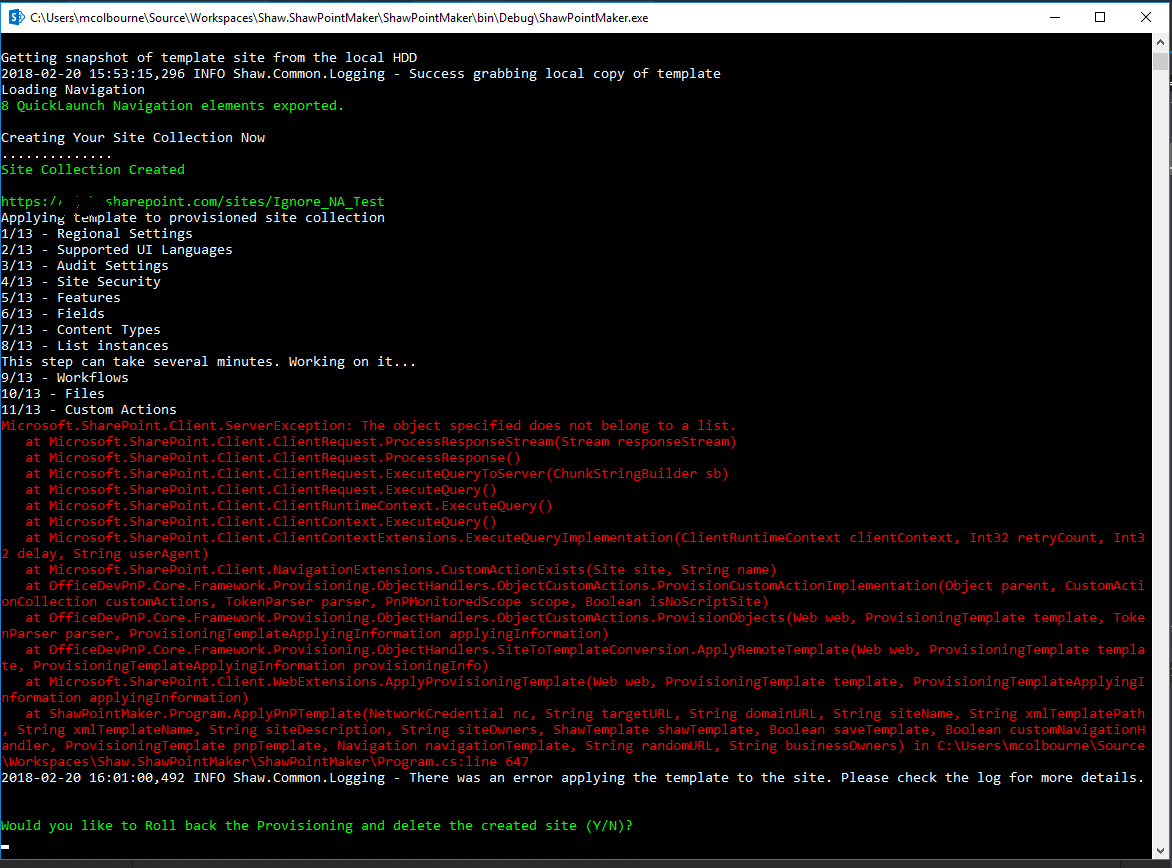
Same issue here
 Colbz
on 21 Feb 2018
Colbz
on 21 Feb 2018
Related issues
 NPrice99
·
7Comments
NPrice99
·
7Comments
 TanmayDharmaraj
·
4Comments
TanmayDharmaraj
·
4Comments
 nikolayyordanov
·
3Comments
nikolayyordanov
·
3Comments
 ndepaoli
·
6Comments
ndepaoli
·
6Comments
 Andrewsimmans
·
4Comments
Andrewsimmans
·
4Comments
Most helpful comment
Okay, got some more time to look at this over lunch. It looks like there are two issues going on here...
One is that some changes to file publishing back in June-August caused a bug that causes the error 'The object specified does not belong to a list' to get thrown when a file is published to a non-list-based folder. That's the error you're seeing here. I've submitted a pull request that fixes that error (you should see it linked above).
The second and bigger issue, however is that even in the older builds, the file uploads were actually broken, but it was a silent type of broken. What happened in older builds (and what will continue to happen after the fix above) was that instead of your file being properly uploaded to the specified folder in the root site, a hidden folder was being created in the subweb's root folder structure corresponding to the part of the path after the token, and your file was uploaded there. So in @darrenparkinson 's case, the files would go to a '{subweb}/_catalogs/theme/15' folder. That folder is perfectly accessible through the SDK or a tool like SharePoint Online Client Browser, and the file can still be accessed directly, but it's not associated with an actual list, so it can't be easily viewed/modified through the normal site. In the case of a file path like '{SiteCollection}/Style Library', unless you've specifically created a library named 'Style Library' in the subweb, the same situation will apply.
To sum up, there's still a big, old, outstanding bug in https://github.com/SharePoint/PnP-Sites-Core/blob/dev/Core/OfficeDevPnP.Core/Framework/Provisioning/ObjectHandlers/ObjectFiles.cs that needs to be resolved. It does not (and as far as I can tell hasn't ever) properly upload files to the root site when root site based tokens are used and the template is being applied to a subweb.
@VesaJuvonen or @jansenbe could either of you weigh in?