Pnp-powershell: Document Set content type added by Add-PnPContentTypeToList does not work properly
Notice: many issues / bugs reported are actually related to the PnP Core Library which is used behind the scenes. Consider carefully where to report an issue:
- Are you using
Apply-SPOProvisioningTemplateorGet-SPOProvisioningTemplate?
The issue is most likely related to the Provisioning Engine. The Provisioning engine is _not_ located in the PowerShell repo. Please report the issue here: https://github.com/officedev/PnP-Sites-Core/issues. - Is the issue related to the cmdlet itself, its parameters, the syntax, or do you suspect it is the code of the cmdlet that is causing the issue? Then please continue reporting the issue in this repo.
- If you think that the functionality might be related to the underlying libraries that the cmdlet is calling (We realize that might be difficult to determine), please first double check the code of the cmdlet, which can be found here: https://github.com/OfficeDev/PnP-PowerShell/tree/master/Commands. If related to the cmdlet, continue reporting the issue here, otherwise report the issue at https://github.com/officedev/PnP-Sites-Core/issues
Reporting an Issue or Missing Feature
I tried to create site with document set.
Document set content type was added successfully.
But when I opened document library and created new document set by click [Save] button on "NewDocSet.aspx", error message was displayed.
Sorry, something went wrong
The system cannot find the file specified. (Exception from HRESULT: 0x80070002))
Please confirm what it is that your reporting
Then opened the document library again, document set was created.
Expected behavior
I should be able to create document set without error.
Actual behavior

Steps to reproduce behavior
$TENANT = "TENANTNAME"
$SHAREPOINTADMINURL = "https://$TENANT-admin.sharepoint.com/"
$SHAREPOINTURL = "https://$TENANT.sharepoint.com"
$CONNECTID = "USER ID"
$CONNECTPASSWORD = "USER PASSWORD"
$NEWSITETITLE = "SITE TITLE";
$NEWSITEPATH = "$SHAREPOINTURL/sites/SITE PATH";
Import-Module SharePointPnPPowerShellOnline
$connectSecurePassword = ConvertTo-SecureString $CONNECTPASSWORD -asplaintext -force
$connectCredential = New-Object System.Management.Automation.PSCredential -argumentlist $CONNECTID, $connectSecurePassword
Connect-PnPOnline -Url $SHAREPOINTURL -Credential $connectCredential
New-PnPSite -Type CommunicationSite -Title $NEWSITETITLE -Url $NEWSITEPATH -Lcid 1033 -SiteDesign Blank
$connectSecurePassword = ConvertTo-SecureString $CONNECTPASSWORD -asplaintext -force
$connectCredential = New-Object System.Management.Automation.PSCredential -argumentlist $CONNECTID, $connectSecurePassword
Connect-PnPOnline -Url $NEWSITEPATH -Credential $connectCredential
$featureGuid = "3bae86a2-776d-499d-9db8-fa4cdc7884f8"
Enable-PnPFeature -Identity $featureGuid -Scope Site -Force
Set-PnPList -Identity "Documents" -EnableContentTypes $true
Add-PnPContentTypeToList -List "Documents" -ContentType "Document Set"
Which version of the PnP-PowerShell Cmdlets are you using?
- [ ] PnP PowerShell for SharePoint 2013
- [ ] PnP PowerShell for SharePoint 2016
- [x] PnP PowerShell for SharePoint Online
What is the version of the Cmdlet module you are running?
(you can retrieve this by executing Get-Module -Name *pnppowershell* -ListAvailable)
3.13.1909.0
How did you install the PnP-PowerShell Cmdlets?
- [ ] MSI Installed downloaded from GitHub
- [x] Installed through the PowerShell Gallery with Install-Module
- [ ] Other means
 HiroshiYoshino
All 7 comments
Thank you for reporting this issue. We will be triaging your incoming issue as soon as possible.
![msftbot[bot] picture](https://avatars2.githubusercontent.com/in/26612?v=4&s=40) msftbot[bot]
on 3 Oct 2019
msftbot[bot]
on 3 Oct 2019
When I had enabled document set by SharePoint Site Featrure GUI and used PowerShell PnP for other settings, the above error did not occur. So "Enable-PnPFeature" seems to be the cause.
HiroshiYoshino
on 11 Oct 2019
I have also tested and I can confirm the same behaviour.
There is no way to enable document set feature from pnp-powershell or xml provisioning template. Well, better said, you CAN enable the feature, HOWEVER, when you try to create document set, you will get this error after file is saved :
_( cannot find the file specified. (Exception from HRESULT: 0x80070002) )_
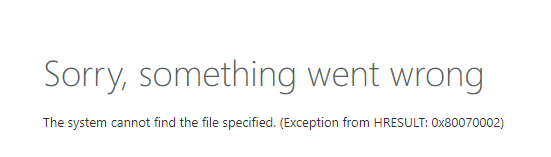
or when you visit a docset related url
[site]/_layouts/15/DocSetHome.aspx?id=[docset_filepath]
you get the following error:

To conclude, if you manually disable the docset feature and, using the web ui, enable the feature again, everything goes fine.
Please could you provide a fix asap, this is an important issue for provisioning site processes. Thanks
 holylander
on 25 Oct 2019
holylander
on 25 Oct 2019
I confirmed the following:
- CSOM is used when enabling site feature in SharePoint PnP.
- The same problem occurs even if the site function is enabled using .NET and the latest CSOM(16.1.19404.12000).
- CSOM is calling the SharePoint web service (/_vti_bin/client.svc/ProcessQuery)
So I realized that this issue would not be resolved without server-side modifications.
Is there no choice but to wait for a fix? Or is there any other way to tell Microsoft about the fix?
HiroshiYoshino
on 28 Oct 2019
I found a solution in case you want to enable the "docset feature" either from pnp-powershell or CSOM ( you wont success to enable this from a provisioning template, since it wont work).
Basically, you need to enable "custom scripts" before enable the docset feature by a script.
Therefore, in case you need to enable this feature using pnp powershell, your code should implement something like this:
$tenant= [yourtenant]
$site_url= [yousite]
$user & $psswd= [login params]
$credentials = getCredentials -user $user -pswd $psswd

$connected = connect-pnponline -url $($tenant.replace(".sharepoint.com", "-admin.sharepoint.com")) -credentials $credentials
$context = Get-PnPContext
Write-host "Enabling site scripts on target site..." -ForeGroundColor Yellow
$site = Get-PnPTenantSite -Detailed -Url "$tenant$site_url"
$DenyAddAndCustomizePagesStatusEnum = [Microsoft.Online.SharePoint.TenantAdministration.DenyAddAndCustomizePagesStatus]
$site.DenyAddAndCustomizePages = $DenyAddAndCustomizePagesStatusEnum::Disabled
$site.Update()
$context.ExecuteQuery()
Write-Host  "OK: site sidescripts has enabled" -ForeGroundColor Green

Write-host "Enabling docset feature on target site..." -ForeGroundColor Yellow
$connected = spConnect -tenant  $tenant -site $site_url -credentials $credentials
$featureGuid = "3bae86a2-776d-499d-9db8-fa4cdc7884f8"
Enable-PnPFeature -Identity $featureGuid -Scope Site -Force
Write-Host "OK: site docset feature has been enabled" -ForeGroundColor Green
Sources :
Remember, you need to enable the custom site scripts before enabling the docset feature, if you do it the other way around, it wont work.
I think Microsoft should add some validation regarding the missing required settings, when using CSOM/pnpPowershell/xml templates.
holylander
on 28 Oct 2019
Thanks for your advice.
When I had created new site manually and set "DenyAddAndCustomizePages" and enabled document set feature with the above command, I could create document set without error.
But when I try to do everything with PnP Powershell as shown below, the error will still occur.
$TENANT = "TENANTNAME"
$SHAREPOINTADMINURL = "https://$TENANT-admin.sharepoint.com/"
$SHAREPOINTURL = "https://$TENANT.sharepoint.com"
$CONNECTID = "USER ID"
$CONNECTPASSWORD = "USER PASSWORD"

$NEWSITETITLE = "SITE TITLE";
$NEWSITEPATH = "$SHAREPOINTURL/sites/SITE PATH";

Import-Module SharePointPnPPowerShellOnline
$connectSecurePassword = ConvertTo-SecureString $CONNECTPASSWORD -asplaintext -force
$connectCredential = New-Object System.Management.Automation.PSCredential -argumentlist $CONNECTID, $connectSecurePassword
Connect-PnPOnline -Url $SHAREPOINTURL -Credential $connectCredential

New-PnPSite -Type CommunicationSite -Title $NEWSITETITLE -Url $NEWSITEPATH -Lcid 1033 -SiteDesign Blank

$context = Get-PnPContext
$site = Get-PnPTenantSite -Detailed -Url $NEWSITEPATH
$DenyAddAndCustomizePagesStatusEnum = [Microsoft.Online.SharePoint.TenantAdministration.DenyAddAndCustomizePagesStatus]
$site.DenyAddAndCustomizePages = $DenyAddAndCustomizePagesStatusEnum::Disabled
$site.Update()
$context.ExecuteQuery()

$connectSecurePassword = ConvertTo-SecureString $CONNECTPASSWORD -asplaintext -force
$connectCredential = New-Object System.Management.Automation.PSCredential -argumentlist $CONNECTID, $connectSecurePassword
Connect-PnPOnline -Url $NEWSITEPATH -Credential $connectCredential

$featureGuid = "3bae86a2-776d-499d-9db8-fa4cdc7884f8"
Enable-PnPFeature -Identity $featureGuid -Scope Site -Force
Set-PnPList -Identity "Documents" -EnableContentTypes $true
Add-PnPContentTypeToList -List "Documents" -ContentType "Document Set"
Something still seems to be missing ...
HiroshiYoshino
on 31 Oct 2019
I knew what was wrong, so I correct it and close issue.
In the previous post, I could not change the "DenyAddAndCustomizePages" settings because I didn't connect to the Administration Center. The following command worked as expected.
Thank you very much, Alberto.
$TENANT = "TENANTNAME"
$SHAREPOINTADMINURL = "https://$TENANT-admin.sharepoint.com/"
$SHAREPOINTURL = "https://$TENANT.sharepoint.com"
$CONNECTID = "USER ID"
$CONNECTPASSWORD = "USER PASSWORD"

$NEWSITETITLE = "SITE TITLE";
$NEWSITEPATH = "$SHAREPOINTURL/sites/SITE PATH";

Import-Module SharePointPnPPowerShellOnline
$connectSecurePassword = ConvertTo-SecureString $CONNECTPASSWORD -asplaintext -force
$connectCredential = New-Object System.Management.Automation.PSCredential -argumentlist $CONNECTID, $connectSecurePassword
Connect-PnPOnline -Url $SHAREPOINTURL -Credential $connectCredential
New-PnPSite -Type CommunicationSite -Title $NEWSITETITLE -Url $NEWSITEPATH -Lcid 1033 -SiteDesign Blank

Connect-PnPOnline -Url $SHAREPOINTADMINURL -Credential $connectCredential
$context = Get-PnPContext
$site = Get-PnPTenantSite -Detailed -Url $NEWSITEPATH
$DenyAddAndCustomizePagesStatusEnum = [Microsoft.Online.SharePoint.TenantAdministration.DenyAddAndCustomizePagesStatus]
$site.DenyAddAndCustomizePages = $DenyAddAndCustomizePagesStatusEnum::Disabled
$site.Update()
$context.ExecuteQuery()

Connect-PnPOnline -Url $NEWSITEPATH -Credential $connectCredential
$featureGuid = "3bae86a2-776d-499d-9db8-fa4cdc7884f8"
Enable-PnPFeature -Identity $featureGuid -Scope Site -Force
Set-PnPList -Identity "Documents" -EnableContentTypes $true
Add-PnPContentTypeToList -List "Documents" -ContentType "Document Set"
Related issues
 mrik23
·
20Comments
mrik23
·
20Comments
 vipulkelkar
·
35Comments
vipulkelkar
·
35Comments
 mrpullen
·
22Comments
mrpullen
·
22Comments
 jagsridharan
·
31Comments
jagsridharan
·
31Comments
 chriswharton22
·
23Comments
chriswharton22
·
23Comments