Pnp-powershell: Allow to force Connect-PnPOnline to use modern auth
Notice: many issues / bugs reported are actually related to the PnP Core Library which is used behind the scenes. Consider carefully where to report an issue:
- Are you using
Apply-SPOProvisioningTemplateorGet-SPOProvisioningTemplate? The issue is most likely related to the Provisioning Engine. The Provisioning engine is _not_ located in the PowerShell repo. Please report the issue here: https://github.com/officedev/PnP-Sites-Core/issues. - Is the issue related to the cmdlet itself, its parameters, the syntax, or do you suspect it is the code of the cmdlet that is causing the issue? Then please continue reporting the issue in this repo.
- If you think that the functionality might be related to the underlying libraries that the cmdlet is calling (We realize that that might be difficult to determine), please first double check the code of the cmdlet, which can be found here: https://github.com/OfficeDev/PnP-PowerShell/tree/master/Commands. If related to the cmdlet, continue reporting the issue here, otherwise report the issue at https://github.com/officedev/PnP-Sites-Core/issues
Reporting an Issue or Missing Feature
We can't force Connect-PnPOnline to use modern auth like we can do with Connect-SPOService. So we can't connect with stored credentials (Windows credential manager) if we have a conditional access policy apply to the user account.
Expected behavior
We should be able to login using modern auth and stored credentials like we can with SPO management shell and other module like Azure AD and Teams.
Actual behavior
Error: Connect-PnPOnline : The sign-in name or password does not match one in the Microsoft account system.
Steps to reproduce behavior
Try to connect to an account that has a conditional access policy enforced especially the one to block legacy auth.
https://techcommunity.microsoft.com/t5/Azure-Active-Directory-Identity/Azure-AD-Conditional-Access-support-for-blocking-legacy-auth-is/ba-p/245417
Which version of the PnP-PowerShell Cmdlets are you using?
- [ ] PnP PowerShell for SharePoint 2013
- [ ] PnP PowerShell for SharePoint 2016
- [x] PnP PowerShell for SharePoint Online
What is the version of the Cmdlet module you are running?
version 3.0.1808.1
How did you install the PnP-PowerShell Cmdlets?
- [x] MSI Installed downloaded from GitHub
- [ ] Installed through the PowerShell Gallery with Install-Module
- [ ] Other means
 mrik23
All 20 comments
This is also problematic if we want to disable legacy auth at the SPO tenant level.
mrik23
on 9 Oct 2018
Hi @mrik23.
Have you tried using Connect-PnPOnline -SPOManagementShell which is the same auth used by Connect-SPOService. As for stored credentials in the credentials manager of Windows that should be the default behaviour if you don't provide a specific auth method. You might need to add -ClearTokenCache as well if switching between tenants, and add -SkipTenantAdminCheck as it will give an error and cause you to connect twice (looking at that).
 wobba
on 15 Nov 2018
wobba
on 15 Nov 2018
I have tried 2 ways to connect using PNP and attached is the screenshot.
Using useweblogin attribute let's login successfully (after passing the MFA).
 niteshadi
on 20 Nov 2018
niteshadi
on 20 Nov 2018
@wobba thanks for the help, but I still can't get it to work if the account as legacy auth disabled by conditional access. If I use -SkipTenantAdminCheck it will ask me to sign-in when I try to run any cmd.
If I use -UseWebLogin it works, but I want to be able to login unattended from the stored credentials. I get it to work with Connect-SPOService and other services like Azure AD and Teams, but for some reason not PnP PowerShell.
mrik23
on 21 Nov 2018
Guess we need to see how SPO does it and replicate :)
wobba
on 21 Nov 2018
@wobba that would be cool, thanks.
mrik23
on 29 Nov 2018
I don't have any conditional policies applied, however, I get the same error when trying to use both Connect-PnPOnline or Connect-SPOService:
The sign-in name or password does not match one in the Microsoft account system.
- MFA disabled
- password is 100% valid
Do you guys have any idea why it happens and how to fix it?
I use below code:
$username = "user"
$password = "pass"
$secstr = New-Object -TypeName System.Security.SecureString
$password.ToCharArray() | ForEach-Object {$secstr.AppendChar($_)}
$cred = new-object -typename System.Management.Automation.PSCredential -argumentlist $username, $secstr

Connect-SPOService -Url https://org.sharepoint.com/sites/dev -Credential $cred

Connect-PnPOnline -Url https://org.sharepoint.com/sites/dev -Credentials $cred
 s-KaiNet
on 18 Feb 2019
s-KaiNet
on 18 Feb 2019
I found the issue. As soon as your password contains $ sign, it won't work. Connect-PnPOnline and Connect-SPOService both take only left part of the password, i.e. if a password is qwer$2343 only qwer will be sent as a the whole password (verified with Fiddler).
I've changed $ to * and it started working. I use 3.6.1902.0 version of PnP-PowerShell.
s-KaiNet
on 18 Feb 2019
I actually don't think it's the cmdlets in itself but more PowerShell. How did you enter the password in the $password line?
Like this?
$password = "1234$56787"
````

If you query the length of the $password variable, you'll notice it's only 4 given the example above:

```powershell
$password.Length
However, if you enter it as follows:
``powershell
$password = "1234$5678"
````
Then you'll notice the length is correctly set to 9.
 erwinvanhunen
on 18 Feb 2019
erwinvanhunen
on 18 Feb 2019
WOW, that's the actual reason! :)
I used notepad and totally forgot about $ special meaning in PowerShell.
Thank you Erwin!
s-KaiNet
on 18 Feb 2019
@mrik23 How are you using Connect-SPOService unattended with credential manager? It's not directly supported afaik as it either prompts or require the -Credential parameter.
wobba
on 5 Mar 2019
I'm unable to connect using the Credentials parameter, but can connect using SPOManagement shell. I don't have any special characters like the $ sign in password.
I've a long running powershell script and after the script runs for about an hour I get the remote server returned an error. Appears the connection to SharePoint is getting closed in between. Is there a way to keep the connection open for a long period of time?
 rjn71
on 7 May 2019
rjn71
on 7 May 2019
@rjn71 The token used expires in 60 minutes, when it fails it will re-connect and get a new token, but you have to catch that one command failing if I'm not mistaken.
@erwinvanhunen do you have any ideas around this - how can we ensure to get a new valid token without throwing an exception.
wobba
on 8 May 2019
@wobba Here is simple example of script.
Import-Module CredentialManager
$Credential = Get-StoredCredential -Target "<Account>"
Connect-SPOService -Url $adminUrl -Credential $Credential
Connect-PnPOnline -Url $adminUrl -Credentials $Credential
With Connect-SPOService it works even if legacy auth is blocked by a conditional access policy, while it doesn't work with Connect-PnPOnline. Clearly both cmdlets are using different method to authenticate.
Note that the account doesn't require MFA, else even Connect-SPOService will fail.
Connect-SPOService : Could not authenticate to SharePoint Online https://xxxxxxx-admin.sharepoint.com/ using OAuth 2.0
mrik23
on 8 May 2019
@rjn71 The token used expires in 60 minutes, when it fails it will re-connect and get a new token, but you have to catch that one command failing if I'm not mistaken.
@erwinvanhunen do you have any ideas around this - how can we ensure to get a new valid token without throwing an exception.
Thanks Erwin. As you mentioned I need a way to catch exception and re-validate the connection without prompting the user to enter the credentials since. I'm using the SPOManagementShell switch to establish the connection initially
rjn71
on 9 May 2019
@mrik23 If you enter password/username manually for credentials, it works with SPO but not PnP? Could you attach fiddler to the PowerShell window and monitor the difference in auth calls?
wobba
on 14 May 2019
Sorry to jump in here with my issue...Do you guys know any way to connect to SharePoint Online 'unattended' when MFA is enabled and legacy auth disabled?
My script use 'user profile bulk import api' and requires SharePoint administrator permissions. It also needs to run unattended.
 SinghGurd
on 31 May 2019
SinghGurd
on 31 May 2019
@SinghGurd connect using a SharePoint App or an ADAL application instead (app-only). See for example https://github.com/SharePoint/PnP-PowerShell/tree/master/Samples/SharePoint.ConnectUsingAppPermissions on how to set this up.
wobba
on 31 May 2019
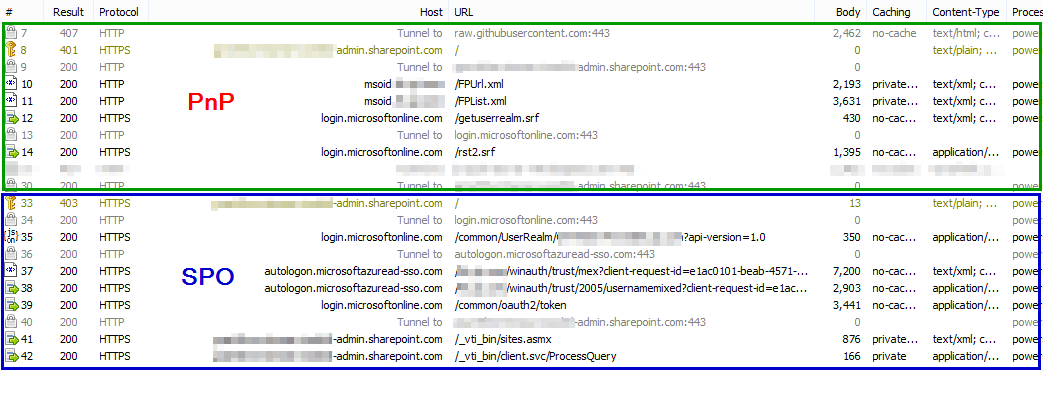
@wobba I finally took some time to check the difference between SPO and PnP module to connect to SharePoint.
The error is blocked by conditional access returned by login.microsoft.com/rst2.srf when using PnP.
SPO uses different endpoints to perform the login flow, I guess that's the issue. But not sure if PnP can use the same endpoints or not.
mrik23
on 8 Jul 2019
@wobba I turned off "LegacyAuthProtocolsEnabled" for the SharePoint tenant and now I can use Connect-PnPOnline without getting the conditional access error.
Turning off legacy auth seems to force a different sign-in flow, and now SPO and PnP are both getting the token from https://login.microsoftonline.com/common/oauth2/token.
mrik23
on 9 Jul 2019
Related issues
 decapent
·
12Comments
decapent
·
12Comments
 NerijusV
·
54Comments
NerijusV
·
54Comments
 janegilring
·
23Comments
janegilring
·
23Comments
 robbert-vanandel
·
29Comments
robbert-vanandel
·
29Comments
 jagsridharan
·
31Comments
jagsridharan
·
31Comments
Most helpful comment
@wobba I turned off "LegacyAuthProtocolsEnabled" for the SharePoint tenant and now I can use Connect-PnPOnline without getting the conditional access error.
Turning off legacy auth seems to force a different sign-in flow, and now SPO and PnP are both getting the token from https://login.microsoftonline.com/common/oauth2/token.