Pnp-powershell: New-PnPSite Unable to decode the header '[PII is hidden]' as Base64Url encoded string
Reporting an Issue or Missing Feature
Issue
Expected behavior
New Communication / Team site to be created
Actual behavior
An error is thrown with the following message. Works on other tenant. Seems like it might be related to security ??
Used to work on the environment
New-PnpSite : IDX12729: Unable to decode the header '[PII is hidden]' as Base64Url encoded string.
jwtEncodedString: '[PII is hidden]'.
At C:\dev\kappa\Scripts\Initialize-HubSites.ps1:22 char:9
+         New-PnpSite -Type CommunicationSite
+         ~~~~~~~~~~~~~~~~~~~~~~~~~~~~~~~~~~~~~
    + CategoryInfo          : WriteError: (:) [New-PnPSite], ArgumentException
    + FullyQualifiedErrorId : EXCEPTION,SharePointPnP.PowerShell.Commands.NewSite
Steps to reproduce behavior
1) Connect to sharepoint environment using the Connect-PnPOnline "https://tenant-admin.sharepoint.com"
2) Try creating a new PnPSite using the following:
New-PnpSite -Type CommunicationSite -Title "TEST TITLE" -Description "TEST DESCRIPTION" -Url "https://tenant.sharepoint.com/sites/testsite"
Which version of the PnP-PowerShell Cmdlets are you using?
- [ ] PnP PowerShell for SharePoint 2013
- [ ] PnP PowerShell for SharePoint 2016
- [ x] PnP PowerShell for SharePoint Online
What is the version of the Cmdlet module you are running?
3.13.1909
How did you install the PnP-PowerShell Cmdlets?
- [ ] MSI Installed downloaded from GitHub
- [ x] Installed through the PowerShell Gallery with Install-Module
- [ ] Other means
 decapent
All 12 comments
Thank you for reporting this issue. We will be triaging your incoming issue as soon as possible.
![msftbot[bot] picture](https://avatars2.githubusercontent.com/in/26612?v=4&s=40) msftbot[bot]
on 9 Sep 2019
msftbot[bot]
on 9 Sep 2019
I get the same error message with apply-pnpprovisioningtemplate. This is all over my console in debug-mode:
powershell.exe Warning: 0 : 2019-09-11 18:05:40.8977    [OfficeDevPnP.Core]     [0]     [Information]   Could not determine lease for appOnlyAccessToken. Error = System.ArgumentException: IDX12729: Unable to decode the header '[PII is hidden]' as Base64Url encoded string. jwtEncodedString: '[PII is hidden]'. ---> System.TypeInitializationException: Typeinitialiseringen for System.IdentityModel.Tokens.Jwt.JsonExtensions forårsaket et unntak. ---> System.IO.FileNotFoundException: Could not load file or assembly 'Newtonsoft.Json, Version=10.0.0.0, Culture=neutral, PublicKeyToken=30ad4fe6b2a6aeed' or one of its dependencies. Systemet finner ikke angitt fil.
   ved System.IdentityModel.Tokens.Jwt.JsonExtensions..cctor()
   --- Slutten på sporingen av intern unntaksstakk ---
   ved System.IdentityModel.Tokens.Jwt.JsonExtensions.DeserializeJwtHeader(String jsonString)
   ved System.IdentityModel.Tokens.Jwt.JwtSecurityToken.Decode(String[] tokenParts, String rawData)
   --- Slutten på sporingen av intern unntaksstakk ---
   ved System.IdentityModel.Tokens.Jwt.JwtSecurityToken.Decode(String[] tokenParts, String rawData)
   ved OfficeDevPnP.Core.AuthenticationManager.<>c__DisplayClass32_1.<EnsureAzureADCredentialsToken>b__1(Object obj)    0ms
 tarjeieo
on 11 Sep 2019
tarjeieo
on 11 Sep 2019
This same issue appears in Pnp Core as well, looks like PnP Core, and thus PnPPS is using Newton.JSON version 11.0.1 while possibly System.IdentityModel.Tokens.Jwt.JsonExtensions is looking for Newton.JSON 10.0.0 still. @erwinvanhunen
 eoverfield
on 24 Sep 2019
eoverfield
on 24 Sep 2019
I am getting this error message simply trying to run Connect-PnPOnline. This is my code:
$clientId = "[hidden]"
$tenantId = "[hidden]"
$clientSecret = '[hidden]'

$uri = "https://login.microsoftonline.com/$tenantId/oauth2/v2.0/token"

$body = @{
    client_id     = $clientId
    scope         = "https://graph.microsoft.com/.default"
    client_secret = $clientSecret
    grant_type    = "client_credentials"
}

$tokenRequest = Invoke-WebRequest -Method Post -Uri $uri -ContentType "application/x-www-form-urlencoded" -Body $body -UseBasicParsing


$token = ($tokenRequest.Content | ConvertFrom-Json).access_token

$session = Connect-PnPOnline -AccessToken $token
 pittmanism
on 7 Oct 2019
pittmanism
on 7 Oct 2019
For the community, we found a work around this issue by using the UseWebLogin switch. The exact cause of the problem is still blurry but has been tracked down to the security scheme of the tenant that uses MFA and is behind Okta.
decapent
on 14 Oct 2019
I can confirm that this is also not working with the latest version (3.15.1911.0)
Getting the same error:

My sample to reproduce this:
# Define AppId, secret and scope, your tenant name and endpoint URL
$AppId = "<appid>"
$AppSecret = '<appsecret'
$Scope = "https://graph.microsoft.com/.default"
$TenantName = "<tenant>.onmicrosoft.com"

$Url = "https://login.microsoftonline.com/$TenantName/oauth2/v2.0/token"

# Add System.Web for urlencode
Add-Type -AssemblyName System.Web

# Create body
$Body = @{
    client_id = $AppId
    client_secret = $AppSecret
    scope = $Scope
    grant_type = 'client_credentials'
}

# Splat the parameters for Invoke-Restmethod for cleaner code
$PostSplat = @{
    ContentType = 'application/x-www-form-urlencoded'
    Method = 'POST'
    # Create string by joining bodylist with '&'
    Body = $Body
    Uri = $Url
}

# Request the token!
$Request = Invoke-RestMethod @PostSplat

Connect-PnPOnline -AccessToken $Request.access_token -Url "https://<tenant>-admin.sharepoint.com"
 zapftho
on 19 Nov 2019
zapftho
on 19 Nov 2019
I'm also getting this issue on a particular tenant when using Apply-PnPTenantTemplate
 jonathanhotono
on 22 Nov 2019
jonathanhotono
on 22 Nov 2019
Just discovered this same issue, using Office 365 CLI accesstoken get command to generate a token and pass into Connect-PnPOnline
$token = o365 accesstoken get -r https://tenant.sharepoint.com --new
Connect-PnPOnline -Url https://tenant.sharepoint.com -AccessToken $token
Connect-PnPOnline : IDX12729: Unable to decode the header '[PII is hidden]' as Base64Url encoded string. jwtEncodedString: '[PII is hidden]'.
At line:1 char:1
+ Connect-PnPOnline -Url https://lundhill.sharepoint.com -AccessToken $ ...
+ ~~~~~~~~~~~~~~~~~~~~~~~~~~~~~~~~~~~~~~~~~~~~~~~~~~~~~~~~~~~~~~~~~~~~~
    + CategoryInfo          : NotSpecified: (:) [Connect-PnPOnline], ArgumentException
    + FullyQualifiedErrorId : System.ArgumentException,SharePointPnP.PowerShell.Commands.Base.ConnectOnline
Access token used can be decoded using https://jwt.io/
 garrytrinder
on 3 Dec 2019
garrytrinder
on 3 Dec 2019
This is the message from the inner exception while debugging it
Could not load file or assembly 'Newtonsoft.Json, Version=10.0.0.0, Culture=neutral, PublicKeyToken=30ad4fe6b2a6aeed' or one of its dependencies. The system cannot find the file specified.
Callstack of the (most) inner exception:
at System.IdentityModel.Tokens.Jwt.JsonExtensions..cctor()
 jackpoz
on 9 Dec 2019
jackpoz
on 9 Dec 2019
Hi,
I just did a few tests using both Graph token and certificate token without an issue. Is it still not working? @zapftho @tarjeieo @garrytrinder
Trying to figure out if it was a PnP or service issue.
 wobba
on 23 Jan 2020
wobba
on 23 Jan 2020
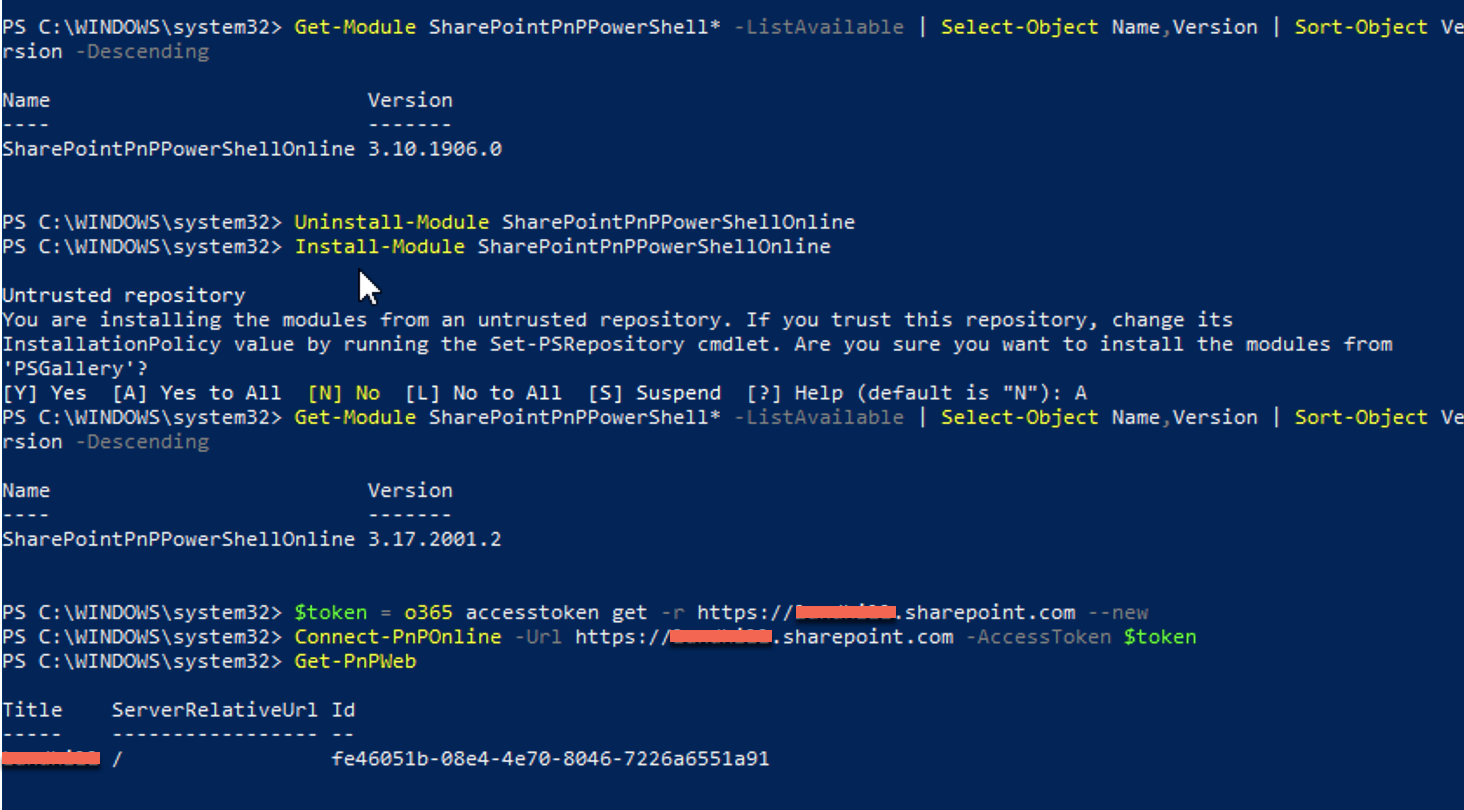
@wobba just tested using 3.17.2001.2 and I don't get the error anymore...
garrytrinder
on 23 Jan 2020
I know we had some newtonsoft dll issues, but don't recall exactly when we fixed them, but good to see it working and I'll close this one for now.
wobba
on 23 Jan 2020
Related issues
 Forket
·
39Comments
Forket
·
39Comments
 Chris-Leeworthy
·
28Comments
Chris-Leeworthy
·
28Comments
 NicholasMiller3
·
22Comments
NicholasMiller3
·
22Comments
 JoshuaWalsh
·
16Comments
JoshuaWalsh
·
16Comments
 frisla
·
13Comments
frisla
·
13Comments