Pnp-modern-search: 3.15.x releases seem to break client-side navigation
Version used
3.15.2
Describe the bug
This issue is not present in 3.14.2. Upon upgrading to 3.15.x I noticed that when navigating to a page with the PnP search web parts on it, subsequent navigation to other sites breaks.
To Reproduce
Steps to reproduce the behavior:
- Install 3.15.2 package to tenant app catalog and globally deploy
- Add search box and search results web parts to a page
- Link up the search box to the results web part, set default query to "*". Leave all other config default.
- Load up the page. Search results show up fine.
- Navigate to another site, it loads fine
- Navigate once more to another site and the client-side navigation is broken. Clicking sites in the hub nav changes the URL, but the page doesn't update. You need to fully reload the page to get navigation working again.
Screenshots
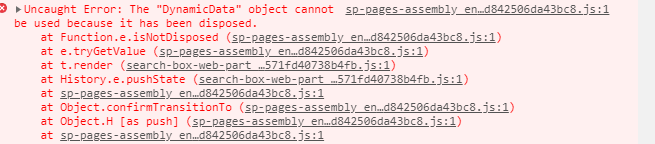
Desktop:
- Windows 10, Chrome 85.0.4183.102
 mbice
mbice
All 12 comments
5 and 6, how do I navigate to a new site? Where do I click? What's the navigation setup?
 wobba
on 23 Sep 2020
wobba
on 23 Sep 2020
@wobba I’m just navigating using out-of-the-box hub navigation. I have a handful of sites connected to the root site, which is registered as a hub site.
Thanks!
mbice
on 23 Sep 2020
Hub site, got it. Will try to repro.
wobba
on 23 Sep 2020
@wobba just wanted to check in. Were you able to reproduce this on your end?
Thanks!
mbice
on 5 Oct 2020
Haven't had any spare time for this and was oof last week.
wobba
on 5 Oct 2020
@mbice - is your tenant on Standard Release?
 MakingThingsWorkToronto
on 15 Oct 2020
MakingThingsWorkToronto
on 15 Oct 2020
@MakingThingsWorkToronto I just re-tested with the latest release (3.15.3) and it reproduces fully on a standard release tenant. On targeted release I'm seeing the same error, albeit less frequently and in a different way. On targeted release I am able to reproduce it with the following steps:
- Edit a page and add search box and search results web parts (default configuration)
- Publish page
- Try to navigate away using hub navigation -- same error as the one I originally logged
mbice
on 15 Oct 2020
Pushed a fix to the dev branch. @mbice are you able to build this one and verify?
wobba
on 20 Oct 2020
Hi @wobba I rebuilt and tried again on both standard and targeted release tenants. I'm still seeing the issues I've outlined. The bug is less prevalent on targeted release, where it only happens after publishing a page with search web parts on them. On standard all I need to do to reproduce is navigate to the page with the web parts, then navigate away and it breaks navigation entirely.
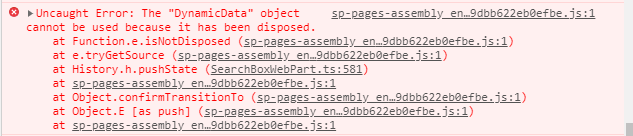
Seems to be failing on this call.

Thanks!
mbice
on 22 Oct 2020
@mbice I do see that one as well when I edit/save etc... Logged https://github.com/SharePoint/sp-dev-docs/issues/6403 which I'm curios if can fix this. If we are to add checks all over, that's a lot of checks.
wobba
on 22 Oct 2020
@wobba, we are also experiencing the same issue. I just upgraded to version 3.15.3 to test the fix provided by pull request #394 that fixes issue #302. I confirmed that is being fixed but it seems the fix brought about the behavior @mbice described here which seems to be the opposite of what we were experiencing with version 3.14.x. I just wanted to provide more info...perhaps it will be helpful.
 saregbesola
on 2 Nov 2020
saregbesola
on 2 Nov 2020
@wobba @saregbesola @MakingThingsWorkToronto
I tested again with 3.16.0 and issue seems to be resolved for me now.
mbice
on 17 Dec 2020
Related issues
mbice
·
3Comments
 RichG82
·
3Comments
RichG82
·
3Comments
 anoopt
·
4Comments
anoopt
·
4Comments
 szyvett
·
4Comments
szyvett
·
4Comments
 stevebeauge
·
5Comments
stevebeauge
·
5Comments