Pnp-modern-search: search vertical won't pass keyword across other vertical pages
when I search by keywords I ma trying to use the search vertical like it works in the classic exp. but it keeps removing my search keyword from the search box and not passing into the next search vertical page. also, I noticed their are two ways to configure search vertical. one using multiple pages and one method of using the same pages, what are pros and cons? what is ideal?
Thanks
 cpluceDev
All 16 comments
any instruction out there that can help. everything else seems to work fine but the cross keyword search vertical feature
cpluceDev
on 9 Sep 2020
Which searchbox are you using, and how have you connected your web parts? Also, which version.
 wobba
on 9 Sep 2020
wobba
on 9 Sep 2020
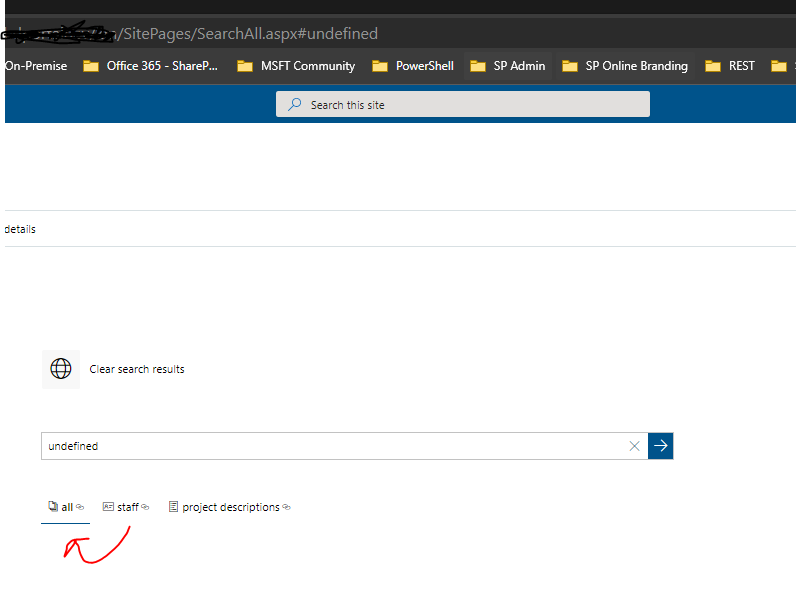
I actually got this to work. I was able to get it to work by using the single page and connecting all the web parts together. I am using all the oder search web parts on a single page. I was using the url fragment. with multiple pages. and this work but caused an issue with "undefined" when trying to navigate from vertiacal pages without a keyword in search so this won't work. I am sure there is a way to get it to work completely with multiple pages but it only worked when a keyword was in the search box because I was passing the keyword in the url with the #. seems to work with one page as id like except fro my utile results sources are nt working so I had to use the same results source for all verticals and different KQL for each. ideally id like to have that configured / scoped separate for each results source and use that id but that didn't work. thx
cpluceDev
on 9 Sep 2020
I am using the latest version. just installed this last week
cpluceDev
on 9 Sep 2020
You can have different result sources per vertical, and different rendering as well using result type item templates. Should be possible to pass the query to another page as well and have that picked up by the search box. I'll try to retest it myself this week.
wobba
on 9 Sep 2020
yeah the passing of the keyword to the search box does work with search vertical. the issue arises when I click on the verticals when the search box is blank. I got an undefined b/c im using the url fragment with the # in the url at the end. that was the only way I got it working. I need it to work both with or without keywords
cpluceDev
on 10 Sep 2020
Can you share exact setup, also use the latest version so we can triage.
wobba
on 10 Sep 2020
version 3.14.20
3 search vertical pages
- All
- Staff
- Projects
configured all pages the same
- search refiner connected to search results
- search vertical using open in new page / link passing the URL fragment (eg. .../sites/page.aspx#{SearchBoxQuery})
- search vertical connected to search results page
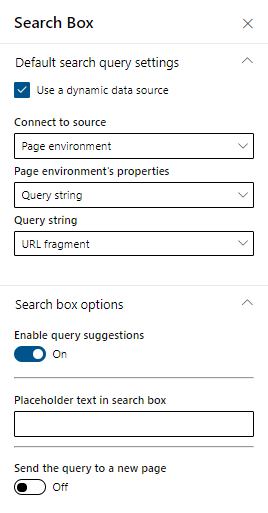
- search box - page environment -> query string -> url fragment.
- search results - connected to search box - > search query
Thanks so much let me know if you need anything else
cpluceDev
on 10 Sep 2020
cpluceDev
on 10 Sep 2020
how can i get around this undefined when using verticals with url fragment when search box is empty? is this possible? any other configuration methods as work around for the same functionality?
cpluceDev
on 10 Sep 2020
Please test with the latest release which has some fixes related to URL routing
wobba
on 11 Sep 2020
i updated to the latest version and i still get the undefined when using search verticals and url fragment
cpluceDev
on 12 Sep 2020
Using version 3.15.3 of the search web parts, its still happening.
I used a vertical which is configured as a hyperlink with the target _https://…/search?q={searchTerms}_.
When I click now on the vertical whithout a searchTerm, it will open the URL _https://…/search?q=undefined_!
Will there be a fix soon, e.g. empty string instead of undefined since the searchTerm can be interpreted as an empty string and not as undefined?
 MarcoSimon
on 27 Oct 2020
MarcoSimon
on 27 Oct 2020
as a workaround i configured the verticals to use the same page / a single page for all search results. however, this doesn't show the count for all verticals at once on my end. Unless you click on the vertical, the count is displayed for that vertical search result
cpluceDev
on 28 Oct 2020
We are facing the same behavior with verticals. When switching between verticals without a query keyword, we get "undefined". We have different result sources for the verticals and this is with both url fragment and query parameter. We already updated to the latest release 3.18.2.
 VerlindenEAM
on 8 Apr 2021
VerlindenEAM
on 8 Apr 2021
@VerlindenEAM Pushed a fix for the "undefined" now. Using #{searchTerms} or #{SearchBoxQuery} should now pass the query if there is one, and pass blank instead of undefined if the query is empty. Will be part of v3.19.
wobba
on 16 Apr 2021
Related issues
 RedGlow
·
5Comments
RedGlow
·
5Comments
 fijaz
·
3Comments
fijaz
·
3Comments
 RichG82
·
3Comments
RichG82
·
3Comments
 sympmarc
·
4Comments
sympmarc
·
4Comments
 vreezy
·
3Comments
vreezy
·
3Comments