Pnp-modern-search: SearchResults WebPart keeps losing connection to SearchBox
Version used
3.13
Describe the bug
The Search Results webpart does not show any results, after adding a search box WP and connecting to it. No other customizations. When we go to Configure the Search Results webpart, it does not persist the 'Connect to Source' settings, and shows a blank search query keywords option. How can we persist the 'Connect to Source' option?
This happens even if I hit Back from the 3rd page :(
To Reproduce
Steps to reproduce the behavior:
- New SitePage
- Add a SearchBox WP
- Add a Search Results WP
- Configure Search Results WP -> Chose to Connect to Source, and select the Search Box/SearchQuery, click Next.
- Click Back, and the previous selection goes away :(
Expected behavior
I would hope to see the connection persist.
Screenshots
If applicable, add screenshots to help explain your problem.
Desktop (please complete the following information):
- Browser [e.g. chrome, safari]
Additional context
Add any other context about the problem here.
 Somu76
All 23 comments
I found some more information here that can possibly shed more light on this...
When chosing the 'Connect to Source' option, if I select PageEnvironment/Search/SearchQuery first, and then switching to SearchBox/SearchQuery (before we go to the next page), the connection seems to stick.
If I then try to chose 'PageEnvironment' again to play around, we end up getting an error like below:

I could only remove the connection and start from scratch to make it go away.
Somu76
on 3 Jun 2020
Please try setting the connection in Edge and let me know if that works. I’ve seen this issue intermittently and believe it’s a tenant / site collection specific SpFx release issue. Also try upgrading to the most recent version :)
 MakingThingsWorkToronto
on 5 Jun 2020
MakingThingsWorkToronto
on 5 Jun 2020
Thanks. I thought I was using the latest version (3.13), and I am using the latest Edge Chromium browser. It reproduces in multiple site collections in my tenant and in my customer’s tenant... will try other browsers and tenants tomorrow...
Sent from my iPhone
On Jun 4, 2020, at 10:43 PM, Making Things Work notifications@github.com wrote:
Please try setting the connection in Edge and let me know if that works. I’ve seen this issue intermittently and believe it’s a tenant / site collection specific SpFx release issue. Also try upgrading to the most recent version :)
—
You are receiving this because you authored the thread.
Reply to this email directly, view it on GitHubhttps://nam02.safelinks.protection.outlook.com/?url=https%3A%2F%2Fgithub.com%2Fmicrosoft-search%2Fpnp-modern-search%2Fissues%2F299%23issuecomment-639224820&data=02%7C01%7C%7C07adcf9346de42a511e108d808fa4333%7C84df9e7fe9f640afb435aaaaaaaaaaaa%7C1%7C0%7C637269218239717688&sdata=FDjtx4SpdxIVXTEKfsrD08edccE7YrMezxflsrWtBK4%3D&reserved=0, or unsubscribehttps://nam02.safelinks.protection.outlook.com/?url=https%3A%2F%2Fgithub.com%2Fnotifications%2Funsubscribe-auth%2FAC4AJCLAYEEQH6GHX6VSWD3RVBLV7ANCNFSM4NR4T6BA&data=02%7C01%7C%7C07adcf9346de42a511e108d808fa4333%7C84df9e7fe9f640afb435aaaaaaaaaaaa%7C1%7C0%7C637269218239727689&sdata=9ncSYDtWOfdiQ%2F9oU92lwXWF%2FalF9JxsxSxyQxSk3W8%3D&reserved=0.
Somu76
on 5 Jun 2020
Sorry I should have been more clear. See if you can launch the old non-chromium edge version to connect the WP (if you still have it)...
https://docs.microsoft.com/en-us/deployedge/microsoft-edge-sysupdate-access-old-edge
MakingThingsWorkToronto
on 5 Jun 2020
If you can get details this is due to SharePoint/SPFx, and not how we pick the connection in the web parts you can either log an issue at sp-dev-docs, or I can try to escalate.
 wobba
on 5 Jun 2020
wobba
on 5 Jun 2020
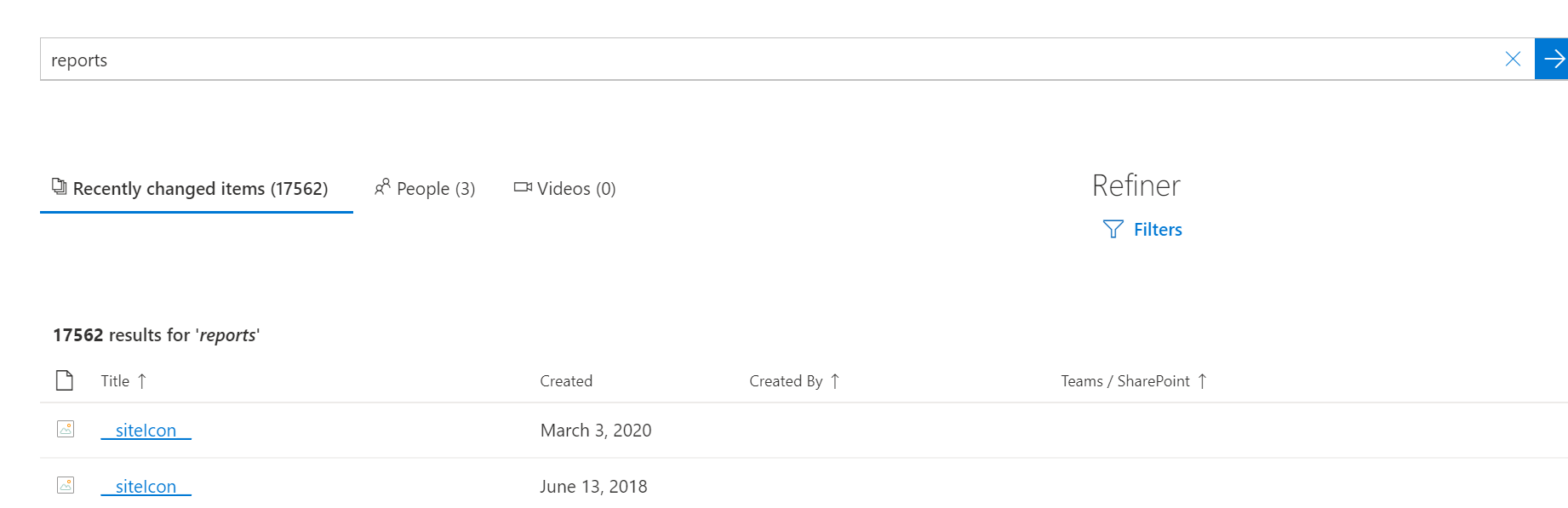
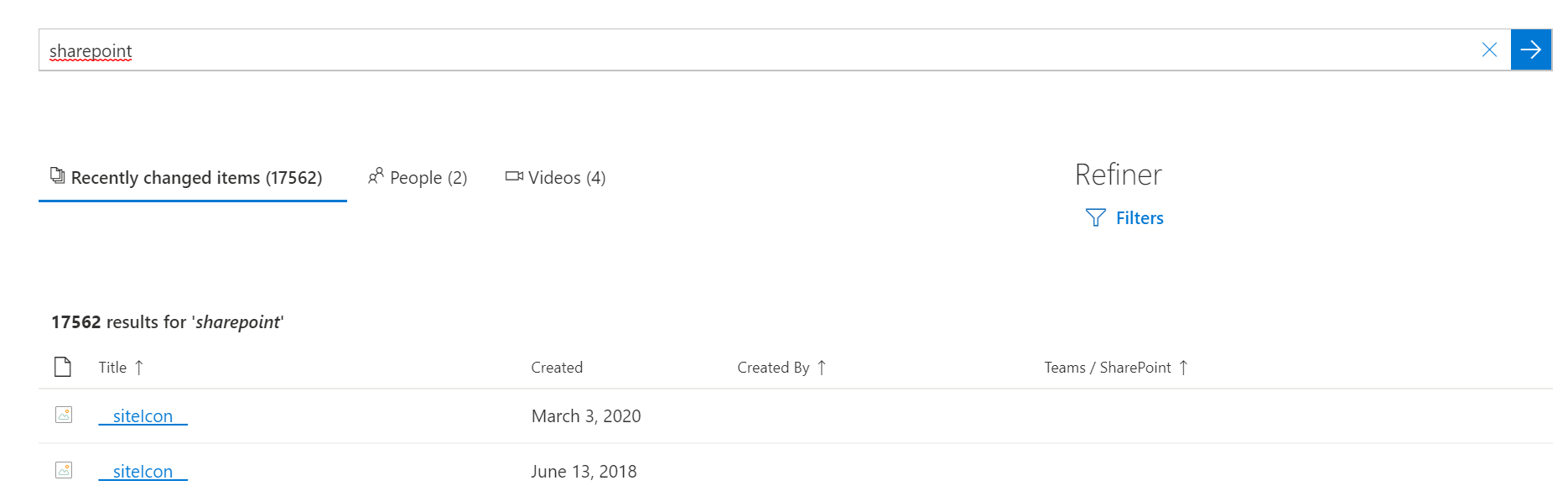
Hi @wobba , experiencing the same issue in multiple tenants with version 3.13, it seems that even if the config stick, somehow results are not connected correctly between the searchbox and results webpart.
This is the results when I'm searching the word "reports"
And I'm getting the same searching for "sharepoint"
 JimmyHang
on 19 Jun 2020
JimmyHang
on 19 Jun 2020
I downgraded to version 3.10, connections seems stable, but search resuslt webpart still displays the same results no matter what i search for????
JimmyHang
on 19 Jun 2020
After some more testing, I found out that the culprit is the "Sear Vertical" webpart, if I remove it, then my Search Box and Search Results, behaves the way they should...more testing then...;)
JimmyHang
on 19 Jun 2020
Good find @JimmyHang, and could be some connection race conditions here.
wobba
on 19 Jun 2020
I am seeing a similar problem, the search box doesn't seem to be passing the query string to the results web part. I can get the results web part to work as expect when not connected but it shows no results as soon as I connect the search box. I have updated to the latest build 3.14.1
 gmparky
on 30 Jun 2020
gmparky
on 30 Jun 2020
@gmparky log a separate issue as this is about it working sometimes. And include the steps on how you connect and setup the webparts.
wobba
on 30 Jun 2020
This is happening with my SharePoint sites as well. The Search Results doesn't seem to retain its connection to the search box. I know that the query and the result source are fine. Nothing happens when I use the search box. And when I look at the search results connection, it is always empty, even though I repeatedly add the information. A week ago, before the upgrade, this search was working for this site collection, and now it is completely broken. No matter what browser I use, I can break the search results box by selecting a different source than search results, and then try to change it to the search box. The page locks up and I am unable to continue editing.
 DJS-ECM
on 2 Jul 2020
DJS-ECM
on 2 Jul 2020
@DJS-ECM seems related to #325 in your case.
wobba
on 2 Jul 2020
This is happening with my SharePoint sites as well. The Search Results doesn't seem to retain its connection to the search box. I know that the query and the result source are fine. Nothing happens when I use the search box. And when I look at the search results connection, it is always empty, even though I repeatedly add the information.
Seeing the same issue on different tenants. Both with 3.13 and 3.14.1
 MartinSpitz
on 2 Jul 2020
MartinSpitz
on 2 Jul 2020
This happens to me as well. It doesn't matter what browser I use.
DJS-ECM
on 7 Jul 2020
@DJS-ECM any errors in the console when you try to add the connection from search wp to searchbox wp?
wobba
on 7 Jul 2020
Hello, nothing turns up in the console. There are 0 runtime errors over the past 4 days and I tried configuring the search results web part from two different browsers this morning. Tank you.
Donna Steinwand | She/Her | Enterprise Content Management | Land O’Lakes, Inc.
4001 Lexington Avenue North | Mail Stop IT Building A | Arden Hills, MN 55126
P 651.375.2423 | C 651.233.6184 | [email protected]
FEEDING HUMAN PROGRESS
landolakesinc.comhttps://www.landolakesinc.com/ | LinkedInhttps://www.linkedin.com/company/landolakesinc/ | Facebookhttps://www.facebook.com/LandOLakesInc | Twitterhttps://twitter.com/landolakesinc | Instagramhttps://www.instagram.com/landolakesinc/
From: Mikael Svenson notifications@github.com
Sent: Tuesday, July 7, 2020 11:51 AM
To: microsoft-search/pnp-modern-search pnp-modern-search@noreply.github.com
Cc: Steinwand, Donna DJSteinwand@landolakes.com; Mention mention@noreply.github.com
Subject: [EXTERNAL] Re: [microsoft-search/pnp-modern-search] SearchResults WebPart keeps losing connection to SearchBox (#299)
@DJS-ECMhttps://nam03.safelinks.protection.outlook.com/?url=https%3A%2F%2Fgithub.com%2FDJS-ECM&data=02%7C01%7Cdjsteinwand%40landolakes.com%7C5adc764cac9048b03c3808d82295f4ee%7C21ab97d78e754056826b9d8ec665c5a3%7C0%7C0%7C637297374760420120&sdata=N9%2FP5uFfQ6gUwKTI8zr9oSWzgpZvvlV6tjZvYIAArVc%3D&reserved=0 any errors in the console when you try to add the connection from search wp to searchbox wp?
—
You are receiving this because you were mentioned.
Reply to this email directly, view it on GitHubhttps://nam03.safelinks.protection.outlook.com/?url=https%3A%2F%2Fgithub.com%2Fmicrosoft-search%2Fpnp-modern-search%2Fissues%2F299%23issuecomment-654991065&data=02%7C01%7Cdjsteinwand%40landolakes.com%7C5adc764cac9048b03c3808d82295f4ee%7C21ab97d78e754056826b9d8ec665c5a3%7C0%7C0%7C637297374760430114&sdata=4%2FAkoPICBlrhp%2FuHydU3GS4OySpYKzSKQ%2B%2Ff%2FMgOoZg%3D&reserved=0, or unsubscribehttps://nam03.safelinks.protection.outlook.com/?url=https%3A%2F%2Fgithub.com%2Fnotifications%2Funsubscribe-auth%2FAQEVQILFQMVPC5GPQCVH4VLR2NG77ANCNFSM4NR4T6BA&data=02%7C01%7Cdjsteinwand%40landolakes.com%7C5adc764cac9048b03c3808d82295f4ee%7C21ab97d78e754056826b9d8ec665c5a3%7C0%7C0%7C637297374760430114&sdata=3hebn4SNoIauxhPUfS5vvasfnbjhwT5zA3kvUV%2B9aoo%3D&reserved=0.
Warning: This email originated from outside of Land O’Lakes. DO NOT click on links or open attachments unless you recognize the sender and know the content is safe.
This message may contain confidential material from Land O'Lakes, Inc. (or its subsidiary) for the sole use of the intended recipient(s) and may not be reviewed, disclosed, copied, distributed or used by anyone other than the intended recipient(s). If you are not the intended recipient, please contact the sender by reply email and delete all copies of this message.
DJS-ECM
on 7 Jul 2020
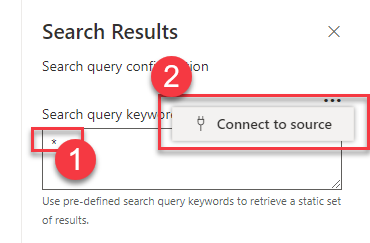
What if you try to set "*" as query keywords first in the Search Results WP settings and then retry the connection to the search box?
 FranckyC
on 7 Jul 2020
FranckyC
on 7 Jul 2020
It looks like the query of * works, because the correct number of documents is returned according to what I defined as the search result source.
However, the query in the search box does nothing. When I look at the search results web part configuration, there is no information saved in the “Connect to source” where I would specify the search box.
DJS-ECM
on 7 Jul 2020
It looks like the query of * works, because the correct number of documents is returned according to what I defined as the search result source. However, the query in the search box does nothing. When I look at the search results web part configuration, there is no information saved in the “Connect to source” where I would specify the search box.
We are using version
3.14.1.0
DJS-ECM
on 13 Jul 2020
What if you try to set "*" as query keywords first in the Search Results WP settings and then retry the connection to the search box?
We have the same issue like the other people here and if we follow your advice it works.
The version is 3.14.2.0
 ofreytag
on 15 Jul 2020
ofreytag
on 15 Jul 2020
Still an issue?
wobba
on 21 Oct 2020
We upgraded to the most recent version and that seems to have fixed the issue.
Thank you.
Donna Steinwand | She/Her | Collaboration Services | Land O’Lakes, Inc.
4001 Lexington Avenue North | Mail Stop IT Building A | Arden Hills, MN 55126
P 651.375.2423 | C 651.233.6184 | [email protected]
FEEDING HUMAN PROGRESS
landolakesinc.comhttps://www.landolakesinc.com/ | LinkedInhttps://www.linkedin.com/company/landolakesinc/ | Facebookhttps://www.facebook.com/LandOLakesInc | Twitterhttps://twitter.com/landolakesinc | Instagramhttps://www.instagram.com/landolakesinc/
From: Mikael Svenson notifications@github.com
Sent: Wednesday, October 21, 2020 1:14 PM
To: microsoft-search/pnp-modern-search pnp-modern-search@noreply.github.com
Cc: Steinwand, Donna DJSteinwand@landolakes.com; Mention mention@noreply.github.com
Subject: [EXTERNAL] Re: [microsoft-search/pnp-modern-search] SearchResults WebPart keeps losing connection to SearchBox (#299)
Still an issue?
—
You are receiving this because you were mentioned.
Reply to this email directly, view it on GitHubhttps://nam03.safelinks.protection.outlook.com/?url=https%3A%2F%2Fgithub.com%2Fmicrosoft-search%2Fpnp-modern-search%2Fissues%2F299%23issuecomment-713770216&data=04%7C01%7Cdjsteinwand%40landolakes.com%7C295378a2ecb54d7dbf3808d875ed2768%7C21ab97d78e754056826b9d8ec665c5a3%7C0%7C0%7C637389008725747527%7CUnknown%7CTWFpbGZsb3d8eyJWIjoiMC4wLjAwMDAiLCJQIjoiV2luMzIiLCJBTiI6Ik1haWwiLCJXVCI6Mn0%3D%7C1000&sdata=Fn0yBz%2FkJY6FGwwhyvMqP5Fj0Lw4AlAfX9LfZIhWX8c%3D&reserved=0, or unsubscribehttps://nam03.safelinks.protection.outlook.com/?url=https%3A%2F%2Fgithub.com%2Fnotifications%2Funsubscribe-auth%2FAQEVQIL67BPMAOJSOBJXRT3SL4QILANCNFSM4NR4T6BA&data=04%7C01%7Cdjsteinwand%40landolakes.com%7C295378a2ecb54d7dbf3808d875ed2768%7C21ab97d78e754056826b9d8ec665c5a3%7C0%7C0%7C637389008725747527%7CUnknown%7CTWFpbGZsb3d8eyJWIjoiMC4wLjAwMDAiLCJQIjoiV2luMzIiLCJBTiI6Ik1haWwiLCJXVCI6Mn0%3D%7C1000&sdata=2O0q670IWqNE3SZ79jEBaVazz6mZyVctnnZHDSepXvg%3D&reserved=0.
Warning: This email originated from outside of Land O’Lakes. DO NOT click on links or open attachments unless you recognize the sender and know the content is safe.
This message may contain confidential material from Land O'Lakes, Inc. (or its subsidiary) for the sole use of the intended recipient(s) and may not be reviewed, disclosed, copied, distributed or used by anyone other than the intended recipient(s). If you are not the intended recipient, please contact the sender by reply email and delete all copies of this message.
DJS-ECM
on 21 Oct 2020
Related issues
 vreezy
·
3Comments
vreezy
·
3Comments
 sympmarc
·
5Comments
sympmarc
·
5Comments
 mbice
·
3Comments
mbice
·
3Comments
 stevebeauge
·
5Comments
stevebeauge
·
5Comments
 fijaz
·
3Comments
fijaz
·
3Comments