Pnp-modern-search: Preview pane showing error text for some results in Simple List layout
Version used
3.12.1
Describe the bug
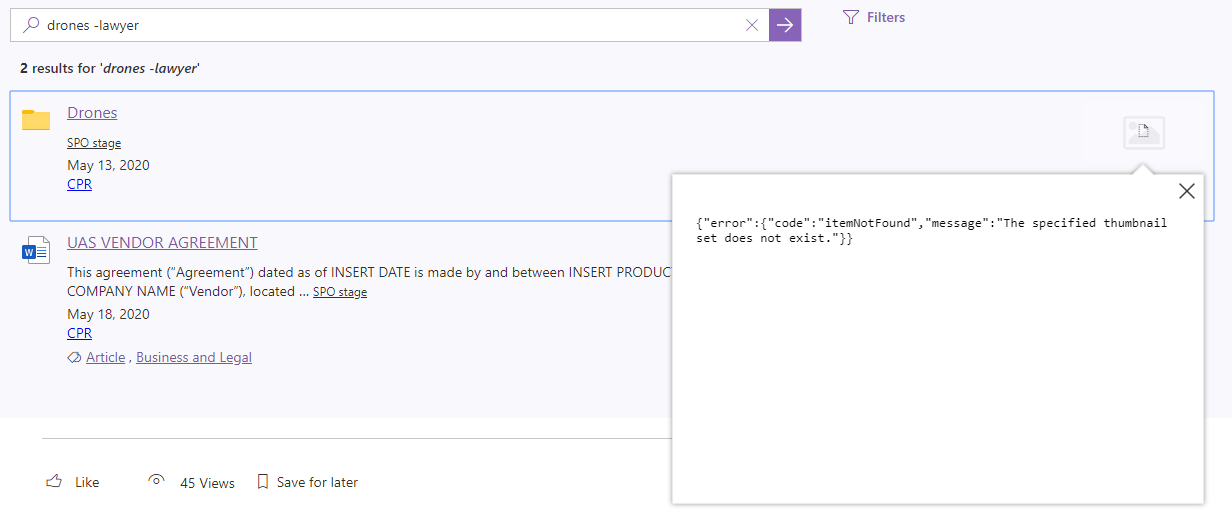
Preview pane showing below error text for results in Simple List layout where there are Folder result items.
{"error":{"code":"itemNotFound","message":"The specified thumbnail set does not exist."}}
To Reproduce
Steps to reproduce the behavior:
- Add Search box, Search Results web-parts to the page
- Configure the Search Results to show the results in Simple List layout
- Enter some search term and press enter
- In results look for the results for Folder names
- Try to click on the preview image to open the preview pane.
- See the error
Expected behavior
It should show some default image or show text as - No preview available
Desktop (please complete the following information):
- Chrome
 AmitTyagi1
All 6 comments
Thanks @malcom1120 .
Unfortunately I don't yet have the development environment setup for SPFx projects. Can you please provide the .sppkg file with this fix?
Thanks in advance.
AmitTyagi1
on 20 May 2020
@AmitTyagi1 As a workaround until my bug fix gets merged into the package and released.
- Add IsDocument manage property to the returned properites
- Customize the default simple-list layout by changing
{{#if (getPreviewSrc item)}}with{{#eq IsDocument 'true'}}
 malcom1120
on 20 May 2020
malcom1120
on 20 May 2020
Sure, I am going to try it right away. Thanks a lot.
AmitTyagi1
on 20 May 2020
@malcom1120 sorry it didn't worked for me. Do we have to make any changes in the {{else}} block too ?
AmitTyagi1
on 20 May 2020
Attached is the full block for the preview container. The preview container shouldn't even show if it is not a document. I noticed yesterday that it was showing for Pages, Containers and ListItems. My bug fix, fixes all of those. This is the main part that corrects it. It makes it behave like the out of the box result item.
<div class="template_previewContainer ms-hiddenSm">
                                    {{#eq IsDocument 'true'}}
                                        {{#isnt FileType 'aspx'}}
                                        <div class="doc-container">
                                            <div class="img-container">
                                                <img class="document-preview-item img-preview" width="120" loading="lazy" src="{{getPreviewSrc item}}" data-src="{{getPreviewSrc item}}" data-url="{{#eq FileType 'pdf'}}{{#contains Path '-my.sharepoint'}}{{{ServerRedirectedEmbedURL}}}{{else}}{{{Path}}}{{/contains}}{{else}}{{{ServerRedirectedEmbedURL}}}{{/eq}}" onerror="this.onerror=null;this.src='{{@root.utils.defaultImage}}';"/>
                                                <div class="hover">
                                                    <div><i class="ms-Icon ms-Icon--Preview" aria-hidden="true"></i></div>
                                                </div>
                                            </div>
                                        </div>
                                        {{/isnt}}
                                    {{/eq}}
                                    </div>
malcom1120
on 20 May 2020
Perfect @malcom1120 . It worked for me.
AmitTyagi1
on 20 May 2020
Related issues
 anoopt
·
4Comments
AmitTyagi1
·
5Comments
anoopt
·
4Comments
AmitTyagi1
·
5Comments
 vreezy
·
3Comments
vreezy
·
3Comments
 szyvett
·
4Comments
szyvett
·
4Comments
 jimmywim
·
4Comments
jimmywim
·
4Comments