Pnp-modern-search: Refiners webpart showing duplicates with "#" sign for multi-choice columns
Version used
3.8.0
Describe the bug
Using the Refiners webpart shows my metadata to select with a "#" sign and seem to be some sort of duplicates (they don't contain the amount of files than the correct refiner though...).
For example, I have a site column called _Utility_ (this is a multi-choice type from the moment it was created). The values are _Multi Utility_, _Telecoms_, and more...
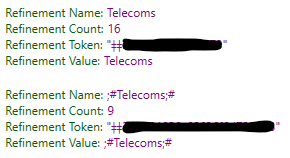
In the refiners, I will have the normal ones, and also duplicates will appear with a "#" sign and ";" with a different numbers of files.
If you select both (i.e.: Telecoms & ;#Telecoms#;), I see no difference when comparing files that would be tagged with one or the other. So I don't know why the number of files is different...
Localization is disabled by default, by I enabled/disabled as suggested by @FranckyC - No change
To Reproduce
Steps to reproduce the behavior:
- Install Search PnP Webpart
- Create a site column of type Multi-Choice
- Configure the Refiners with refinable metadata (possibly wait a SPO crawl)
- See the error
Expected behavior
I expect those "#" duplicates not to be here.
Screenshots

Desktop (please complete the following information):
Tried on Microsoft Edge Dev Build 82.0.432.3 and Google Chrome Version 80.0.3987.122 (Official Build) (64-bit)
Additional context
- No problem with single choice columns
 veronicageek
All 10 comments
Hi @veronicageek , what if you use Search Query Tools? Do you get the same refinement values for this query?
 FranckyC
on 28 Feb 2020
FranckyC
on 28 Feb 2020
@FranckyC - Yes, I have the same strange behavior...
veronicageek
on 4 Mar 2020
Hmm so it seems the issue is about your data and not the WP itself. Did you try to force a re index in the site/libraries where the documents are stored?
FranckyC
on 4 Mar 2020
You could also inspect the documents matching these refinement values and see if there anything wrong with this column.
FranckyC
on 4 Mar 2020
I've already tried to compared the documents, and I don't see anything different. All the metadata columns have been created in the same way (PnP), and the other column types have no issue.
I'll try re-indexing a few sites then...
veronicageek
on 4 Mar 2020
We could do some trimming and merge, but not ideal as it could lead to matching substrings in other values. I'd rather report it as a crawler issue/improvement (not me reporting, but you as a customer 😉) if reproducible for multi-choice columns.
 wobba
on 4 Mar 2020
wobba
on 4 Mar 2020
Sorry to not be able to help much here. Sometimes the SharePoint search can have weird behavior. By any chance, have the faulty data been migrated recently from an other env?
FranckyC
on 4 Mar 2020
@wobba Not a big fan of this solution since it is really an odd scenario that I can't even reproduce ;)
FranckyC
on 4 Mar 2020
Sorry to not be able to help much here. Sometimes the SharePoint search can have weird behavior. By any chance, have the faulty data been migrated recently from an other env?
Yes it has been migrated. From SP2013 to SPO with third party tool
veronicageek
on 4 Mar 2020
This could explain, maybe the data have been corrupted during the process.
FranckyC
on 4 Mar 2020
Related issues
 mbice
·
3Comments
mbice
·
3Comments
 PrabhuChandar
·
3Comments
PrabhuChandar
·
3Comments
 AmitTyagi1
·
5Comments
AmitTyagi1
·
5Comments
 vreezy
·
3Comments
vreezy
·
3Comments
 thebigs1992
·
4Comments
thebigs1992
·
4Comments
Most helpful comment
@wobba Not a big fan of this solution since it is really an odd scenario that I can't even reproduce ;)