Pnp-modern-search: How to use extension library and target different search results web parts ?
We are considering to use Search Results web part as a Content Search Web Part for content roll-up and not specifically for Search Results Page purpose. So it would be used in multiple pages in same site itself.
Based on requirements, we are in need of modifying the search query for specific web part in a page. We are trying to avoid modifications on the source code of the search web parts to reduce impact for merging future changes in the solutions.
Since the query modifier extension library is deployed across site / tenant and uses a single library component id, the chances of the modifier affecting the other search results web parts are high. Is it possible to have the modifier implemented as a web part connection instead of extension library. With that approach, we could also easily target multiple search results web parts based on needs.
Another option is to have a property in the search results web part that will allow to key in the component ID of the library.
 kmprasad4u
All 9 comments
Hi @kmprasad4u. You can also turn on/off the query modifier when needed:
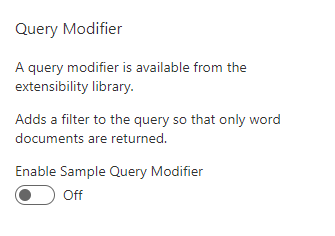
Does it do the trick in your scenario?
 FranckyC
on 15 Feb 2020
FranckyC
on 15 Feb 2020
Hi @FranckyC
Appreciate your reply. However the query modifier toggle is getting turned on automatically when the library is available in the site. So people adding the web part may oversee the option getting turned on. Though unlikely, what if we need to have different modifier behaviors based on Search Results web part ?
kmprasad4u
on 16 Feb 2020
You're right, this option shouldn't be on by default. @bschlintz what do you think about having multiple query modifiers that can be activated on demand per Web Part like the suggestion providers?
FranckyC
on 16 Feb 2020
+1 for changing the querying modifier to be Disabled as the default.
Multiple query modifiers would be neat, but require some planning. We would have to think about whether they were "chainable", meaning one or more could modify the same query, or if they were mutually exclusive. If they were chainable, then the order in which they fire could yield different results. My vote would be to allow multiple in a mutually exclusive manner.
 bschlintz
on 19 Feb 2020
bschlintz
on 19 Feb 2020
@bschlintz What if we restrict to only 1 query modifier per Web Part? I mean, using multiple query modifiers seems to be an odd scenario to me.
FranckyC
on 19 Feb 2020
Yes, agreed. Each web part could choose to enable or disable query modification in general (disabled as default). If enabled, then only one query modifier could be selected for the web part if there were multiple available.
bschlintz
on 19 Feb 2020
You can always read the k= or q= param for the original query as well for parts which don't want the modification.
 wobba
on 20 Feb 2020
wobba
on 20 Feb 2020
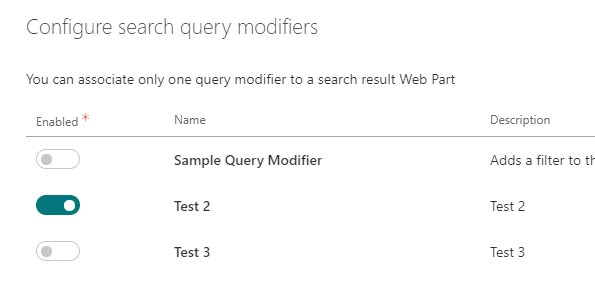
@kmprasad4u this PR #105 allows to choose among multiple query modifiers. You can select only one at once per Web Part instance. Query modifiers are disabled by default. Hope it helps in your scenario.
FranckyC
on 20 Feb 2020
Thanks @FranckyC
kmprasad4u
on 25 Feb 2020
Related issues
 RichG82
·
3Comments
RichG82
·
3Comments
 mbice
·
4Comments
mbice
·
4Comments
 polashivaprasad
·
5Comments
polashivaprasad
·
5Comments
 RedGlow
·
5Comments
RedGlow
·
5Comments
 MarcoSimon
·
5Comments
MarcoSimon
·
5Comments
Most helpful comment
Yes, agreed. Each web part could choose to enable or disable query modification in general (disabled as default). If enabled, then only one query modifier could be selected for the web part if there were multiple available.