Plyr: Problem load player controls after change svg and blank file urls
Hello and thank you for perfect video framework
I use plyr for html5 audio and video player in my website and work correctly and beautifully
i upload 2 file for play my video and audio (plyr.js and plyr.css)
and upload plyr.svg and blank.mp4 files to my website host
and edit plyr.js file for change plyr.svg and blank.mp4 file addresses in 3195 and 3197 lines for load plyr.svg and blank.mp4 files from my website hosting for speedy load and faster ping in my country
but after change, player controls not show and Hides! and only show controls and work corrently when plyr.svg and blank.mp4 with default addresses in plyr.js file!
please help me for solve this problem
thank you very much
 ahmadshc
All 8 comments
You don't need to hack the source code to change those two paths. Check the docs for how to change them via config. https://github.com/sampotts/plyr#options
For the issue of your sprite not loading, make sure you have the correct mime type set in your server config.
Good luck! 👍
 sampotts
on 4 Nov 2018
sampotts
on 4 Nov 2018
You don't need to hack the source code to change those two paths. Check the docs for how to change them via config. https://github.com/sampotts/plyr#options
For the issue of your sprite not loading, make sure you have the correct mime type set in your server config.
Good luck! 👍
thank you
if i set mime type on my server, enough upload 2 files (blank.mp4 and plyr.svg) or need upload all .svg files in (sprite) folder downloaded from githup?
If I do this, how should I call them?
my new question for this, is did you really need to design controls like that? and not another way?
my problem is that my distance to you is high
in my place ping cdn.plyr.io - pingtime average is 107ms
and that makes that this makes the controls loaded slower
If there was a way up files
blank.mp4 and plyr.svg
Designed otherwise
Or, it did not require special and difficult settings to transfer it to another server
your player is best web player in the world, beautifull and blue color for player and quility selector are very great. thank you again for
ahmadshc
on 4 Nov 2018
It's easy to use another server for those files. You need to change the iconUrl to your new URL and then the blankVideo option to your new URL.
The mime types for the files should be
| File | Type |
| --- | --- |
| blank.mp4 | video/mp4 |
| plyr.svg | image/svg+xml |
It's strange though as the files are served via Fastly's very fast CDN which is globally distributed.
sampotts
on 4 Nov 2018
It's easy to use another server for those files. You need to change the
iconUrlto your new URL and then theblankVideooption to your new URL.The mime types for the files should be
File Type
blank.mp4video/mp4
plyr.svgimage/svg+xml
It's strange though as the files are served via Fastly's very fast CDN which is globally distributed.
i'm sorry for say this:
i am an amateur in programming!
can give me example for?
i understand you somewhat, but I do not know how to do these things
here is my code:
(in attachement below
plyrt.txt
)
I know I need to change these two addresses
but i dont now mime types and how to set this in my java section or only set in server (host) enough?
and enough upload 2 files (plyr.svg and blank.mp4) to my host?
regarding cdn, my country is iran and in probably iran not any cdn servers or google server and other services
anyway i'm sorry to bother you and I'll be happy to solve this problem
ahmadshc
on 5 Nov 2018
It really depends on the server you're using. I'd just Google it myself and get an example.
sampotts
on 5 Nov 2018
It really depends on the server you're using. I'd just Google it myself and get an example.
thank you
i now new set below mime type on my host, is it correct?
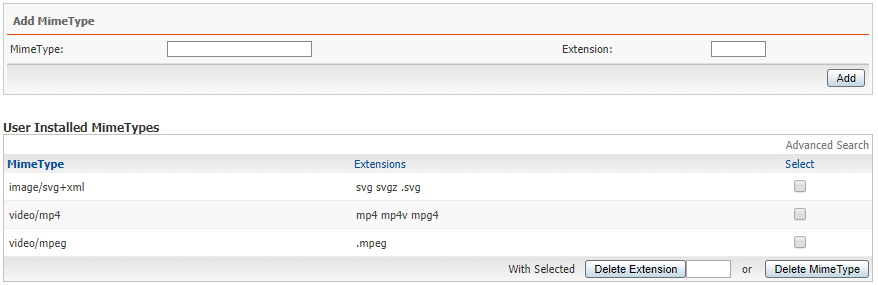
unfortunately, it still does not work
thank you
ahmadshc
on 5 Nov 2018
Please post the code you're using on jsfiddle.net or codepen.io
sampotts
on 5 Nov 2018
Please post the code you're using on jsfiddle.net or codepen.io
Of course, in these examples I did not put my own address and the same address
ahmadshc
on 5 Nov 2018
Related issues
 tolew1
·
27Comments
tolew1
·
27Comments
 donnygunawan93
·
83Comments
donnygunawan93
·
83Comments
 shainanigans
·
21Comments
shainanigans
·
21Comments
 zulhfreelancer
·
29Comments
zulhfreelancer
·
29Comments
 prateekkathal
·
22Comments
prateekkathal
·
22Comments
Most helpful comment
You don't need to hack the source code to change those two paths. Check the docs for how to change them via config. https://github.com/sampotts/plyr#options
For the issue of your sprite not loading, make sure you have the correct mime type set in your server config.
Good luck! 👍