Plyr: Suggestion: add download button inside the player control bar
When the user click the download icon, they'll download the video straight away into their computer.
If the video is coming from YouTube or Vimeo, we need to think about that so that user can download them too.
 zulhfreelancer
All 29 comments
Tell me if I'm wrong, but I _think_ that's illegal
 AnthyG
on 15 Apr 2016
AnthyG
on 15 Apr 2016
@AnthyG if that's illegal, maybe we can just proceed without YouTube/Vimeo download.
Example:
The .mp4 video is hosted on AWS S3. When users click on the download button, they'll download the video straight away.
zulhfreelancer
on 15 Apr 2016
@zulhfreelancer, Well, by illegal, I mean, that YouTube at it's base, does not allow to download "Files".
(I actually have to say, that I download Videos sometimes)
BUT, that "download-button" would require a Serverside Script I bet, and that means, that the Serverhoster (or whatever), is responsible for all the Videos, the user downloads. And the user can, if he has enough knowledge of using Plyr in the Console etc., change the source too!
This in the end, is pretty risky, not only in terms of copyright etc., but also in terms of Serverload!
AnthyG
on 15 Apr 2016
maybe we can just proceed without YouTube/Vimeo download.
@zulhfreelancer that seems reasonable. A bool option could be added like showDownloadButton. The setting would have no effect for YouTube/Vimeo, but if for an audio/video file conditionally show a download icon in the controls. I'm sure @SamPotts has a valuable opinion on this :smiley:
@AnthyG I'm not sure I understand why a server-side script would be required to download a file
 shakeelmohamed
on 16 Apr 2016
shakeelmohamed
on 16 Apr 2016
We could certainly add this option for HTML5 video and audio but of course links for YouTube and Vimeo wouldn't be possible. Vimeo offers downloading of _some_ videos (opt-in by the owner). YouTube has no approved method.
With regards to adding load, that wouldn't be the case. Since the user is watching the video using progressive download anyway, it would be the same as them watching the whole video through the player. Using S3 and CloudFront (or similar) to serve your videos would be fastest method but might not always be the cheapest (the largest chunk of my AWS bill is always CloudFront by a large margin).
The only issue (minor) I can foresee is choosing the source to use for the link. If there are multiple (.mp4 and .webm for example), which one would be used?
 sampotts
on 16 Apr 2016
sampotts
on 16 Apr 2016
@SamPotts Maybe the user could choose, which format to download?
And if the source is a YouTube or Vimeo video, then there could be a "go-to"-link, meaning a redirection to the Video on YouTube or Vimeo.
Maybe :D
AnthyG
on 16 Apr 2016
Sounds like a good solution to me. I'll add it as part of a UI refresh I've been meaning to do.
sampotts
on 16 Apr 2016
@SamPotts Any progress/ETA on this?
 nikola3244
on 19 Apr 2017
nikola3244
on 19 Apr 2017
This would be very nice feature for audio as well.
I think as the first approximation it is possible to just make the download button as a link to the source file. I can implement this but I would need a download icon in SVG format, since my drawing skill is terrible.
 vers-one
on 20 Apr 2017
vers-one
on 20 Apr 2017
I'll add this to my current stream of work given it'd be pretty straightforward. I guess with HTML5 we'd just grab the first <source> or src attribute. The others would link to YouTube or Vimeo.
sampotts
on 20 Apr 2017
Hey @sampotts it would be awesome to see a download button feature on the player. Hopefully it's not too far off?
 igor-gp
on 30 Jul 2017
igor-gp
on 30 Jul 2017
Hey @sampotts . I'm really keen on this feature. Want me to implement and PR? Did you already source an SVG asset? Otherwise I can find a CC one, or bug a designer for a favour.
 jamesoflol
on 3 Aug 2018
jamesoflol
on 3 Aug 2018
I'll dig out an icon. I think I had one lined up already. If you wanted to add a PR that'd be great.
https://github.com/sampotts/plyr/blob/master/contributing.md
sampotts
on 3 Aug 2018
Great! Yep, if you can find the icon, the rest should be easy enough :) Thanks Sam.
jamesoflol
on 3 Aug 2018
Just an FYI, I started on this. Should be done soon.
sampotts
on 27 Sep 2018
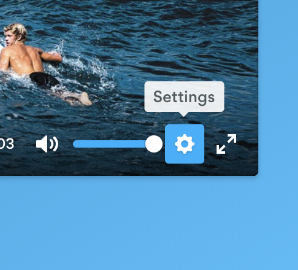
Hey Sam, as long as you're going to be editing CSS for controls, could you please take a look at the spacing between volume and settings button? It seems that only the CC button has enough left margin. See example:
jamesoflol
on 28 Sep 2018
@jamesoflol Sure, will take a look.
sampotts
on 28 Sep 2018
Thanks!
jamesoflol
on 28 Sep 2018
I'm gonna use lib in electron app and I want to save video in a file during buffering video, does you have any idea for this???
 mashahbazi
on 24 Oct 2018
mashahbazi
on 24 Oct 2018
It only took me over 2 years (!!) but this is finally in as of v3.4.5.
You can turn it on in the controls option by adding download. It'll automatically point to the current source and open in a new window. You can also specify a custom url in the urls option, specifically setting the urls.download property - e.g.
const player = new Plyr('#player', {
    urls: {
        download: 'https://example.com/path/to/download',
    },
});
You can set the custom URL on the fly when changing source too by setting the config:
player.config.urls.download = 'https://example.com/path/to/download';
Thank you @sampotts! ❤️
zulhfreelancer
on 25 Oct 2018
It only took me over 2 years (!!) but this is finally in as of v3.4.5.
You can turn it on in the
controlsoption by addingdownload. It'll automatically point to the current source and open in a new window. You can also specify a custom url in theurlsoption, specifically setting theurls.downloadproperty - e.g.const player = new Plyr('#player', { urls: { download: 'https://example.com/path/to/download', }, });You can set the custom URL on the fly when changing source too by setting the config:
player.config.urls.download = 'https://example.com/path/to/download';
Somehow this isn't working? Is this still possible? Theres no download button appearing.
I've used:
%audio#testPlayer{controls: 'download'}
  %source{ src: "https://www.blabla.com/mp3", type: "audio/mp3"}
and
const player = new Plyr('#testPlayer', {
    urls: {
        download: 'https://www.blabla.com/mp3',
    }
});
 ferdiamg
on 10 Dec 2018
ferdiamg
on 10 Dec 2018
Add 'download' to your controls options. I need to make it clearer in the docs I guess:
https://github.com/sampotts/plyr/blob/master/controls.md#using-default-controls
sampotts
on 11 Dec 2018
Isn't the idea of download to download to the downloads folder rather than open it up in another window?
 robroyce7
on 22 Mar 2019
robroyce7
on 22 Mar 2019
@robroyce7 You can sent the Content-Disposition header with your response to force a download but it's not something we can control in the player other than adding the download attribute which has limited support. We should probably add that for HTML5 videos but the header is more fail safe.
sampotts
on 22 Mar 2019
Thanks, although that's not really an option for me as I'm uploading to an LMS (Learning Management System). It may help others though.
robroyce7
on 22 Mar 2019
The best we can do in JavaScript/HTML is the download attribute unfortunately. Even that seems to be a bit hit and miss from my experience.
sampotts
on 22 Mar 2019
@sampotts Thanks so much for adding the download button. Now Plyr has become perfect for me and all non-profits don't need to make a separate download link for iOS. Will the download button show up in the audio player too? (Wow I think it shows, I just saw someone asked in another issue). Sorry to go off-topic but two very quick questions. Will captions be seen in the audio player too somewhere above or below the player? I am having dificulty in initialiing the audio player. Do I have initialize it separately on page load? I think the player initializing code should be made more clear in the docs. It tooks a novice like me hours to fix the video player initializing with wordpress as I did not want to use any plugins.
 nitaaikumar
on 21 May 2020
nitaaikumar
on 21 May 2020
Hi @sampotts I'm looking to enable a download button for the audio player, but a bit confused — it seems you added this functionality, and it's sort of referred to in the docs but not explained clearly enough for me. Apologies if I've misunderstood!
 scannermobs
on 8 Dec 2020
scannermobs
on 8 Dec 2020
Related issues
 Generalomosco
·
3Comments
Generalomosco
·
3Comments
 ahmadshc
·
4Comments
ahmadshc
·
4Comments
 elliottcoe
·
4Comments
elliottcoe
·
4Comments
 tomByrer
·
3Comments
tomByrer
·
3Comments
 Zsavajji
·
3Comments
Zsavajji
·
3Comments
Most helpful comment
It only took me over 2 years (!!) but this is finally in as of v3.4.5.
You can turn it on in the
controlsoption by addingdownload. It'll automatically point to the current source and open in a new window. You can also specify a custom url in theurlsoption, specifically setting theurls.downloadproperty - e.g.You can set the custom URL on the fly when changing source too by setting the config: