Plyr: Very high CPU usage in Safari even when idle.
Expected behaviour
When the page is idle, the CPU usage should be minimal.
Actual behaviour
The CPU usage is high.
Steps to reproduce
Visit https://plyr.io in Safari, open the Activity Monitor and look at the CPU usage for the tab the player is loaded in.
Environment
- Browser: Safari
- Version: Version 11.1.1 (13605.2.8)
- Operating System: macOS
- Version: High Sierra 10.13.5 (17F77)
Console errors (if any)
None
Link to where the bug is happening
 JonathanBristow
All 15 comments
Note: The tab has to be active and visible on screen for the CPU usage to be high. Tested this on 3 different Macbooks now and getting the same issue on all of them.
JonathanBristow
on 27 Jul 2018
Plyr is a relatively lightweight abstraction over HTML5 media or YouTube or Vimeo iframes. It shouldn't be doing anything CPU-intensive, but I can confirm this behaviour is happening for me as well.
 friday
on 27 Jul 2018
friday
on 27 Jul 2018
I’m aware of this. I raised a bug with WebKit a while back to do with styled range inputs causing constant redraws. I’ll add the link shortly and you can chime in. They are very slow.
On 28 Jul 2018, at 3:20 am, friday notifications@github.com wrote:
Plyr is a relatively thin wrapper over HTML5 media or YouTube or Vimeo iframes. It shouldn't be doing anything CPU-intensive, but I can confirm this behaviour is happening for me as well.
—
You are receiving this because you are subscribed to this thread.
Reply to this email directly, view it on GitHub, or mute the thread.
 sampotts
on 28 Jul 2018
sampotts
on 28 Jul 2018
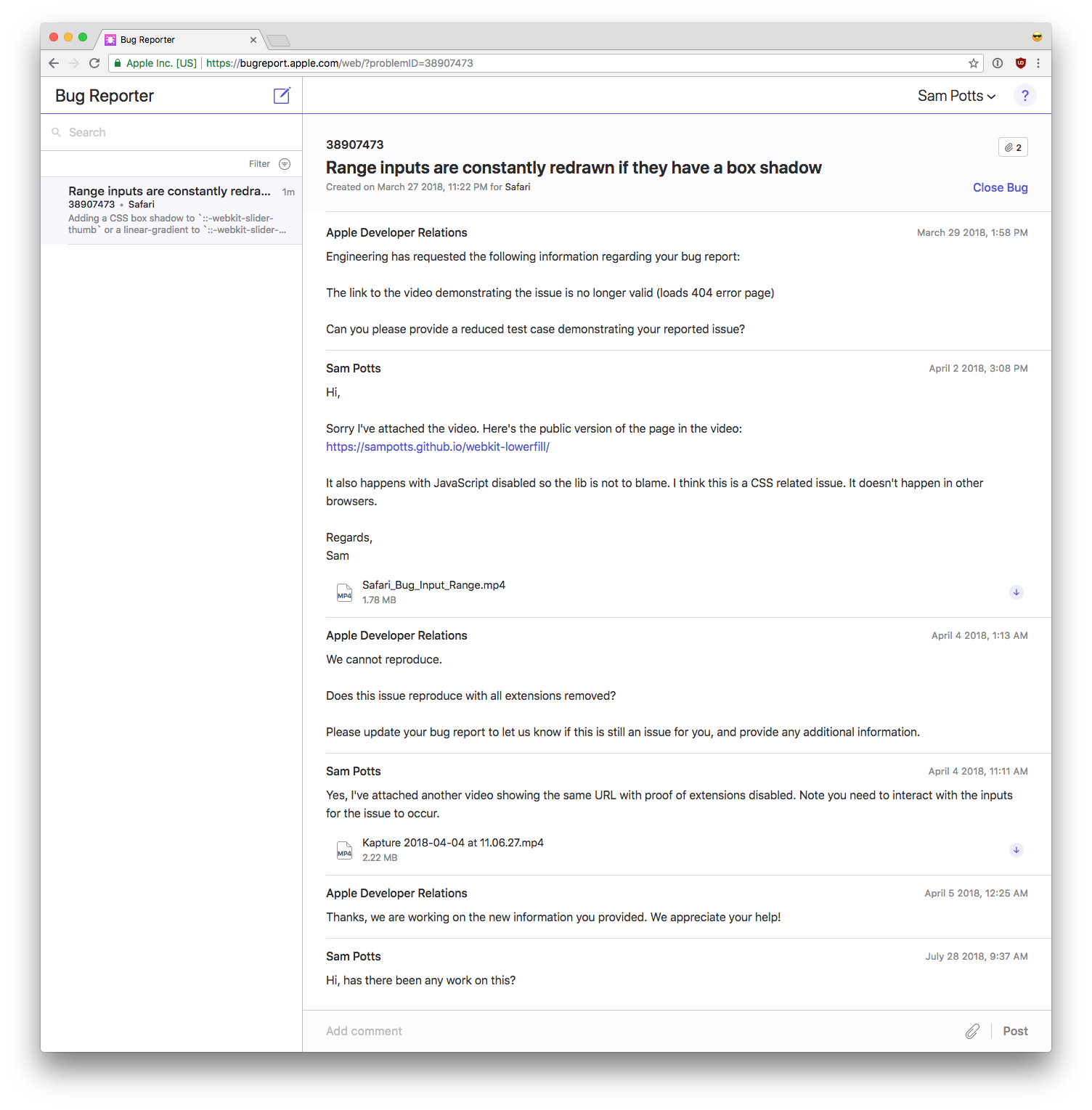
I'm not sure if you can see this... https://bugreport.apple.com/web/?problemID=38907473
I've followed up with them again. I'm surprised they don't see this as reasonably high priority. No other browsers seem to exhibit the same behaviour.
sampotts
on 28 Jul 2018
It requires logging in with an apple-id, but the embedded picture is readable.
To replicate, go to https://sampotts.github.io/webkit-lowerfill/
- Enable the dev tools
- The range tracks are red. This is how Safari devtools show elements being redrawn. When elements are constantly or blinking red like this, there's an infinte redraw-loop.
- Drag one of the handles. The input-element will start blinking red (for the same reason).
- Drag the other handles.
- Do some MDMA
- Have a rave party
If I disable JS in Safari the tracks won't be red initially, and the CPU usage won't be crazy. The infinite blinking effect is still there after dragging however.
friday
on 28 Jul 2018
Could we isolate the element which is being redrawn inside Plyr?
JonathanBristow
on 28 Jul 2018
As I said, it's the <input type="range">. Without Safari actually fixing the bug in their browser, I'm not sure what else we can do. I'll try and see if I can hack something to fix it.
sampotts
on 28 Jul 2018
Oh I see, sorry I must have missed that! I can indeed see the element redrawing constantly, even in Chrome. Would it be possible to replace the plyr_progress element with something that doesn't use a range input?
JonathanBristow
on 28 Jul 2018
It's not a problem with range inputs. It may be something in the css and possibly the MutationObserver (although it seems to happen without JS).
This pen doesn't have any problem in Safari. It's in many ways similar to Plyr's progress bars (range inputs using css variables)
I made that by styling the whole range input as a track however (avoiding some prefixes), which may not work with Plyr's thin tracks (small devices + fat fingers)
friday
on 28 Jul 2018
Ah sorry, @JonathanBristow asked which element was causing it, hence my answer. The issue is definitely related to the <input type="range"> element and the CSS used to style it, causing Safari to constantly redraw. I'm not convinced it's the MutationObserver but I'll take another look.
sampotts
on 28 Jul 2018
I think I've found a fix. Removing transition: all 0.3s ease in the @mixin plyr-range-track() stops the redraws. It's a bit risky to transition all anyway so I'll work out what's actually needed to transition there and push a fix tomorrow.
sampotts
on 28 Jul 2018
You're my hero! Will this be pushed to NPM as a release or will I need to link to the commit in my project?
JonathanBristow
on 28 Jul 2018
I am also seeing this issue, could you let me know when a fix is pushed? 😄
 markwalsh-liverpool
on 30 Jul 2018
markwalsh-liverpool
on 30 Jul 2018
@sampotts Any news on the commit being pushed? I don't mind forking so I can use it in my project until you have time to get a full release sorted. I'm under time pressures unfortunately.
JonathanBristow
on 30 Jul 2018
I've pushed v3.3.23 to npm which includes the patch so you should be good to grab that. Sorry for the delay.
sampotts
on 30 Jul 2018
Related issues
 fleps
·
43Comments
fleps
·
43Comments
 zulhfreelancer
·
29Comments
zulhfreelancer
·
29Comments
 louie-senpai
·
23Comments
louie-senpai
·
23Comments
 weavermedia
·
18Comments
weavermedia
·
18Comments
 lukeyouell
·
27Comments
lukeyouell
·
27Comments
Most helpful comment
I think I've found a fix. Removing
transition: all 0.3s easein the@mixin plyr-range-track()stops the redraws. It's a bit risky to transitionallanyway so I'll work out what's actually needed to transition there and push a fix tomorrow.