Plyr: [V3] [3.0.3] Controls are still visible after clicking pause/play on touch devices
Expected behaviour
When the video is playing and no further touch-input is triggered, the controls should hide
Actual behaviour
The controls stay on mobile
Environment
- Browser: Any touch device
- Version: Any touch device
- Operating System: Any touch device
- Version: Any touch device
Steps to reproduce
- Go to https://plyr.io/
- Start as a touch device
- Try to play the video, then pause, and then play again - the controls are still shown, even after seconds
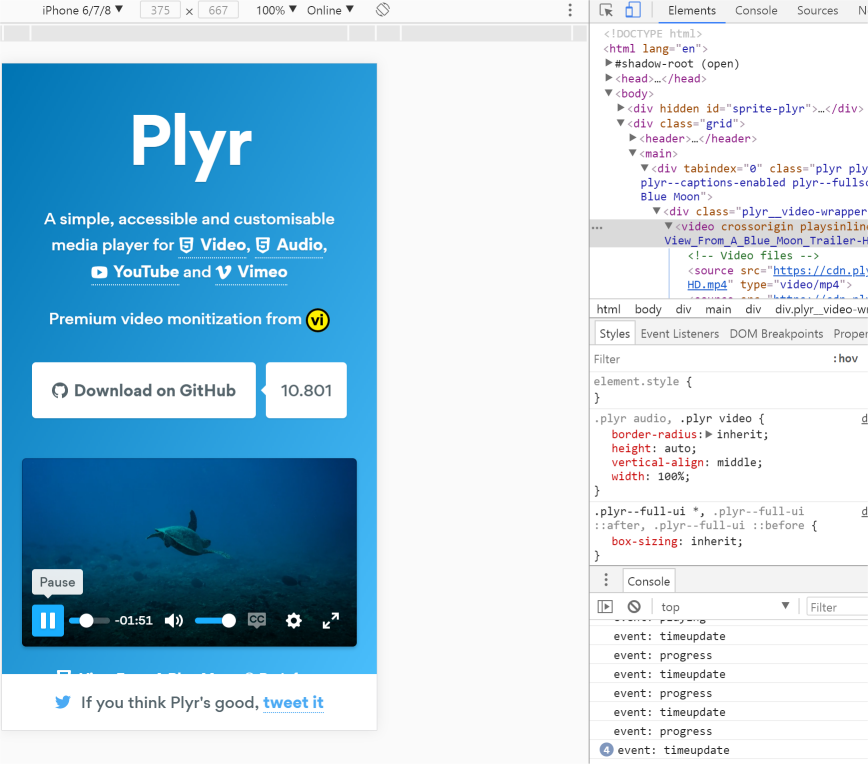
Further remarks
- Many of the :hover states don't work correctly on mobile. I think we need some touch detection to fully add touch support. Modernizr offers a "touch"/"no-touch"-class on the body, which is widely used for dealing with hover-states on mobile.
 MBWebTechMariusz
All 17 comments
I think I found the issue:
-                    utils.on(this.player.elements.controls, 'mouseenter mouseleave', function (event) {
+                    utils.on(this.player.elements.controls, 'mouseenter mouseleave touchstart touchend', function (event) {
                        _this4.player.elements.controls.hover = event.type === 'mouseenter';
                    });
Can confirm this! It's quite annoying
 malinushj
on 26 Mar 2018
malinushj
on 26 Mar 2018
Feel free to debug and PR a fix then 👍
 sampotts
on 26 Mar 2018
sampotts
on 26 Mar 2018
@malinushj I have found a quite good solution, but I can't make an pull request yet because the current version is not working for me. @sampotts the current version which is uploaded is somehow broken, I can't seek at all. Can you confirm this?
MBWebTechMariusz
on 27 Mar 2018
Yeah I noticed that - have pushed a fix. I'm working on the controls now - touch events are a monumental pain in the ass. Essential the requirements are hide after x seconds unless:
- Controls are hovered on a mouse device
- Controls are pressed on a touch or mouse device
- Loads of other scenarios I've forgotten
It doesn't help that iOS just fires all the touch events and mouse events...
sampotts
on 27 Mar 2018
Hey @sampotts , yeah, I've noticed the mutiple events while I was debugging.
I have a version which is working correctly, here are my proposed fixes:
// Determine percentage, if already visible
            if (utils.is.event(event)) {
                var pageX = event.pageX

                if (event.touches !== undefined && event.touches.length && event.touches[0].pageX !== undefined) {
                    pageX = event.touches[0].pageX
                }

                percent = 100 / clientRect.width * (pageX - clientRect.left);
            }
            if (utils.is.event(event) && ['mouseenter', 'mouseleave', 'touchstart', 'touchmove', 'touchend'].includes(event.type)) {
                utils.toggleClass(this.elements.display.seekTooltip, visible, ['mouseenter', 'touchstart', 'touchmove'].includes(event.type));
            }
                utils.on(this.player.elements.progress, !support.touch ? 'mouseenter mouseleave mousemove' : 'touchstart touchend touchmove', function (event) {
                    return controls.updateSeekTooltip.call(_this4.player, event);
                });
                    utils.on(this.player.elements.controls, !support.touch ? 'mouseenter mouseleave' : 'touchstart touchend', function (event) {
                        _this4.player.elements.controls.hover = event.type === 'mouseenter';
                    });
                    utils.on(this.player.elements.controls, !support.touch ? 'mousedown mouseup' : 'touchstart touchend touchcancel', function (event) {
                        _this4.player.elements.controls.pressed = ['mousedown', 'touchstart'].includes(event.type);
                    });
It's really hard to work out what's changed from that lot.
With the seek tooltip, I'd planned to just hide it on touch devices but could look at those changes you've done.
I can see the direction but another thing we need to support is both mouse and touch support. I think I have it fixed but seeing a weird bug with Safari after seeking it's impossible to press any other buttons in the controls and the progress container seems to get all the click events. It's so weird.
sampotts
on 27 Mar 2018
I've pushed my changes but will continue to work on a fix for after seeking. If you could take a look that'd be good.
BTW it's best to fork the repo, make your changes (run gulp to build + watch) and then commit and PR when you're done.
sampotts
on 27 Mar 2018
I think I'll push 3.0.4 for now as there's other fixes in there. Will fix the seeking issue and push 3.0.5 asap.
sampotts
on 27 Mar 2018
Ok, thank you for your time! I will consider this so we can work better together :)
MBWebTechMariusz
on 27 Mar 2018
If you need a hand, feel free to grab me in the Slack
sampotts
on 27 Mar 2018
Do you mean https://bit.ly/plyr-slack? I've found it in the readme, but it keeps saying "the invitation is not longer active". Do you have a new one?
MBWebTechMariusz
on 27 Mar 2018
Will update but try https://bit.ly/plyr-chat
sampotts
on 27 Mar 2018
I think it's better that the big-play and controls show after stoping in iphone.Dose anybody know how to archive it?
 SnugNest
on 29 Mar 2018
SnugNest
on 29 Mar 2018
@1057641912 I can confirm that the big-play Button was working when the video stopped, even on iPhone. On which version do you see the issue?
MBWebTechMariusz
on 29 Mar 2018
plyr.js --- 3.0.9
iphone5s --- IOS 11.2.6
iphoneX --- IOS 11.2.6
but it works on iPad.
You can try the two website, https://codepen.io/sampotts/pen/jARJYp and snugnest.com on iphone then you will see the big-play Button was not working when the video stopped.
SnugNest
on 29 Mar 2018
I'll close this for now as I think it's just the issue of the controls acting odd after a seek
sampotts
on 29 Mar 2018
Related issues
 lukeyouell
·
27Comments
lukeyouell
·
27Comments
 calvinthefreak
·
22Comments
calvinthefreak
·
22Comments
 stanvanheumen
·
22Comments
stanvanheumen
·
22Comments
 danicholls
·
40Comments
danicholls
·
40Comments
 fleps
·
43Comments
fleps
·
43Comments