- [x] Issue does not already exist
- [x] Issue observed on https://plyr.io
Expected behaviour
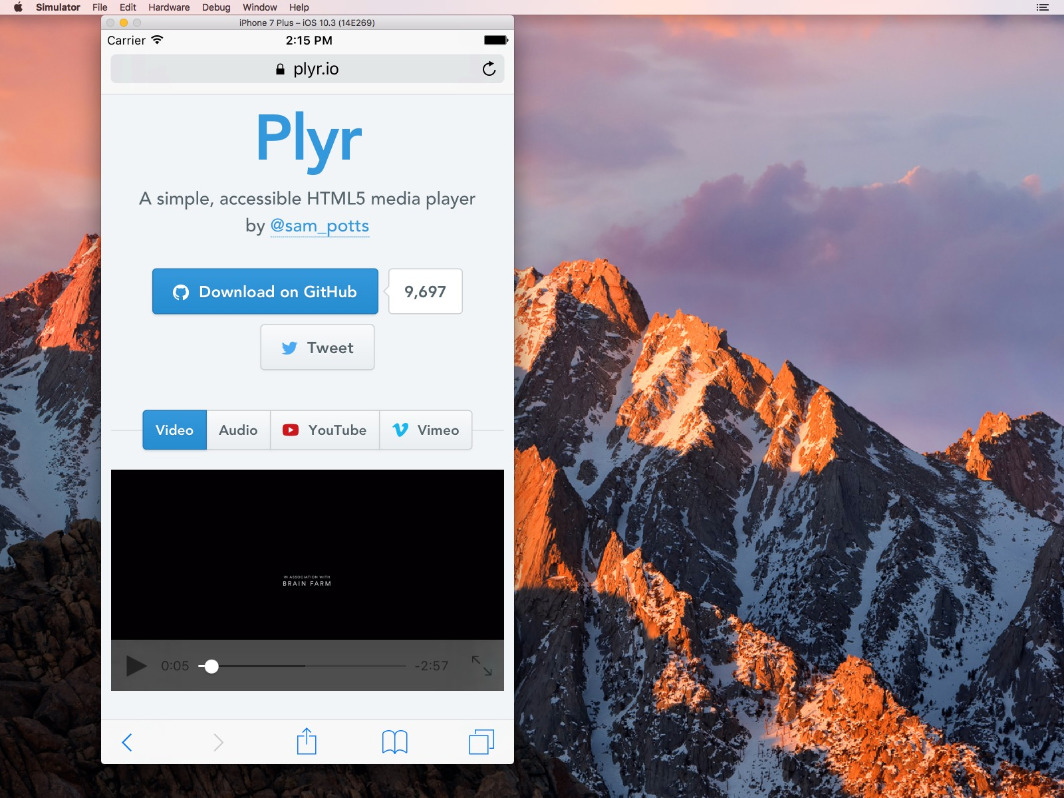
Should show custom player UI.
Actual behaviour
Does show the HTML5 player UI and the native vimeo and youtube player UI.
Environment
- Browser: Safari
- Version: 10
- Operating System: iOS
- Version: 10.3
Players affected:
- [x] HTML5 Video
- [ ] HTML5 Audio
- [x] YouTube
- [x] Vimeo

 julmot
All 10 comments
Hey Julian, did you read the docs?
playsinline support is coming in V3.
 sampotts
on 13 Aug 2017
sampotts
on 13 Aug 2017
Does playsinline affect the player UI? From my point of view this currently only controls autoplay and whether or not iOS goes in fullscreen when initially viewing a video.
julmot
on 13 Aug 2017
Yes. playsinline allows the player to remain inline rather than full screen when playing - meaning the custom UI can be used. Without it, the custom UI is pointless as it's hidden when the video is actually playing.
sampotts
on 13 Aug 2017
I'm very confused currently. I can't find answers to my questions in the docs:
- Where will the custom player UI be visible and where not?
- How to autoplay videos in all browsers with all supported formats – HTML5, Youtube and Vimeo?
- How to set default HTML5 options to other formats – Youtube and Vimeo – too (#632)? Answer for now: Manually use the API for each format. There's no API for all options targeting all formats.
What I need is a custom player UI for all recent browsers and devices, with autoplay support, especially with Vimeo support, as it's the only way to have a video cdn without branding (e.g. Youtube logo).
So, what's the current status for autoplaying and custom player UI?
I've just added playsinline to a HTML5 video, but this still shows the native iOS player UI.
julmot
on 13 Aug 2017
https://github.com/sampotts/plyr#browser-support
As I said in my first comment:
playsinlinesupport is coming in V3.
That's when the custom UI will be supported on iOS. The other issue I'll have to take a look at. Autoplay also isn't supported on iOS as outlined in the link I provided. It requires user input to play. If the video is muted and playsinline is enabled then it'll work.
I'm working on getting V3 out as quick as I can but I've had a son since starting on it and time is scarce. It's getting closer though.
sampotts
on 13 Aug 2017
That's when the custom UI will be supported on iOS.
But I've just tested it by manually adding playinline to a <video> and this didn't cause the plyr UI to appear.
However, how should playsinline solve the autoplay mechanism for Vimeo and Youtube, where it's just an iframe? And why does playsinline affect the UI of Vimeo videos, where it's embedded within an iframe too. Sorry for asking this, but it's really not clear for me.
I'm working on getting V3 out as quick as I can but I've had a son since starting on it and time is scarce. It's getting closer though.
No problem, I'd just like to clear my confusion.
julmot
on 13 Aug 2017
I'll make it a little larger so you read it...
playsinline support is coming in V3.
Current is V2.
playsinline is not supported for YouTube but is for Vimeo through their SDK/API - from memory. YouTube are little slow to make changes to their JS/iframe SDK. It's passed as a parameter when initialising. As I say though - support is coming soon
sampotts
on 13 Aug 2017
Hi @sampotts ,
Congrats with the newborn! Everything okay?
I was just wondering; do you have any idea when V3 is coming up? I'm awaiting this function to update my app.
Thanks a lot!
Kind regards.
 basiteaal
on 17 Oct 2017
basiteaal
on 17 Oct 2017
Closing this one as I think it's fixed but feel free to re-open if not solved in v3 👍
sampotts
on 21 Mar 2018
Hello @sampotts using 3.2.4 - autoplay muted youtube videos on iOS 11 - can't make it works :(
 pyotr
on 28 Apr 2018
pyotr
on 28 Apr 2018
Related issues
 afuno
·
19Comments
afuno
·
19Comments
 shainanigans
·
21Comments
shainanigans
·
21Comments
 tolew1
·
27Comments
tolew1
·
27Comments
 louie-senpai
·
23Comments
louie-senpai
·
23Comments
 fleps
·
43Comments
fleps
·
43Comments
Most helpful comment
I'll make it a little larger so you read it...
playsinlinesupport is coming in V3.Current is V2.
playsinlineis not supported for YouTube but is for Vimeo through their SDK/API - from memory. YouTube are little slow to make changes to their JS/iframe SDK. It's passed as a parameter when initialising. As I say though - support is coming soon