Plugin.video.netflix: Video Stream only at 540? - CoreElec - Linux - Arm
Bug report
Your Environment
- Netflix add-on version: 1.3.2
- Operating system version/name: Linux - CoreElec 9.2.2
- Device model: GT1 Ultimate
Used Operating system:
- [ ] Android
- [ ] iOS
- [x] Linux
- [ ] OSX
- [ ] Raspberry-Pi
- [ ] Windows
I've tried to set 1080 in the plugin setting but still it is only playing at 540p.
Yes ignored rules, not sure how I can help in debugging the cause of it only playing at 540p.
I can play at 720p on chromium (1080p with a hack extension)- armv7 browser on the exact same device.
SUMMARY for the problem
If the follow links not works, copy/paste the link in to the browser
The tests, and how to check resolutions:
https://github.com/CastagnaIT/plugin.video.netflix/issues/655#issuecomment-647163339
The cause of the problem:
https://github.com/CastagnaIT/plugin.video.netflix/issues/655#issuecomment-648695860
https://github.com/CastagnaIT/plugin.video.netflix/issues/655#issuecomment-648929816
Notice for user, to be read before you say it does not work:
https://github.com/CastagnaIT/plugin.video.netflix/issues/655#issuecomment-663852816
 spikerguy
All 230 comments
Your Environment
Netflix add-on version: 1.3.2
Operating system libreelec 9.2.1
Device model: Raspberry Pi4 1Go
Used Operating system:
Android
iOS
Linux
OSX
X Raspberry-Pi
Windows
I have exactly the same issue as Spikerguy but with libreelec 9.2.1 and Raspberry Pi4.
no HD anymore on that device.
 jlb312
on 22 May 2020
jlb312
on 22 May 2020
@spikerguy can you check in the kodi system menu that if you have whitelisted 1080p? If you look at your log and search for '540' you see that resolution is chosen from the whitelist.
 stevenhoving
on 22 May 2020
stevenhoving
on 22 May 2020
@stevenhoving
Sorry it seems that my issue is not exactly the same as @spikerguy in fact in my Whitelist I have the following line coming from my KODI log as you can see no 540 resolution.
In fact after the update to 1.3.2, I lost all HD resolution on Netflix, and I am always in SD.
Sorry for my english.
I guess our issues are relied but not excatly the same.
2020-05-22 20:19:50.855 T:3011613280 NOTICE: Found resolution 1920x1080 with 1920x1080 @ 60.000000 Hz
2020-05-22 20:19:50.855 T:3011613280 NOTICE: Found resolution 1920x1080 with 1920x1080 @ 59.940063 Hz
2020-05-22 20:19:50.855 T:3011613280 NOTICE: Found resolution 1920x1080 with 1920x1080 @ 50.000000 Hz
2020-05-22 20:19:50.855 T:3011613280 NOTICE: Found resolution 1920x1080 with 1920x1080 @ 30.000000 Hz
2020-05-22 20:19:50.855 T:3011613280 NOTICE: Found resolution 1920x1080 with 1920x1080 @ 29.970032 Hz
2020-05-22 20:19:50.855 T:3011613280 NOTICE: Found resolution 1920x1080 with 1920x1080 @ 25.000000 Hz
2020-05-22 20:19:50.855 T:3011613280 NOTICE: Found resolution 1920x1080 with 1920x1080 @ 24.000000 Hz
2020-05-22 20:19:50.855 T:3011613280 NOTICE: Found resolution 1920x1080 with 1920x1080 @ 23.976025 Hz
2020-05-22 20:19:50.855 T:3011613280 NOTICE: Found resolution 1600x1200 with 1600x1200 @ 60.000000 Hz
2020-05-22 20:19:50.855 T:3011613280 NOTICE: Found resolution 1280x1024 with 1280x1024 @ 60.000000 Hz
2020-05-22 20:19:50.855 T:3011613280 NOTICE: Found resolution 1366x768 with 1366x768 @ 59.940063 Hz
2020-05-22 20:19:50.855 T:3011613280 NOTICE: Found resolution 1280x720 with 1280x720 @ 60.000000 Hz
2020-05-22 20:19:50.855 T:3011613280 NOTICE: Found resolution 1280x720 with 1280x720 @ 59.940063 Hz
2020-05-22 20:19:50.855 T:3011613280 NOTICE: Found resolution 1280x720 with 1280x720 @ 50.000000 Hz
2020-05-22 20:19:50.855 T:3011613280 NOTICE: Found resolution 1024x768 with 1024x768 @ 60.000000 Hz
2020-05-22 20:19:50.855 T:3011613280 NOTICE: Found resolution 800x600 with 800x600 @ 60.000000 Hz
2020-05-22 20:19:50.855 T:3011613280 NOTICE: Found resolution 720x576 with 720x576 @ 50.000000 Hz
2020-05-22 20:19:50.855 T:3011613280 NOTICE: Found resolution 720x480 with 720x480 @ 59.940063 Hz
2020-05-22 20:19:50.855 T:3011613280 NOTICE: Found resolution 720x480 with 720x480 @ 60.000000 Hz
2020-05-22 20:19:50.855 T:3011613280 NOTICE: Found resolution 640x480 with 640x480 @ 60.000000 Hz
jlb312
on 22 May 2020
@stevenhoving
The only video streams I can get are :
h264 768x432 172032 bps
h264 960x540 260096 bps
h264 960x540 397312 bps
h264 960x540 784384 bps
If it can help. None are in my whitelist.
Regards
jlb312
on 22 May 2020
@spikerguy can you check in the kodi system menu that if you have whitelisted 1080p? If you look at your log and search for '540' you see that resolution is chosen from the whitelist.
My whitelist is blank, So not sure how is it getting 540. Now I have added 1080 to my whitelist let me try netflix and get back with the feedback.
Thanks
UPDATE: It is still the same. Still playing at 540p.
spikerguy
on 22 May 2020
Hello all
I confirm on Raspberry Pi 3B+ , Pi 4 , with Libreelec 9.2.1 and leia 18.6 no HD modes available anymore :
Only these modes :
h264 768x432 172032 bps
h264 960x540 260096 bps
h264 960x540 397312 bps
h264 960x540 784384 bps
It seems that Netflix change his policy for certain boxes ? It is an assumption read on kodi forum.
I don't know why.
Regards
jlb312
on 23 May 2020
as well explained by the readme, the resolutions don't depend from the add-on but on Netflix
there is little we can do, i have tried updating the user agents
update with this, then do Reset ESN from expert settings, only after try a video
and give me a new debug log
plugin.video.netflix_1.3.2_20200523_t1.zip
 CastagnaIT
on 23 May 2020
CastagnaIT
on 23 May 2020
if you can copy this file here too: manifest.json (after play video)
it is in the useer data kodi folder / addon data/ plugin netflix /...
nf debug verbose need to be enabled or this file will be not saved
CastagnaIT
on 23 May 2020
as well explained by the readme, the resolutions don't depend from the add-on but on Netflix
there is little we can do, i have tried updating the user agentsupdate with this, then do Reset ESN from expert settings, only after try a video
and give me a new debug log
plugin.video.netflix_1.3.2_20200523_t1.zip
Reseted the ESN
Enabled Debug in Verbose,
Installed the updated Plugin.
Logged in to netflix
And It is still the same.
spikerguy
on 23 May 2020
I have only SD since yesterday... silly netflix rules....
...and after some time they will wake up with their hand in the potty as Disney+ will take their customers!
 vteccorp
on 23 May 2020
vteccorp
on 23 May 2020
@spikerguy where are the log and manifest files?
CastagnaIT
on 23 May 2020
@jlb312 do not paste files or log as text
CastagnaIT
on 23 May 2020
@CastagnaIT
I am sorry but the system doesnt allow the joined file with .json extension may I used zipped format ?
jlb312
on 23 May 2020
no add ".txt" at the end of file
CastagnaIT
on 23 May 2020
I am trying again
manifest.json.txt
It seems OK now
jlb312
on 23 May 2020
@CastagnaIT
Here
Kodi Log
Where can I find the manifest ?
spikerguy
on 23 May 2020
Here is my Kodi log
jlb312
on 23 May 2020
@spikerguy in the directory
userdata\addon_data\plugin.video.netflix
jlb312
on 23 May 2020
Thanks @jlb312
I got confused with .kodi and userdata.
Manifest
spikerguy
on 23 May 2020
i tried the same tvshow letter of king on my kubuntu linux and works until 1080p
so is something related to arm devices
try this (and reset esn again before play)
plugin.video.netflix_1.3.2_20200523_t2.zip
CastagnaIT
on 23 May 2020
tryalso delete msl_data.json file and reboot kodi
CastagnaIT
on 23 May 2020
I can play the same in 1080p on the same device which is Arm AML S912, I think it is something to do with the android egl which is used, Cause as it might lead netflix to think it is an android and it is running at netflix mobile resolution.
I will try this and get back to you.
Thanks for the quick response.
spikerguy
on 23 May 2020
i do not understand your relation with android
CastagnaIT
on 23 May 2020
No change for me on RPi 4 libreelec 9.2.1 KODI 18.6 still in 540 modes
Note that I try on windows KODI the netflix plugin works in HD.
jlb312
on 23 May 2020
windows is different, netflix handles linux differently is more restrictive
also in netflix website they do not respond to linux issues, this is what netflix write on website...
Due to the many configurations of Linux, Netflix customer support is unable to assist with troubleshooting issues on Linux devices.
at the moment I don't know what else to do
CastagnaIT
on 23 May 2020
@CastagnaIT
It is very hard for me to understand how the netflix servers makes the difference between different clients with linux configuration. RPI4 libreelec (linux) worked very well till yesterday. I note that KODI stable version is now 18.7 (may 21) and libreelec 9.2.1 is still with 18.6. Many coincidences may be too.
Thanks to your efforts , lets wait and see for now.
jlb312
on 23 May 2020
@CastagnaIT
Netflix need Lib widevine to play video over their embedded video player.
to get widevine we use either from direct link which is only available for X86_64 and for the Arm devices we use the Chrome OS recovery image to extrace widevine file, and use the corresponding browser user agent to make use of the libwidevine.
So it is a complete different implementation for X86_64 and Armv7 and also different for Windows and Linux.
I will do some more digging and get back to something hopfeully.
Thanks.
spikerguy
on 23 May 2020
hdcp override on inputstream adaptive addon is on or off?
CastagnaIT
on 23 May 2020
hdcp override on inputstream adaptive addon is on or off?
Off.
spikerguy
on 23 May 2020
turn ON end try a different episode or reboot kodi
CastagnaIT
on 23 May 2020
off
jlb312
on 23 May 2020
no effects for me
jlb312
on 23 May 2020
Enabled Override HDCP
Restarted CoreElec.
tried to play a different Episode.
Still 540p.
spikerguy
on 23 May 2020
Please try also this, i updated version in the manifest request
do not think this fix the problem but better to try
plugin.video.netflix_1.3.2_20200523_t3.zip
CastagnaIT
on 23 May 2020
Please try also this, i updated version in the manifest request
do not think this fix the problem but better to try
plugin.video.netflix_1.3.2_20200523_t3.zip
Nothing wrong it trying and it doesn't work.
Updated the plugin and then restarted kodi.
Played new ep still 540p.
Thanks for the effort.
spikerguy
on 23 May 2020
I also have only playing at 540p 2days ago
My Environment
Netflix add-on version: 1.3.2
Operating system version/name: Linux - CoreElec 9.2.2
Device model: Khadas VIM3 Pro (AML A311D)
 YW-JEONG
on 24 May 2020
YW-JEONG
on 24 May 2020
Im also confirm this issue, at max 540p playing
My Environment
Netflix add-on version: 1.3.2 ( Im tryed older versions too, but same issue)
Operating system version/name: Linux - CoreElec 9.2.1 nightly
Device model: Beeling GT-King (AML S922)
 frodo19
on 25 May 2020
frodo19
on 25 May 2020
I suspect that the whole problem is due to the Widevine library. Widevine supports 3 levels of security:
- L1 (the safest)
- L2 (medium)
- L3 (the weakest)
Netflix limits the maximum resolution of the materials depending on the maximum level that your device supports:
- L1 no restrictions (UHD)
- L3 520p max
L3 is default. We need to check how the Widevine library checks the maximum level and convince the library that our device supports L1. Sounds easy in theory, in practice it will probably be very difficult;)
 marcinolawski
on 25 May 2020
marcinolawski
on 25 May 2020
I use widevine from elm recovery image and it can do 1080p on chromium though.
I think inputstream helper is also using the same image. Will check in the script and get back.
spikerguy
on 25 May 2020
Netflix limits the maximum resolution of the materials depending on the maximum level that your device supports:
widevine is only one of the pieces that is involved to get the available resolutions
netflix take in account also of type/model of device, operative system, and in some case of video production and other rules that will never be disclosed to the public
in the case of linux platforms (not android)
widevine are not involved to make manifest request
and resolutions are obtained from the manifest requested to netflix
manifest data may also vary depending on the type of ESN used
@spikerguy you use chromium on what operative system?
CastagnaIT
on 25 May 2020
@CastagnaIT
Manjaro ARM aarch64, I packaged chromium armv7 on docker with chromeos widevine extracted at time of installation, it uses chromeos user agent.
spikerguy
on 25 May 2020
can you get the user agent of cronium from this page?
https://www.whatismybrowser.com/detect/what-is-my-user-agent
CastagnaIT
on 25 May 2020
here
Its on my git
spikerguy
on 25 May 2020
but is see also
Install Netflix 1080P Extension
are you using this extension?
CastagnaIT
on 25 May 2020
Yes extension to get 1080p without extension i get 720p.
spikerguy
on 25 May 2020
the extensions invalidate the right behaviour of netflix website
so your sentence:
I can play at 1080p on chromium - armv7 browser on the exact same device.
is totally wrong
we don't use hacks here to circumvent netflix limits
CastagnaIT
on 25 May 2020
is totally wrong
we don't use hacks here to circumvent netflix limits
Yes my bad should have made that clear before.
Ok then how is the plugin making use of the widevine and useragent? Maybe I can dig into that and try different way to see of I can help in any ways?
spikerguy
on 25 May 2020
the addon usr agent is set in device_utils.py
in previous test we have tried to use this UA without success:
Mozilla/5.0 (X11; CrOS armv7l 12871.102.0) AppleWebKit/537.36 (KHTML, like Gecko) Chrome/81.0.4044.141 Safari/537.36
CastagnaIT
on 25 May 2020
the addon usr agent is set in device_utils.py
in previous test we have tried to use this UA without success:
Mozilla/5.0 (X11; CrOS armv7l 12871.102.0) AppleWebKit/537.36 (KHTML, like Gecko) Chrome/81.0.4044.141 Safari/537.36
From my understanding this can only play at 720p right? Then how was it playing 1080p before.
Also what changed have happened that now its only playing at 540p.
spikerguy
on 25 May 2020
i am not a netflix engineer
and i can not provide all answers...
we must first rely on this page as a basis: https://help.netflix.com/en/node/23742
Up to 1080p on Chrome OS
here specify "up to" that means not all content at 1080p
the initial behavior was correct (1080p)
but we can't know what changes they might have made internally
if you get 720p with Chronium
we should be able to do it also here
CastagnaIT
on 25 May 2020
if the arm UA for some reason has problem
perhaps is possible to use the standard linux UA
that it generate a different esn
if you want to try update and do reset esn
CastagnaIT
on 25 May 2020
I tried this and after reset esn I get error on parsing from netflix. Kodi Log attached.
Thanks for trying.
spikerguy
on 25 May 2020
Pasting my tests here for reference:
Thanks for all your hard work CastagnaIT.
- Intel x64 windows Leia Netflix plugin gives HD streams. Inputstream adaptive 2.4.5.
- Mi Box 3 Android Oreo Widevine L1 Leia, plugin gives HD. Inputstream adaptive 2.4.3.
- Vero 4k+ osmc Widevine L3 Leia plugin restricted to SD. Inputstream adaptive 2.4.3.
- Intel x64 libreelec nuc Leia plugin restricted to SD / Same nuc on Windows 10, gets HD streams.
All above tested on Kodi Leia 18.6
 kafantaris
on 25 May 2020
kafantaris
on 25 May 2020
@spikerguy sorry my bad
i am doing too things at once
plugin.video.netflix_1.3.2_20200525_t5.zip
CastagnaIT
on 25 May 2020
@spikerguy sorry my bad
i am doing too things at once
plugin.video.netflix_1.3.2_20200525_t5.zip
No worries, Take your time.
I tried t5 and its giving me error when trying to play the ep.
So this widevine lib is not going to work with the updated UA.
I will try using my lib and see if ithelps.
spikerguy
on 25 May 2020
what type error?
CastagnaIT
on 25 May 2020
No T5 doesn't work. It doesn't allow to play the video.
Will attach log in sometime. my sd card is being used for some other way :(
Will be back in sometime.
spikerguy
on 25 May 2020
With T5 I got error 1044 from netflix the title is not available please try another one.
If it can help
jlb312
on 25 May 2020
have you do Reset ESN before play?
CastagnaIT
on 25 May 2020
Yes I did it each time I am trying a new test.
jlb312
on 25 May 2020
have you ever tried to do also Logout? (warning this reset all settings)
CastagnaIT
on 25 May 2020
No I do not I am going to try this
jlb312
on 25 May 2020
No changes same 1044 error with T5 after logout reset esn
jlb312
on 25 May 2020
can show me the ESN?
CastagnaIT
on 25 May 2020
Yes T5 is throwing error 1044 from netflix the title is not available please try another one.
Log above.
What I usually do when you share updated plugin is.
- Install new plugin
- Reset ESN
- Try to play a new ep.
spikerguy
on 25 May 2020

This is my ESN
jlb312
on 25 May 2020
@jlb312 has the right esn (LX == linux)
@spikerguy not have the right esn ?!? (01 == CrOS):
Performing key handshake. ESN: NFCDCH-01-GDQV083WHH2KRXU69TU5UHN5Q4EWR4
but i still don't understand why that error
@spikerguy the log is a bit mixed with two differents attempts that's way i got confused
the problem is that i do not see "Performing key handshake" with the last changed esn (LX)
i will do some checks and after report
CastagnaIT
on 25 May 2020
[DELETED] need other tests
CastagnaIT
on 25 May 2020
The same problem version T5 installed on the Raspberry Pi 4 4 GB - when enabling video shows error error 1044 from netflix the title is not available please try another one.
I tried :
Delete old plugin and temporary files
Install new plugin (t5)
Reset ESN
Play a new ep.


Netflix turns on 1280x720 with chromium
I hope that I can fix it, I need netflix on Raspberry for TV
 norbix029
on 26 May 2020
norbix029
on 26 May 2020
I can add that I have the same problem on ARM boards: I only get Netflix shows in 540p now where I got at least 720p before (like, a week ago). Using CoreElec on Odroid C2 and C4 with Netflix plugin 1.3.2.
Does it help if I try out something?
I just bought the new Odroid C4 with the hope of getting 1080p DRM software decoding to work without stuttering and now Netflix stops delivering it ;-(
 robcast
on 26 May 2020
robcast
on 26 May 2020
I also get this behavior since about 1 to 2 weeks.
I am using coreelec on my X96 Max Plus and just upgraded to the latest inputstream version (2.4.5.1).
I can only play series and movies up to 540p.
If you need some logs I can provide them if you tell me which one you need.
 major-mayer
on 26 May 2020
major-mayer
on 26 May 2020
@spikerguy I had a really hard time understanding your log
because the operation sequence is not what you have described
so it is not reliable and i wasted a lot of time
i have do others checks to the esn updating sequence and is right, so it is excluded
and also nothing is changed in manifest request (compared with windows side)
@robcast i am sorry for your new device, but if you have look the resolutions table in readme
you must have seen that to not have resolutions problems you have to use an android device
is not useful to know every device because the afflicted systems are all arm's devices, excluded android at least on my android L3 working as expected as always
maybe it is possible analyze the network flow to get the manifest data from an arm device (that i do not have) that run netflix website from chromium browser (without hack extensions), and then give me the manifest data so i can see if the problem could be there
to do this there are two possibilities:
1) proxy
"netflix-mitm-proxy" that there is in my repository
instruction on readme
2) debug browser
i can not give too details here i want avoid legal problems, these are some guideline:
-open netflix website
-open chromium debug window
-navigate pages until cadmium player js file and view it
-find inside the string "Sending MSL request" then add a breakpoint in to this line
now when you try to play a video the breakpoint is fired, then find the variables "_mslrequest" and
when the child variable "method" have the string content as "manifest" then copy all content of child "body" variable in a file and attach here
CastagnaIT
on 26 May 2020
another thing with the t5 test provide me a "manifest.json" after try to play a video, never mind if stop with error
CastagnaIT
on 26 May 2020
Ok I will clean the logs.
- Deleted all logs.
- Started CoreElec.
- Installed T5
- Reset ESN.
- Try to play netflix new ep.
- Netflix returned error.
Kodi log and manifest attached.
Apologise for the previous log I think it was all mixed. I will clean the log manually everytime from now onwards.
BTW I rarely watch anything on kodi, I am just trying to help CoreElec and LibreElec users.
I will try to get the browser logs tonight if I get time.
Thanks for the support.
spikerguy
on 26 May 2020
this is an experiment, i do not thing works:
plugin.video.netflix_1.3.2_20200526_t6.zip
I will need someone to provide what i mentioned earlier
CastagnaIT
on 26 May 2020
jlb312
on 26 May 2020
Error 1044 always present
jlb312
on 26 May 2020
1. proxy
   "netflix-mitm-proxy" that there is in my repository
   instruction on readme
I could try that out, but where can i find this piece of software?
Is it a kodi addon, or should I install it somehow else? And which readme/ repo are you talking about?
major-mayer
on 26 May 2020
I could try that out, but where can i find this piece of software?
in my github repositories...
CastagnaIT
on 27 May 2020
Hmm I see, but i don't know how to install mitmdump on a coreelec system, because there is no pip or brew installer available.
And i can't just open the binary mitmdump file, because that gives me an unexpected "(" error.
major-mayer
on 27 May 2020
...the proxy is not for Kodi/addon is for ARM OS browser
it makes no sense to debug with proxy the add-on where the source codes are open source...
CastagnaIT
on 27 May 2020
Yeah this makes sense to me.
So i think that i have to switch to another OS instead of coreelec to use this browser and debug/ log the connection between the browser and netflix right?
I'm not even sure if there exists another OS for this small TV box like armbian, i only used Coreelec and Android so far, so I don't think i can help there, sorry ...
major-mayer
on 27 May 2020
this is an experiment, i do not thing works:
plugin.video.netflix_1.3.2_20200526_t6.zipI will need someone to provide what i mentioned earlier
As you mentioned, "t6" version wasn't working.
I'm looking forward to solve this issue.
(1080p resolution is working until last weekday)
If you need any logs or testing or support and so on..
I cant help you solve problem.
Thank you for your efforts!!
 kmc4001
on 27 May 2020
kmc4001
on 27 May 2020
I will try to get the data using this method.
- debug browser
- i can not give too details here i want avoid legal problems, these are some guideline:
- -open netflix website
- -open chromium debug window
- -navigate pages until cadmium player js file and view it
- -find inside the string "Sending MSL request" then add a breakpoint in to this line
- now when you try to play a video the breakpoint is fired, then find the variables "_mslrequest" and
- when the child variable "method" have the string content as "manifest" then copy all content of child "body" variable in a file and attach here
Thank you for the work.
spikerguy
on 27 May 2020
someone can test this? (reset ESN after update)
plugin.video.netflix_1.3.2_20200527_t7.zip
CastagnaIT
on 27 May 2020
T7 tested
No more error 1044
Go back to ESN NFCDHG-01-xxxx
Still limited to 540p resolution on RPi4
jlb312
on 27 May 2020
Just want to inform but a strange behaviour on Chromium Netflix.
It plays at 720 in the beginning and the settles down at 488p and it never goes back to 720p even when the internet is fast enough to handle 720p.
Will try a detailed test tonight on chromium and get back.
spikerguy
on 27 May 2020
@jlb312 try also this thanks, i think this is last attempt
plugin.video.netflix_1.3.2_20200527_t8.zip
I think netflix has made the system so complicated to limit the resolutions in the various OS that they also don't even know what is wrong
CastagnaIT
on 27 May 2020
1044 error is back
ESN NFCDHG-LX-xxxx
Sniff!! I am close to the nervous breakdown with Netflix company behavior
I am sad that I can't used my favourite KODI add-on anymore on my RPi4 and RPi3B+ (unfortunately I am not alone).
Thank you again for your efforts
jlb312
on 27 May 2020
unfortunately i don't understand the difference between addon and the chromium browser on CrOS to get missing 720p and i don't have an arm device with CrOS for make test locally
I can't teach someone remotely need someone already quite experienced in testing and the environment
the problem came suddenly, so or it is an action intended by netflix house, or they have a bug and will be fixed soon
I don't know what else to think
have you tried also to enable VP9 profile? (with regular addon version)
CastagnaIT
on 27 May 2020
I have just a last beotian question about your python code where you detect the user agent : the addon usr agent is set in device_utils.py
It seems that you detect the platform here and send it back the information to netflix am I right ? Is the problem can coming from that point ?
jlb312
on 27 May 2020
About the Vp9 profile I also tested it, the resolution remains at 540p.
jlb312
on 27 May 2020
i will try to reimplement the old 1080p unlock workaround
CastagnaIT
on 27 May 2020
Sorry just wanted to mention again, in case it's of any help, that this latest problem is not specific to arm devices. I've got the same issue on a x64 Intel nuc with libreelec.
kafantaris
on 27 May 2020
I tried to play Netflix at HD on any of my ARM boards to have something to check against but failed so far. The Netflix app under Android (Android Pie, Widevine L3) only plays SD and Chromium (Chromium 81, Ubuntu 18) did not have Widevine and I couldn't get it to install... Now I only have Chrome or Safari on Intel that plays HD but I guess that is too different to check.
Is there something I can try in Kodi on ARM?
Wild speculation: could it have something to do with resolution fall-forward in the stream? I saw that the Netflix app on Ipad starts in 720 and only after a while goes to 1080...
robcast
on 27 May 2020
Hello @robcast
This is not the right place to discuss this.
This is an issue thread which we're trying to find the fix for.
The answer to your question is very vast and complex to explain here.
You should read the read me on this repo and see what all works and how it works.
Thank You.
@CastagnaIT I am tryin to get the MSL request but I cannot seem to find it in the cadmium-playercore.js file. I can see Error sending MSL request
I will try to add breakpoint there and see if it helps.
spikerguy
on 27 May 2020
I could get 1080p again.. I don't know how..
I tried T8 , reset ESN, ESN : NFCxxx-LX-xxxx
and then I got 1044 error. so, I go back to normal 1.3.2 ,reset ESN
ESN back to NFCxxx-01-xxxx
I played ep, but surprisingly I could get 1080p..
My Environment
Operating system version/name: Linux - CoreElec 9.2.2 Nightly build 20200525
Device model: Khadas VIM3 Pro (AML A311D)

YW-JEONG
on 28 May 2020
I could get 1080p again.. I don't know how..
I tried T8 , reset ESN, ESN : NFCxxx-LX-xxxx
and then I got 1044 error. so, I go back to normal 1.3.2 ,reset ESN
ESN back to NFCxxx-01-xxxx
I played ep, but surprisingly I could get 1080p..
My Environment
Operating system version/name: Linux - CoreElec 9.2.2 Nightly build 20200525
Device model: Khadas VIM3 Pro (AML A311D)
Wow... That's good news!!!
Can you share zip file successed playing 1080p?
(You described "go back to normal 1.3.2")
And,
Did you install "normal 1.3.2" after uninstalling previous version
or overwriting previous version?
If you uninstalled previous version,
Did you choice options "clear all user data"? or not?
kmc4001
on 28 May 2020
I just update to plugin.video.netflix 1.3.2 and reset ESN.
that's all
YW-JEONG
on 28 May 2020
Working for me again at 1080p, no needed reset anything.
frodo19
on 28 May 2020
I can confirm it's working here too on my arm device, I'll check on the x64 later but I suspect it'll be the same.
Edit:
As I suspected it works fine on the LibreELEC x64 Intel NUC as well.
kafantaris
on 28 May 2020
so it was their problem as i suspected
better so
CastagnaIT
on 28 May 2020
I confirm, after installing version 1.3.2 with repo - netflix correctly plays 1080p on Raspberry Pi 4
ESN back to NFCxxx-01-xxxx
Thanks for the help
norbix029
on 28 May 2020
i didnt have to do anything. it works nicely again on my rpi 4. it goes to 1080p no problems. although throughout this problem i had some interesting findings. so when its on 540p . all is fine. but when it is only 480p it causes color issues. like the one described on the other thread (which is fixed on kodi Matrix i heard? but i dont know how to upgrade to Matrix on RPI4) . anyways now that its fixed episodes which was having color issues (480p) now works nicely. no more color issues. also interesting findings. i heard that the rpi 4 cant handle HW accel on netflix even on h264 right? so before all this 540 problems i tried using hevc etc and it is smooth. now after its fixed (the 540) it is still smooth. only i cant do hevc. when i use hevc and i open a movie or series and play em. it gives me error. i forgot the error exactly. but now only h264 and vp9 works. interestingly on 1080p vp9 is fine too. on htop it only uses 2-3 cores on about 30 percent max.
on youtube module. i tried using vp9 too to get 4k60fps stream. and suprisingly it is smooth without any hitch. i think i checked the htop back then and its fine too. so idk . is my rpi using HW accel? or what . since its weird tbh.
 xDaKillerx
on 28 May 2020
xDaKillerx
on 28 May 2020
Working again for also for me :)
major-mayer
on 28 May 2020
It works again for me to.
Thanks to all contributors aspecially @CastagnaIT and @spikerguy that spent lot of time to freeup the problem.
jlb312
on 28 May 2020
Working fine for me on 1080p.
So it confirmed that it is external.
@CastagnaIT sorry for all the trouble.
Thank you once again for all your hard work.
spikerguy
on 28 May 2020
I can confirm that Netflix start streaming again in 1080p on CoreELEC 9.2.2 / Beelink GT King. I haven't even reset ESN... mine also starts with NFCxxx... etc.
Thanks for support CastagnaIT, even though the fault was on the Netflix server side! :)
vteccorp
on 28 May 2020
Works again as it used before. Thank you for great support and attempts to fix Netflix problems :)
No need to reset anything.
 cube79
on 28 May 2020
cube79
on 28 May 2020
@CastagnaIT
It looks like the issue is back... i get only SD on rpi 3
 the-dreamer
on 11 Jun 2020
the-dreamer
on 11 Jun 2020
I confirm the bug from Netflix side is back.
my system RPi4 Libreelec 9.2.3 Leia 18.7.1
jlb312
on 11 Jun 2020
i reopen the issue if you want continue if you want talk about the problem
CastagnaIT
on 11 Jun 2020
Thank you @CastagnaIT.
It was just to inform the community but it is a good idea to reopen the topic for discussion.
jlb312
on 11 Jun 2020
1080p was working in the morning... now again... SD only!
I hope that it will "repair" itself quickly... like last time.
CoreELEC / Beelink GT King
EDIT: This time ESN has not changed it still starts with NFCxxx. I tried to reset it but it's still the same.
EDIT: It all coincided with my CoreELEC update to version 9.2.3 and I thought this was the main problem.
Indeed reopening this topic is good idea :)
vteccorp
on 11 Jun 2020
I too confirm that this issue persists.
I'm running a CoreELEC devel (9.2) on Odroid N2 board. I tried reinstalling netflix plugin (official release and master), downgrading (and updating to latest version) a widevine library, clearing caches, resetting ESN, etc. Unfortunately, nothing worked.
 adrian-007
on 11 Jun 2020
adrian-007
on 11 Jun 2020
I just wanted to say, that I got the same problem on a Pi4, Kodi18.6, raspbian buster. It coincided with a widevine update 2 days ago, so I first assumed this would be the problem. I think I tried all the suggestions here, but nothing worked so far.
 Deadmansshoe
on 12 Jun 2020
Deadmansshoe
on 12 Jun 2020
I also observe a similar issue on a fresh GS-King X (running the P0 firmware): the max resolution I can get today is 960p (running with CoreELEC, not Android).
 eenbroleke
on 12 Jun 2020
eenbroleke
on 12 Jun 2020
@eenbroleke my post on bee-link not concern this issue
GS-King X have other problems _on Android_
CastagnaIT
on 12 Jun 2020
ok, my bad, I updated both posts.
eenbroleke
on 12 Jun 2020
I can confirm this issue in my Vero 4K+ with OSMC.
@Deadmansshoe if the problem coincided with a widevine update, did you try to use the older version? I've tried an older version of the library (from September 2019) extracted from a Chrome OS recovery image, but it was the same thing, no HD at all.
 perHub
on 13 Jun 2020
perHub
on 13 Jun 2020
@perHub so far I have not tried it, just reinstalled widevine through the inputstream helper adding. Unfortunately I don't know how to install an older version so far, but I will find out and tell you then.
Deadmansshoe
on 15 Jun 2020
ok, I can tell you what I did, I downloaded an ARM Chrome OS Image and copied the file "libwidevinecdm.so" to ~/.kodi/cdm. The problem is finding a version that lets you play HD content (if downgrading the library actually helps with that), it may be so since you said this issue started after a widevine update (in my case I just installed the addon recently, I've tried the deprecated version some months ago and the HD content worked well but the hardware acceleration was not available at the moment)
perHub
on 15 Jun 2020
I have the same problem even though I haven't updated the Widevine library. I doubt that a return to the old version of Widevine would solve the problem.
marcinolawski
on 15 Jun 2020
Can confirm the issue on CoreELEC 9.2 with Plugin Version 1.4.1.
Any ideas how to debug?
If I selected "manuall stream selection" the 960x540 resolution option is the highest one I can choose.
Edit: Seems to be a Netflix Issue because they force "non-certed" devices to a lower rate?! If that is true we have to go back to the roots.
 sk2212
on 17 Jun 2020
sk2212
on 17 Jun 2020
Hello,
Do you think we can try to contact Netflix about this problem? It seems to me that "Due to the many configurations of Linux, Netflix customer support is unable to assist with troubleshooting issues on Linux devices" concerns error F7355 and not necessarily resolution selection concerns. (But I don't know much about it and I may be saying something stupid)
 Isator
on 17 Jun 2020
Isator
on 17 Jun 2020
@Isator Well, I think someone who knows something about the internals of the Netflix Plugin and used Widevine Plugin can give some information how the stream selection is requested from Netflix.
Somehow Netflix must decide which streams they provide for the client and I do not know which information they are using.
sk2212
on 17 Jun 2020
when it occurred the first time, netflix will not provide in the manifest the 1080p streams
if that's still the case, as i have said many older posts, the widevine is not the real cause
I would like to help but the only ARM device i have does not start CoreElec so black screen...then i can not do any test...
CastagnaIT
on 17 Jun 2020
Hi Stefano, which device do you own ?
If this is the GS King X, we can discuss the booting failure.
eenbroleke
on 17 Jun 2020
@eenbroleke yes it is, but not in this Issue post,
i have informed the company and i am waiting an answer,
if you have a working firmware or steps to do you can use my github email to contact me via Hangout message
CastagnaIT
on 17 Jun 2020
@CastagnaIT Well, I can debug and test for you if you tell me what I should do :-). What ARM device do you have? If nothing helps I can provide an Odroid C2 for you.
sk2212
on 17 Jun 2020
@sk2212 Send it to him now ;) The work he have doesn't have a working corelec or libreelec yet.
As he is doing such a great work with this plugin.
spikerguy
on 17 Jun 2020
@spikerguy No joke: I will do it if he wants.
Edit: Maybe, a 70€ Donation is easier ;-).
sk2212
on 17 Jun 2020
@sk2212 thank you
but now i see what the company says to me next days
I can't provide you file to testing,
we are not aware of the actual cause
then i need to do a lot of tests to figure out something, not possible in remote
CastagnaIT
on 17 Jun 2020
@eenbroleke many thanks! your solution has worked!
now i have CoreELEC working, i will try to investigate to the problem
CastagnaIT
on 17 Jun 2020
@sk2212
Place an order of a device which have good support for LE and CE and use @CastagnaIT address as delivery address.
It is one of the ways to contribute to the amazing work done by Stefano.
spikerguy
on 17 Jun 2020
I noticed an interesting thing. When I watch movies I get 540p, but when I watch trailers I get full 1080p. The only reason I can think of is that trailers are DRM free.
marcinolawski
on 18 Jun 2020
when it occurred the first time, netflix will not provide in the manifest the 1080p streams
if that's still the case, as i have said many older posts, the widevine is not the real causeI would like to help but the only ARM device i have does not start CoreElec so black screen...then i can not do any test...
please try xbian www.xbian.org https://sourceforge.net/projects/xbian/files/release/
 npmstart-pray
on 18 Jun 2020
npmstart-pray
on 18 Jun 2020
Why is the resolution still 960x540 after upgrading to plugin.video.netflix-1.4.1? How to set it to reach 720p?
My environment is: Coreelec 9.2.0
 matthuo333
on 20 Jun 2020
matthuo333
on 20 Jun 2020
@matthuo333
Because this bug is still open. #701 was for login fails error, not for this error.
marcinolawski
on 20 Jun 2020
I confirm I can't get more that 960x540p in all my Linux machines, using this Kodi addon, Firefox with 1080p extension or Google Chrome, on Arch x86-64.
I will get 1920x1080p running Microsoft Edge inside a VMWare guest "windows 10" Virtual Machine, on Linux.
The issue is not limited to ARM and Corelec but Linux in general.
This is a Netflix issue, thanks for all your hard work and your help supporting alternative OSes!
 magoscur0
on 21 Jun 2020
magoscur0
on 21 Jun 2020
With version 1.5.0 the plugin plays at SD. May be there is a problem selecting a HD stream.
 jbouwh
on 21 Jun 2020
jbouwh
on 21 Jun 2020
--edited for last updates--
Summary
The problem is limited only to linux devices with ARM CPU
If you have a x86/x64 linux device you can still playback until at 1080P.
I have made some test to try resolve the problem:
- Force 1080p in manifest request, but NF server refuse the manifest request
- I have tried to reimplement the 1080P workaround used for linux (years ago) but NF server refuse the license request
- Tried also change user agent but are worse results
On ARM cpu's NF add-on use the website "behaviour" for ChromeOS,
in the website requirements still specified until 1080P:
https://help.netflix.com/en/node/23742
~So the issue is, again, definitely from the netflix servers.~
~_The only way to understand if really the Chromebook's devices are affected
is try a real Chromebook device with ARM cpu._~
These are the only ways to try verify if the resolutions are still available:
1) Try to play from website by using _Chromebook_ and a Chrome browser, and then see if the video resolution is at 1080P (with CTRL+ALT+SHIFT+D).
2) Try to play from website by using an _ARM device_ like RPI with _Chronium_ browser, and then see if the video resolution is at 1080P (with CTRL+ALT+SHIFT+D).
Do not try compare the video resolutions with other operative systems! (e.g. windows).
so based on this info, we can start check the issue
CastagnaIT
on 21 Jun 2020
I have spoken with Netflix support and the only thing they have told me for sure was that it's not a corona limitation, so it seems they have banned a lot of devices <--- please not !!
 AreaScout
on 21 Jun 2020
AreaScout
on 21 Jun 2020
But this problem is not device specific it is happen on ChromeOS system, the manufacturer or model data are not taken in account
CastagnaIT
on 21 Jun 2020
Yes but still they banned a lot of devices with this, I mean a resolution of 540 is unacceptable in the long run
AreaScout
on 21 Jun 2020
has i say in previous post:
If someone have a Chromebook, then try playback on Chrome browser, and see if the video resolution is at 1080P (with CTRL+ALT+SHIFT+D)
so based on this info, users will have to start reporting the problem to netflix
the only way to fix this problem is, test with a Chromebook,
then if the issue happen, it is necessary report to netflix that resolutions in ChromeOS not works
CastagnaIT
on 21 Jun 2020
I know I have read it, but I do not own one, sorry
AreaScout
on 21 Jun 2020
@CastagnaIT
I can confirm that you can get HD on ARM Linux. I used this hack and I can get 720p on my Rasbery Pi 4 in Chromium browser. I'm afraid it's not that Netflix doesn't like ARM Linux, I'm afraid that Netflix doesn't like our plugin.
marcinolawski
on 22 Jun 2020
No I don't think Netflix doesn't like the plugin, it look's like they just want to support the slowness of an RPi < 4 🤣, if that script really works on an RPi4, then it must be the browser user-agent string ?
AreaScout
on 22 Jun 2020
@marcinolawski can you show a screenshot of nf video details with CTRL+ALT+SHIFT+D?
i do not have RPI to make a test to undestand the hack, can you explain better the steps?
CastagnaIT
on 22 Jun 2020
@CastagnaIT For my understanding, they are using a custom Chromium launcher with a custom user agent string which starts the Chromium Browser.
Maybe all of the magic is that user agent string which reduce the video quality to 540p.
So I think, on a Chromebook Netflix is running also without any problems.
sk2212
on 22 Jun 2020
If I choose to select the stream manually in inpustream.adaptive settings then it's even worse it's 768x432 :(
AreaScout
on 22 Jun 2020
For my understanding, they are using a custom Chromium launcher with a custom user agent string which starts the Chromium Browser.
this how can help me? i have ask for details
So I think, on a Chromebook Netflix is running also without any problems.
the theory is not useful...
CastagnaIT
on 22 Jun 2020
They are using following:
[Desktop Entry]
Version=1.0
Name=Chromium (Media Edition)
GenericName=Web Browser (Media Edition)
Comment=Access the Internet
Exec=chromium-browser %U --user-agent="Mozilla/5.0 (X11; CrOS armv7l 11895.95.0) AppleWebKit/537.36 (KHTML, like Gecko) Chrome/74.0.3729.125 Safari/537.36"
Terminal=false
X-MultipleArgs=false
Type=Application
Icon=chromium-browser
Categories=Network;WebBrowser;
MimeType=text/html;text/xml;application/xhtml_xml;x-scheme-handler/http;x-scheme-handler/https;
StartupNotify=true
Actions=NewWindow;Incognito;TempProfile;
X-AppInstall-Package=chromium-browser[Desktop Action NewWindow]
Name=Open a New Window (Media Edition)
Exec=chromium-browser --user-agent="Mozilla/5.0 (X11; CrOS armv7l 11895.95.0) AppleWebKit/537.36 (KHTML, like Gecko) Chrome/74.0.3729.125 Safari/537.36"[Desktop Action Incognito]
Name=Open a New Window in incognito mode (Media Edition)
Exec=chromium-browser --incognito --user-agent="Mozilla/5.0 (X11; CrOS armv7l 11895.95.0) AppleWebKit/537.36 (KHTML, like Gecko) Chrome/74.0.3729.125 Safari/537.36"[Desktop Action TempProfile]
Name=Open a New Window with a temporary profile (Media Edition)
Exec=chromium-browser --temp-profile --user-agent="Mozilla/5.0 (X11; CrOS armv7l 11895.95.0) AppleWebKit/537.36 (KHTML, like Gecko) Chrome/74.0.3729.125 Safari/537.36"
sk2212
on 22 Jun 2020
@CastagnaIT Screenshot:

marcinolawski
on 22 Jun 2020
@CastagnaIT Hack:
- Replace your user-aget to "Mozilla/5.0 (X11; CrOS armv7l 11895.95.0) AppleWebKit/537.36 (KHTML, like Gecko) Chrome/74.0.3729.125 Safari/537.36"
- Install libwidevinecdm.so from https://pi.vpetkov.net/libwidevinecdm.so_.zip
- (Rather not relevant) disable Xcompmgr
marcinolawski
on 22 Jun 2020
I have changed the user-agent string inside the addons/plugin.video.netflix/resources/lib/common/device_utils.py file either this is the wrong place to do it or this solution is not working
AreaScout
on 22 Jun 2020
@marcinolawski Do not know if this would help but maybe you can record the network requests sent from Chromium Browser during login/play (CTRL + SHIFT + I).
sk2212
on 22 Jun 2020
if you use chrome dev tools you can not see encrypted content
is needed to use a proxy "netflix-mitm-proxy" (in my repository) from a computer
that decrypt the flow and save it to a log
so the rpi must point the connection to the proxy in the pc
CastagnaIT
on 22 Jun 2020
another thing you can do is provide the manifest request data of your browser via chrome dev tool (CTRL + SHIFT + I)
steps:
1) open nf website and go to homepage
2) To Chrome dev tools open page Sources
3) locate the file cadmium-playcore....js and open it
4) enable the pritty view or the code is show very ugly
5) now research "Sending MSL request" and put a break point (click to the line number)
now the situation is similar to this:

ONLY now, if you try to move the mouse pointer over a image of a tvshow, the code will be paused to the break point.
then on the right of screen, you can see the data
the "method" data MUST contain "manifest" text, if it is not "manifest" press play button and try again to move the mouse over another tvshow image
when you have catch the "manifest" method, copy all "body" data to a text file and give me the file
CastagnaIT
on 22 Jun 2020
OK, but it will take a few hours before I find time for this.
marcinolawski
on 22 Jun 2020
Here is a manifest.json from a Pi4 using chromium with the method suggested in https://github.com/CastagnaIT/plugin.video.netflix/issues/655#issuecomment-647211925
CTRL+ALT+SHIFT+D confirms 1080p.
{
    "version": 2,
    "url": "manifest",
    "id": 15928332716196,
    "languages": ["en-US"],
    "params": {
        "type": "standard",
        "viewableId": 70270364,
        "profiles": ["heaac-2-dash", "heaac-2hq-dash", "playready-h264mpl30-dash", "playready-h264mpl31-dash", "playready-h264hpl30-dash", "playready-h264hpl31-dash", "vp9-profile0-L30-dash-cenc", "vp9-profile0-L31-dash-cenc", "playready-h264mpl40-dash", "playready-h264hpl40-dash", "vp9-profile0-L40-dash-cenc", "dfxp-ls-sdh", "simplesdh", "nflx-cmisc", "BIF240", "BIF320"],
        "flavor": "PRE_FETCH",
        "drmType": "widevine",
        "drmVersion": 25,
        "usePsshBox": true,
        "isBranching": false,
        "useHttpsStreams": true,
        "supportsUnequalizedDownloadables": true,
        "imageSubtitleHeight": 1080,
        "uiVersion": "shakti-v1c24c919",
        "uiPlatform": "SHAKTI",
        "clientVersion": "6.0023.976.011",
        "supportsPreReleasePin": true,
        "supportsWatermark": true,
        "showAllSubDubTracks": false,
        "videoOutputInfo": [{
                "type": "DigitalVideoOutputDescriptor",
                "outputType": "unknown",
                "supportedHdcpVersions": [],
                "isHdcpEngaged": false
            }
        ],
        "titleSpecificData": {
            "70270364": {
                "unletterboxed": false
            }
        },
        "preferAssistiveAudio": false,
        "isUIAutoPlay": false,
        "isNonMember": false,
        "desiredVmaf": "plus_lts"
    }
}
 wagnerch
on 22 Jun 2020
wagnerch
on 22 Jun 2020
Also can confirm libwidevinecdm.so is the same that InputStream Helper downloads for ARM-based machines.
wagnerch
on 22 Jun 2020
Just one remark for the issue. All stream in Kodi Coreelec , NF addon plays at 540. When I choose one Trailer, for example Snowpiercer, my CE machine play the trailer at 1980*1020, probably not protected.
frodo19
on 22 Jun 2020
mmmh thanks for the manifest this confirm that the problem is not here...
I will try to study to see if i am able to implement a different msl encryption/decr method
apparently i see no other way to try
CastagnaIT
on 22 Jun 2020
I managed to get mitm proxy working, and one thing I noticed is there is a "challenge" added to the payload. Base64-decoding it reveals some interesting cleartext information:
000004e0: f2a0 72f4 4c44 3a5f 7949 2131 f40f c1e2  ..r.LD:_yI!1....
000004f0: f118 1476 87c3 3aa1 d81a 180a 1161 7263  ...v..:......arc
00000500: 6869 7465 6374 7572 655f 6e61 6d65 1203  hitecture_name..
00000510: 6172 6d1a 160a 0c63 6f6d 7061 6e79 5f6e  arm....company_n
00000520: 616d 6512 0647 6f6f 676c 651a 170a 0a6d  ame..Google....m
00000530: 6f64 656c 5f6e 616d 6512 0943 6872 6f6d  odel_name..Chrom
00000540: 6543 444d 1a19 0a0d 706c 6174 666f 726d  eCDM....platform
00000550: 5f6e 616d 6512 0843 6872 6f6d 654f 531a  _name..ChromeOS.
00000560: 230a 1477 6964 6576 696e 655f 6364 6d5f  #..widevine_cdm_
00000570: 7665 7273 696f 6e12 0b34 2e31 302e 3136  version..4.10.16
00000580: 3130 2e36 3208 0801 1000 1800 2001 122c  10.62....... ..,
00000590: 0a2a 0a14 0801 1210 0000 0000 03d2 6749  .*............gI
I couldn't find/tell if the plugin does this?
wagnerch
on 22 Jun 2020
depends on what type of http request/response you mean
usually the challenge is used for license request
CastagnaIT
on 22 Jun 2020
I e-mailed you the proxy log, didn't want to include it on the issue. It was in the manifest request payload, btw.
wagnerch
on 22 Jun 2020
today i have 1080p to my arm device,
and i do not understand if is something that i changed in my local experiments
or if netflix has resolved the issue
someone can try and report?
CastagnaIT
on 24 Jun 2020
@CastagnaIT These are good news, yesterday I got a new libwidevine 13020.82.0 so I was confident that it could work now, but it didn't, I tested it just now again and still on my side it does not work :(
AreaScout
on 24 Jun 2020
I did also a short test and tried several shows where at least the info is displaying 1080p but still got max SD. RPI3 LibreElec 9.2.3 Germany
the-dreamer
on 24 Jun 2020
well,
i fairly certain the problem is the missing "challenge" data
i have tried a workaround and works but is not a good solution,
I will contact a dev i hope he can give me some additional information
CastagnaIT
on 24 Jun 2020
@CastagnaIT If you do have a workaround just for now, I would be happy to try it :)
AreaScout
on 24 Jun 2020
i will publish the workaround if the dev answer me that there is no alternative
about widevine procedures are no joke
CastagnaIT
on 24 Jun 2020
@CastagnaIT
Yes understandable, wooo I am happy that this will work again, I have reactivated my WiiU yesterday, but Netflix on Kodi is 100+ times better than the APP on WiiU
AreaScout
on 24 Jun 2020
Can confirm that resolution is still 540p with CoreElec 9.2 and Netflix Plugin 1.5.0
sk2212
on 24 Jun 2020
Can confirm that resolution is still 540p with CoreElec 9.2 and Netflix Plugin 1.5.0
Still the same resolution at 540p; no change.
 edragon7
on 24 Jun 2020
edragon7
on 24 Jun 2020
It seems to me this challenge blob comes from libwidevinecdm, but tracing/debugging cadmium player is a real pain with the obfuscation. Most of the clear text strings are in libwidevinecdm.
Oddly, I could take that blob from my Pi 4, drop it into my OSMC box, and also get HD video. Which suggests that it does not have anything to do with MSL PSKs or the MSL session, and nothing probably host/client specific.
But at least in my testing, it seems this "challenge" token is the problem. It also seems that only certain platforms are required to send this challenge token.
wagnerch
on 24 Jun 2020
Yes, only Linux ARM running Netflix kodi plugin, so I think on X11 ARM with older Chrome browser the problem must also be there !?
AreaScout
on 24 Jun 2020
What I mean to say is in cadmium-player there is a boolean enableCDMAttestedDescriptor, if that is true then it calls what I am guessing is CDMAttestedDescriptor class which generates the challenge. But it's pretty hard to follow. I'll have to check my reactContext on the Pi 4 to see if that is sent to request this feature. My guess is either cadmium-player knows to send it based on some platform attribute or Netflix sends it in the truths.
wagnerch
on 24 Jun 2020
the challenge data is provided in some way by widevine session
i do not think you will find something in the source
i can easly limit to add this challenge data only for arm devices this not a problem
can you send me via e-mail the full ReactContext from RPI browser?
CastagnaIT
on 24 Jun 2020
Sent 2x reactContext, 1st one is "anonymous" so I don't know if that is useful (via view source), the 2nd one is plucked via element picker and pasted into Geany (text editor).
wagnerch
on 24 Jun 2020
last mail received is good
but i found nothing of useful by comparing with windows side
CastagnaIT
on 24 Jun 2020
Yeah, only thing that stood out was obsfucatedTruths had an extra element "44" but no real smoking gun. So maybe they just base it on what the browser sends (ChromeOS), so probably as simple as any non-Android ARM device for sure.
wagnerch
on 24 Jun 2020
well i got a response,
to fix in right way the challenge data needed for the manifest, are needed changes to InputStreamAdaptive
and after test NF to use widevine encryption on all type of platforms
is probably that in the future it will be mandatory to make this change
so to now i implement the workaround
CastagnaIT
on 24 Jun 2020
Finally we have a strong lead on this :smile:
Nice work.
spikerguy
on 24 Jun 2020
This is the test version, let me know:
Kodi19:plugin.video.netflix_1.5.0+matrix.1_20200624.zip
Kodi18:plugin.video.netflix_1.5.0_20200624.zip
CastagnaIT
on 24 Jun 2020
 AreaScout
on 24 Jun 2020
AreaScout
on 24 Jun 2020
s905x2 coreelec 9.2.3 works!
 notoco
on 24 Jun 2020
notoco
on 24 Jun 2020
Confirming! Working again on Odroid C2 with CoreElec 9.2! Thanks for the amazing work, dude!
sk2212
on 24 Jun 2020
Yeahhh... 1080p works beautifully!
Beelink GT King / CoreELEC 9.2.3
Thanks for Your hard work CastagnaIT :)
vteccorp
on 24 Jun 2020
Its working again! Amazing!
PI 4, Rasbian Buster, Kodi 18.7
Thank you very much for your time and effort CastagnaTI!
Deadmansshoe
on 24 Jun 2020
Raspberry Pi 4 + LibreELEC 9.2.3 is working!
 42Swampy
on 24 Jun 2020
42Swampy
on 24 Jun 2020
Confirm Raspberry pi4 with Libreelec 9.2.3 is working right. Thanks a lot
 AlessandroSpa
on 24 Jun 2020
AlessandroSpa
on 24 Jun 2020
Raspberry Pi 3 with LibreElec 9.2.3 : it's working (Thanks a lot !), but not with every show (Brooklyn 99 is still 540 max)
Isator
on 24 Jun 2020
I have to agree with @Isator, some series only play in 540p although the plugin tells me 1080p should be possible. More examples are The Sinner and Riverdale.
As far as I have tried, movies always reach the indicated quality (or 1080p at 4k).
Deadmansshoe
on 25 Jun 2020
I confirm @Isator and @Deadmansshoe movies are playing at 1080p, but series (The.Last.Kingdom) only at 540p.
Kodi running on Arch Linux x86-64
magoscur0
on 25 Jun 2020
Any chance for kodi android widevine l3 to get 1080p
 Mantul2020
on 25 Jun 2020
Mantul2020
on 25 Jun 2020
well i got a response, ...
@CastagnaIT in case they don’t follow this repo, has someone brought this to the attention of the InputStreamAdaptive devs?
I’m looking forward to what happens in the ARM world with Apple making the change...
npmstart-pray
on 25 Jun 2020
I confirm @Isator and @Deadmansshoe movies are playing at 1080p, but series (The.Last.Kingdom) only at 540p.
Kodi running on Arch Linux x86-64
on linux not all tvshows and movies can be played as described (1080p)
for some reason this difference has always existed
but should be interesting to see in RPI browser on The.Last.Kingdom what resolution is specified
@CastagnaIT in case they don’t follow this repo, has someone brought this to the attention of the InputStreamAdaptive devs?
I’m looking forward to what happens in the ARM world with Apple making the change...
they already know
CastagnaIT
on 25 Jun 2020
Hello,
I would like to think loudly, caus last year I faced the MSL v1-to-v2 migration adaptation of jojo and markus Add-on, but, since I had an accident, I just have one functional hand, so I cannot code or support too much... but,this issue is very inportant, since a bad challange will return a bad lincense, and so....
I think that it could be great if @emilsvennesson , since it add-on (inoutstreamhelper) grabs and unpack the widevine and the complete os, maybe he could add somewhere / passes the file version of the chrome browser and widevine, so you guys can hack the User Agent correctly. since it update frequently it will be updated accord.
Or if you guys want to hack it for 1080p, you can grab the latest version for L1/L2/L3 devices from here https://omahaproxy.appspot.com/ ....What I meant is querying once per x time, or at background service load.
that way you will always have a valid and latest version depending on OS/Device.
Hope it helps!!!
BTW, You have done a really great job @CastagnaIT
 jakermx
on 25 Jun 2020
jakermx
on 25 Jun 2020
About testing......There are a "Movie Series" called Test Patterns (Id = 80018499) that would help you to see what are you video playback capabilities.....
jakermx
on 25 Jun 2020
Great work Stefano. My test results is good, fast all movies / Series played correctly in CE, GT-King 1080p.
Except some series, they played 480p or 540p like : The Last Kingdom , The Big Bang Theory, Friends, The 100 , The Queen of the Souths, The Sinner, Riverdale.
frodo19
on 25 Jun 2020
but,this issue is very inportant, since a bad challange will return a bad lincense, and so....
I don't really like the workaround, but will be necessary until ISA implements the needed interface for all platforms
the manifest challenge should not affect the license in any way, because it is a separate process
otherwise it wouldn't explain why the hardcoded challenge works although it contains the keys of my widevine session...
the challenge does not contain much data in addition to the session keys
is possible that NF use it in the manifest only to get the actual version/platform of the widevine libraries
then establish the behavior of the profiles
maybe he could add somewhere / passes the file version of the chrome browser and widevine, ...
obtain the updated version of chrome and the platform version would be nice
but from what i have seen updating the chrome version is not strictly important
in any case if he wants to do, is needed "Chrome" version but also the platform version of ChromeOS (knot to chrome version)
I just have one functional hand, so I cannot code or support too much...
I thought you were completely cured! i am sorry for this situation...
CastagnaIT
on 25 Jun 2020
Hi there,
Challenge is the encoded HTTP GET method headers where the HW ID, Session ID, Methonds and User Agent are used as Entity by NF in order to response correctly, thats why if you use an old UA, there are not much capabilities as use a newer one. if you see the MSLHandler it creates an internal HTTP Server just to get it in order to hack it. Hardcoding is a workaround, but maybe it will be a headache for you.
HW ID and ESN are linked, UA and codecs too, and As I remember, there is something made by NF wth the session ID... maybe you could try pymsl by @truedread, we used to test MSL stuff using his code.
Anyway, anything I could help, ping me at gmail...same account.
Cheers bro
jakermx
on 25 Jun 2020
The Last Kingdom, 720x432 in RPi 4 Chromium.
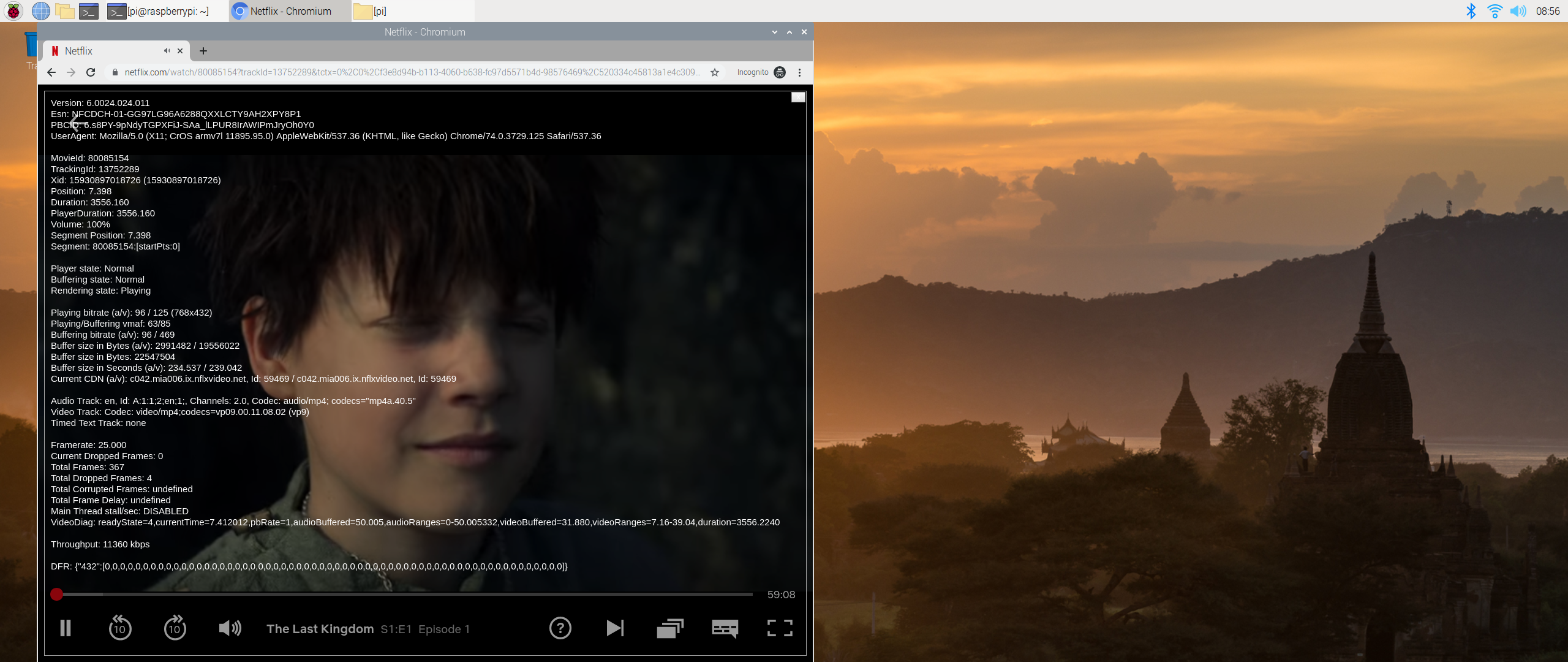
wagnerch
on 25 Jun 2020
@wagnerch thanks for the confirm
with the add-on we can get a little better resolution
768x432 >>> 960x540
CastagnaIT
on 25 Jun 2020
@CastagnaIT, it looks like, since few days the issue is back. Watching Suits Season 8, which is HD on RPI but now back on SD, Cross Checked with other shows and also not getting HD anymore.
the-dreamer
on 23 Jul 2020
Is there a widevine update you’ve missed, perhaps?
Sent from nowhere near my ready room with my new tricorder
On Jul 23, 2020, at 15:51, the-dreamer notifications@github.com wrote:
@CastagnaIT, it looks like, since few days the issue is back. Watching Suits Season 8, which is HD on RPI but now back on SD, Cross Checked with other shows and also not getting HD anymore.
—
You are receiving this because you commented.
Reply to this email directly, view it on GitHub, or unsubscribe.
npmstart-pray
on 23 Jul 2020
Not i am aware of. Last update happend 2 or 3 weeks before by input stream helper. My Rpi is running LE 9.2.3. I have not followed the whole discussion but out of my mind a solution was to add some ID/Key/Challenge from browser into the addon, but the id was static. Maybe that is now a problem. But i am not in topic to judge.
the-dreamer
on 24 Jul 2020
rolls the boxes this thing...
CastagnaIT
on 24 Jul 2020
I just checked and I'm still getting 1080p at the moment (Star Trek TNG, in Germany).
robcast
on 24 Jul 2020
Cursed 720p, Aliens vs Predators 540p, yes this rolls the boxes again :(
AreaScout
on 24 Jul 2020
This is strange, on series always the first episode is 720p, from the second episode to end its 1080p
AreaScout
on 24 Jul 2020
This is strange, on series always the first episode is 720p, from the second episode to end its 1080p
thanks for the info, i think the problem is always the same on initial widevine "challege" data, where i add a workaround
unfurnately InputStream Adaptive add-on provide this data only under android, so the implementation is missing on other OS, the maintainer already know of the problem, i do not know if @peak3d has time to spend to try implement the needed interface
i will try some test with the workaround again soon
CastagnaIT
on 24 Jul 2020
Tried some tests today and i have 1080P, not on all videos but there is
it is known that Netflix not provide hi-res resolutions on all videos under linux ARM devices
To every user
Before say that some videos not works is mandatory
check the video resolution availability by playing it from website with Chromium browser on arm a device like RPI
(CTRL+ALT+SHIFT+D for video info) and then report your test here
This is the only way to not waste time unnecessarily
The workaround is not perfect but without InputStream Adaptive interface is not possible full fix this issue
CastagnaIT
on 25 Jul 2020
@CastagnaIT
I would but CTRL+ALT+SHIFT+D seems not supported anymore ?? I have Chrome Browser under Windows 10 but no Video Info is displayed :(
AreaScout
on 25 Jul 2020
@CastagnaIT
Ok I have found a way to display this info, although it's not 100% useful because Chrome on Windows and Linux only supports 720p, ok now to your plugin:
AVP: 540p but it's the same in the browser, so this is normal ( very old movie already ... like I am )
Cursed: Episode 1 720p, all other Episodes 1080p
1983: 1080p
AJIN Demi-Human: 1080p
Castlevania: Episode 1 540p all other Epsiodes 720p, same in Chrome
Chihiros Reise ins Zauberland: 1080p
Freud: 1080p
Ghost in the Shell SAC 2045: Episode 1 720p, all other Episodes 1080p
Gotham: all Series and Episodes 540p in Chrome Browser 720p
Haus des Geldes ( La casa de papel ): 1080p
I hope that helps, if you need more examples please ask
AreaScout
on 25 Jul 2020
I would but CTRL+ALT+SHIFT+D seems not supported anymore ?? I have Chrome Browser under Windows 10 but no Video Info is displayed :(
yes it is working
but you can not use Windows to compare resolutions played on ARM linux, this is wrong
CastagnaIT
on 25 Jul 2020
Ah ok, I have to install an OS with GUI, I don't use this very often on ARM/Linux, that will take some hours or at least until tomorrow
AreaScout
on 25 Jul 2020
@CastagnaIT
I installed Ubuntu 18.04 with chromium browser on one of my odroidxu4's and it's the same, all movies/series that are 540p, are also 540p in chromium, in chromium 720p is the maximum what is allowed and of course I can't get higher resolutions like that.
AVP: 540p, same in Chrome
Castlevania: Episode 1 540p all other Epsiodes 720p, same in Chrome
Gotham: all Series and Episodes 540p same in Chrome
All other movies/series which are playing in 1080p are in 720p in Chrome
RG
P.S.: Back one year or so Gotham was 1080p, I am sure
AreaScout
on 25 Jul 2020
Ok the reason the first Episode is sometimes streamed in lower resolution seems to be the automatic video resolution feature triggered by your broadband capabilities of your internet connection, if others agree I think we can close this again
https://help.netflix.com/en/node/87
RG
AreaScout
on 25 Jul 2020
P.S.: Back one year or so Gotham was 1080p, I am sure
it is possible,
when a tvshow/movie start losing audience and/or become old,
_often_ i see Netflix remove the hi-res
several times i have seen 4k titles lowered to 1080P
this is a nuisance, because if you want to see an older title you have to accept low resolutions, or find alternatives outside netflix platform
CastagnaIT
on 25 Jul 2020
P.S.: Back one year or so Gotham was 1080p, I am sure
it is possible,
when a tvshow/movie start losing audience and/or become old,
_often_ i see Netflix remove the hi-res
several times i have seen 4k titles lowered to 1080P
this is a nuisance, because if you want to see an older title you have to accept low resolutions, or find alternatives outside netflix platform
Ok that explains why, thanks for clarify this 👍
AreaScout
on 25 Jul 2020
Hi,
Try pymsl in order to get the manifest, as far as I saw, it is codec aviability based issue,you can hack Chrome to get higher Resolutions, please Remember that once Netflix Addon gets the Manifest, the playback is called by InputStreamAdaptive, so a License needs to be available for the challenge thatisa mix of (Web Browser Version, Architecture, OS, and RootKit) .
In order to test it, enable all HD options in AddOn, and dont restrict ISA , I would suggest to set Manual Stream Selecion on ISA. then try to play anything.... and check the available video options on playback menu. or share the manifest file you got.
that way you will see the title options aviability for your system.
jakermx
on 26 Jul 2020
Try pymsl
pymsl is only a sort of copy of the code of this add-on, nothing more
and do not taken in account of some things, so can not be used.
please Remember that once Netflix Addon gets the Manifest, the playback is called by InputStreamAdaptive, so a License needs to be available for the challenge thatisa mix of
The license data come from Widevine library, ISA only route the data to the add-on.
The license challenge data is not exactly what is needed for the manifest request,
there is need of the key request challenge from Widevine key request initialization
,you can hack Chrome to get higher Resolutions,
If you are really sure about this, put here a working test _from a Chromium browser under ARM device like RPI on linux OS_.
But i'm pretty sure (since I've done tests before, previous posts) that it won't work.
In order to test it, enable all HD options in AddOn, and dont restrict ISA , I would suggest to set Manual Stream Selecion on ISA. then try to play anything.... and check the available video options on playback menu. or share the manifest file you got.
Are you kidding? ...
CastagnaIT
on 26 Jul 2020
Hi there, sorry for my big post....
I tested what I said on
RPi2 B (ARMHF)
RPi3 B+(ARMHF)
Nvidia Jetson Nano (ARM64 aka AARCH64)
X86 Single Core (1VC)
x86 Dual Core (2 VC)
amd64 Dual Core (2 VC)
amd64 QuadCore (16 VC)
amd64 OctaCore (32 VC)
All Running Bionic, Also on Windows and WIoT, Google Chrome and Google Chromium(Just Linux Based).... same manifest, NVidia Jetson Nano, requiered a hack that I compiled for L4T kernel to work with ffmpeg...gstreamer wasnt tested.
As I said before... Challenge data allows a to do it....well...ESN + right Challenge does it....let me grab the debugs and manifests for you.
I also have an RPi Zero W, but the playback hangs, but the manifest is the same.
jakermx
on 26 Jul 2020
The Issue thread say ARM devices,
netflix/widevine do not handle these chipset/systems in same way
X86 Single Core (1VC)
x86 Dual Core (2 VC)
amd64 Dual Core (2 VC)
amd64 QuadCore (16 VC)
amd64 OctaCore (32 VC)
this add-on has never made use of hacks to get 1080p resolutions (at least not under my maintenance),
and even if they work (weird enough), I'm not going to adopt these methods because they are illegal,
and the main responsibility is on me.
there is no interest in testing hundreds of devices is counterproductive
until now, with previous users in this thread we have based our tests on RPI OS + Chronium without hack plugin
so if you have no concrete data to share with practical applications without using hacks,
but only vague theories and/or randomly done tests, don't continue to create confusion in this thread
is a waste of time
CastagnaIT
on 26 Jul 2020
S905x also at a weird res ( 960x540) The 100
 ghost
on 4 Aug 2020
ghost
on 4 Aug 2020
Add check instructions for video resolution availability for ARM also in wiki:
https://github.com/CastagnaIT/plugin.video.netflix/wiki/FAQ-%28Audio%2C-Video%2C-Subtitle%2C-Other%29#video-stream-only-at-540p-sd-on-arm-device-linuxkodi-os
This issue is now closed
CastagnaIT
on 25 Oct 2020
Related issues
 dagwieers
·
12Comments
dagwieers
·
12Comments
 eyalgm
·
7Comments
eyalgm
·
7Comments
 DanilosTeam
·
17Comments
DanilosTeam
·
17Comments
 Wittmannen
·
7Comments
Wittmannen
·
7Comments
 bogdanszmyd
·
8Comments
bogdanszmyd
·
8Comments
Most helpful comment
well i got a response,
to fix in right way the challenge data needed for the manifest, are needed changes to InputStreamAdaptive
and after test NF to use widevine encryption on all type of platforms
is probably that in the future it will be mandatory to make this change
so to now i implement the workaround