Plugin.video.netflix: Can't login on Netflix plugin - Incorrect password
Bug report
Hello,
since 7 days I cannot login to the Netflix plugin :"password incorrect"
I tried login/password on a different system : it is working
I tried to reinstall libre elec and everything, same issue.
Thank you
Your Environment
- Netflix add-on version: 0.16.4
- Operating system version/name: libre elec.9.2.0
- Device model: raspberry pi 3+
Used Operating system:
- [ ] Android
- [ ] iOS
- [ ] Linux
- [ ] OSX
- [x] Raspberry-Pi
- [ ] Windows
Describe the bug
Debug log
The debug log can be found from this link:
To new users with Incorrect password problem
A new login system has been added,
is called "Authentication key"
In the readme all the information
https://github.com/CastagnaIT/plugin.video.netflix#login-with-authentication-key
~A new login solution is in test, will be released next days~
~The test files are on this comment:~
~https://github.com/CastagnaIT/plugin.video.netflix/issues/502#issuecomment-684824673~
~I suggest instead to use the test, to wait for the new release~
 arnaudcoz
All 244 comments
Hello
There is something about it. Couple days ago Netflix on "Beelink GT King TV BOX/CoreELEC/Kodi" stopped working. Today I logged out from the Netflix on PC and phone... and there is the same problem - INCORRECT PASSWORD! Now I can't log in from any device.
I think there can be two reasons: There is a data leak or Netflix began blocking shared family accounts (I share my account with my friends because in my country even family account is too expensive). First I need to contact my friends and try to change account password.
PS Or simply Your right CastagnaIT ...maybe the algorithm went crazy after the last update! :)
 vteccorp
on 6 Mar 2020
vteccorp
on 6 Mar 2020
I don't know in your country,
but here in italy netflix is implementing a block of the accounts shared between multiple users, who are not family members
but it's seem not implemented yet,
but we have been ~unofficially~ warned by the newspapers,
(i just read a statement from the CEO, and it is official)
I can assure you that there has been no change in the operation of the login code
it is rumored on the net that netflix tracks the location from where the login is made
but at the moment we don't know anything, i find a totally wrong policy
I hope it's just a temporary problem
EDIT 12/05/2020
To all users and future users
Each case that emerges seems different so it becomes impossible to find a common meeting point to try to understand how to solve the problem, then just writing here that it doesn't work is totally useless...
1) Check if Netflix automatically reset your password for suspicious activity (notice by e-mail)
2) Provide a FULL debug log BY FOLLOW INSTRUCTION IN THE README
3) Explain if you use netflix only from the Kodi library, and how often you open and browse the add-on
4) Explain what operations you were doing when it happened, or did you do the last time you used
5) Let me know if the device stays with Kodi on 24 hours a day, without ever closing Kodi or turning off the device
In the Wiki there is a temporary solution, but, this will cancel any possibility of future testing in your system:
https://github.com/CastagnaIT/plugin.video.netflix/wiki/FAQ-%28Errors%29#email-or-password-is-incorrect
 CastagnaIT
on 6 Mar 2020
CastagnaIT
on 6 Mar 2020
Hello,
how can we explain that I can use Netflix on Mac OS Catalina with chrome and cannot with the same login/password on LibreELEC : "password incorrect" ?
thank you
arnaudcoz
on 6 Mar 2020
I had the same problem of the incorrect password today with the Netflix add-on v1.0.0, I checked my email and I got this message from Netflix telling me to reset my password, I changed the password and the problem of the incorrect password solved for me (the problem of the incorrect password happened after I deleted Kodi folder multiple times and installed the Netflix add-on every time).

 Essam311
on 7 Mar 2020
Essam311
on 7 Mar 2020
is not version 1.0.0 happens with all versions
I don't know what kind of things netflix is changing, but it's clearly related to what i wrote earlier
no matter if it was not shared, they most likely modified the protection algorithms
CastagnaIT
on 7 Mar 2020
@CastagnaIT I understand that it happens on all the versions, I just was referring to the version I was using, and the excessive login at a short time could result in Netflix changing the password by itself same as using a VPN or sharing the accounts.
Essam311
on 7 Mar 2020
Hello,
i have just installed v 1.0.0
still the "incorrect password" issue.
then I delete everything in the directory : LibreELEC:~/.kodi/userdata/addon_data/plugin.video.netflix/database
try to log on : same issue again.
arnaudcoz
on 7 Mar 2020
Do i have to reset password data base ? is it located in LibreELEC:~/.kodi/userdata/addon_data/plugin.video.netflix/database ?
thank you
arnaudcoz
on 7 Mar 2020
, and the excessive login at a short time
this does not happen,
login is done only first time (when you receive the e-mail notification), all subsequent times it does not happen because it uses cookies as it does in the browser, so it resumes the same session left pending
CastagnaIT
on 7 Mar 2020
Do i have to reset password data base ? is it located in LibreELEC:~/.kodi/userdata/addon_data/plugin.video.netflix/database ?
thank you
it should not be necessary to delete the database,
so you lose all your data
you can delete files:
- COOKIE_xxxxxxx
- msl_data.json
CastagnaIT
on 7 Mar 2020
@CastagnaIT I had to delete Kodi folder and install the Netflix add-on and everything and enter my email and password for testing many times. Not just a regular logout and login.
Essam311
on 7 Mar 2020
if you delete everything and start from scratch, and after works
can mean anything...
before deleting everything it was necessary to do take intermediate steps, this way it doesn't help
CastagnaIT
on 7 Mar 2020
@arnaudcoz provide a debug log
instruction in Readme https://github.com/CastagnaIT/plugin.video.netflix#something-doesnt-work
after enabled debug and debug verbose, reboot Kodi before take the log
CastagnaIT
on 7 Mar 2020
@CastagnaIT Deleting Kodi folder not because I was trying to fix the problem of the incorrect password, I was trying to modify the Netflix add-on and testing if what I did will work or not in a clean installation, I think deleting Kodi folder and installing the Netflix add-on many times in a short time and entering my password and email triggered Netflix to change my password by itself, this happened to me before long time ago while using 0.13.XX versions, and this is the reason checking my email was the first thing I did. Not saying there anything wrong with the Netflix add-on, just saying that signing in Netflix too many times in a short period of time may trigger Netflix to think the account is compromised based on my experience with deleting Kodi folder many times and installing the Netflix add-on clean installation every time which requires entering my email and password many times in a short amount of time.
Essam311
on 7 Mar 2020
Hello,
You are right, I had to change the password on Netflix website.
it is doing fine now.
thank you
arnaudcoz
on 7 Mar 2020
Ok, guys. I have a problem.
After changing my password, I started using Netflix without any problem. Then Netflix sent an e-mail for suspicious transactions. I completely reset my RPI device and reloaded it again. I installed Netflix and started installations. The system gave the username or password incorrect error after
downloading the widevine CDM. Then it threw me out of Netflix. When I tried logging in again, it gave a password error. What's the problem? I do not want to change my password again because Netflix says it as a suspect .
 brhnsfrn
on 12 Mar 2020
brhnsfrn
on 12 Mar 2020
can you take this test?
-Reset again the netflix password
-Reinstall again (only) netflix addon
NOW BEFORE open the addon,
1)Enable Kodi debug
2)Open context menu from Netflix addon icon (without open addon), select "Settings"
In expert Settings, change Debug to Verbose, Press OK
Only now, login, when it stops for incorrect password extract the Kodi log and attach here or use hastebin
CastagnaIT
on 12 Mar 2020
I experienced the problem today,
I haven't logged in to netflix on my android for about 10 days
then when kodi started up, netflix reset my password
Fortunately in my device i always leave the debugging enabled
apparently it seems to be caused by some expired cookies
Unfortunately, no one gave me a log to make a comparison
so i will have to wait for the cookies to expires again to get a confirmation of this theory
CastagnaIT
on 14 Mar 2020
Well, i first thought the Addon stole my Account + Password since i could not login via my Computer, at least i know now that Netflix fucked up.
That will be fun to explain to my Brother though, who is the account owner, as to why he has to change the password.
But still, thanks for the Addon, it worked perfect when it did during this one day.
Edit: Huh strange, i asked my other Brother and he showed me that he could login to Netflix with his Iphone without a problem, yet i still cant login via my PC.
 DieHardjagged
on 15 Mar 2020
DieHardjagged
on 15 Mar 2020
I have the same buy only with the plugin. I don't know if the cookies are still valid, but, I can access with computer, tablet, Tvsmarttv, with the kodi plugin it throws me a incorrect password.
 joaomamede
on 4 Apr 2020
joaomamede
on 4 Apr 2020
Same here. Logins with other devices work, Add-In fails during login (first start login). No mails from netflix.
2020-04-17 19:46:14.650 T:140164146462912   DEBUG: ------ Window Deinit (DialogKeyboard.xml) ------
2020-04-17 19:46:14.913 T:140161602295552   DEBUG: [plugin.video.netflix (1)] Handling HTTP IPC call to login
2020-04-17 19:46:14.918 T:140161743574784   DEBUG: [plugin.video.netflix (0)] Handling HTTP POST IPC call to login
2020-04-17 19:46:14.918 T:140161743574784   DEBUG: [plugin.video.netflix (0)] Executing GET request to https://www.netflix.com/profiles/manage
2020-04-17 19:46:15.737 T:140161743574784   DEBUG: [plugin.video.netflix (0)] Request took 0.196685s
2020-04-17 19:46:15.738 T:140161743574784   DEBUG: [plugin.video.netflix (0)] Request returned statuscode 200
2020-04-17 19:46:15.738 T:140161743574784   DEBUG: [plugin.video.netflix (0)] Call to _request_call took 197ms
2020-04-17 19:46:15.738 T:140161743574784   DEBUG: [plugin.video.netflix (0)] Extracting reactContext JSON
2020-04-17 19:46:15.752 T:140161743574784   DEBUG: [plugin.video.netflix (0)] Call to extract_json took 15ms
2020-04-17 19:46:15.752 T:140161743574784   DEBUG: [plugin.video.netflix (0)] Extracting api urls from webpage
2020-04-17 19:46:15.752 T:140161743574784   DEBUG: [plugin.video.netflix (0)] Extracted {u'browser_info_version': u'78.0.3904.92'}
2020-04-17 19:46:15.752 T:140161743574784   DEBUG: [plugin.video.netflix (0)] Extracted {u'auth_url': u'XXXXXXXXXXXXXXX'}
2020-04-17 19:46:15.752 T:140161743574784   ERROR: [plugin.video.netflix (0)] Could not extract [u'models', u'playerModel', u'data', u'config', u'ui', u'initParams', u'apiUrl']
2020-04-17 19:46:15.752 T:140161743574784   DEBUG: [plugin.video.netflix (0)] Extracted {u'request_id': u'XXXXXXXXXXXXXXXX'}
2020-04-17 19:46:15.752 T:140161743574784   ERROR: [plugin.video.netflix (0)] Could not extract [u'models', u'playerModel', u'data', u'config', u'core', u'assets', u'core']
2020-04-17 19:46:15.752 T:140161743574784   ERROR: [plugin.video.netflix (0)] Could not extract [u'models', u'playerModel', u'data', u'config', u'ui', u'initParams', u'uiVersion']
2020-04-17 19:46:15.752 T:140161743574784   DEBUG: [plugin.video.netflix (0)] Extracted {u'api_endpoint_root_url': u'https://www.netflix.com/api'}
2020-04-17 19:46:15.752 T:140161743574784   DEBUG: [plugin.video.netflix (0)] Extracted {u'browser_info_os_version': u'0.0.0'}
2020-04-17 19:46:15.752 T:140161743574784   DEBUG: [plugin.video.netflix (0)] Extracted {u'browser_info_os_name': u'Linux'}
2020-04-17 19:46:15.752 T:140161743574784   DEBUG: [plugin.video.netflix (0)] Logging in...
2020-04-17 19:46:15.760 T:140161743574784   DEBUG: [plugin.video.netflix (0)] Executing POST request to https://www.netflix.com/login
2020-04-17 19:46:16.102 T:140161743574784   DEBUG: [plugin.video.netflix (0)] Request took 0.07391s
2020-04-17 19:46:16.102 T:140161743574784   DEBUG: [plugin.video.netflix (0)] Request returned statuscode 200
2020-04-17 19:46:16.102 T:140161743574784   DEBUG: [plugin.video.netflix (0)] Call to _request_call took 74ms
2020-04-17 19:46:16.102 T:140161743574784   DEBUG: [plugin.video.netflix (0)] Extracting session data...
2020-04-17 19:46:16.102 T:140161743574784   DEBUG: [plugin.video.netflix (0)] Extracting reactContext JSON
2020-04-17 19:46:16.112 T:140161743574784   DEBUG: [plugin.video.netflix (0)] Call to extract_json took 9ms
2020-04-17 19:46:16.112 T:140161743574784   ERROR: [plugin.video.netflix (0)] Login not valid, error code incorrect_password
2020-04-17 19:46:16.112 T:140161743574784   DEBUG: [plugin.video.netflix (0)] Call to extract_session_data took 9ms
 adlerweb
on 17 Apr 2020
adlerweb
on 17 Apr 2020
Running a Mi Box with Android 8 and the addon always says my Netflix password is incorrect.
Tried Kodi 18 Leia and Matrix and different versions of the addon.
On all my other Android devices, tv & phone with different networks, Netflix works fine.
Anyone else with a Mi Box Android 8 that found a solution?
 mo123
on 24 Apr 2020
mo123
on 24 Apr 2020
I highly appreciate @CastagnaIT for his great work, and I need a reply from him for peace of mind only.
This is a serious concern, I have a premium account but the Netflix app on my 2015 Nvidia Shield doesn’t support Atmos format. The only way I can get the Atmos format is through this add on.
The concern is, will my login credentials be exposed to anyone other than Netflix? Will Netflix know I am using the add on? Please let me know.
 showmak
on 6 May 2020
showmak
on 6 May 2020
yes my dog now know your password and watch sex education...😂
so in the Wiki there are all your answers
CastagnaIT
on 6 May 2020
yes my dog now know your password and watch sex education...😂
so in the Wiki there are all your answers
Lol, thank you for the quick reply. I read the Wiki and indeed the answer to my concern is there.
Please stay safe.
showmak
on 6 May 2020
I'm getting login errors like @adlerweb now too :/
 mackal
on 10 May 2020
mackal
on 10 May 2020
I have exactly the same problem
 cesarpuig
on 10 May 2020
cesarpuig
on 10 May 2020
@mackal have you resolved?
if you have not resolved, can you provide a full log with verbose nf debug enabled?
CastagnaIT
on 11 May 2020
@mackal have you resolved?
if you have not resolved, can you provide a full log with verbose nf debug enabled?
Turns out my brother changed the password again, but my browser sessions was never killed and I just assumed I had the right password still (last time the password changed, I had to relogin on browser as well ...), sorry I can't provide more help :(
mackal
on 11 May 2020
Having an identical issue; Netflix is working on my Laptop, my Smartphone but not on my Kodi.
 sajo84
on 11 May 2020
sajo84
on 11 May 2020
Turns out my brother changed the password again, but my browser sessions was never killed and I just assumed I had the right password still (last time the password changed, I had to relogin on browser as well ...), sorry I can't provide more help :(
if he changed password is normal that report invalid password...
but does not happen immediately here on python we can't reproduce the website in full, so it's impossible to solve all particular cases
To all users and future users
Each case that emerges seems different so it becomes impossible to find a common meeting point to try to understand how to solve the problem, then just writing here that it doesn't work is totally useless...
1) Check if Netflix automatically reset your password for suspicious activity (notice by e-mail)
2) Provide a FULL debug log BY FOLLOW INSTRUCTION IN THE README
3) Explain if you use netflix only from the Kodi library, and how often you open and browse the add-on
4) Explain what operations you were doing when it happened, or did you do the last time you used
5) Let me know if the device stays with Kodi on 24 hours a day, without ever closing Kodi or turning off the device
In the Wiki there is a temporary solution, but, this will cancel any possibility of future testing in your system:
https://github.com/CastagnaIT/plugin.video.netflix/wiki/FAQ-%28Errors%29#email-or-password-is-incorrect
CastagnaIT
on 12 May 2020
I hope I did now the correct debugging
01_KODI.log
I use LIBREELEC on KODI 18, Netflix Addon 1.2.2
Kodi always ON (24/7)
sajo84
on 12 May 2020
@sajo84 your problem is another again different to others,
i see this:
2020-05-12 14:53:44.641 T:1790935936 DEBUG: [plugin.video.netflix (3)] It is not possible to get a system UUID creating a new UUID
I will provide you with a modified version for testing, then you will need to provide me a log with the modified version, so i can verify where the problem is coming from
CastagnaIT
on 12 May 2020
@sajo84 install and give me a new log thanks
plugin.video.netflix_1.2.2_20200512_rpi_t1.zip
CastagnaIT
on 12 May 2020
Here we go with new Debug log
01_KODI.log
Thanks for your help.
sajo84
on 12 May 2020
@sajo84 again wrong log no nf debug
CastagnaIT
on 12 May 2020
New
01_KODI_NEW.log
sajo84
on 12 May 2020
Found the issue, install this:
plugin.video.netflix_1.2.2_20200512_rpi_t2.zip
then you will have to logout and redo the login
CastagnaIT
on 12 May 2020
I've activated the Debug-logging on Kodi settings => System and set logging level on Netflix Addon to Verbose with the new plugin.video.netflix_1.2.2_20200512_rpi_t2. (I do not see how to activate nf debug)
Same issue:
01_KODI.log
sajo84
on 12 May 2020
you have do Logout? settings>logout?
i do not see the Logout executed in log
CastagnaIT
on 13 May 2020
Hi,
After changing the password, it is working again! :)
sajo84
on 14 May 2020
having a "+" sign in the account email causes this issue. Simply change your accounts adress to something else:
foo.[email protected] <- is not working
foo.[email protected] <- is working
 mhutzsch
on 12 Jun 2020
mhutzsch
on 12 Jun 2020
@mhutzsch
can you make a login test with email with plus "+" sign?:
(take the version you need)
Kodi18: plugin.video.netflix_1.4.0_20200613.zip
Kodi19: plugin.video.netflix_1.4.0+matrix.1_20200613.zip
CastagnaIT
on 13 Jun 2020
@CastagnaIT thanks for fixing it. Will try later and report (not sure if I find some time today for, if not tmr)
mhutzsch
on 13 Jun 2020
@CastagnaIT didnt't work. See attached kodi.log
(Ignore the parts in the log where I uninstalled and reinstalled the plugin, I just wanted to be on the offical one instead of the patched version. The 401 caused by too many requests can be ignored as well)
I tried it the following way:
- Installed official netflix plugin from repo
- Logged in into netflix
- Streamed videso
- installed patched version
- logged out from netflix
- changed netflix mail adress to something with "+" ([email protected])
- restartet kodi
- logged in into netflix with patched version
- login works
- streaming video causes error:
ERROR: [plugin.video.netflix (0)] {"entityauthdata": {"authdata": {"pubkeyid": "MSL_TRUSTED_NETWORK_SERVER_KEY", "identity": "Netflix"}, "scheme": "RSA"}, "errordata": "eyJpbnRlcm5hbGNvZGUiOjIwNTAwNywibWVzc2FnZWlkIjo5NDU4MTczMDUyNjA0MzAsImVycm9yY29kZSI6NywiZXJyb3Jtc2ciOiJFbWFpbCBvciBwYXNzd29yZCBpcyBpbmNvcnJlY3QuIiwidGltZXN0YW1wIjoxNTkyMDcxMzM3fQ==", "signature": "cqVFma0L+gD9Yk73bAOI3yExsEpPEmjkwaJRChPAyezMnlRDpho+O2fMHehdYUmvIWgns49KOsx405qb6ICtRGgE1gCvvbnRnBXM069fXjnV6TM8T0JqboE8lFYvb2NxbIz+0HSajz6J947sxg3+Ly/4YYB0IPWssNoojtSBGbMyiQYbj1SJuuauo4NrsojCj9EYOpxqoD1DxJoMc67yCwy70BHqXZ/JyFvTWGrssIwQyK2JdF89vsxoakA3a/Z5mQU4J94L4WlBdjIMa0maJHR2JR314YOG1L/Yo2zx7Idk7g0qgAPmUAgKCJZWw14tDuJ/TS/Y2EColMwSUWJQVw=="}
For me, you don't need to do any further investigation. I can live with the workaround not having ay suspicious signs in my account.
kodi.log
mhutzsch
on 13 Jun 2020
but it does raise a question for me,
can other special characters than "+" cause problem with login/playback?
can countries that using special characters have difficulties?
i will add in to todo list
CastagnaIT
on 13 Jun 2020
Well, it could be an unexpected behaviour in the netflix api...
mhutzsch
on 13 Jun 2020
@CastagnaIT thanks for your work on this plugin. I am having the same error as @adlerweb I think using the latest 1.7.1 plugin on Leia.
[DELETED - no log text in message content]
See attached log file (I've enabled DEBUG/verbose).
I am using an e-mail address with format firstname.[email protected] and the password has a special character in it. Could these be causing issues? I am also from New Zealand so I don't know if there's any weird regional problem?
Just like @adlerweb I have no problems logging into Netflix on other devices, browsers, apps. I haven't been locked out or forced to reset the password.
Let me know if I can help further...
 Air-w0lf
on 18 Aug 2020
Air-w0lf
on 18 Aug 2020
@Air-w0lf your email has no particular special characters,
can you write here the special characters used for password? (also intended with characters with particular accents dots etc..)
CastagnaIT
on 18 Aug 2020
@Air-w0lf your email has no particular special characters,
can you write here the special characters used for password? (also intended with characters with particular accents dots etc..)
Thanks @CastagnaIT for the prompt response. The only special character in the password is '@' and everything else is just regular English letters and numbers. If it was up to me I would have changed the password already to test my theory but this is a shared premium account with four people using it and so I don't want to cause them problems if possible!
Air-w0lf
on 18 Aug 2020
it would have saved me a lot of time,
i will try to use a password with the "@"
i will let you know next days
the @ is at start/end or between the password text?
CastagnaIT
on 18 Aug 2020
Hi,
I have exactly the same problem. My password also had a @ in the middle so I removed it and the problem persists. In the attached log and after one unsuccessful try (password incorrect) I could login but with an error and the addon still doesn’t work.
Thank you for your help.
 ravenjmsa
on 18 Aug 2020
ravenjmsa
on 18 Aug 2020
The same problem here, it started yesterday with version 1.7.1. I have two Kodi boxes, one Minix Neo U9-H with Android 6.0.1 and Kodi Leia (18.8), and another one, an ubuntu-based, AMD computer with Kodi Leia (18.8). I logged out in one of the computers (the Ubuntu Box) and I couldn't log in anymore. I reset the password in the Netflix website and the problem remained. Then, due to the password reset, I was asked to log in again, in the Android box, but I couldn't. The official Netflix apps in my Android Phone (an Android 10 based Nokia 6.1 with the latest Netflix app) and the latest compatible with Android 6.0.1 in the Minix Box login without problem. I was trying to synchronize both Kodi boxes' libraries through a MySQL database installed in the Ubuntu box. At Kodi level, they synchronize terrifically, but I started experiencing problems at Netflix Addon level (later I discovered the problem, but it was too late, I had already logged off in one of the boxes and I couldn't log in again). Both, my login and my password have no special characters, just regular letters and numbers. Now I'm doing some stuff I have to finish, but as soon as I have time, I will read the instructions and attach both log files, the one from the Minix box and the one from the Ubuntu box.
 lilomaster
on 18 Aug 2020
lilomaster
on 18 Aug 2020
Almost identical issue to @lilomaster . Installed kodi 18.8 with Netflix 1.7.1 on a Minix Z64 (64 bit running linux Mint 20.0) early this week. First run configuration ran well, provided credentials and all was good. Played a few shows. Yesterday decided to install the netflix addon to another kodi machine (AsRock Beebox also running linux Mint 20 and Kodi 18.8). On first install received "Incorrect password" issue. On same machine logged successfully into Netflix via browser - no issues so not a Netflix issue. Didn't receive any "suspicious activity" email from Netflix. Changed password anyways via browser. Tried again on Kodi and no go.
Went back to the other Kodi box (which previously worked well) and obviously since I had changed the password now didn't work. Provided update NEW credentials and now getting "Incorrect password" issue, so addon doesn't work on this machine either. New password works on both browser and android phone app. Both email and passwords have no special characters.
Attached kodi.log
Check if Netflix automatically reset your password for suspicious activity (notice by e-mail) - No email recieved
Provide a FULL debug log BY FOLLOW INSTRUCTION IN THE README - attached
Explain if you use netflix only from the Kodi library, and how often you open and browse the add-on - used it on Kodi only for last week, only browser once after I had the issue
Explain what operations you were doing when it happened, or did you do the last time you used - see above
Let me know if the device stays with Kodi on 24 hours a day, without ever closing Kodi or turning off the device - turned kodi device 1 off before setting up kodi device 2, not on 24/7
 petercep
on 18 Aug 2020
petercep
on 18 Aug 2020
OK. As I said earlier, I attach both my Kodi logs. I activated the Verbose mode in my log. Sorry guys, in the previous files I forgot to activate the Debug Log in Kodi. These are the proper files.
As I said earlier:
- no special characters in username nor password either.
- Both machines have a single MySQL DB synchronized, both in Kodi and Netflix plugin (the DB is stored in the Ubuntu box)
- Official Netflix apps work without a problem.
- The Ubuntu Box stays on 24/7, but I regularly update packages and addons, so I restart it, at least, once a week, some times, more often.
- On the other hand, the Minix box stays off when not in use.
- No password reset by Netflix due to suspicious behavior (no e-mail from Netflix).
Thanks in advance.
DEBUG_kodi_Minix_Neo_U9-H.log
DEBUG_kodi_Ubuntu_Box.log
lilomaster
on 18 Aug 2020
BTW I should specify that I am a first time user of this add-on and I immediately hit this issue yesterday. Sounds like this could be an issue for some who need to authenticate for the first time or re-authenticate? Could it be that Netflix have changed something in the background?
Air-w0lf
on 19 Aug 2020
From today also to me started raise incorrect password error
I don't know what's changed
I will let you know if i find anything
For the Logout problem the issue is fixed in DailyBuild version
CastagnaIT
on 19 Aug 2020
Found the problem due to website changes,
Please update with this test and let me know:
Kodi 18:
~[plugin.video.netflix_1.7.1_20200819_t1.zip]~
Kodi 19:
~[plugin.video.netflix_1.7.1+matrix.1_20200819_t1.zip]~
CastagnaIT
on 19 Aug 2020
thanks mate. Awesome addon BTW!
I just updated, but still getting login failed, with a correct password(no funky chars!) same on rpi2 + nuc- tried a reboot for shits n giggles. *Kodi 18
 trevevs
on 19 Aug 2020
trevevs
on 19 Aug 2020
Thanks for your quick response! Tried the update above, still does not work. Opened Kodi, removed existing addon, closed kodi, opened and installed from zip, asked for credentials...Still getting incorrect password.
petercep
on 19 Aug 2020
Strange behaviour of website under windows works, but under linux the endpoint seem not works correctly and cause the login issue...
seem that using the "dynamic" login endpoint works
i will attach another test as soon as possible
CastagnaIT
on 19 Aug 2020
i have tried again the test zip (under linux)
and sometime raise incorrect password and other times works as usual
sound like more as netflix website bug
Update: tested also under CoreElec and works as usual
so i suggest to try login multiple times
could be a temporary website issue
CastagnaIT
on 19 Aug 2020
MiBox
i have the same issue, tried everything nothing works, incorrect passwod
 DemFaR
on 19 Aug 2020
DemFaR
on 19 Aug 2020
Wonderful!
It works like a charm, on this side. In my Ubuntu box, it logged in immediately. In my Minix Android TV Box it logged in after three attempts.
lilomaster
on 20 Aug 2020
Found the problem due to website changes,
Please update with this test and let me know:
Kodi 18:
plugin.video.netflix_1.7.1_20200819_t1.zip
Kodi 19:
plugin.video.netflix_1.7.1+matrix.1_20200819_t1.zip
I was configuring for the first time today Kodi on Raspbian and was having the password problem. I downloaded this version, and now is working, thank you.
 Pipa10
on 20 Aug 2020
Pipa10
on 20 Aug 2020
ha mine just worked on my NUC (libreelec) after a few tries. Rpi2 (libreelec ) still no good though after a ton of attempts..
trevevs
on 20 Aug 2020
@trevevs can you try again on RPI with this:
~Kodi 18: [plugin.video.netflix_1.7.1_20200820_t2.zip]~
~Kodi 19: [plugin.video.netflix_1.7.1+matrix.1_20200820_t2.zip]~
CastagnaIT
on 20 Aug 2020
ive tryed last one still problem exists.When i first wrote password it says login ok the a new bar appears logout succsesfull.After that only inccorect password error.Using android tv on kodi 18.8. On my phone with 18.7 works like a charm,same on my pc.
 vakilll
on 20 Aug 2020
vakilll
on 20 Aug 2020
@trevevs can you try again on RPI with this:
Kodi 18: plugin.video.netflix_1.7.1_20200820_t2.zip
Kodi 19: plugin.video.netflix_1.7.1+matrix.1_20200820_t2.zip
Hey- just tried and no good.
cheers
trevevs
on 20 Aug 2020
I have found how compose the endpoint with the locale part
i hope will solve the situation:
~k18 [plugin.video.netflix_1.7.1_20200820_t3.zip]~
~k19 [plugin.video.netflix_1.7.1+matrix.1_20200820_t3.zip]~
CastagnaIT
on 20 Aug 2020
Just tried with t2 version on Kodi 18 [plugin.video.netflix_1.7.1_20200820_t2.zip]
And it worked.
On first attempt I uninstalled plugin and immediately installed the new one and still had the same login failure.
Then uninstalled, reboot, and re-install and it worked on first try.
FYI: yesterday I tried many many times with std plugin without any success.
 erik-joghems
on 20 Aug 2020
erik-joghems
on 20 Aug 2020
if first attempt has failed means that the problem still exists
the login should works from first time
@trevevs let me know if Test 3 works
CastagnaIT
on 20 Aug 2020
t3 does not work too
vakilll
on 20 Aug 2020
@CastagnaIT I tried every version you posted here on my RPi with LibreElec. But every single one shows the same error in logs. ERROR:[plugin.video.netflix (0)] Could not extract [u'models', u'playerModel', u'data', u'config', u'ui', u'initParams', u'uiVersion'
And then throws the incorrect password error.
 heckinx
on 20 Aug 2020
heckinx
on 20 Aug 2020
@heckinx these are not a real error are depending on endpoint used
so are not related
well i think i have nothing else to do,
i will apply these latest modifications,
it seems that the problem now is on netflix website side
CastagnaIT
on 20 Aug 2020
if first attempt has failed means that the problem still exists
the login should works from first time@trevevs let me know if Test 3 works
Na T3 same, no bananas. :-(
trevevs
on 20 Aug 2020
I have released version 1.8.0
contains the same fix of test version, then same situation
let's see what happen in next days
CastagnaIT
on 20 Aug 2020
On kodi the repo only have the version 1.7.1.
But I founded:
https://castagnait.github.io/repository.castagnait/zip/plugin.video.netflix/
And it's working! Thanks man.
 kauly
on 20 Aug 2020
kauly
on 20 Aug 2020
I tried 1.8.0 from the link in the comment above me
Still getting the incorrect error "incorrect password" while the password is correct.
This is on my android's kodi
on my windows' kodi the netflix plugin is still successfully connected with that same password (I dare not try to disconnect it in fear I will not be able to reconnect again)
no idea why, no idea what to do.
 korenmic
on 21 Aug 2020
korenmic
on 21 Aug 2020
(This is Google Translate, so there may be a mistranslation)
tried 'plugin.video.netflix_1.7.1_20200819_t1.zip'.
If so, does the country code affect the endpoint?
[endpoints.py]
'login':
{'address': '/login', -->'/kr/login/' etc...
'is_api_call': False,
'use_default_params': False,
'add_auth_url': None,
'content_type': 'application/x-www-form-urlencoded',
'accept': 'text/html,application/xhtml+xml,application/xml'},
Ask with short knowledge.
 nr8121
on 21 Aug 2020
nr8121
on 21 Aug 2020
@CastagnaIT thank you for your work. 1.8 solved the issue for me immediately.
Air-w0lf
on 21 Aug 2020
@nr8121 already tried on the branch login_endpoint and not works
seem that the cause is not the endpoint address
CastagnaIT
on 21 Aug 2020
Tried 1.8.0 on raspberry pi 3+ and still get incorrect password error
 swznd
on 22 Aug 2020
swznd
on 22 Aug 2020
I have released version 1.8.0
contains the same fix of test version, then same situationlet's see what happen in next days
Thanks for the new release chief- still no good on my Rpi2 with latest libreelec.
cheers
trevevs
on 22 Aug 2020
after change password and try to login multiple times, suddenly it works
but when I try to logout and login again it doesn't work again, then I try to repeat change password and login multiple times, and works again, logged in successfully
swznd
on 22 Aug 2020
Thanks for a suggestion from a user,
seem perhaps we have found a working solution
at least to my old Android login as worked
Need someone test in the various OS:
~Kodi 18: [plugin.video.netflix_1.8.0_20200823_t4.zip]~
~Kodi 19: [plugin.video.netflix_1.8.0+matrix.1_20200823_t4.zip]~
in your feedback you report your system/device thanks
CastagnaIT
on 23 Aug 2020
Downloaded and installed it. Still not working 😭. It says "Addon Signals call timeout". BTW, My system is kodi 18.8 on android 9 and my device is mi TV 4. Hope you can fix this. I am quite devastated about this Addon login issue. I have tried to reinstall or log in, but neither of them works.
 wz991111
on 23 Aug 2020
wz991111
on 23 Aug 2020
@wz991111 can you try also this?:
Updated (same as master branch, no new changes):
~Kodi 18: [plugin.video.netflix_1.8.0_20200825_t5a.zip]~
~Kodi 19: [plugin.video.netflix_1.8.0+matrix.1_20200825_t5a.zip]~
_TEST FILES DELETED, YOU CAN DOWNLOAD DIRECTLY FROM THE DAYLYBUILD LINK IN THE README_
CastagnaIT
on 23 Aug 2020
HI CastagnalT, Having the same login issue... Just Tried t5 plugin, worked but only after 3 tries to login. almost fixed. keep up your great work. Thanks. Latest Libreelec Leia on Pi4 2Gig
 gsg2016
on 23 Aug 2020
gsg2016
on 23 Aug 2020
@wz991111 can you try also this?:
[plugin.video.netflix_1.8.0_20200823_t5.zip]
Hi, I'm a new user and I was having this problem from the start. This version fixed it for me but I had to uninstall the plugin first. I'm using CoreElec 9.2.4.2 on an Odroid C2.
Thank you for your work!
 7185
on 23 Aug 2020
7185
on 23 Aug 2020
Hi, I'm new to this...I tried t1,2,3,4&5 still the same error(email and password incorrect) I'm using Kodi 8.8 android box x96q
Hope there will be a fix and also...thank you for trying to help us
 getconnected702
on 23 Aug 2020
getconnected702
on 23 Aug 2020
Hi, another new person. This was the recommended way to get Netflix onto my Android 9 projector.
Fresh Kodi 18.8 install. 1.8.0 version installed and got incorrect password error (other devices are still ok).
Uninstalled this version and installed t5 version.
First 2 attempt gave the incorrect password.
3rd attempt gave "Addon Signals call timeout" error.
thanks!
 emplo-yee
on 24 Aug 2020
emplo-yee
on 24 Aug 2020
I tryed 1.8 t5 and after 7 attempts ! one after another i loged in.
vakilll
on 24 Aug 2020
We have to wait next days to see if netflix change/fix the website
all changes made here seem have only a placebo effect
CastagnaIT
on 24 Aug 2020
well I just got mine logged in. Rpi2, fresh build of latest libreelec 9. 3 failed logins, 1 failed using duff account, then after 2 more attempts, I got in. Im NOT signing out!
LOL thanks Stef!
trevevs
on 24 Aug 2020
我也是登录密码错误,今天又尝试很多次,还是失败了
 hanfeizile
on 24 Aug 2020
hanfeizile
on 24 Aug 2020
继续尝试
getconnected702
on 24 Aug 2020
I recently reinstalled kodi on my raspberry and had to reconfigure all addons, including Netflix!
Using the standard theme (Estuary), I was unable to sign in to Netflix. In the browser and app, everything was ok!
I always installed my favorite theme, Confluence ZEIGEIST (https://forum.kodi.tv/showthread.php?tid=242892) and to my surprise, I managed to enter normally!
Apparently, the problem may be the theme, not the addon!
And thanks for the work! :)
 cremilton
on 25 Aug 2020
cremilton
on 25 Aug 2020
I was looking for the placebo fix, so my solution was to just to keep trying, but I would close my eyes for 5 seconds after I entered my password. The first time it never worked after 7 attempts. I came back to it later when the sun was down to make sure it wasn't a UV issue. It finally logged in after 7-10 attempts.
Only "issue" is the 960x540 as the max resolution which is discussed in other threads.
emplo-yee
on 25 Aug 2020
I'm using Ubuntu-Mate 20.04.1 and after I got the usual incorrect password error, it changes to: DBProfilesMissing or Addon Signals call timeout. Still unable to login.
 johnlund
on 26 Aug 2020
johnlund
on 26 Aug 2020
Adding countryCode, contryIsoCode, recaptchaResponseToken and recaptchaResponseTime to netflix login payload,
Will it work?
nr8121
on 26 Aug 2020
recaptcha has been active on the website for several years and has never been a problem
but it is possible that they have made a recaptcha version upgrade more aggressive,
or not to be excluded can be a temporary problem of the website, as already happened many times in other situations, which only led to a great waste of time..
as far as i know you can not add recaptcha because is needed an account with a paying service to generate the tokens
if you do it, using it in addon script your paied access key will be public... bad thing
For new users:
_TEST FILES HAS BEEN DELETED,
YOU CAN DOWNLOAD DIRECTLY FROM THE DAILYBUILD LINK IN THE README_
CastagnaIT
on 26 Aug 2020
Same here) Fresh install and fresh Mi TV 4S Global edition ;D
Tried from PC, works fine)
 Asgoret
on 26 Aug 2020
Asgoret
on 26 Aug 2020
It still shows "incorrect password..." in 1.8.0 when login.
How to fix it ?
BTW , The device is N1, OS is coreelec 9.2.2
 matthuo333
on 27 Aug 2020
matthuo333
on 27 Aug 2020
我也是登录密码错误,今天又尝试很多次,还是失败了
兄弟,最后解决了么? 不会因此凉了吧?
matthuo333
on 27 Aug 2020
继续尝试
尝试怎么样? 不会因此凉了吧?
matthuo333
on 27 Aug 2020
Hi, sorry for my english, as said Cremilton 3 days before, using the standard theme (Estuary) as interfase Skin, was unable to sign in to Netflix, but with the Confluence theme or another, Netflix play again, I can signing ok!
I tried this in Ubuntu 20.04 and then I'll try over mi RPI
 ale-greca
on 28 Aug 2020
ale-greca
on 28 Aug 2020
I tried changing the interfase over my RPI, but here i cuoldn't play Netflix, again Incorrect password
ale-greca
on 28 Aug 2020
I am trying to work to a different solution
because i do not find any solution to the problem
the base of my idea is this:
- The user access to NF via Chrome browser (if are already login in Chrome this step is not required)
- Open a Login extractor software that will save the login data to a protected file in the computer
- Copy this file and open it with the NF add-on to bypass NF login protections/problems
I am defining the basis of the development and at moment i do not know if this will works really...
I will develop this software in C# to limit the need for external dependecies
CastagnaIT
on 28 Aug 2020
Hi guys,
Haven't tried for a few days, yet just wanted to let people know that 1.8.0 t3 worked for me on a linux ubuntu/mint box using kodi 18.8 Leila. I had troubles before, never could log in. So, I tried changing the skin from @cremilton 's post (from Estuary to Amber) and tried logging in. First time failed, yet second time I was in. So, changing skin might be a fix?? Now I'm not changing skin until we get a real fix. I hope this helps.
Cheers
petercep
on 29 Aug 2020
Hi @CastagnaIT
Thanks for your hard work to solve this. The Chrome Login Extractor tool sounds like a good solution. You mentioned you'll develop it in C#. Can use use the opensource .net core library, so that it will be compatible with non-windows desktops? I use Ubuntu Linux desktop, so would be great if I could use Mono to run the the login extractor tool. I'm a Linux Desktop application developer, so I can probably help out, or help with testing if thats required.
 ashleysommer
on 29 Aug 2020
ashleysommer
on 29 Aug 2020
@petercep @cremilton
In an act of sheer desperation (after 24 hours not working, my wife and kids were begging me to get the netflix going!) I changed my skin from default to "Confluence ZEIGEIST". First two times failed. Third time logged in fine 😄.
So after trying about 50 times in the last 24 hours without success, I changed my skin, then on third time it worked. How is that possible?! Surely it cannot be related. Surely changing the skin does not help here, and it is a huge coincidence.
ashleysommer
on 29 Aug 2020
Hi
I experienced the same things. Fresh install and can't login. I changed my password to a simlier version (maybe easier to type in), and still cannot log in. After THIS (don't know if it is helped but) i switched from wireless network to wired and VOILA!!. Logged in successfully.
 arnolddozsa
on 29 Aug 2020
arnolddozsa
on 29 Aug 2020
I recently reinstalled kodi on my raspberry and had to reconfigure all addons, including Netflix!
Using the standard theme (Estuary), I was unable to sign in to Netflix. In the browser and app, everything was ok!
I always installed my favorite theme, Confluence ZEIGEIST (https://forum.kodi.tv/showthread.php?tid=242892) and to my surprise, I managed to enter normally!
Apparently, the problem may be the theme, not the addon!
And thanks for the work! :)
Tanks. That's work for me too!
 thib6670
on 29 Aug 2020
thib6670
on 29 Aug 2020
Hi guys....Netflix still not working?
getconnected702
on 31 Aug 2020
Same here. Tried trying the daily builds and even changing the theme and still invalid password.
 faptaincrunch
on 1 Sep 2020
faptaincrunch
on 1 Sep 2020
EDITED: new release is out 1.9.0 - avoid the test versions
~Tester required~
This is a test for the new login method, via _NFAuthentication Key file_.
Usually the login is performed by using Username+Password
Well, this method use a key file + PIN + Password
where the key file and the PIN, is provided by a software
What does the software do?
Open the Chrome browser in a special mode, and open the Netflix login page, after you have logged, extract netflix webpage data.
HOW TO DO
Being a test it is mandatory to install add-ons from scratch, so delete previous add-on version.
PREREQUISITE: Have a computer with Windows system and Chrome browser
- Download the NFAuthenticationKey software (only for Windows system)
~[NFAuthenticationKey_t3.zip]~ - Extract the folder to your computer
- Start the software, and follow the instructions on screen
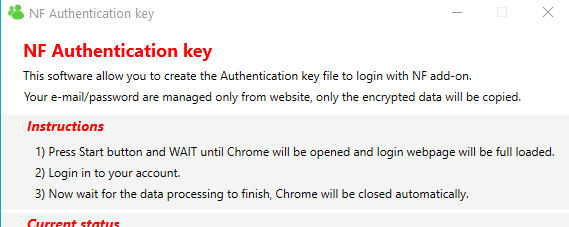
- When done, take note of the PIN and copy the file "NFAuthentication.Key" to a usb storage with the test add-on version:
Kodi18: ~[plugin.video.netflix_1.8.0_20200902_t4.zip]~
Kodi19: ~[plugin.video.netflix_1.8.0+matrix.1_20200902_t4.zip]~ - Install and start the add-on by choose the login with Authentication key, select the file and put the PIN + account password
Note: the key file created can be used to login on every type of device/system where the add-on is installed.
Side note for security
The software works only in localhost do not have access to internet,
It do NOT handle an username/password, this is done ONLY by Chrome browser,
the only purpose is to collect encrypted data.
A "NFAuthenticationKey" software for Linux or MAC system?
Well, i developed NFAuthenticationKey software for Windows,
and i spent a lot of time (many hours..) to studying and developing this login solution
for those who want to help me and other users
and if you have experience in development
in my repository there is the source code
It can be used to make a porting of the software to others operative systems
If your software respect same protection system and instructions
will be officially accepted in the repository for the use.
CastagnaIT
on 1 Sep 2020
@CastagnaIT Tested the NFAuthentication file method. After trying to log in i get a following error: WebsiteParsingError: E-mail field not found. Kodi 18.8 Leia on LibreELEC 9.2.4
heckinx
on 1 Sep 2020
Hi there!
Tested as described... also received "E-mail field not found" window after I entered pin + password. And a funny thing: email about confirm the e-mail changing request :)
 Snp3r
on 1 Sep 2020
Snp3r
on 1 Sep 2020
Hi there!
Tested as described... also received "E-mail field not found" window after I entered pin + password. And a funny thing: email about confirm the e-mail changing request :)
Yup, I also got the email change request email, after every log in try.
heckinx
on 1 Sep 2020
email changing request? this is new LoL....
it seems that the website from your country is different
i will try to change endpoint, I will make the change soon
CastagnaIT
on 1 Sep 2020
Test version updated (same post msg)
you can use the same auth key file
CastagnaIT
on 1 Sep 2020
@CastagnaIT The updated version logged in on the first try, works like a charm! Good job!
heckinx
on 1 Sep 2020
Good job guys....so android version still no luck?
getconnected702
on 1 Sep 2020
_t2 version works for me too :) (coreELEC 9.2.4.2, Kodi 18.8) thank you @CastagnaIT
Snp3r
on 1 Sep 2020
@CastagnaIT , _t2 version works for me as well in Matrix under Windows. Thanks!
 bartolomesoriano
on 2 Sep 2020
bartolomesoriano
on 2 Sep 2020
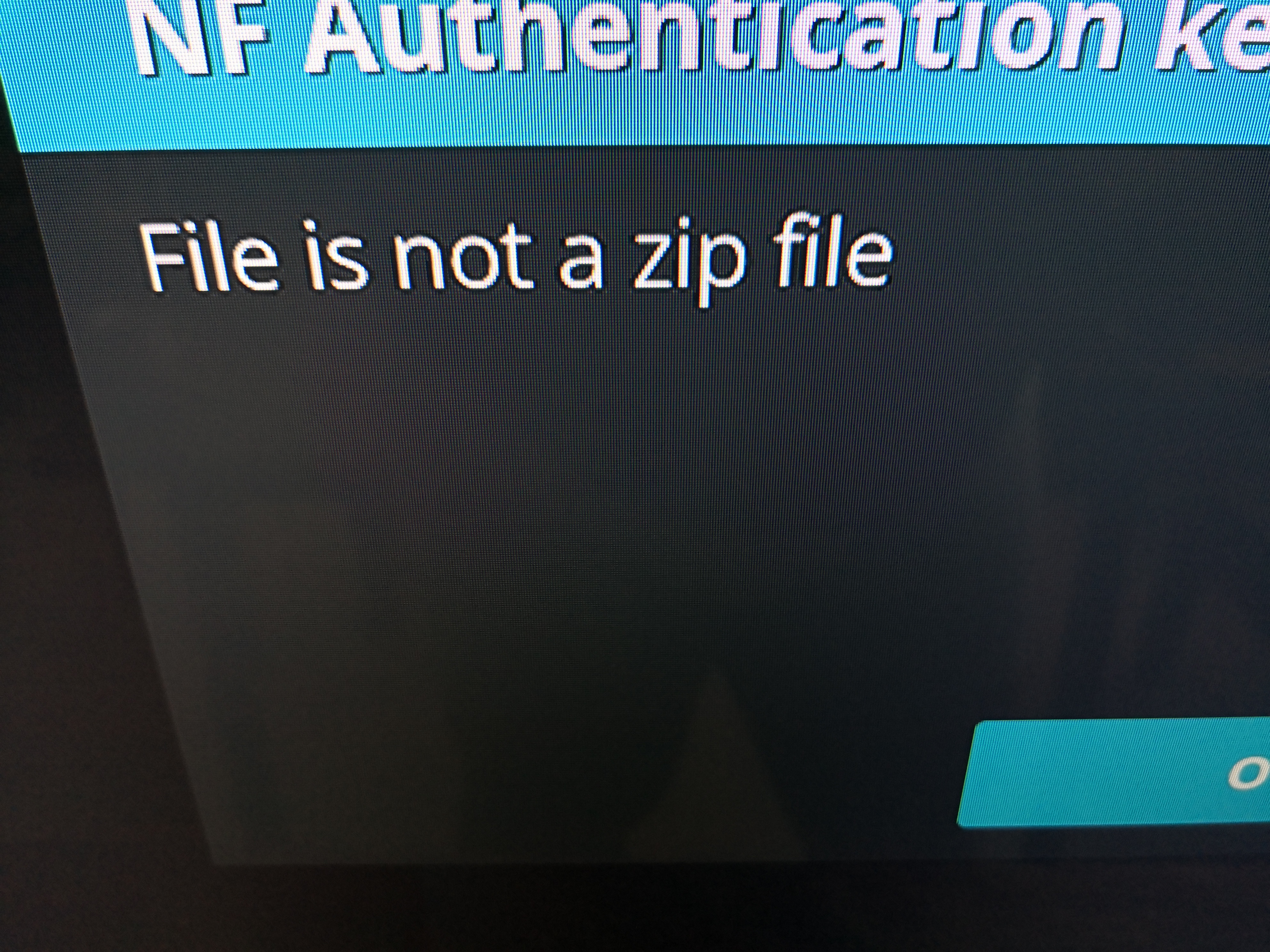
After typing the pin i get this error
DemFaR
on 2 Sep 2020
@DemFaR what device/system? have you tried create the key file more times or only one?
CastagnaIT
on 2 Sep 2020
@DemFaR what device/system? have you tried create the key file more times or only one?
MIBOX4
Android tv 9
Kodi 18.8
I tried twice, and i tried to enter the wrong pin and got the same error, so kodi throw this error before confirming the pin
DemFaR
on 2 Sep 2020
I created the file twice i mean, from different locations on my laptop
DemFaR
on 2 Sep 2020
seem to be a python bug, i have to understand how to do
CastagnaIT
on 2 Sep 2020
Installed on kodi 18.8 windows everything works.
Attempted to install kodi 18.7 android 9, mi box x96 air, error - file is not a zipe file.
 BursztynowyCygan
on 2 Sep 2020
BursztynowyCygan
on 2 Sep 2020
"File is not a zipe file" in my case too...
Android TV 8, Kodi 18.8, Kaon 6077
 pardalek73
on 2 Sep 2020
pardalek73
on 2 Sep 2020
_t2 + NFAuthenticationKey worked for me too. Many thanks for your efforts
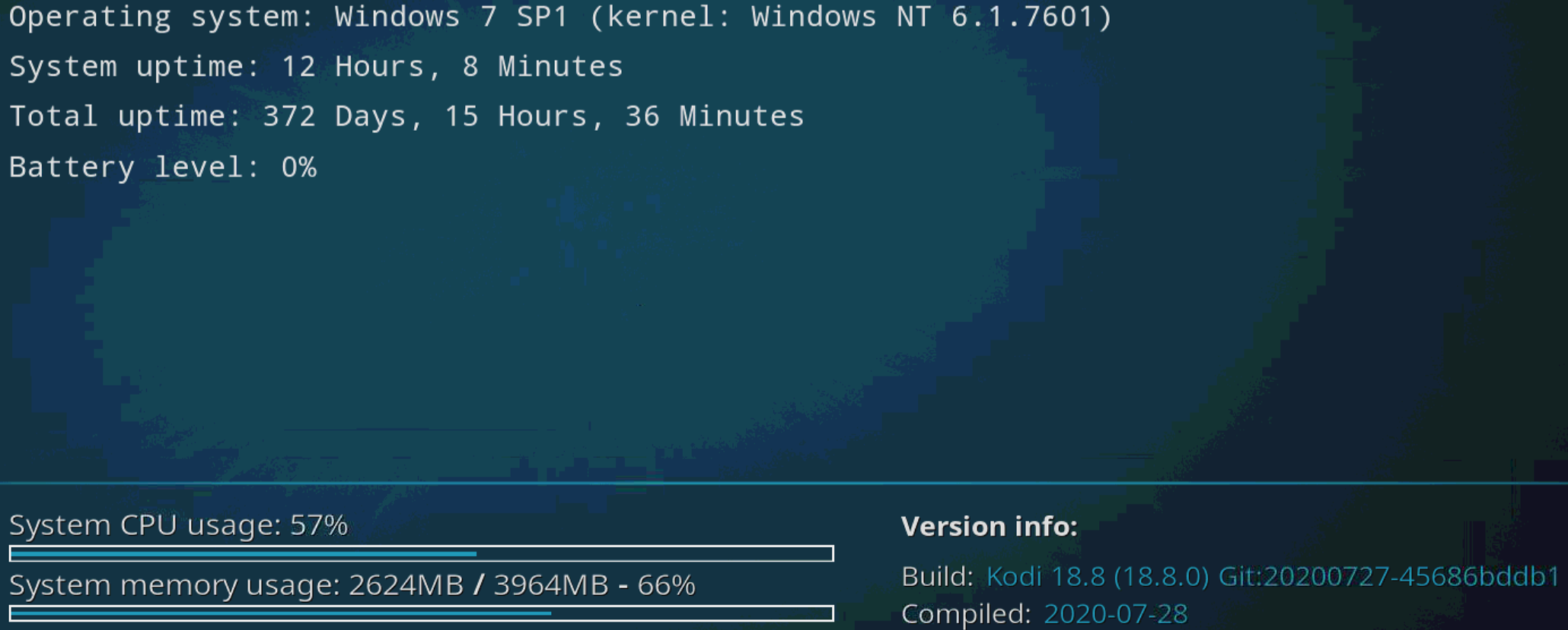
I stand corrected - No playback. I can login, see shows etc, but it kicks me out when I try to play a video
 katsamenis
on 2 Sep 2020
katsamenis
on 2 Sep 2020
Hi guys...is it possible for a video to be made on how to go about with this fix?
getconnected702
on 2 Sep 2020
_t2 version works for me too, first try. LibreELEC 9.2.4, Kodi 18.8) thank you @CastagnaIT (sorry for the double ticket )
 Rinlinius
on 2 Sep 2020
Rinlinius
on 2 Sep 2020
seem to be a python bug, i have to understand how to do
"File is not a zip file" seems like an Android problem...
cf. https://github.com/kivy/python-for-android/issues/1388
 oslo83
on 2 Sep 2020
oslo83
on 2 Sep 2020
@oslo83 i will remove the zip in favor of aes encryption
CastagnaIT
on 2 Sep 2020
well,
i have updated the software and the addon test version
then you will have to re-create the file key.
Links in the same previous comment: https://github.com/CastagnaIT/plugin.video.netflix/issues/502#issuecomment-684824673
This time should works also on Android tv
CastagnaIT
on 2 Sep 2020
well,
i have updated the software and the addon test version
then you will have to re-create the file key.Links in the same previous comment: https://github.com/CastagnaIT/plugin.video.netflix/issues/502#issuecomment-684824673
This time should works also on Android tv
Successfully logged with t3 build.
oslo83
on 2 Sep 2020
Perfect, it works. Successfully logged with t3 build on android too. Thank you very much.
pardalek73
on 2 Sep 2020
successful android login - thank you
BursztynowyCygan
on 2 Sep 2020
login successful but no playback when trying to play a show/episode (UK account)
Playback error
MSLError:Email or password is incorrect
it then loops back to login prompt: Choose login method
kodi info
v: _t3
katsamenis
on 2 Sep 2020
hi what is t3 build any help will do thanks
 KODINETFLIX
on 2 Sep 2020
KODINETFLIX
on 2 Sep 2020
hi what is t3 build any help will do thanks
see previous post
katsamenis
on 2 Sep 2020
@katsamenis your email has special characters? write here the characters
CastagnaIT
on 2 Sep 2020
anyone have a link for the t2 thanks
KODINETFLIX
on 2 Sep 2020
Good point! It's got a .
form is: x.[email protected]
katsamenis
on 2 Sep 2020
@CastagnaIT
logged in and played successfully with t3
MIBOX4
Android tv 9
Kodi 18.8
Great work man , excellent.
DemFaR
on 2 Sep 2020
@katsamenis the dot "." is not a problem
have you installed from scratch by deleting previous old addon data?
check also if you have received a nf email for password reset
CastagnaIT
on 2 Sep 2020
yup - installed from scratch, deleting previous data. I can login fine. I can see the shows' list, the profiles, I can search etc. The error occurs when I try to play a show. No email from nf
katsamenis
on 2 Sep 2020
@katsamenis install from scratch this (you can use same file key to login):
plugin.video.netflix_1.8.0_20200902_t3_katsamenis.zip
if not works, open Kodi log file and find the line "ACCOUNT EMAIL PARSED" check if the email is correct and let me know
CastagnaIT
on 2 Sep 2020
First and foremost, many thanks for taking the time!
No, Unfortunately it does the same thing.
No Log extract
katsamenis
on 2 Sep 2020
@katsamenis i need to to know this answer
if not works, open Kodi log file and find the line "ACCOUNT EMAIL PARSED" check if the email is correct and let me know
this line are visible only after login (in the log) if you have closed/reopened kodi will be deleted
CastagnaIT
on 2 Sep 2020
OK I got it now, No it is not. It seems to be another (valid) email, which is associated with the paypal (login email and pp email are different)
katsamenis
on 2 Sep 2020
Thanks for working on the workaround @CastagnaIT
I have the same problem as katsamenis - I can login with your t3 build of the plugin.
I can browse and search the shows etc.
But when trying to play anything I'm getting logged out and being asked to login again.
I also have different email for login and different for paypal (which I used to pay for NF). SO maybe here is something weird?
I use RaspberryPi/OSMC and Kodi 18.6
 ochmanmi
on 2 Sep 2020
ochmanmi
on 2 Sep 2020
Thanks for working on the workaround @CastagnaIT
I have the same problem as katsamenis - I can login with your t3 build of the plugin.
I can browse and search the shows etc.
But when trying to play anything I'm getting logged out and being asked to login again.
I also have different email for login and different for paypal (which I used to pay for NF). SO maybe here is something weird?
I use RaspberryPi/OSMC and Kodi 18.6
Is your login email different from you billing email by any chance?
Check under Account MEMBERSHIP & BILLING
katsamenis
on 2 Sep 2020
Is your login email different from you billing email by any chance?
Yes, this is what I wrote: "I also have different email for login and different for paypal (which I used to pay for NF)."
ochmanmi
on 2 Sep 2020
@CastagnaIT , thanks for version t3. Tested and working correctly both in Leia (18.8) and Matrix (nightly from September 1).
bartolomesoriano
on 2 Sep 2020
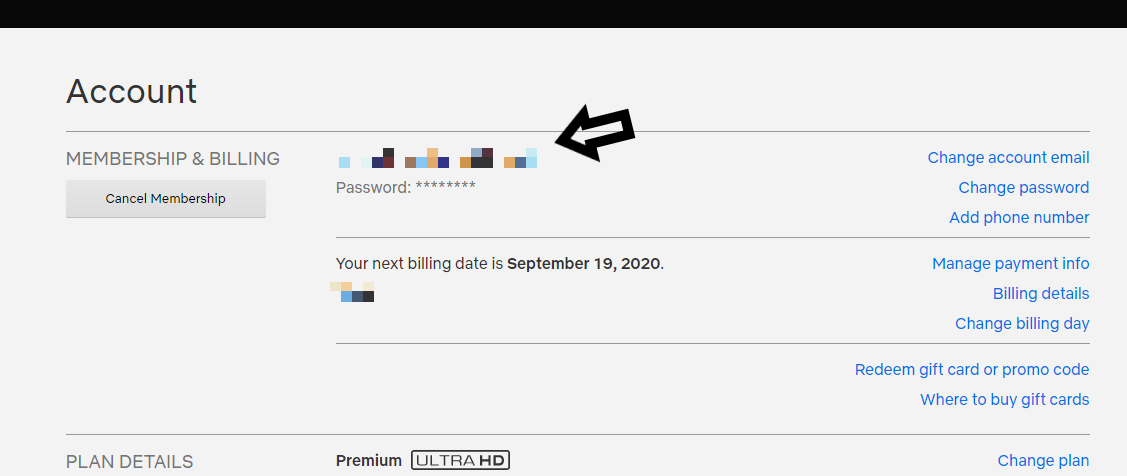
let me understand, the email that you use to login is not the email visible here?
CastagnaIT
on 2 Sep 2020
It is - The email I (we?) are using to login is the pixelated one you point the arrow to. The email the log is showing by the ACCOUNT EMAIL PARSED is the one shown by the "Billing details", which because it is paypal contains an email address.
katsamenis
on 2 Sep 2020
it's weird... because the add-on reads exactly that field (arrow)
if also possible that in your country your web page is different,
in this case it would be useful if you can send me the html code of your page
and also the web-address show in the browser bar
otherwise i do not understand what is different
CastagnaIT
on 2 Sep 2020
on it...
katsamenis
on 2 Sep 2020
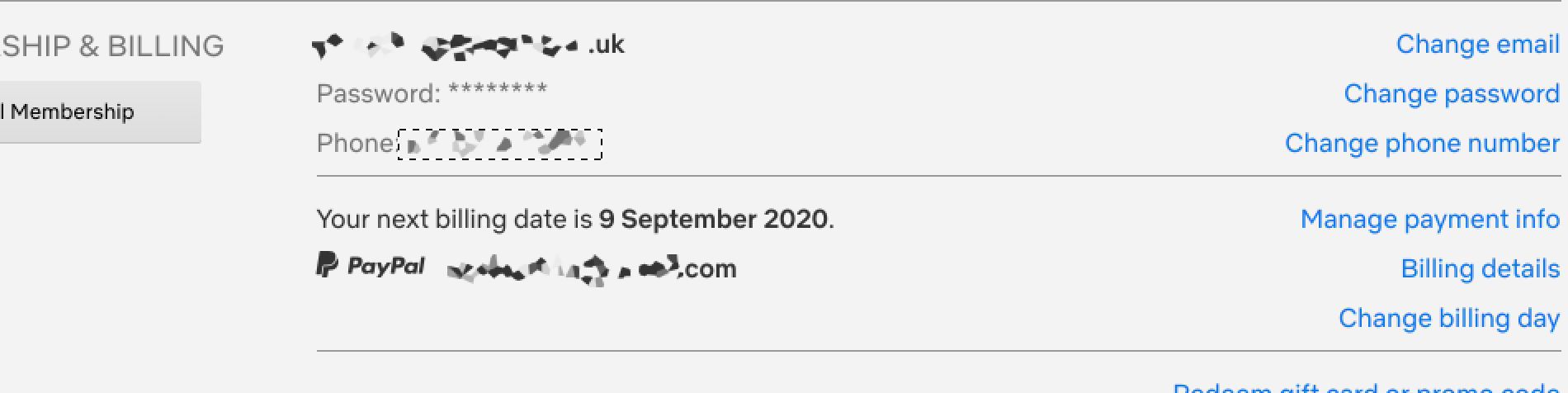
the address shown is : https://www.netflix.com/gb/login
and the login page source is this:
[DELETED]
katsamenis
on 2 Sep 2020
@katsamenis you have saved the login page insted the account page...
send the html page to my github e-mail to no expose your info
CastagnaIT
on 2 Sep 2020
@katsamenis thanks for the code
I have do a test and something strange happens with regex
now i will be able to understand how to fix it
CastagnaIT
on 2 Sep 2020
Well found the problem the regex tester make different results ...Lol...
now seem works:
I have updated the test version
you can download at same comment: https://github.com/CastagnaIT/plugin.video.netflix/issues/502#issuecomment-684824673
CastagnaIT
on 2 Sep 2020
@CastagnaIT _t4 works for me now. May thanks for fixing this so promptly. I guess in 5-days will need to update the key?
katsamenis
on 2 Sep 2020
@katsamenis thank you for your support! very much appreciated friendly
I will take a large coffee cup! :)
for security reason the "NFAuthentication.key" file expire (can not be more used) after 5 days,
but in the NF add-on, if no special events happen (website changes, reset/change password, ecc..) the login will never expire
CastagnaIT
on 2 Sep 2020
getconnected702
on 2 Sep 2020
Thanks, for my t4 also works! Great work ;)
ochmanmi
on 2 Sep 2020
Bug report
Your Environment
- Netflix add-on version: 1.8.0
- Operating system version/name: Mac OSX
- Device model:
Used Operating system:
- [ ] OSX
Describe the bug
Correct password says incorrect, i even tried changing pass from Netflix site.
https://paste.kodi.tv/akuqusuvif.kodi
Expected behavior
I should log in with correct credentials and access addon
Actual behavior
Incorrect Password popup
Steps to reproduce the behavior
1.Install or Reinstall addon
2.Run config wizard or press Logout(in)
3.Get popup error
Possible fix
Debug log
The debug log can be found from this link:
https://paste.kodi.tv/akuqusuvif.kodi
Additional context or screenshots (if appropriate)
Installation
- [ ] I'm using other Netflix Repo
- [ ] I'm using a different source
Other information
Screenshots
 unkn0wn234
on 3 Sep 2020
unkn0wn234
on 3 Sep 2020
Thanks, for my t4 also works! Great work ;)
send me a link for t4 pls
KODINETFLIX
on 3 Sep 2020
@radzki your "solution", that is not a solution, is dangerous for the users
expose the email and the password in clear in to the entire system
In addition, the values you have hardcoded, are the same as those asked by the ui dialogs
@KODINETFLIX just read first post
I suggest everyone instead to use the test, to wait for the new release
CastagnaIT
on 3 Sep 2020
Operating system Enigma 2 - Kodi 18.8
login successfully
Thanks
 laxcoo
on 3 Sep 2020
laxcoo
on 3 Sep 2020
@CastagnaIT indeed, it is a security issue and not really a solution. Maybe I expressed myself badly. I didn't mean it to be a solution. The point is that it worked and I don't know why because I didn't have the time to understand the code.
I shall delete the comment, so other people are not tempted to expose their credentials.
 radzki
on 3 Sep 2020
radzki
on 3 Sep 2020
Bug report
Your Environment
- Netflix add-on version: 1.8.0
- Operating system version/name: Mac OSX
- Device model:
Used Operating system:
- [ ] OSX
Describe the bug
Correct password says incorrect, i even tried changing pass from Netflix site.
https://paste.kodi.tv/akuqusuvif.kodiExpected behavior
I should log in with correct credentials and access addon
Actual behavior
Incorrect Password popup
Steps to reproduce the behavior
1.Install or Reinstall addon
2.Run config wizard or press Logout(in)
3.Get popup errorPossible fix
Debug log
The debug log can be found from this link:
https://paste.kodi.tv/akuqusuvif.kodiAdditional context or screenshots (if appropriate)
Installation
- [ ] I'm using other Netflix Repo
- [ ] I'm using a different source
Other information
Screenshots
T3 and T4 are successful in login and playback (I played episode of Full Metal Alchemist Brotherhood).
Tested on my windows 10 Laptop.
I will now be testing on my device i got the error with.
unkn0wn234
on 4 Sep 2020
Hey, @CastagnaIT any help for raspberry pi 4 users on raspbian?
 Bearbobs
on 4 Sep 2020
Bearbobs
on 4 Sep 2020
no more help,
wait the next release
CastagnaIT
on 4 Sep 2020
cool, and ETA on that?
and any help we can provide in development?
Bearbobs
on 4 Sep 2020
Hi . Can't login to Netflix.
Kodi 18.7.
 4V76
on 4 Sep 2020
4V76
on 4 Sep 2020
give the developer some time to try something relax people we all have the same problem i have faith in castagnalt.
KODINETFLIX
on 4 Sep 2020
Bug report
Your Environment
- Netflix add-on version: 1.8.0
- Operating system version/name: Mac OSX
- Device model:
Used Operating system:
- [ ] OSX
Describe the bug
Correct password says incorrect, i even tried changing pass from Netflix site.
https://paste.kodi.tv/akuqusuvif.kodiExpected behavior
I should log in with correct credentials and access addon
Actual behavior
Incorrect Password popup
Steps to reproduce the behavior
1.Install or Reinstall addon
2.Run config wizard or press Logout(in)
3.Get popup errorPossible fix
Debug log
The debug log can be found from this link:
https://paste.kodi.tv/akuqusuvif.kodiAdditional context or screenshots (if appropriate)
Installation
- [ ] I'm using other Netflix Repo
- [ ] I'm using a different source
Other information
Screenshots
T3 and T4 are successful in login and playback (I played episode of Full Metal Alchemist Brotherhood).
Tested on my windows 10 Laptop.I will now be testing on my device i got the error with.
Transferring Key works on Mac OSX now
unkn0wn234
on 5 Sep 2020
I can't login with transferred key:
http://paste.kodi.tv/vivuyugisi
I had to generate my own key because fuck windows using this script:
https://github.com/Enerccio/NFAuthentication
but it should be the same (based on your code)
 Enerccio
on 5 Sep 2020
Enerccio
on 5 Sep 2020
@Enerccio you are using a test version, not all test version here are compatible and some have errors
your script is quite good but can not approve it officially "as is".
Are you going to make it official or leave it like that?
if you want improve it i can list to you the changes to do
or else i will delete the link from here
CastagnaIT
on 5 Sep 2020
well what would you like to improve?
I used v3 linked here, should I use other one?
Enerccio
on 5 Sep 2020
@Enerccio last test version link is in the first post
i will let you know,
i will open an Issue thread in your Repository,
this is OT in this Issue thread
CastagnaIT
on 5 Sep 2020
@Enerccio last test version link is in the first post
is it? I can't find it, can you link it please? Github threads are kinda stupid and this one has like 140 posts...
Enerccio
on 5 Sep 2020
the first post is the head, read it....
CastagnaIT
on 5 Sep 2020
ah okay, I checked your first post lol, didn't know you edited OP
Enerccio
on 5 Sep 2020
okay, same error with t4 version :(
Enerccio
on 5 Sep 2020
in your log Kodi and netflix debug verbose are disabled,
have you created the key with NFAuthenticationKey_t3.zip (<< test3) ?
CastagnaIT
on 5 Sep 2020
in your log Kodi and netflix debug verbose are disabled,
have you created the key with NFAuthenticationKey_t3.zip (<< test3) ?
I completely removed netflix addon, including the settings data and installed it. Still same error:
http://paste.kodi.tv/cipabunuzi
and no, I created my key with my tool, I do not have windows...
Enerccio
on 5 Sep 2020
@Enerccio we continue the discussion in your repo/issue
CastagnaIT
on 5 Sep 2020
I have same issue on my Xiaomi Mibox S which i just purchased and installed Kodi on to replace my TVs built in smart functionality (so it never had Netflix before, completely fresh install). Netflix works fine on a TV, works fine in Mibox S Netflix app, the password works while signing in to web service, but whenever i want to sign in in Kodi on Mibox S, it fails. Today i will try Netflix Kodi plugin on a different platform to check if its Mibox S specific (one of the persons above also reported a problem with it) or not and provide a debug log
 Dinth
on 6 Sep 2020
Dinth
on 6 Sep 2020
@Dinth try this 502 comment
DemFaR
on 6 Sep 2020
@Dinth try this 502 comment
Thanks for your reply and the advice. Unfortunately none of my computers is running Windows OS. Is there no NFAuthenticationKey for Macs or Linux?
Dinth
on 6 Sep 2020
The new release 1.9.0 with the new login method is in rollout (the method with credentials can be always used),
this thread will remain open for a few days then it will be closed.
_Info to the new login method in the Readme or wiki._
NFAuthenticationKey software is currently available only for Windows.
Versions for other operating systems could be developed from other devs, and will be added in wiki instructions only when approved.
CastagnaIT
on 6 Sep 2020
Thanks. I will try to generate the file on a windows machine, once im back at work after the pandemic finishes.
But where are those changes in login API coming from? Same thing recently happened with Youtube addon - it doesnt accept username/password and requires API key now. But on the other hand, even very old TVs can still sign into YT and Netflix without an issue or app update.
Dinth
on 6 Sep 2020
Waiting solution for android box
 Mantul2020
on 6 Sep 2020
Mantul2020
on 6 Sep 2020
Getting a error (METHOD NOT FOUND : VOID.......) when trying to run the NF Authentication key t3)
Any idea what I'm doing wrong?
getconnected702
on 7 Sep 2020
Must be the key file + pin for each device ??? Or is it enough to generate once and apply to all?I used it on everyone yesterday and it wanted to login again after a while... Thank you
 otava5
on 8 Sep 2020
otava5
on 8 Sep 2020
@otava5 i do not know the effects to more different devices with same key file,
i think it is better create different file keys one per device
CastagnaIT
on 8 Sep 2020
i have added the NFAuthenticationKey for linux:
https://github.com/CastagnaIT/plugin.video.netflix/wiki/Login-with-Authentication-key
@Dinth can you try?
Before you have to update the add-on with last _DailyBuild_ version (link in the readme)
CastagnaIT
on 9 Sep 2020
Tried out the Linux instructions. Produced a key file along with a PIN, however, when using that key file, an Exception is raised:
ERROR: [plugin.video.netflix (1)] Traceback (most recent call last):
  File "/home/osmc/.kodi/addons/plugin.video.netflix/resources/lib/run_addon.py", line 33, in wrapper
    func(*args, **kwargs)
  File "/home/osmc/.kodi/addons/plugin.video.netflix/resources/lib/run_addon.py", line 249, in run
    success = route(pathitems)
  File "/home/osmc/.kodi/addons/plugin.video.netflix/resources/lib/run_addon.py", line 88, in lazy_login_wrapper
    if _check_valid_credentials():
  File "/home/osmc/.kodi/addons/plugin.video.netflix/resources/lib/run_addon.py", line 75, in _check_valid_credentials
    return _check_valid_credentials()
  File "/home/osmc/.kodi/addons/plugin.video.netflix/resources/lib/run_addon.py", line 73, in _check_valid_credentials
    if not login():
  File "/home/osmc/.kodi/addons/plugin.video.netflix/resources/lib/utils/api_requests.py", line 65, in login
    data = common.run_nf_authentication_key()
  File "/home/osmc/.kodi/addons/plugin.video.netflix/resources/lib/common/credentials.py", line 135, in run_nf_authentication_key
    return _prepare_authentication_key_data(data)
  File "/home/osmc/.kodi/addons/plugin.video.netflix/resources/lib/common/credentials.py", line 189, in _prepare_authentication_key_data
    raise Exception('Authentication key file not supported')
Exception: Authentication key file not supported
Double-checked in case I mistyped the PIN, but same result.
 grauerkoala
on 9 Sep 2020
grauerkoala
on 9 Sep 2020
Before you have to update the add-on with last DailyBuild version (link in the readme)
CastagnaIT
on 9 Sep 2020
Before you have to update the add-on with last DailyBuild version (link in the readme)
My bad, works!
grauerkoala
on 9 Sep 2020
ERROR: [plugin.video.netflix (1)] Traceback (most recent call last):
                                              File "/home/anuj/.kodi/addons/plugin.video.netflix/resources/lib/run_addon.py", line 33, in wrapper
                                                func(*args, **kwargs)
                                              File "/home/anuj/.kodi/addons/plugin.video.netflix/resources/lib/run_addon.py", line 249, in run
                                                success = route(pathitems)
                                              File "/home/anuj/.kodi/addons/plugin.video.netflix/resources/lib/run_addon.py", line 88, in lazy_login_wrapper
                                                if _check_valid_credentials():
                                              File "/home/anuj/.kodi/addons/plugin.video.netflix/resources/lib/run_addon.py", line 73, in _check_valid_credentials
                                                if not login():
                                              File "/home/anuj/.kodi/addons/plugin.video.netflix/resources/lib/utils/api_requests.py", line 65, in login
                                                data = common.run_nf_authentication_key()
                                              File "/home/anuj/.kodi/addons/plugin.video.netflix/resources/lib/common/credentials.py", line 135, in run_nf_authentication_key
                                                return _prepare_authentication_key_data(data)
                                              File "/home/anuj/.kodi/addons/plugin.video.netflix/resources/lib/common/credentials.py", line 189, in _prepare_authentication_key_data
                                                raise Exception('Authentication key file not supported')
                                            Exception: Authentication key file not supported
2020-09-09 19:08:22.784 T:139801906902784   ERROR: GetDirectory - Error getting plugin://plugin.video.netflix/
2020-09-09 19:08:22.800 T:139804170797952   ERROR: CGUIMediaWindow::GetDirectory(plugin://plugin.video.netflix/) failed
Same issue using latest build package from github as well as dropbox
Bearbobs
on 9 Sep 2020
I did that but I received the following message when executed python3
NFAuthenticationKey.py
"File "NFAuthenticationKey.py", line 244, in
Main(temp_path)
NameError: name 'temp_path' is not defined"
What I doing wrong
Alejandro Greca
El mié., 9 sept. 2020 a las 6:27, Stefano Gottardo (<
[email protected]>) escribió:
Before you have to update the add-on with last DailyBuild version (link in
the readme)—
You are receiving this because you commented.
Reply to this email directly, view it on GitHub
https://github.com/CastagnaIT/plugin.video.netflix/issues/502#issuecomment-689444134,
or unsubscribe
https://github.com/notifications/unsubscribe-auth/AIBDXNMRYRTC4INVQGTSLB3SE5DABANCNFSM4LBP4S4Q
.
ale-greca
on 9 Sep 2020
@ale-greca my bad..updated, download the zip again
CastagnaIT
on 9 Sep 2020
And I stopped going completely logged in via the web. I reset my password, log out, and no longer sign in.
otava5
on 9 Sep 2020
Plesase fix
 9000000
on 10 Sep 2020
9000000
on 10 Sep 2020
First a word of thanks for what is clearly a lot of hard work going into addressing this bug. Thank you. Thank you.
I modified my version of NFAuthenticationKey.py (on Linux) to use which rather than whereis given my whereis returns all kinds of useless things like /etc/chromium before getting to the actual binary. After doing this, it ran fine and produced an NFAuthentication.key and a PIN. From there I could scp and follow the login procedure. A few tries later my box connected to Netflix just fine.
In case you are interested here is the modified function:
def get_browser_path():
    """Check and return the name of the installed browser"""
    if '*' not in BROWSER_PATH:
        return BROWSER_PATH
    for browser_name in ['google-chrome', 'google-chrome-stable', 'google-chrome-unstable', 'chromium']:
        try:
            ret = subprocess.check_output(['which', browser_name]).decode('utf-8').split(' ')
        except subprocess.CalledProcessError:
            continue
        if len(ret) > 0:
            return ret[0].strip()
    raise Warning('Chrome or Chronium browser not detected.\r\nTry check if it is installed or specify the path in the BROWSER_PATH field inside "NFAuthenticationKey.py" file')
 mhosken
on 10 Sep 2020
mhosken
on 10 Sep 2020
@mhosken i did not know this command thanks
but from a little research "which" command should return only the path
why you keep the ".split(' ')" ? there is a particular reason?
CastagnaIT
on 10 Sep 2020
Sorry. That was left over from the previous code. The split() is unneeded and turns the string into an array. So the return statement would need to become return ret.strip() (the strip() being there just in case).
Any chance that the nightly build could have a version greater than the 1.9.0 that is released otherwise the updater updates back to the old 1.9.0 release and dumps the nightly and I can't login?
mhosken
on 11 Sep 2020
I already know the reason why the error is due to the adblock you turned on
You turn off adblock everything will work normally
9000000
on 11 Sep 2020
Question: does this mean we need to generate a new authentication key file to log in every 5 days, or will the key last forever? Mine has suddenly stopped working. I'll troubleshoot later, but I'm curious to this in the meantime.
Don't know if it's relevant but I stop and start Kodi frequently on my Raspberry Pi (OSMC) frequently to use other apps (e.g. RetroArch) and I'm wondering whether the Netflix add-on wants to log in again a fresh time every restart (hence my key no longer working).
 audero-cmyk
on 12 Sep 2020
audero-cmyk
on 12 Sep 2020
When you say Linux in this context. Will this work on all Linux based environments such as a Minix android box? Probably the answer is yes, but just confirming
 mattryderstorm
on 12 Sep 2020
mattryderstorm
on 12 Sep 2020
if for you the instructions here are badly explained, then propose how to improve them:
https://github.com/CastagnaIT/plugin.video.netflix/wiki/Login-with-Authentication-key
@mhosken thanks, yes i have updated the version of the daily build
CastagnaIT
on 12 Sep 2020
HI Please, can I get help...
I followed all steps but I get a message " Bad JSON escape: P. Path 'chromeExePath', line 5, position 24.
the path i entered is as follows.
{
"url": "https://www.netflix.com/login",
"localhostAddress": "localhost",
"chromeDebugPort": 9222,
"chromeExePath": "C:Program FilesGoogleChromeApplicationchrome.exe"
}
 severram
on 12 Sep 2020
severram
on 12 Sep 2020
HI Please, can I get help...
I followed all steps but I get a message " Bad JSON escape: P. Path 'chromeExePath', line 5, position 24.
the path i entered is as follows.
{
"url": "https://www.netflix.com/login",
"localhostAddress": "localhost",
"chromeDebugPort": 9222,
"chromeExePath": "C:Program FilesGoogleChromeApplicationchrome.exe"
}
Try "chromeExePath": "C:\\Program Files\\Google\\Chrome\\Application\\chrome.exe"
audero-cmyk
on 13 Sep 2020
Hi and thank you for creating this, I'm using Kodi on an Android box and getting the incorrect username or password error, Do you have a possible Kodi android fix?
 KleosAu
on 13 Sep 2020
KleosAu
on 13 Sep 2020
I´d like to try the authentication method but I don´t have a dropbox account. Why not host it on github too?
 ghtux
on 13 Sep 2020
ghtux
on 13 Sep 2020
I´d like to try the authentication method but I don´t have a dropbox account. Why not host it on github too?
You don't have to. Just click away the signin prompt and then go to the top right corner. There click download -> direct download. Et voilá!
 XanderThunder
on 13 Sep 2020
XanderThunder
on 13 Sep 2020
Hi Please, can I get help...
I followed all steps but I get a message "Error reading JObject from JsonReader. Path ", line 0, position 0.
the path i entered is as follows.
{
"url": "https://www.netflix.com/login",
"localhostAddress": "localhost",
"chromeDebugPort": 9222,
"chromeExePath": "C:\Program Files (x86)\Google\Chrome\Application\chrome.exe"
}
 desverger-git
on 13 Sep 2020
desverger-git
on 13 Sep 2020
I tried to use the Authentication Key but it's still with an Error:
Exception: Authentication key file not supported
I am using the version 1.9 of the NetFlix Plugin... Downloaded here:
https://github.com/CastagnaIT/repository.castagnait/blob/master/zip/plugin.video.netflix/plugin.video.netflix-1.9.0.zip
I already updated it on Kodi.. but the error keeps there...
I don't know What I have to do... =(
 jrdutra
on 13 Sep 2020
jrdutra
on 13 Sep 2020
I tried to use the Authentication Key but it's still with an Error:
Exception: Authentication key file not supportedI am using the version 1.9 of the NetFlix Plugin... Downloaded here:
https://github.com/CastagnaIT/repository.castagnait/blob/master/zip/plugin.video.netflix/plugin.video.netflix-1.9.0.zipI already updated it on Kodi.. but the error keeps there...
I don't know What I have to do... =(
https://www.dropbox.com/sh/vlme12cw5rva1ts/AADwhOAnBu-hpnCok43VKcnJa?dl=0
Try with the daily build. Works! :-)
ghtux
on 13 Sep 2020
I tried to use the Authentication Key but it's still with an Error:
Exception: Authentication key file not supported
I am using the version 1.9 of the NetFlix Plugin... Downloaded here:
https://github.com/CastagnaIT/repository.castagnait/blob/master/zip/plugin.video.netflix/plugin.video.netflix-1.9.0.zip
I already updated it on Kodi.. but the error keeps there...
I don't know What I have to do... =(https://www.dropbox.com/sh/vlme12cw5rva1ts/AADwhOAnBu-hpnCok43VKcnJa?dl=0
Try with the daily build. Works! :-)
Thank you Very Mch!!!! It Worked!!!! :D
jrdutra
on 13 Sep 2020
Someone with the problem can try if with email/pw is able to login with this new test?
~[plugin.video.netflix_1.9.0_20200915_t5a.zip]~
thanks
CastagnaIT
on 15 Sep 2020
Shame error
On Tue, 15 Sep 2020, 10:00 Stefano Gottardo, notifications@github.com
wrote:
Someone with the problem can try if with email/pw is able to login with
this new test?Kodi18: plugin.video.netflix_1.9.0_20200915_t5.zip
https://github.com/CastagnaIT/plugin.video.netflix/files/5223326/plugin.video.netflix_1.9.0_20200915_t5.zipthanks
—
You are receiving this because you commented.
Reply to this email directly, view it on GitHub
https://github.com/CastagnaIT/plugin.video.netflix/issues/502#issuecomment-692540403,
or unsubscribe
https://github.com/notifications/unsubscribe-auth/AQW5QYS2FRPC3OG6MTYTTSTSF4NKPANCNFSM4LBP4S4Q
.
getconnected702
on 15 Sep 2020
@getconnected702 have you time to try again? i have updated the zip
what device you have?
CastagnaIT
on 15 Sep 2020
Still not working.
On Tue, 15 Sep 2020, 10:17 Stefano Gottardo, notifications@github.com
wrote:
@getconnected702 https://github.com/getconnected702 have you time to
try again? i have updated the zip—
You are receiving this because you were mentioned.
Reply to this email directly, view it on GitHub
https://github.com/CastagnaIT/plugin.video.netflix/issues/502#issuecomment-692549347,
or unsubscribe
https://github.com/notifications/unsubscribe-auth/AQW5QYRUHEHFJJALHW4EDC3SF4PJHANCNFSM4LBP4S4Q
.
getconnected702
on 15 Sep 2020
@CastagnaIT I've been getting the 'incorrect login details' error, so I need to get the Auth key and pin. The trouble is that I'm on MacOS. I've tried the Linux method in the hopes that it would work, after running the .py file, it couldn't locate my chrome install, I've updated the browser path in NFAuthentication.py but it still nothing.
Basically what I want to know, is it possible to retrieve the Auth key on macOS or will I need to make a Linux or Windows VM?
 greggStar
on 15 Sep 2020
greggStar
on 15 Sep 2020
@greggStar i do not know macOS but i can try fix the script if you try run this:
test.zip
when you run it
should open the Chrome automatically in incognito,
and anfter when you press ENTER the script should close Chrome automatically
let me know if in the console "PATH EXISTS" comment will be printed on screen
CastagnaIT
on 15 Sep 2020
How about android box.. Any fix
Mantul2020
on 15 Sep 2020
As Workaround try accesing your KODI WebPage ...https://yourdeviceip:8080....go addons then netflix and use your browser to set user and password. It worked for me.
Cheers
 jakermx
on 16 Sep 2020
jakermx
on 16 Sep 2020
@CastagnaIT I've tried the latest daily image (plugin.video.netflix_1.9.0_20200912), modified the NFAuthenticationKey.py script a bit to work on MacOS (specified the path to Chrome the same way you did earlier in this thread) and got authentication to work. (Kodi 18) Had a problem with auth key with the latest build from the repository.
 strawberrypie
on 16 Sep 2020
strawberrypie
on 16 Sep 2020
I tried to use the Authentication Key but it's still with an Error:
Exception: Authentication key file not supported
I am using the version 1.9 of the NetFlix Plugin... Downloaded here:
https://github.com/CastagnaIT/repository.castagnait/blob/master/zip/plugin.video.netflix/plugin.video.netflix-1.9.0.zip
I already updated it on Kodi.. but the error keeps there...
I don't know What I have to do... =(https://www.dropbox.com/sh/vlme12cw5rva1ts/AADwhOAnBu-hpnCok43VKcnJa?dl=0
Try with the daily build. Works! :-)
Its works :
- downloaded plugin from dropbox NFAuthenticationKey_1.0.1.0
- in setting.json replace line with Chrome path
(...
..
"chromeExePath": "C:\Program Files (x86)\Google\Chrome\Application\chrome.exe") - Start NFAuthenticationKey.exe --> Press Start, then web page opens, and then click mouse back on NFAuthenticationKey.exe window
- web page load :) enter user pass and remeber pin code!
desverger-git
on 16 Sep 2020
Should this work cross-device? I ran the NFAuthenticationKey in linux successfully. But when I copy the keyfile into my Kodi running on Odroid it says the key file is not supported.
 TomFern
on 17 Sep 2020
TomFern
on 17 Sep 2020
https://github.com/CastagnaIT/plugin.video.netflix/issues/502#issuecomment-689386047
Before you have to update the add-on with last DailyBuild version (link in the readme)
It works. I did it on ubuntu and I transferred the file to Coreelec without any problems - it is only important that there is a daily version - it does not work on normal 1.9.
 notoco
on 18 Sep 2020
notoco
on 18 Sep 2020
From today addon version 1.9.1 will be released
that include the support of NFAuthenticationKey for linux
CastagnaIT
on 18 Sep 2020
I am on RPi 3, installation was successful but it keeps saying that password is incorrect. I am pretty sure the login credential I enter are correct though, any solution please? I have tried last 2 versions
 Rabia-Saeed
on 26 Sep 2020
Rabia-Saeed
on 26 Sep 2020
I am on RPi 3, installation was successful but it keeps saying that password is incorrect. I am pretty sure the login credential I enter are correct though, any solution please? I have tried last 2 versions
Take a Look here, It has worked for me..:
~https://github.com/CastagnaIT/plugin.video.netflix/issues/502#issuecomment-691729028~
jrdutra
on 26 Sep 2020
To new users with Incorrect password problem
THIS THREAD IS NOW CLOSED
DO NOT OPEN NEW ISSUE THREAD FOR "INCORRECT PASSWORD" PROBLEM
ONLY CASES OF MALFUNCTIONS WILL BE ACCEPTED
I invite everyone to use the forum to discuss and ask for help
_In order to avoid the "Incorrect password" error, a new login system has been already added in the add-on and is called as "Authentication key"_
_In the readme there is the link to get all the information:_
https://github.com/CastagnaIT/plugin.video.netflix#login-with-authentication-key
AVOID TO USE THE TEST VERSIONS OR THE VARIOUS LINKS/FILES OF THIS THREAD
CastagnaIT
on 26 Sep 2020
Related issues
 DanilosTeam
·
17Comments
DanilosTeam
·
17Comments
 kjetilk
·
5Comments
kjetilk
·
5Comments
 dagwieers
·
13Comments
dagwieers
·
13Comments
 Wittmannen
·
7Comments
Wittmannen
·
7Comments
 elbowz
·
13Comments
elbowz
·
13Comments
Most helpful comment
@katsamenis thank you for your support! very much appreciated friendly
I will take a large coffee cup! :)
for security reason the "NFAuthentication.key" file expire (can not be more used) after 5 days,
but in the NF add-on, if no special events happen (website changes, reset/change password, ecc..) the login will never expire