Plugin.video.netflix: Addon syncs my list even though Keep My List and Kodi Library in sync is switched off
Bug report
Your Environment
- Netflix add-on version: 15.9 (you send me yesterday)
- Operating system version/name: LE 9.1.501
- Device model: Rpi4
Settings addon: https://paste.kodi.tv/ayarutepic
Used Operating system:
- [ ] Android
- [ ] iOS
- [ ] Linux
- [ ] OSX
- [x] Raspberry-Pi
- [ ] Windows
Describe the bug
I exported one show (Peaky Blinders) to my local library, when I switch on scheduled automated updates, my list gets synchronized instead of only the single show.
Expected behavior
Only the show I exported (Peaky Blinders) is synchronized with my local library
Actual behavior
All the shows in my list are synchronized.
Steps to reproduce the behavior
- Purge library
- Export 1 show (Peaky Blinders)
- Wait until scheduler updates
Debug log
The debug log can be found from this link:
https://paste.kodi.tv/ezayilelux.kodi
I don't have debug log at this moment but the info log shows a bunch errors as well. The sync starts at line 1456 with:
2019-11-19 00:00:49.789 T:2594173808 WARNING: [plugin.video.netflix (-1)] Cannot remove show_80002479 from Kodi library, item not present
2019-11-19 00:00:53.617 T:2239263600  NOTICE: VideoInfoScanner: Starting scan ..
2019-11-19 00:00:57.214 T:2239263600   ERROR: GetDirectory - Error getting
2019-11-19 00:00:57.311 T:2239263600 WARNING: Process directory '/storage/netflix/shows/13 Reasons Why/' does not exist - skipping scan.
2019-11-19 00:00:57.311 T:2239263600 WARNING: Process directory '/storage/netflix/shows/72 Cutest Animals/' does not exist - skipping scan.
2019-11-19 00:00:57.311 T:2239263600 WARNING: Process directory '/storage/netflix/shows/Alias Grace/' does not exist - skipping scan.
2019-11-19 00:00:57.311 T:2239263600 WARNING: Process directory '/storage/netflix/shows/Altered Carbon – Das Unsterblichkeitsprogramm/' does not exist - skipping scan.
2019-11-19 00:00:57.311 T:2239263600 WARNING: Process directory '/storage/netflix/shows/Altered Carbon/' does not exist - skipping scan.
2019-11-19 00:00:57.311 T:2239263600 WARNING: Process directory '/storage/netflix/shows/Arrested Development/' does not exist - skipping scan.
2019-11-19 00:00:57.311 T:2239263600 WARNING: Process directory '/storage/netflix/shows/Ascension/' does not exist - skipping scan.
2019-11-19 00:00:57.311 T:2239263600 WARNING: Process directory '/storage/netflix/shows/Bates Motel/' does not exist - skipping scan.
2019-11-19 00:00:57.311 T:2239263600 WARNING: Process directory '/storage/netflix/shows/Better Than Us/' does not exist - skipping scan.
2019-11-19 00:00:57.311 T:2239263600 WARNING: Process directory '/storage/netflix/shows/Black Mirror/' does not exist - skipping scan.
2019-11-19 00:00:57.312 T:2239263600 WARNING: Process directory '/storage/netflix/shows/Black Spot/' does not exist - skipping scan.
2019-11-19 00:00:57.312 T:2239263600 WARNING: Process directory '/storage/netflix/shows/Bobby Kennedy for President/' does not exist - skipping scan.
2019-11-19 00:00:57.312 T:2239263600 WARNING: Process directory '/storage/netflix/shows/Brooklyn Nine-Nine/' does not exist - skipping scan.
2019-11-19 00:00:57.312 T:2239263600 WARNING: Process directory '/storage/netflix/shows/Chef's Table/' does not exist - skipping scan.
2019-11-19 00:00:57.312 T:2239263600 WARNING: Process directory '/storage/netflix/shows/Collateral/' does not exist - skipping scan.
2019-11-19 00:00:57.312 T:2239263600 WARNING: Process directory '/storage/netflix/shows/Cooked/' does not exist - skipping scan.
2019-11-19 00:00:57.312 T:2239263600 WARNING: Process directory '/storage/netflix/shows/Crossing Lines/' does not exist - skipping scan.
If necessary I can make a debug log but then I have to figure out first how to not show the text on the display.
 jlo88
jlo88
All 20 comments
make a screenshot of your addon library settings thanks
 CastagnaIT
on 19 Nov 2019
CastagnaIT
on 19 Nov 2019
I can make a screenshot in an hour or something, for now I posted the addon settings here: https://paste.kodi.tv/ayarutepic
Edit: I looked for the relevant settings in the xml:
    <setting id="lib_auto_upd_check_now" default="true"></setting>
    <setting id="lib_auto_upd_disable_notification" default="true">false</setting>
    <setting id="lib_auto_upd_freq" default="true">0</setting>
    <setting id="lib_auto_upd_mode">1</setting>
    <setting id="lib_auto_upd_start">00:00</setting>
    <setting id="lib_auto_upd_wait_idle" default="true">false</setting>
    <setting id="lib_sync_mylist" default="true">false</setting>
    <setting id="lib_sync_mylist_now" default="true"></setting>
    <setting id="lib_sync_mylist_sel_profile" default="true"></setting>
    <setting id="lib_sync_mylist_shw_profile" default="true"></setting>
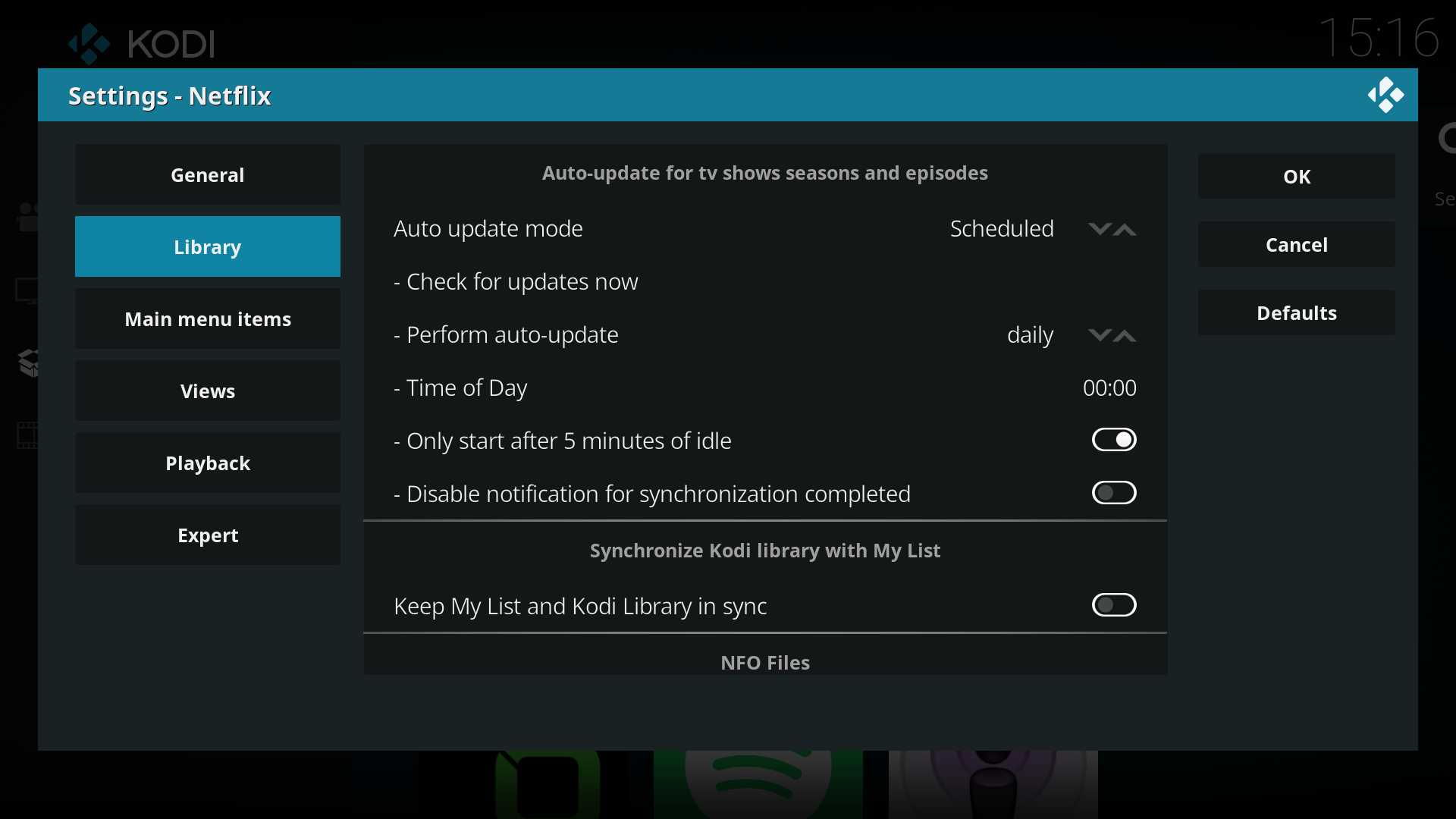
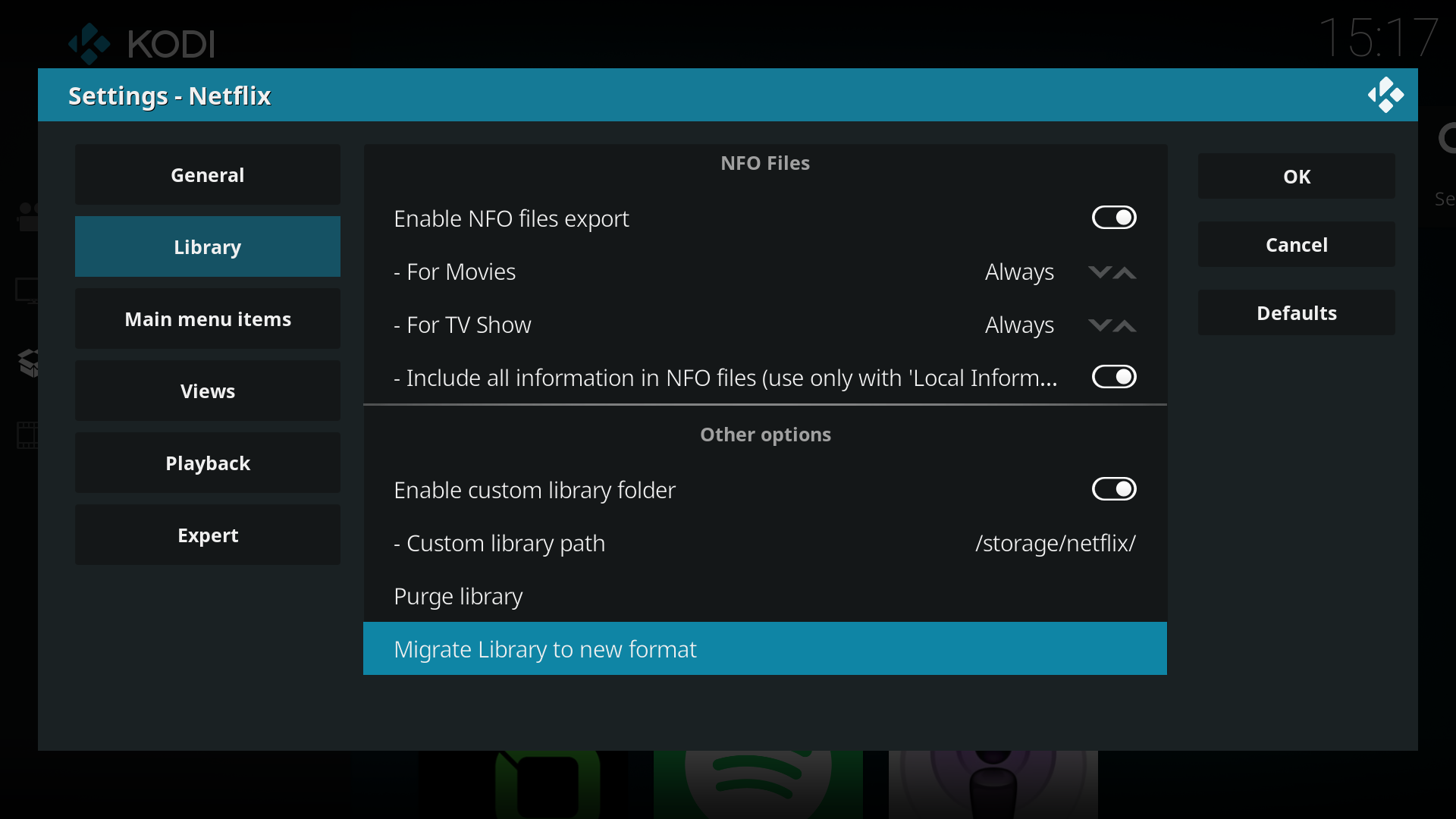
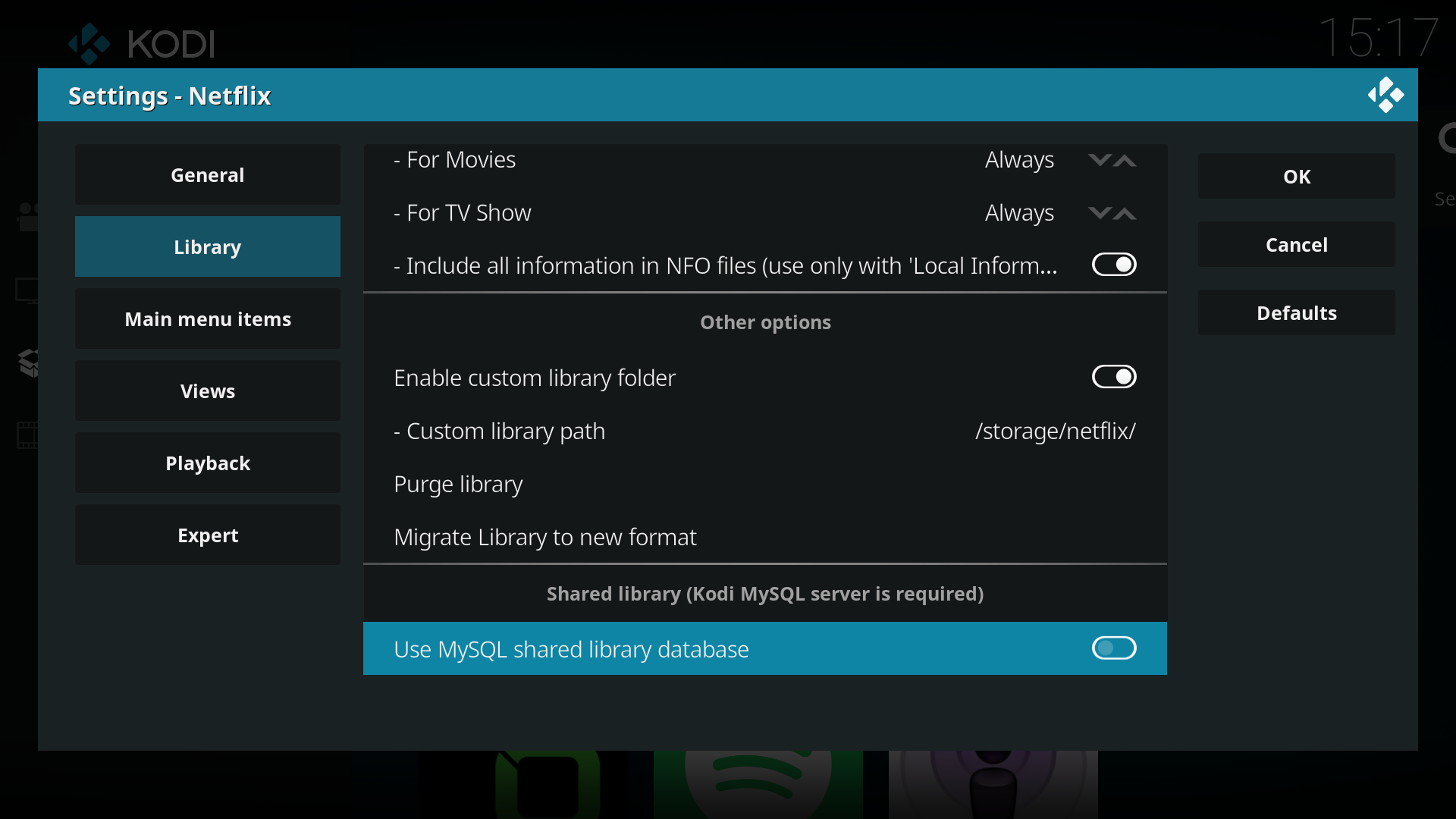
These are my settings:
jlo88
on 19 Nov 2019
Install this and let me know
plugin.video.netflix_0.15.10_20191119_fix.zip
CastagnaIT
on 19 Nov 2019
I just tried again by forcing an update with check updates now and that seems to be working as expected.
I also set a timer a few minutes in the future and at least no unexpected episodes show up but I also don't know if it updated then because I didn't get a notification.
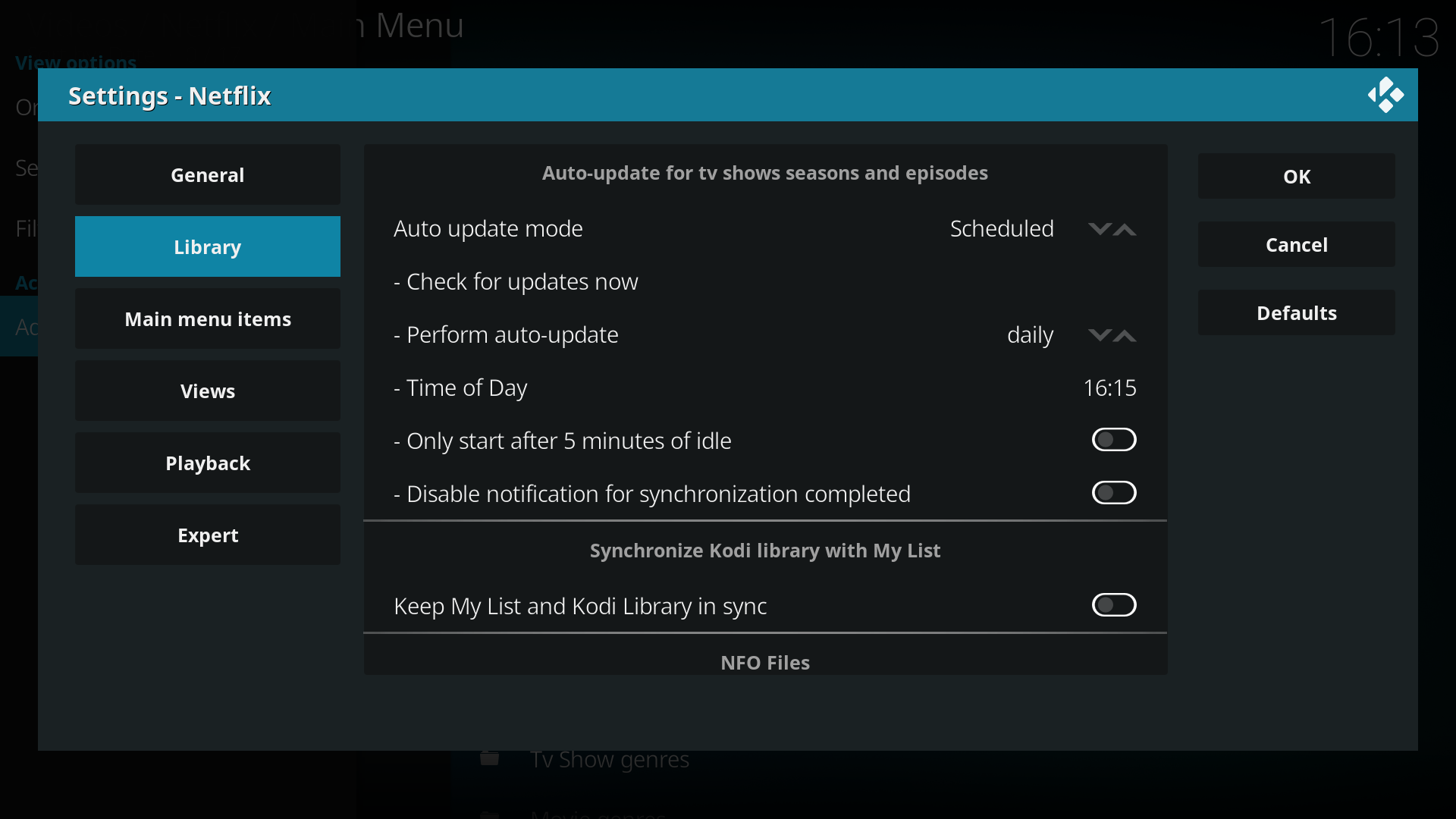
Settings:
Debug log: https://paste.kodi.tv/pexudafaco.kodi
I expected an update at 16:15 and performed a manual update at 16:18
I don't see any evidence of a scheduled update in the log.
jlo88
on 19 Nov 2019
if the auto-update has already been performed once, it will not be performed again even if you change the time.
It is based on the date ("daily" voice), you have to wait for the next day
CastagnaIT
on 19 Nov 2019
aah okay I see! Then I'll set it back to 12 o'clock and let you know tomorrow what happened, thank you for your help already!
jlo88
on 19 Nov 2019
Please if you can let me know by today,
this is an important fix
i should release it as soon as possible
CastagnaIT
on 20 Nov 2019
Hi, I'm not home right now but I'll be home within 3 hours, I'll let you know directly then!
jlo88
on 20 Nov 2019
I don't see any extra shows so that's good, but at the same point I also don't see any evidence of a scheduled update that ran. This should've happened at 00:00h.
Debug log:
kodi.log
00:00h is at line 27569
jlo88
on 20 Nov 2019
i think you have miss to enable debug verbose in nf addon
Go to add-on settings, in Expert page and change "Debug logging level" to "Verbose"
and reboot
CastagnaIT
on 20 Nov 2019
I changed it but now I can only give you a new log tomorrow because I have to wait again right?
jlo88
on 20 Nov 2019
yes, but also i think that the auto-update should already have been executed
so later if you want put new log to confirm all
CastagnaIT
on 20 Nov 2019
I see that there are no unexpected shows.
Upon inspection of the log I think I also see the netflix update, maybe you can check as well to verify. The netflix update starts around 00:00:45
jlo88
on 21 Nov 2019
again no netflix debug info in log....
i think that yesterday you forgot again to change addon settings:
in Expert page and change "Debug logging level" to "Verbose"
CastagnaIT
on 21 Nov 2019
Strange, I'm pretty sure I did enable that and rebooted but I will check tonight. BTW, I have the log level in kodi set to 1 now.
jlo88
on 21 Nov 2019
Here you go, I hope it's fine this time, I checked the settings and it wasn't on verbose last time, not it should be.
jlo88
on 22 Nov 2019
yes this time there is, libbrary auto update is started and ended without errors
CastagnaIT
on 22 Nov 2019
Okay perfect, there were also no unexpected imports so I think this can be closed.
jlo88
on 22 Nov 2019
thank you
CastagnaIT
on 22 Nov 2019
Related issues
 dagwieers
·
13Comments
dagwieers
·
13Comments
 gary9872
·
3Comments
gary9872
·
3Comments
 ciwy85
·
15Comments
ciwy85
·
15Comments
 bogdanszmyd
·
8Comments
bogdanszmyd
·
8Comments
 Smeulf
·
7Comments
Smeulf
·
7Comments