Plugin.video.netflix: Better integration with inputstreamhelper
Feature request
I'm submitting a proposal to ...
- [x] new feature
- [ ] change an existing feature
Describe your request
As one of the developers of script.module.inputstreamhelper, we recently refactored this add-on so it is easier to integrate it in 3rd party add-ons for troubleshooting.
Things you could integrate from your Settings menu:
- An information pane showing Kodi, InputStream and Widevine versions
- Open the InputStream Helper settings
- (Re)install Widevine CDM from the menu (could help with issues)
Describe the use case
We cannot guarantee that Widevine CDM will work perfectly in the future. There have been cases in the past where a new Widevine release broke a perfectly working system, or caused performance issues on some platforms.
Giving people access to version information and control over their Widevine installation may help in troubleshooting or fixing playback issues.
That said, the ultimate goal of InputStream Helper is that it stays out of the way. And that is still the goal, so it is up to you whether you want to give more information/control to your users (when things stop working).
Also see:
 dagwieers
All 22 comments
About the information pane I'm mixed: I do prefer logs rather than data writen by a user. A typo is not rare. To be honest, what may help a lot is if InputStream Helper shows the Widevine version in it's debug log. Seems at 0.4.2, it doesn't, only says it found the binary.
But I'm not against, even if we already have many tabs.
The "Reinstall Windevine" and "Open Inputstream Helper settings" can be really interesting.
 Smeulf
on 11 Sep 2019
Smeulf
on 11 Sep 2019
I do prefer logs rather than data written by a user.
The main reason for having this is that the user does not have to log on to the system to look at logs just to get the most basic information (e.g. to compare). And e.g. the Widevine version information is not available elsewhere.
dagwieers
on 11 Sep 2019
That said, InputStream Helper does have an icon now on Kodi and the settings can be access through that icon. So it may be sufficient to document that in a troubleshooting section in the wiki of the add-on.
dagwieers
on 11 Sep 2019
InputStream Helper does have an icon now on Kodi
Here it's still 'just' a dependency, so I have to go in system settings, addons, manage dependency to see it. Not very convinient. We do have a sortcut for InputStream settings, having one for InputStream Helper is not a big deal and indeed may be sufficient.
Smeulf
on 11 Sep 2019
You should have version 0.4.2 by now? Unless you installed it yourself and auto-update is disabled. Could you check?
http://mirrors.kodi.tv/stats?downloadstats=2019&filter=script.module.inputstreamhelper
dagwieers
on 11 Sep 2019
It is 4.0.2.

"Funny part": It's shown as a "Program Addon" but not in "My Addons/All", see below. That's why I didn't find it, cause I use to go to "My Addons" to see what I have.
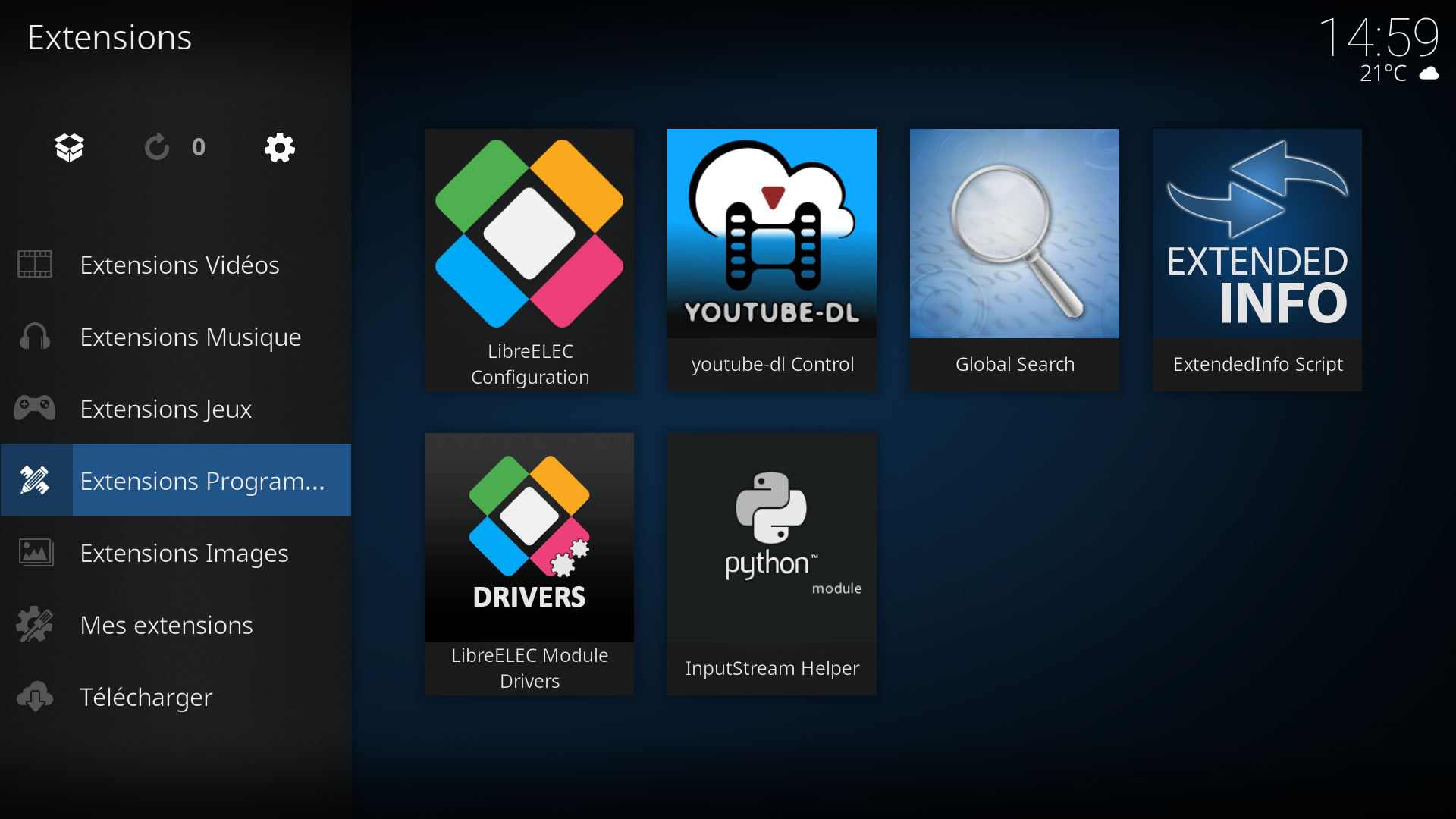

Anyway, we still can add a shortcut for InputStream Helper settings :)
Smeulf
on 11 Sep 2019
I have it in the addons home screen btw, didn't look at it previously.
Smeulf
on 11 Sep 2019
Correct, this is something we have to document in our Wiki as well. (Thanks for reminding me)
Since it is a "script.module" it is not listed, except as a dependency. But it is already nice users can access the settings this way.
dagwieers
on 11 Sep 2019
And I am going to reuse your screenshots in the documentation ;-)
dagwieers
on 11 Sep 2019
Warning: it's in French ^^ For me it's not a problem but... Lol
Smeulf
on 11 Sep 2019
interesting to next development, can be integrated i would prefer perhaps within the expert menu
since it is not a strictly essential but occasional thing
But first i would like to solve all the fire meat we have already opened
 CastagnaIT
on 11 Sep 2019
CastagnaIT
on 11 Sep 2019
@CastagnaIT Adding this is a five minute job if we know what we want to add.
I just added this to another add-on (VTM GO) and I plan to add it to YouTube as well.
dagwieers
on 11 Sep 2019
integrated i would prefer perhaps within the expert menu
I would have put it just after the input stream open settings button in the general options, just to have them both on the same screen. But it's just a matter of taste ;)
Smeulf
on 12 Sep 2019
@Smeulf I don't disagree. I didn't add the InputStream Helper information or the Widevine (re)installation in the settings as they are all behind that link. But for our own plug-ins we do add those as well for convenience.
dagwieers
on 12 Sep 2019
For me, the way you did is the best: no need for any maintenance on our side if anything changes on InputStream Helper ;)
Smeulf
on 12 Sep 2019
@Smeulf That reminds me that we probably want to print the Widevine information in the logs if the user has opened the information pane. I think that is the best of both worlds.
(We could show that information in debug logging mode as well, but then it is printed every time something is being played)
dagwieers
on 12 Sep 2019
In debug logs, we usually have the Kodi version, and the InputStream Helper version.
I do think the only things we miss is the Widevine version installed. As previously said maybe you can display it in your logs when you find the binaries, from the binaries data or the settings values.
Also we may miss this add-on version. But we also have to change a bit the logging method, as it doesn't match the actual debug log (we're still using the old [ ] way) and we can add the version as you did
in the helper (thanks for the idea!)
Smeulf
on 12 Sep 2019
@Smeulf Good point, although we typically do not scan the library to get the version on playback. So let's see if we can store it in the settings as well (although if people replace it on disk, we may not be in sync...)
BTW I think we may want to change the Netflix add-on version in GitHub just after a release, to make it clear that people are running a git version. E.g. append .git → 0.15.2.git
dagwieers
on 12 Sep 2019
BTW I think we may want to change the Netflix add-on version in GitHub just after a release, to make it clear that people are running a git version. E.g. append .git → 0.15.2.git
Indeed, it's sometime pretty hard to determine what version people use. Even with the .git entension code, we may have different code with the same version :( But it's better than nothing IMO.
we typically do not scan the library to get the version on playback. So let's see if we can store it in the settings as well (although if people replace it on disk, we may not be in sync...)
You'll have to remember the current version for your "pin" and "revert" function don't you? ^^
Smeulf
on 13 Sep 2019
@Smeulf I moved the ishelper settings to the same category as the inputstream adaptive settings. I agree that it fits much better there.
dagwieers
on 13 Sep 2019
Sorry @CastagnaIT, 2 against 1 lol.
Oh, I forgot we're not in a democracy haha ;)
Smeulf
on 13 Sep 2019
i think can be closed now this issue
CastagnaIT
on 19 Sep 2019
Related issues
 notoco
·
12Comments
notoco
·
12Comments
 pipsen
·
15Comments
dagwieers
·
12Comments
pipsen
·
15Comments
dagwieers
·
12Comments
 RH1CK
·
6Comments
RH1CK
·
6Comments
 coaxial
·
7Comments
coaxial
·
7Comments
Most helpful comment
Warning: it's in French ^^ For me it's not a problem but... Lol