Plots.jl: failed "Plot" install on Julia 1.4
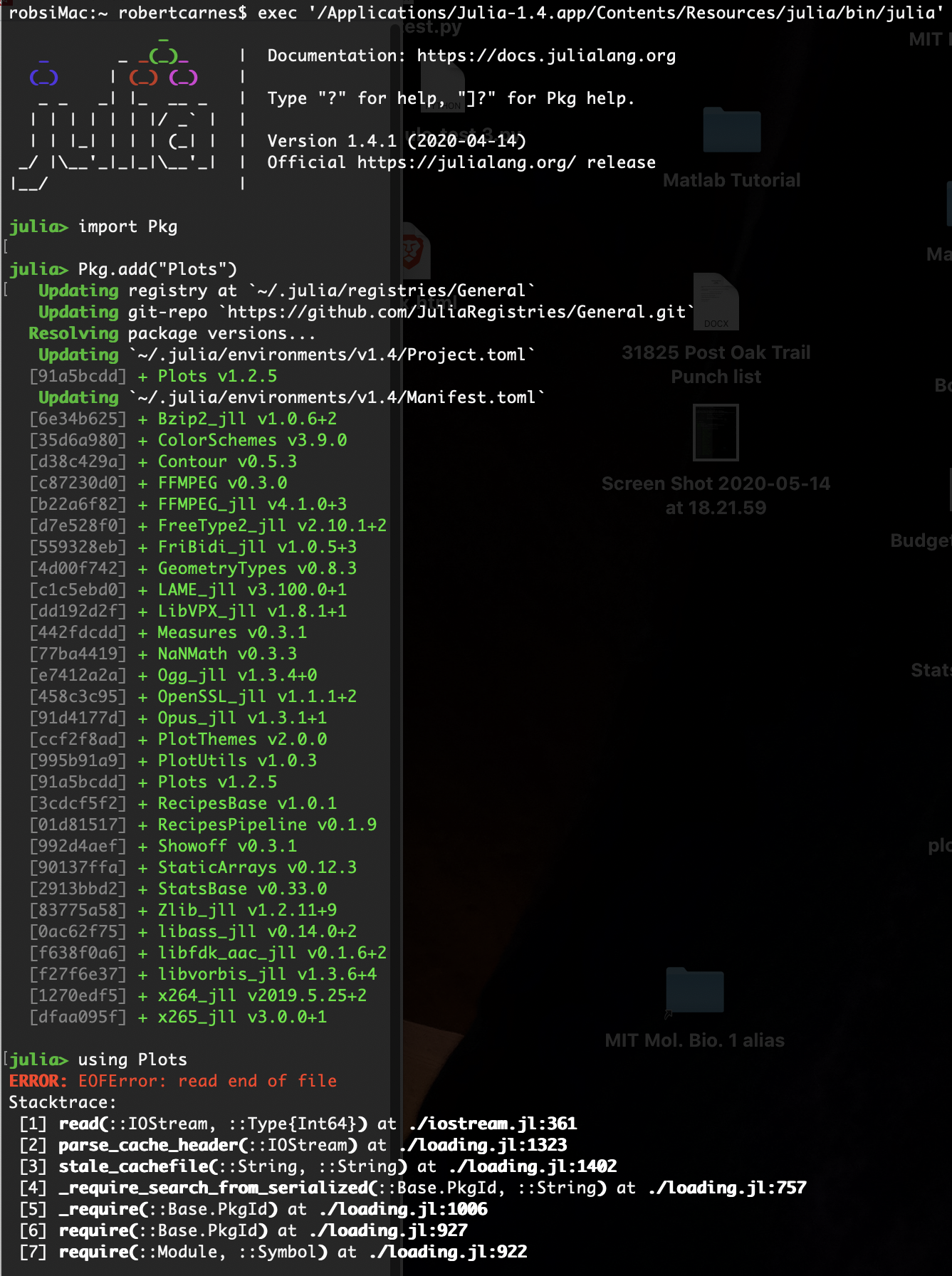
Per install instructions, I am using pkg.add command to install the package. The screen shot is one of aboutt 5 attempts to install this package. Adding additional packages like PyPlot doesn't help. I've re-installed, after using Pkg.rm("Plots") and Pkg.gc() to clean up. At this point, the only ERROR, I'm seeing with a command, using Plots, is EOFError: red end of file and a stacktrace display.
If it's a registry problem, I'm hopelessly unskilled at fixing that! New to Julia and not a coder. Just trying to learn.
 robscott1947
All 12 comments
This is not a known issue, and quite strange. If this is a new install - could you try just nuking your ~/.julia folder and starting again?
 mkborregaard
on 15 May 2020
mkborregaard
on 15 May 2020
Thanks for posting. Some personal context might help.
73 y/o retired physician, last real coding experience was APL tied to an IBM mainframe in 1972. Last time I entered a serious terminal cmd was early MS DOS. So, I'm a rookie punching out of my weight class right now.
Running Julia 1.4 on an iMac, OS10.15. Launching it and running simple REPL commands works fine as installed. I used the standard consumer download package from https://julialang.org/downloads/. I also installed Juno/Atom-beta which faithfully emulates anything I do in the Julia Shell. Two other packages, downloaded via Julia terminal (REPL) work fine in both shell and IDE.
Now to the issue. I think you are suggesting doing a direct-command "rm" via the OS terminal to kill the existing Julia 1.4 installed on my box and all associated files. Am I correct on that?
If so, I have a wicked hard-time navigating via Unix commands in Terminal mode. For instance, if I try to trace the location of the Julia 1.4 directory, using Finder, I can't get to it. If I try tracking it from the directory path you see at the very top of the screen shot, the Terminal returns "can't find". Weird. Two options: I can do a vanilla "uninstall" using a proprietary app that does that, but may leave some residue files, or you might be able to coach me on how to find the top-level folder(directory) that needs to be nuked, and verify the correct Unix command is entered to do just that, and not create collateral damage to other files. If we can get that far, some advice on the best download procedure for Julia 1.4 might set up for success. Thanks for considering all this.... Rob
robscott1947
on 15 May 2020
just go to your home folder (the one with your name), press cmd-shift-. (command-shift-period) to show hidden files, delete the .julia folder you can now suddenly see and install again from scratch
mkborregaard
on 15 May 2020
Great. Thanks. Also, do you recommend a particular form of install. Otherwise, I will use the standard install from https://julialang.org/
RSC
Robert S. Carnes, M.D.
Fair Oaks Ranch, TX
617-763-5262
Sent with ProtonMail Secure Email.
‐‐‐‐‐‐‐ Original Message ‐‐‐‐‐‐‐
On Friday, May 15, 2020 12:25 PM, Michael Krabbe Borregaard notifications@github.com wrote:
just go to your home folder (the one with your name), press cmd-shift-. (command-shift-period) to show hidden files, delete the .julia folder you can now suddenly see and install again from scratch
—
You are receiving this because you authored the thread.
Reply to this email directly, view it on GitHub, or unsubscribe.[https://github.com/notifications/beacon/AMAVSQ4QGDI4Y2JNELSDWU3RRV3JNA5CNFSM4NBK2EFKYY3PNVWWK3TUL52HS4DFVREXG43VMVBW63LNMVXHJKTDN5WW2ZLOORPWSZGOEWB2AMA.gif]
robscott1947
on 15 May 2020
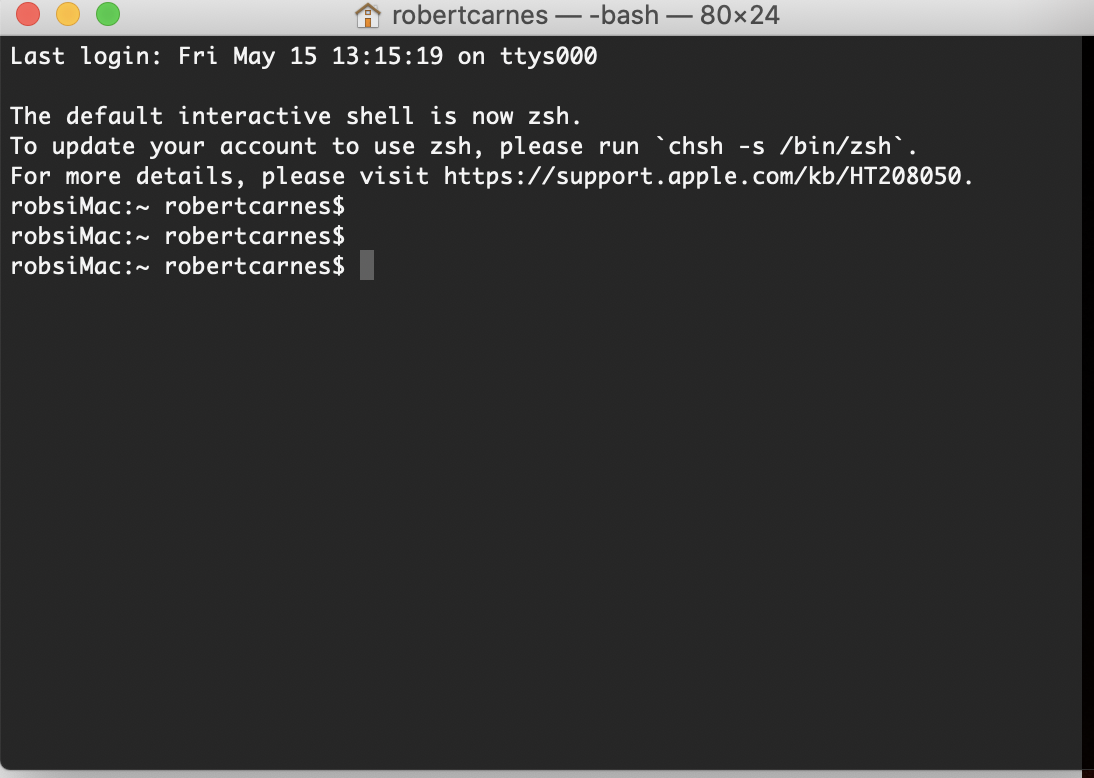
cmd-shift-. command at terminal doesn't display ANY files or sub-directories. Thoughts? I've attached a screen shot of two attempts at command_shift_.
robscott1947
on 15 May 2020
Michael, here's a quick update:
I found a way, using Finder, to click on an Application icon, in this case Julia 1.4, and get the system to display the path. I did that, and the result for Julia 1.4 is:
/System/Library/Frameworks/ Python.framework/Versions/2.7/Extras/lib/python (ignore hyperlink if it appears).
That makes no sense. So, I bored down into the Python folder and subfolders and see no sign of Julia1.4
Using UNIX commands I was able to get the Terminal to list (ls~) the subdirectories, and the system does show Applications as a sub-directory under robertcarnes(user). I can change to Applications, and it displays the active directory in reverse order than what I'm using to seeing, sic: Applications robertcarnes. No backslashes. But, I can't call up a list of sub-directories from that point further. See attached screen shot.
If I could find the dang subdirectory for Julia, I have the command to remove it. But, it seems lost on my system.
Rob
Robert S. Carnes, M.D.
Fair Oaks Ranch, TX
617-763-5262
Sent with ProtonMail Secure Email.
‐‐‐‐‐‐‐ Original Message ‐‐‐‐‐‐‐
On Friday, May 15, 2020 12:25 PM, Michael Krabbe Borregaard notifications@github.com wrote:
just go to your home folder (the one with your name), press cmd-shift-. (command-shift-period) to show hidden files, delete the .julia folder you can now suddenly see and install again from scratch
—
You are receiving this because you authored the thread.
Reply to this email directly, view it on GitHub, or unsubscribe.[https://github.com/notifications/beacon/AMAVSQ4QGDI4Y2JNELSDWU3RRV3JNA5CNFSM4NBK2EFKYY3PNVWWK3TUL52HS4DFVREXG43VMVBW63LNMVXHJKTDN5WW2ZLOORPWSZGOEWB2AMA.gif]
robscott1947
on 15 May 2020
no, cmd-shift-. in your Finder. The result should look like this
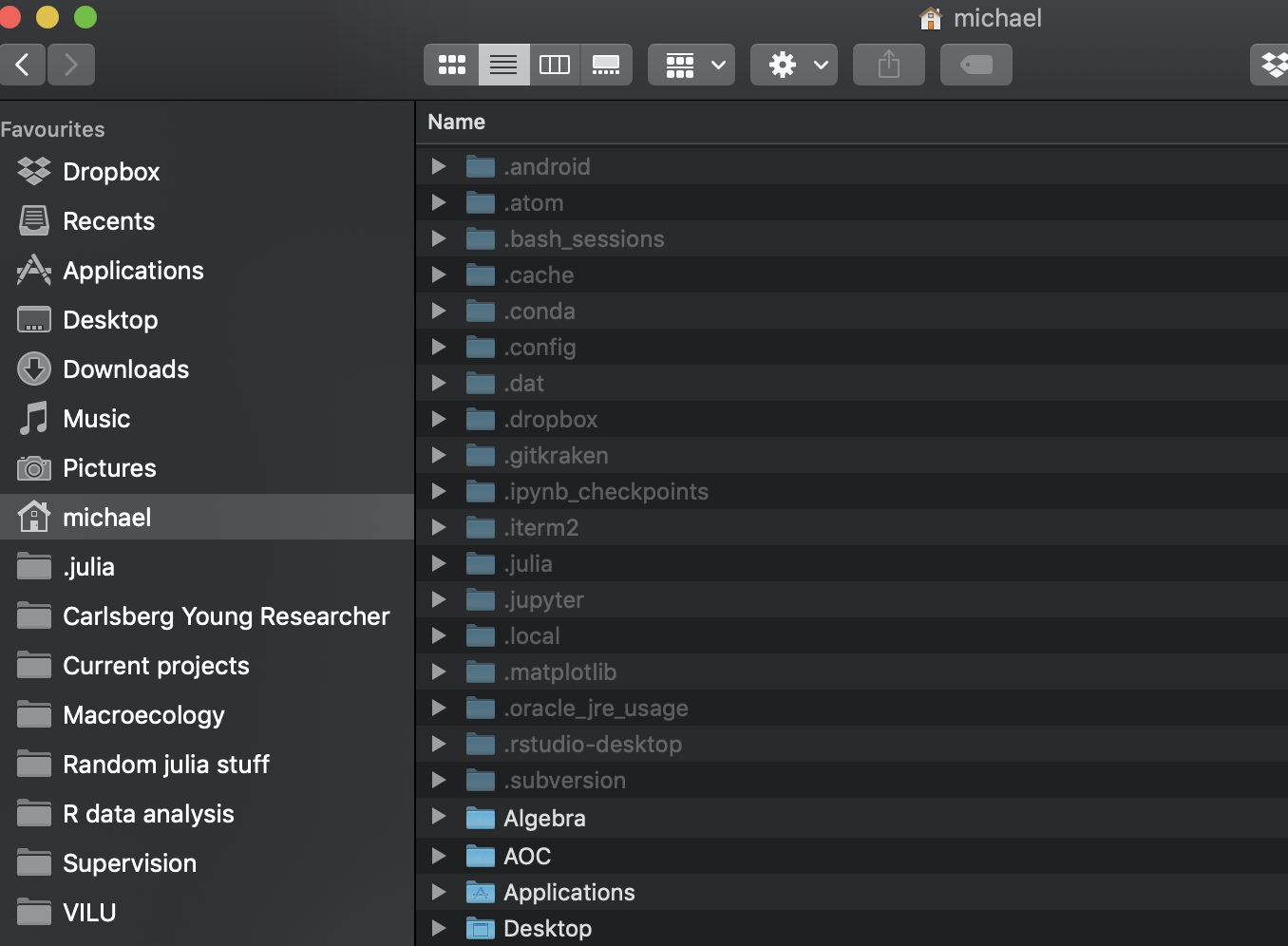
then just delete the .julia folder. Also drag the julia icon from your applications folder to the trashbin.
Then reinstall julia from https://julialang-s3.julialang.org/bin/mac/x64/1.4/julia-1.4.1-mac64.dmg
mkborregaard
on 16 May 2020
Thank you. That's an incredible folder view. Too late today. I will do this and get back to you. One additional bit of data. I re-installed the "Plots" pkg, via the REPL command line, and I've attached a screen shot of the download to document where the package is going on my system.
The issue that's bothering me is that I have a fully-functional Julia at the command line, at the Shell, and on the Atom/Juno IDE. Further, I have two other packages that have been down-loaded using the same methodology, and they call just fine. I want to make sure that the pkg.add command resulting in the Plot's package going where it's supposed to go. I don't mind re-building what I've done so far, but I'm still perplexed as to why this particular package, and not the others, is failing to initialize when it's called.
See attached.
RSC
Robert S. Carnes, M.D.
Fair Oaks Ranch, TX
617-763-5262
Sent with ProtonMail Secure Email.
‐‐‐‐‐‐‐ Original Message ‐‐‐‐‐‐‐
On Friday, May 15, 2020 5:01 PM, Michael Krabbe Borregaard notifications@github.com wrote:
no, cmd-shift-. in your Finder. The result should look like this
then just delete the .julia folder. Also drag the julia icon from your applications folder to the trashbin.
Then reinstall julia from https://julialang-s3.julialang.org/bin/mac/x64/1.4/julia-1.4.1-mac64.dmg
—
You are receiving this because you authored the thread.
Reply to this email directly, view it on GitHub, or unsubscribe.[https://github.com/notifications/beacon/AMAVSQ3X3EID6AA467FVQ5DRRW3UZA5CNFSM4NBK2EFKYY3PNVWWK3TUL52HS4DFVREXG43VMVBW63LNMVXHJKTDN5WW2ZLOORPWSZGOEWC25HI.gif]
robscott1947
on 16 May 2020
I can't see attachments to your mails - you'll have to go to the issue on github and include it. Again I'm pretty sure this has nothing to do with Plots
mkborregaard
on 16 May 2020
Thanks. I'll just make the switch and if it doesn't work, I can share the screen shots if necessary.
Probably do that later this weekend.
Thanks for the help.
RSC
Robert S. Carnes, M.D.
Fair Oaks Ranch, TX
617-763-5262
Sent with ProtonMail Secure Email.
‐‐‐‐‐‐‐ Original Message ‐‐‐‐‐‐‐
On Saturday, May 16, 2020 3:13 AM, Michael Krabbe Borregaard notifications@github.com wrote:
I can't see attachments to your mails - you'll have to go to the issue on github and include it. Again I'm pretty sure this has nothing to do with Plots
—
You are receiving this because you authored the thread.
Reply to this email directly, view it on GitHub, or unsubscribe.[https://github.com/notifications/beacon/AMAVSQ7KTYVAIR3D76XF7GLRRZDLLA5CNFSM4NBK2EFKYY3PNVWWK3TUL52HS4DFVREXG43VMVBW63LNMVXHJKTDN5WW2ZLOORPWSZGOEWDQZJA.gif]
robscott1947
on 16 May 2020
Michael, per instructions, the extant Julia system was removed at the directory (Finder) as were the application icons. A fresh Julia 1.4 was installed, using the .dmg you recommended. The fresh install was tested with simple commands at the REPL, and then tested again via the Atom IDE, on short scripts. Atom did a good bit of housekeeping after it found the new version of Julia, and it is otherwise functional at my level of skill.
I followed these steps by re-installing a prime number package that was workable on the old version, tested it, and then install Stats, and two back-end packages (PyPlot and GR). The only test that I have run is to initialize the package via the "using Stats" command and that is where the fireworks started using the old install. I've kept screen shots of the Stats install sequence and the back-ends, just in case I run into trouble down-stream.
So, mission-accomplished, for what I can tell. Thank you very much for working with a rookie to get this thing going. Rob
robscott1947
on 16 May 2020
Thank you, sirRobert S. Carnes, M.D.Fair Oaks Ranch, TX617-763-5262 Sent from ProtonMail Mobile On Sat, May 16, 2020 at 17:47, Michael Krabbe Borregaard notifications@github.com wrote:
Closed #2705.
—You are receiving this because you authored the thread.Reply to this email directly, view it on GitHub, or unsubscribe.
robscott1947
on 17 May 2020
Related issues
 lstagner
·
5Comments
lstagner
·
5Comments
 daschw
·
3Comments
daschw
·
3Comments
 SebastianM-C
·
4Comments
SebastianM-C
·
4Comments
 Cody-G
·
3Comments
Cody-G
·
3Comments
 tbenst
·
3Comments
tbenst
·
3Comments
Most helpful comment
Michael, per instructions, the extant Julia system was removed at the directory (Finder) as were the application icons. A fresh Julia 1.4 was installed, using the .dmg you recommended. The fresh install was tested with simple commands at the REPL, and then tested again via the Atom IDE, on short scripts. Atom did a good bit of housekeeping after it found the new version of Julia, and it is otherwise functional at my level of skill.
I followed these steps by re-installing a prime number package that was workable on the old version, tested it, and then install Stats, and two back-end packages (PyPlot and GR). The only test that I have run is to initialize the package via the "using Stats" command and that is where the fireworks started using the old install. I've kept screen shots of the Stats install sequence and the back-ends, just in case I run into trouble down-stream.
So, mission-accomplished, for what I can tell. Thank you very much for working with a rookie to get this thing going. Rob