Hi Team Plotly,
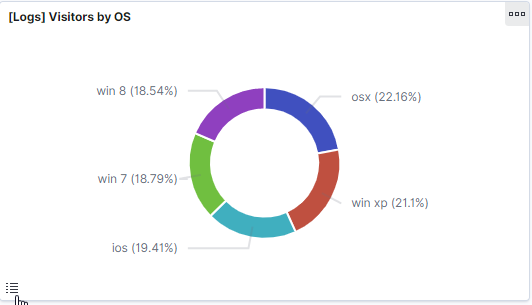
I was wondering if it is possible to add a "legend minimize/maximize (show/hide)" feature in Piecharts. I want to show/hide legend with a button (screenshots attached), so that I can use the space for the chart and also see legend whenever needed.
This feature would be very useful in cases where we have simply too many items in the legend or legend items have long text. In such cases, the user would like to resolve the label by simply hovering over the item, instead of looking for it in the legend.
I actually got this idea from Kibana dashboard (https://demo.elastic.co/app/kibana#/dashboard/edf84fe0-e1a0-11e7-b6d5-4dc382ef7f5b). They have legend minimization in their pie charts.
I'm using this library in ReactJS, will the Plotly.js also update the ReactJS package, any suggestion on this?
Thank you very much for your help.
Regards,
Adnan

 AdnanBoota
All 7 comments
Hi @AdnanBoota
I'm a little confused here. But it sounds like you can get the desired result by toggling layout.showlegend
https://plot.ly/javascript/reference/#layout-showlegend
for example:
var fig = {
  data: [/* */],
  layout: {}
}

Plotly.react('graph', fig)

fig.layout.showlegend = false
Plotly.react('graph, fig)

fig.layout.showlegend = true
Plotly.react('graph, fig)
 etpinard
on 12 Jul 2019
etpinard
on 12 Jul 2019
Hi @etpinard,
Again, thanks for quick response!
Yes, main idea is to show/hide with a button, i was wondering if there could be anything built-in, but if not Will definitely try updating showlegend using ReactJS.
fig.layout.showlegend = false|true
Regards,
Adnan
AdnanBoota
on 15 Jul 2019
i was wondering if there could be anything built-in
We could potentially add this. That said, personally, I don't think this would be a valuable addition to the library. But, I can be convinced otherwise.
etpinard
on 17 Jul 2019
What could be interesting is to add a way to make "toggle" updatemenu buttons. For example,
Plotly.newPlot('graph', [{
  type: 'pie',
  labels: ['a', 'b', 'c'],
  values: [1, 2, 3]
}], {
  updatemenus: [{
    type: 'buttons',
    buttons: [{
      label: '≡',
      method: 'relayout',
      args: ['showlegend', false],
      args2: ['showlegend', true]   // NEW attribute !
    }]
  }]
}
would be enough to effectively close this ticket.
etpinard
on 17 Jul 2019
Hi @etpinard
Yes that also sounds good, button in updatemenus would be a good approach to control the legend toggle.
Thanks!
AdnanBoota
on 17 Jul 2019
cc @catherinezucker - this would allow us to create trace visibility buttons as well, for traces that don't have this functionality in the legend.
 alexcjohnson
on 17 Jul 2019
alexcjohnson
on 17 Jul 2019
The trace-visibility thing could also be addressed via https://github.com/plotly/plotly.js/issues/2642
 nicolaskruchten
on 26 Sep 2019
nicolaskruchten
on 26 Sep 2019
Related issues
 n-riesco
·
3Comments
n-riesco
·
3Comments
 chriddyp
·
3Comments
chriddyp
·
3Comments
 HunterMcGushion
·
3Comments
HunterMcGushion
·
3Comments
 empet
·
3Comments
etpinard
·
3Comments
empet
·
3Comments
etpinard
·
3Comments