Would it be possible to provide alignment API for chart title, "left", "center" "right" ?
 CalvinFernandez
All 22 comments
Yeah. We should really add this.
The _reason_ why nobody has done this yet is that the plot title at the moment is set via two root layout level attributes (layout.title and layout.titlefont) and adding more layout.title**** attribute would feel like polluting the root layout namespace.
Ideally, the main title should have its own layout object container, for example:
 layout.title = {
  text: 'My title',
  font: {
    size: 20,
    color: 'red'
  },
  x: 0,
  y: 1.2,
  xanchor: 'left',
  yanchor: 'bottom',
};
similar to layout.legend. So, to add layout.title: {} in a backward-compatible way would require some conversion step layout.title -> layout.title.text and layout.titlefont -> layout.title.font.
Moreover, axes titles (e.g. layout.xaxis.title) currently follow the same **title / **titlefont pattern. To preserve consistency between title attributes, we should also allow axes title to be input as layout.xaxis.title.text / layout.xaxis.title.font.
 etpinard
on 1 Sep 2016
etpinard
on 1 Sep 2016
Any progress on this?
 mviertel
on 22 Nov 2016
mviertel
on 22 Nov 2016
Hey, I created an pr on that issue, could you please take a look?
https://github.com/AlexVvx/plotly.js/pull/3
 AlexVvx
on 5 Dec 2017
AlexVvx
on 5 Dec 2017
Thanks for taking this on @AlexVvx! I'm torn about the right way to specify alignment. I'm going to continue the discussion here for a bit until we get the right attributes. The closest precedent we have is to use plot fraction, like legend & annotations. But it's hard to match the current behavior:
- Vertically, we just split the top margin (after accounting for anything that may have auto-expanded that margin, such as a legend)
- Horizontally, we center on the whole container, so if for example the right margin is much bigger due to a colorbar, the title will not be centered on the plot area.
The most common alternative title placement is in the top left corner (also whole-container referenced), but occasionally you want the left edges of the title and plot area aligned.
Also keep in mind dynamic sizing, so pixel positioning isn't so great, unless perhaps we have a way to anchor to various plot features (left edge, left plot area edge, center, plot area center, right edge, right plot area edge...)
So the most general is perhaps:
xrefand'yref':'container'(including margins)'paper'(plot area only, not so great a name in this context but matches our usage elsewhere)xandy: 0 is the left / top edge of the container or plot area, 1 is the right / bottom edge. Might need an'auto'value foryto match the current behavior?xanchor:'left','center','right'- like for annotations, could also do an auto like we have there, so eg if you setx: 0you get'left'anchor by default? Auto is particularly nice if we allow the title to be dragged around, otherwise it's easy to get strange alignment that makes a mess when you resize the plot.yanchor:'top','middle','bottom'(auto?)pad: likeborderpadfor annotations, move the text away from the anchor point by this many pixels (so you can position 5px away from the container edge, for example). Do we needxpadandypad?
Thoughts? Does this miss anything important? Could it be simplified?
 alexcjohnson
on 6 Dec 2017
alexcjohnson
on 6 Dec 2017
I agree with @alexcjohnson that we should make the attributes as close as possible to the current legend attributes.
I think both xanchor and yanchor should support an 'auto' values so that the common title.x: 0 automatically gets xanchor: 'left' just like legends.
I like the sound of xref: 'container' to match the current behavior. I think 'container' would also be useful for positioning legends at some point. Setting plot fractions beyond [0, 1] seems to confuse some users.
As for pad, perhaps we should :recycle: Ricky's pad_attributes currently used in sliders and updatemenus and start standardize it.
etpinard
on 6 Dec 2017
As for
pad, perhaps we should :recycle: Ricky'spad_attributescurrently used in sliders and updatemenus and start standardize it.
Good call. It feels awfully verbose to me, but it's going to come up at some point so better to standardize.
OK, I think we've got a good attribute set, @AlexVvx does this make sense? Care to take a stab at incorporating this into your PR?
alexcjohnson
on 6 Dec 2017
Sure, sounds good. Summarizing:
- xanchor: "auto" | "left" | "center" | "right"
- yanchor: "auto" | "top" | "middle" | "bottom"
- pad: {t, r, b, l} like margin
- x, y number between or equal to -2 and 3
- xref, yref: not sure about this, since title is not related to any axis
Backward compatibility, skip new features if title is string (from https://community.plot.ly/t/change-position-of-title/1490/3)
Fix ie issue (https://github.com/plotly/plotly.js/pull/2076#issuecomment-335318828)
AlexVvx
on 6 Dec 2017
xref, yref: not sure about this, since title is not related to any axis
Right, not axes but whether x/y refer to the plot area (excluding margins) or the whole container (including margins). By default it should be the whole container, for backward compatibility and because that seems like the more common usage anyhow, for both centered and left-aligned titles.
Backward compatibility, skip new features if title is string
We should use cleanLayout to massage the old format into the new container.
The only issue I see with this is that applications using relayout/update to change the title (or its font) will break and need to update to the new structure. I suppose in principle we could do the same cleanLayout translation inside relayout - we haven't done that in the past but most of the stuff inside cleanLayout and cleanData are pre-open-source so it wouldn't matter, it's only relevant to plots saved on the plot.ly cloud. This part might be a little tricky to get right, so I'd be happy to do this (after you get the rest of the PR ready) if it's not obvious to you what I'm going for.
Also, from a private convo with @etpinard - it might be nice to have cleanLayout (and cleanData) call Lib.warn whenever they make changes, to alert developers about the format change. I'd be happy to take that one too.
alexcjohnson
on 6 Dec 2017
Ok, then:
- xref: "container" | "plot"
- yref: "container" | "plot"
I wonder about pad, if xanchor and yanchor is center/middle, should it respect paddings?
What is the difference between 'auto' and 'center', 'auto' and 'middle'?
AlexVvx
on 6 Dec 2017
xref: "container" | "plot"
I know it doesn't make the most sense considering only this context, but I think we should match the other xref instances and use 'container' and 'paper'. Perhaps in v2 we could change 'paper' to 'plot'.
alexcjohnson
on 7 Dec 2017
Finally:
- xanchor: "auto" | "left" | "center" | "right"
- yanchor: "auto" | "top" | "middle" | "bottom"
- pad: {t, r, b, l} like margin
- x, y number between or equal to -2 and 3
- xref: "container" | "paper"
- yref: "container" | "paper"
AlexVvx
on 7 Dec 2017
@AlexVvx apologies, I missed these pieces earlier:
I wonder about pad, if xanchor and yanchor is center/middle, should it respect paddings?
In this case since there's no border or fill (yet?) paddings are only going to be relevant on the same side as the anchor, so you're right, it's moot for center and middle.
What is the difference between 'auto' and 'center', 'auto' and 'middle'?
From @etpinard above:
I think both
xanchorandyanchorshould support an'auto'values so that the commontitle.x: 0automatically getsxanchor: 'left'just like legends.
ie the anchor shifts to match the nearest third of the plot.
alexcjohnson
on 7 Dec 2017
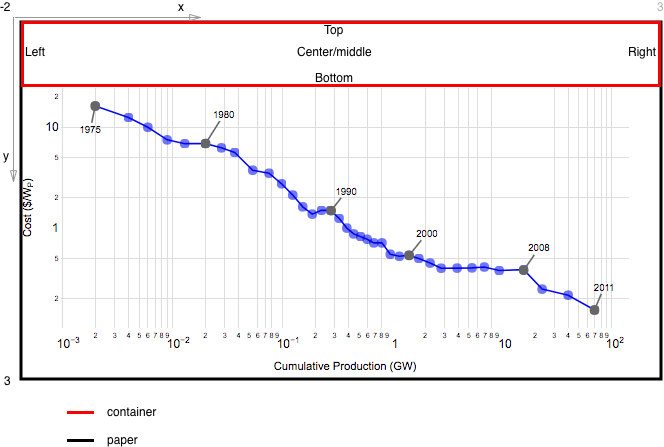
Thank you, one more question regarding picture below. Red rectangle is container, black is 'paper'. I wonder if title will be in the center of paper, on the top of traces. Is that expected?
AlexVvx
on 8 Dec 2017
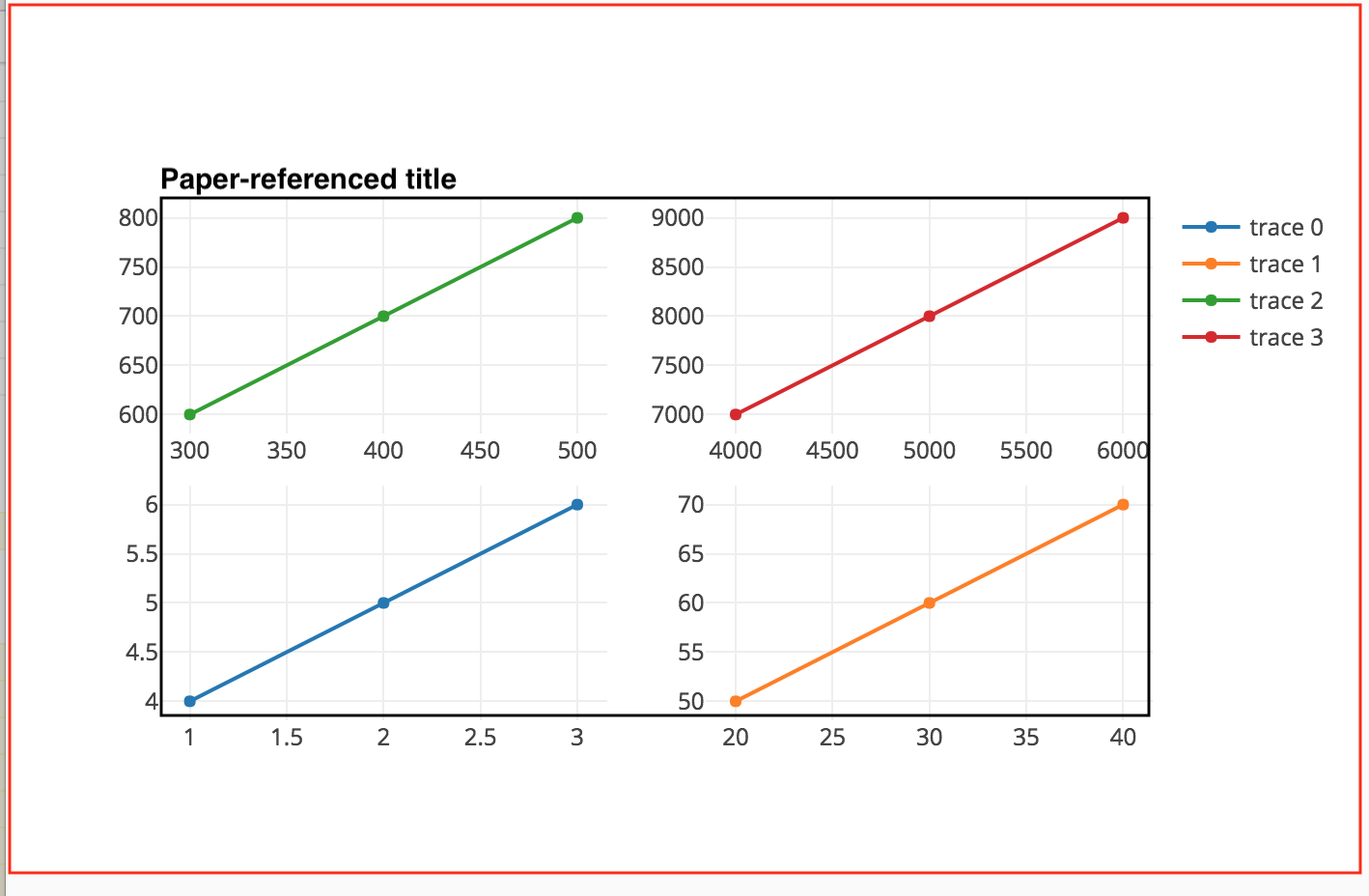
See below: Red is 'container', it's the entire area of the plot <div> including margins. Black is 'paper', it's the coordinate system used to lay out subplots, the legend, and paper-referenced components (shapes, annotations, images), and is basically red minus margins. Be careful because occasionally the margins are increased beyond what was originally specified - use fullLayout._size, it already knows about this.
You're right, it would be weird to put the title in the middle, though maybe there would be uses for it - like if you make a donut chart and want the title in the hole? The main use for 'paper' in title positioning would be sitting on the subplots like the "Paper-referenced title" below. This would look like:
title: {
  text: 'Paper-referenced title',
  xanchor: 'left', // or 'auto', which matches 'left' in this case
  yanchor: 'bottom',
  x: 0,
  y: 1,
  xref: 'paper',
  yref: 'paper'
}

alexcjohnson
on 8 Dec 2017
I wonder if that is right behavior:
- when x:0, y:1, yref: 'paper', then auto yanchor is bottom
- when x:0, y:1, yref: 'container', then auto yanchor is top

ypad should move title to the top or to the bottom?
AlexVvx
on 29 Dec 2017
cc @rmoestl
etpinard
on 11 Oct 2018
Moreover, axes titles (e.g.
layout.xaxis.title) currently follow the same**title/**titlefontpattern. To preserve consistency between title attributes, we should also allow axes title to be input aslayout.xaxis.title.text/layout.xaxis.title.font.
Okay to apply this change to polar.radialaxis.title as well?
 rmoestl
on 14 Nov 2018
rmoestl
on 14 Nov 2018
Okay to apply this change to
polar.radialaxis.titleas well?
Yep, go for it. Ternary axes should use the new structure too.
etpinard
on 14 Nov 2018
... and gl3d axes as well.
etpinard
on 14 Nov 2018
Alright.
BTW colorbar is re-using the titles component as well. I decided to not transition colorbar title attrs to the new structure. Partly because colorbar lives within data, while the other titles live in layout.
rmoestl
on 14 Nov 2018
BTW
colorbaris re-using thetitlescomponent as well. I decided to not transition colorbar title attrs to the new structure. Partly because colorbar lives within data, while the other titles live in layout.
:+1:
etpinard
on 14 Nov 2018
Done in #3276 !
etpinard
on 29 Nov 2018
Related issues
 jonmmease
·
3Comments
jonmmease
·
3Comments
 nicolaskruchten
·
3Comments
nicolaskruchten
·
3Comments
 HunterMcGushion
·
3Comments
HunterMcGushion
·
3Comments
 hashimmoosavi
·
3Comments
hashimmoosavi
·
3Comments
 tim-sauchuk
·
3Comments
tim-sauchuk
·
3Comments
Most helpful comment
Yeah. We should really add this.
The _reason_ why nobody has done this yet is that the plot title at the moment is set via two root
layoutlevel attributes (layout.titleandlayout.titlefont) and adding morelayout.title****attribute would feel like polluting the root layout namespace.Ideally, the main title should have its own layout object container, for example:
similar to
layout.legend. So, to addlayout.title: {}in a backward-compatible way would require some conversion steplayout.title->layout.title.textandlayout.titlefont->layout.title.font.Moreover, axes titles (e.g.
layout.xaxis.title) currently follow the same**title/**titlefontpattern. To preserve consistency between title attributes, we should also allow axes title to be input aslayout.xaxis.title.text/layout.xaxis.title.font.