I seek help in compiling the player-js build. I searched the wiki and this repository and couldn't find instructions. I was successful at compiling Player for mac OS with customizations, following the wiki instructions.
How can I create a build of player-js? (I assume I must have emscripten) It's a dead end to me alone.
 LucasMW
All 19 comments
Hello. I'm not sure if this is documented anywhere, I will provide you with a part of the scripts we use on our jenkins system:
to get emscripten and all dependencies (except liblcf) use the 0.sh script in https://github.com/EasyRPG/buildscripts/tree/master/emscripten (I don't know if this works on OSX, we only run this on Linux)
Set up the emscripten environment:
cd [path-to-buildscripts]/emsdk-portable
./emsdk construct_env
. ./emsdk_set_env.sh
Except for the emcc build step the build is almost like a normal cross-compile build but you must replace PKG_CONFIG_PATH with EM_PKG_CONFIG_PATH and prefix configure with emconfigure:
To compile liblcf:
export CXXFLAGS="-g0 -O2"
export CPPFLAGS="-DU_STATIC_IMPLEMENTATION"
export EM_PKG_CONFIG_PATH="[path-to-buildscripts]/lib/pkgconfig"

autoreconf -fi
emconfigure ./configure --prefix=$PWD --disable-shared
make install
To compile Player:
export EM_PKG_CONFIG_PATH="[path-to-liblcf]/lib/pkgconfig:[path-to-buildscripts]/lib/pkgconfig"
export PKG_CONFIG="pkg-config --static"

autoreconf -fi
emconfigure ./configure --prefix=$PWD --enable-fmmidi --without-sdlmixer
make

cp easyrpg-player easyrpg-player.bc

# convert bitcode to javascript (this takes a while)
emcc -g0 -O2 -v --memory-init-file 1 --llvm-lto 1 \
  -s WASM=0 -s NO_EXIT_RUNTIME=0 -s ASSERTIONS=0 -s ALLOW_MEMORY_GROWTH=1 \
  easyrpg-player.bc -o index.html \
  --post-js resources/emscripten/emscripten-post.js \
  --shell-file resources/emscripten/emscripten-shell.html
When succesful the files index.html, index.js and index.mem are the result.
 Ghabry
on 11 May 2019
Ghabry
on 11 May 2019
I receive this when running
emconfigure ./configure --prefix=$PWD --disable-shared
See `config.log' for more details
shared:ERROR: Configure step failed with non-zero return code: 77. Command line: ./configure --prefix=/Users/lmenezes/Cloned_From_Github/liblcf --disable-shared at /Users/lmenezes/Cloned_From_Github/liblcf
By the way, what do you mean with "but you must replace PKG_CONFIG_PATH with EM_PKG_CONFIG_PATH" ?
LucasMW
on 12 May 2019
Please drop the file config.log here. Or do you expect us to magically know its contents? :eyes:
 carstene1ns
on 12 May 2019
carstene1ns
on 12 May 2019
By the way, what do you mean with "but you must replace PKG_CONFIG_PATH with EM_PKG_CONFIG_PATH" ?
I just meant that building emscripten almost works like everything else, just that this variable is named differently.
Ghabry
on 12 May 2019
Here is my config.log.
LucasMW
on 12 May 2019
no idea what's causing this.
Try "emcc --clear-cache" before running emconfigure as suggested in the logfile.
Ghabry
on 12 May 2019
Thanks!
Clear-cache worked pretty well.
It seems as liblcf step is solved.
Now, step
emconfigure ./configure --prefix=$PWD --enable-fmmidi --without-sdlmixer
in Player fails.
The error message:
checking pkg-config is at least version 0.9.0... yes
checking for liblcf... yes
checking for pixman-1... no
configure: error: Package requirements (pixman-1) were not met:No package 'pixman-1' found
Consider adjusting the PKG_CONFIG_PATH environment variable if you
installed software in a non-standard prefix.Alternatively, you may set the environment variables PIXMAN_CFLAGS
and PIXMAN_LIBS to avoid the need to call pkg-config.
See the pkg-config man page for more details.
LucasMW
on 12 May 2019
Here is the config.log.
LucasMW
on 12 May 2019
The config.log says: "Perhaps you should add the directory containing pixman-1.pc".
But when I runfind . -name pixman-1.pc.
I can only find pixman-1.pc in directories other than the ones associated emscipten.
Example:
./buildscripts/ios/lib/pkgconfig/pixman-1.pc
./buildscripts/ios/pixman-0.36.0/pixman-1.pc
I'm confused.
LucasMW
on 12 May 2019
did you even check if the execution of the "0_build_all.sh" script was successful?
Because emcc reported an error the build probably failed in script 2.sh and you ignored it.
Run "./2_build_toolchain.sh" to build the dependencies.
This makes we wonder how you compiled liblcf, it probably took some random system headers instead. Compile liblcf again afterwards with the correct EM_PKG_CONFIG_PATH.
Ghabry
on 12 May 2019
Also, please use this next time: 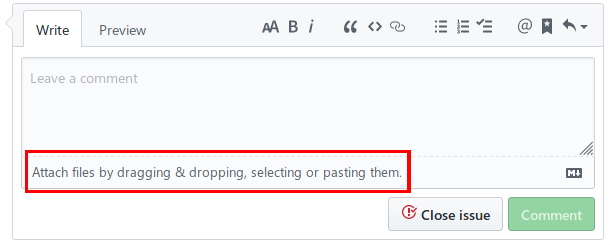
carstene1ns
on 12 May 2019
You were right.
Step ./2_build_toolchain.sh really fails.
It says
* Building ICU (native without ASM) *
checking for ICU version numbers... release 60.2, library 60.2, unicode version 10.0
checking build system type... x86_64-apple-darwin18.2.0
checking host system type... x86_64-apple-darwin18.2.0
checking whether to build debug libraries... no
checking whether to build release libraries... yes
checking for clang... clang
checking whether the C compiler works... yes
checking for C compiler default output file name... a.out
checking for suffix of executables...
checking whether we are cross compiling... configure: error: in/Users/lmenezes/Cloned_From_Github/buildscripts/emscripten/icu-native/source': configure: error: cannot run C compiled programs. If you meant to cross compile, use--host'.
See `config.log' for more details
The config.log is attached, as requested:
config.log
LucasMW
on 12 May 2019
A short internet search suggests, that xcode-select --install might fix this.
https://stackoverflow.com/a/52511046
carstene1ns
on 12 May 2019
I already have this installed. As a matter of fact, it simply replies
xcode-select: error: command line tools are already installed, use "Software Update" to install updates
(No updates available)
My searches suggest this has something to do on how linux permissions differs from mac OS ones.
(Which looks like a dead end)
LucasMW
on 12 May 2019
Note that everything you do is completely unsupported and untested because we only use these scripts to build with our buildbot for emscripten on Linux.
Imo it picks the wrong compiler (emscripten, not the native one).
Start again from a fresh terminal session and only run the "2.sh".
Ghabry
on 12 May 2019
Have you installed the headers like it is written in the rest of the answer?
carstene1ns
on 12 May 2019
Ghabry is right about the wrong compiler. You have the emscripten stuff available in your $PATH environment variable, which is needed for building all cross libraries, but not for ICU (host/tools).
carstene1ns
on 12 May 2019
Is this resolved? @LucasMW
Compared to other projects we try to keep our issue list clean and I want to close it :+1:
Ghabry
on 24 May 2019
Sorry folks, I just gave up on trying to do this on a mac for now. I might try on linux at a later date (as it appears more supported). If you want to close it, go ahead. But I still think the ideal way to close this issue is pointing the documentation for doing so, either on the readme or the wiki.
LucasMW
on 24 May 2019
Related issues
 msikma
·
14Comments
msikma
·
14Comments
 fmatthew5876
·
14Comments
carstene1ns
·
18Comments
fmatthew5876
·
14Comments
carstene1ns
·
18Comments
 Klauserus
·
16Comments
Klauserus
·
16Comments
 zell180
·
23Comments
zell180
·
23Comments