Play-games-plugin-for-unity: NullReferenceException in VersionFromAndroidSDKVersionsEnum (0.10.06)
Steps:
- integrate 0.10.06
- run scene
Stopped polling job due to exception: System.NullReferenceException: Object reference not set to an instance of an object
at GooglePlayServices.UnityCompat.VersionFromAndroidSDKVersionsEnum (System.String enumName, System.String fallbackPrefKey, System.Int32 fallbackValue) [0x00000] in /Users/smiles/dev/src/unity-jar-resolver/source/PlayServicesResolver/src/UnityCompat.cs:58
at GooglePlayServices.UnityCompat.GetAndroidTargetSDKVersion () [0x00015] in /Users/smiles/dev/src/unity-jar-resolver/source/PlayServicesResolver/src/UnityCompat.cs:116
at GooglePlayServices.PlayServicesResolver.CanEnableJetifierOrPromptUser (System.String titlePrefix) [0x000ae] in /Users/smiles/dev/src/unity-jar-resolver/source/PlayServicesResolver/src/PlayServicesResolver.cs:2314
at GooglePlayServices.PlayServicesResolver.ResolveUnsafe (System.Action1[T] resolutionComplete, System.Boolean forceResolution, System.Boolean isAutoResolveJob, System.Boolean closeWindowOnCompletion) [0x00014] in /Users/smiles/dev/src/unity-jar-resolver/source/PlayServicesResolver/src/PlayServicesResolver.cs:1635 at GooglePlayServices.PlayServicesResolver+<ScheduleResolve>c__AnonStorey1E.<>m__3F () [0x00000] in /Users/smiles/dev/src/unity-jar-resolver/source/PlayServicesResolver/src/PlayServicesResolver.cs:1604 at GooglePlayServices.PlayServicesResolver.ExecuteNextResolveJob () [0x00069] in /Users/smiles/dev/src/unity-jar-resolver/source/PlayServicesResolver/src/PlayServicesResolver.cs:1461 at GooglePlayServices.PlayServicesResolver.ScheduleResolve (System.Boolean forceResolution, System.Boolean closeWindowOnCompletion, System.Action1[T] resolutionCompleteWithResult, System.Boolean isAutoResolveJob) [0x000a7] in /Users/smiles/dev/src/unity-jar-resolver/source/PlayServicesResolver/src/PlayServicesResolver.cs:1617
at GooglePlayServices.PlayServicesResolver.AutoResolve (System.Action resolutionComplete) [0x00017] in /Users/smiles/dev/src/unity-jar-resolver/source/PlayServicesResolver/src/PlayServicesResolver.cs:1134
at GooglePlayServices.PlayServicesResolver.m__47 () [0x00016] in /Users/smiles/dev/src/unity-jar-resolver/source/PlayServicesResolver/src/PlayServicesResolver.cs:1113
at Google.RunOnMainThread.ExecutePollingJobs () [0x0004a] in /Users/smiles/dev/src/unity-jar-resolver/source/VersionHandlerImpl/src/RunOnMainThread.cs:300
UnityEngine.Debug:LogError(Object)
Google.RunOnMainThread:ExecutePollingJobs() (at /Users/smiles/dev/src/unity-jar-resolver/source/VersionHandlerImpl/src/RunOnMainThread.cs:303)
Google.RunOnMainThread:m__A() (at /Users/smiles/dev/src/unity-jar-resolver/source/VersionHandlerImpl/src/RunOnMainThread.cs:414)
Google.RunOnMainThread:RunAction(Action) (at /Users/smiles/dev/src/unity-jar-resolver/source/VersionHandlerImpl/src/RunOnMainThread.cs:234)
Google.RunOnMainThread:ExecuteAll() (at /Users/smiles/dev/src/unity-jar-resolver/source/VersionHandlerImpl/src/RunOnMainThread.cs:406)
UnityEditor.EditorApplication:Internal_CallUpdateFunctions() (at C:/buildslave/unity/build/Editor/Mono/EditorApplication.cs:303)
 hippogamesunity
All 11 comments
Also 'Forse Resovle' feature doesn't work with this version. Tried reimport with no luck. No errors when importing. Unity 2019.2.9 and 2019.2.4.
hippogamesunity
on 24 Nov 2019
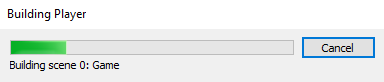
Stuck when building on Android with this version (10 minutes, then kill Unity).
GPGS is always headache. I don't use it in new projects but I have to use it in legacy projects =(
hippogamesunity
on 24 Nov 2019
Thanks for reporting. We will check it on those Unity versions.
 olehkuznetsov
on 29 Nov 2019
olehkuznetsov
on 29 Nov 2019
I had the same bug (android minSdkVersion set to 29).
The entry is probably not in the Unity enum, see there : https://github.com/Unity-Technologies/UnityCsReference/blob/master/Editor/Mono/PlayerSettingsAndroid.bindings.cs).
Then, the resolver cannot get the enum's name and crash.
I set my target to automatic and it worked.
 sebastienalcamo
on 14 Dec 2019
sebastienalcamo
on 14 Dec 2019
I had the same bug (android minSdkVersion set to 29).
The entry is probably not in the Unity enum, see there : https://github.com/Unity-Technologies/UnityCsReference/blob/master/Editor/Mono/PlayerSettingsAndroid.bindings.cs).
Then, the resolver cannot get the enum's name and crash.I set my target to automatic and it worked.
You are Legend .. The Conqueror of the CastleBlackofUnityIssues... It solved the as* paining issue that continued for about 2 days.
 MAtif96Git
on 24 Dec 2019
MAtif96Git
on 24 Dec 2019
I had the same bug (android minSdkVersion set to 29).
The entry is probably not in the Unity enum, see there : https://github.com/Unity-Technologies/UnityCsReference/blob/master/Editor/Mono/PlayerSettingsAndroid.bindings.cs).
Then, the resolver cannot get the enum's name and crash.I set my target to automatic and it worked.
Excelent!!
 lorenzostudiosok
on 28 Feb 2020
lorenzostudiosok
on 28 Feb 2020
That solution is a bandaid only. If people on your team need to use API 29, then they have to go through manual steps to upgrade their unity build and then switch back to automatic. Can a change be put into playservices to catch this issue and prevent it from causing an error?
 zippo227
on 26 Mar 2020
zippo227
on 26 Mar 2020
Thank you for update. Seems as not related to PGS plugin.
olehkuznetsov
on 27 Mar 2020
Just wanted to raise awareness that you can fix this issue by installing the External Dependency Manager package or the latest version of it. Though this bug was not caused by this play games for unity plugin, it's caused by this plugin using an older version of the manager. Learn more here. https://github.com/googlesamples/unity-jar-resolver/issues/344
zippo227
on 27 Mar 2020
Just wanted to raise awareness that you can fix this issue by installing the External Dependency Manager package or the latest version of it. Though this bug was not caused by this play games for unity plugin, it's caused by this plugin using an older version of the manager. Learn more here. googlesamples/unity-jar-resolver#344
Yes, i have found similar solution, using DependecyManager or in an empty project i was imported google play services and get the play resolver librerary new and imported in my old project and works also.
 mrpacogp
on 2 Aug 2020
mrpacogp
on 2 Aug 2020
I had the same bug (android minSdkVersion set to 29).
The entry is probably not in the Unity enum, see there : https://github.com/Unity-Technologies/UnityCsReference/blob/master/Editor/Mono/PlayerSettingsAndroid.bindings.cs).
Then, the resolver cannot get the enum's name and crash.I set my target to automatic and it worked.
I am new to Unity and encountered the same issue. So in which directory is located this file or I am suposed to add it and if I have to add it in which directory I should place it?
 JordanYanakiev
on 30 Nov 2020
JordanYanakiev
on 30 Nov 2020
Related issues
 marcus13345
·
3Comments
marcus13345
·
3Comments
 easycg
·
3Comments
easycg
·
3Comments
 cataHHH
·
4Comments
cataHHH
·
4Comments
 toxikman
·
4Comments
toxikman
·
4Comments
 RafikTSG
·
3Comments
RafikTSG
·
3Comments
Most helpful comment
I had the same bug (android minSdkVersion set to 29).
The entry is probably not in the Unity enum, see there : https://github.com/Unity-Technologies/UnityCsReference/blob/master/Editor/Mono/PlayerSettingsAndroid.bindings.cs).
Then, the resolver cannot get the enum's name and crash.
I set my target to automatic and it worked.