Play-games-plugin-for-unity: Version control with GPGS plugin is an absolute nightmare
The GPGS plugin manages files in Assets/Plugins/Android. These files are binary files that frequently change, and generally would be best to exclude from a repository. In theory, the only file we should need to commit is AndroidResolverDependencies. However, Assets/Plugins/Android is a common directory also used by official Unity plugins and other third-party plugins, so we can't add the directory to gitignore.
Because files created by GPGS include the version number at the end of the file name, we also can't ignore individual files, because the names will change when GPGS updates them.
This makes version control a nightmare when working with multiple team members, or going back and forth between branches which have ended up with different versions of the GPGS libraries. Inevitably, team members will end up with different versions of the libraries, and inevitably, some of them who are in a hurry or inattentive will accidentally commit all files, including changes to GPGS libraries that don't need to be committed. Then those of us who do not commit every change to GPGS libraries get the "files would be overwritten by checkout" message when switching branches, and have to go through and manually discard changes to removed libraries and remove new library versions, so that we can switch branches without errors.
Please have the GPGS plugin write the libraries into their own unique folder, rather than Assets/Plugins/Android , so we can gitignore this entire folder and save endless headaches.
 kevinfoley
All 2 comments
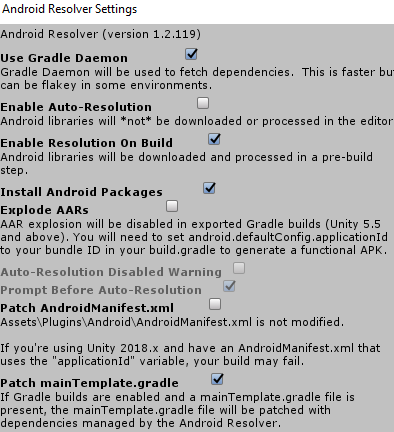
@kevinfoley use the latest version of play services resolver to switch to mainTemplate.gradle patching for dependency management, this means you won't have any aar libraries in your project and eliminates this problem. It works in much the same way except all your dependencies will be downloaded as part of the gradle build process.
Unfortunately the play services resolver is responsible for these files being placed in the main Plugins/Android resolver and does so since it resolves dependencies across multiple plugins i.e. facebook, gpgs, etc rather than just gpgs (that said there shouldn't be anything wrong with it putting them all in Plugins/Android/Libraries..!).
I'd also recommend turning off auto resolution, much better to know when things are being changed than it suddenly changing on you unexpectedly
 sam-mckay
on 14 Aug 2019
sam-mckay
on 14 Aug 2019
Probably this one is for https://github.com/googlesamples/unity-jar-resolver this plugin
 olehkuznetsov
on 28 Nov 2019
olehkuznetsov
on 28 Nov 2019
Related issues
 cataHHH
·
4Comments
cataHHH
·
4Comments
 RafikTSG
·
3Comments
RafikTSG
·
3Comments
 brentbartlett
·
5Comments
brentbartlett
·
5Comments
 ivribalko
·
3Comments
ivribalko
·
3Comments
 toxikman
·
4Comments
toxikman
·
4Comments
Most helpful comment
@kevinfoley use the latest version of play services resolver to switch to mainTemplate.gradle patching for dependency management, this means you won't have any aar libraries in your project and eliminates this problem. It works in much the same way except all your dependencies will be downloaded as part of the gradle build process.
Unfortunately the play services resolver is responsible for these files being placed in the main Plugins/Android resolver and does so since it resolves dependencies across multiple plugins i.e. facebook, gpgs, etc rather than just gpgs (that said there shouldn't be anything wrong with it putting them all in Plugins/Android/Libraries..!).
I'd also recommend turning off auto resolution, much better to know when things are being changed than it suddenly changing on you unexpectedly