Play-games-plugin-for-unity: Resolution failed: Failed to fetch the following dependencies: com.google.games:gpgs-plugin-support:0+@aar
So I made a game currently delayed because of this. And I imported the google play services plugin and Admob plugin. Admob plugin works great. These screenshots are taken without the admob plugin however. So I can confirm the issue is about this plugin. So when I imported the plugin and the plugin made the first resolution, this window popped up:

If i click Yes. It shows resolution failed, I can try to force resolve it again, but same issue. Console log here:

If i click No on the first prompt and try to build it. The build doesn't complete and it shows this error:
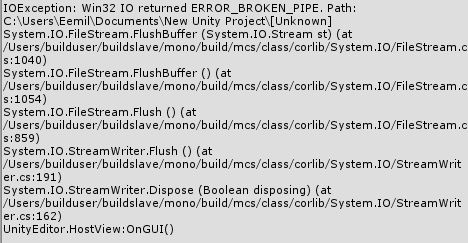
So yeah. I'm pretty much waiting now with complete game to get this to work. Thank you for all of your answers.
I'm running 64bit Windows 8.0 on a Laptop. My Java version is jdk1.8.0_131 And JAVA_HOME is set to C:\Program Files (x86)\Java\jdk1.8.0_131
Unity version 5.6.3p2 and Google Play services version 0.9.42
 emeahonen
All 11 comments
I got this problem too after I install the googleads-mobile-unity plug-in. Now I can't get interstitial ad or connect to google play games service. I'm also using Unity version 5.6.3p2, Google Play services version 0.9.42 and Google Mobile Ads Unity Plugin v3.8.0
 realn3wb13
on 9 Nov 2017
realn3wb13
on 9 Nov 2017
My app's deadline is reaching soon. Can someone help?
emeahonen
on 11 Nov 2017
Hi @emeahonen ,
I went through the same scenario and got the same issue.
How I got this :
1) Imported Google play Games Plugin.
2) Clicked YES in Resolve Conflict window.
3) Tested my Game services (Leaderboards & Achievements) and working perfect (at this step)
4) Imported Google Mobile Ads plugins (Admob).
5) Ads working perfect but google play services not working.
and I got this error also on my android logcat saying _Unable to find gpg_ _DllNotFoundException: gpg_
How I Solved it : (continuing from step 5)
6) Reimported Google Play Games Plugin (It will select the missing files by default).
7) Go to Assets menu => Play Services Resolver => Android Resolver => Force Resolve.
8) After resolving dependencies , _Resolve Conflict window_ pops up. Click NO.
Build and Test your application
add Debug.Log to check your authenticate status.
_Social.localUser.Authenticate (success => {
if (success) {
Debug.Log ("SignIn successful");
} else {
Debug.Log ("SignIn failed");
}
});_
I tried this and it worked perfectly!
My setup:
Running on MacBook Pro , macOS : Sierra 10.12.6
Unity version : Unity 5.6.4p1
Google Play Games Plugin version : v0.9.42
GoogleMobile Ads version : v3.8.0
Please do let know if this works for you
 hasitha92
on 11 Nov 2017
hasitha92
on 11 Nov 2017
I re-import everything but this time I started with admob then google play games and it fixed my problem.
realn3wb13
on 12 Nov 2017
Hey @hasitha92 Thank you so much for your reply. Everything you wrote went the same from steps 1-8. Unfortunately after step 8. My app doesn't build because of the "IOException: Win32 IO returned ERROR_BROKEN_PIPE".
emeahonen
on 12 Nov 2017
@emeahonen are you using any other services like Unity IAP or Facebook plugin ? In which platform are you currently working on? Did you try updating repositories in Android SDK Manager ?
hasitha92
on 12 Nov 2017
@hasitha92 I am using Unity IAP. But this error occurred before even adding the IAP plugin. I am working on Android and I don't have any new updates on Android SDK Manager
emeahonen
on 15 Nov 2017
I fixed the issue. Reinstalled JDK and Moved the project files to Root of C:
emeahonen
on 18 Nov 2017
I were trying to solved it almost 3 hours . Finally solved. @hasitha92 Thanks a lot you saved my day.
 sachinwak
on 8 Dec 2017
sachinwak
on 8 Dec 2017
Hi Im having a similar issue but force resolve isnt working for me.
https://github.com/playgameservices/play-games-plugin-for-unity/issues/2129
any assistance or clues would be appreciated.
thanks
 MukeshMaharaj
on 5 Mar 2018
MukeshMaharaj
on 5 Mar 2018
This Video Explains the solution step by step. https://youtu.be/cIa8PK3QGUw
 Asadjbut
on 12 Nov 2020
Asadjbut
on 12 Nov 2020
Related issues
 bibbis
·
4Comments
bibbis
·
4Comments
 mattr-swol
·
4Comments
mattr-swol
·
4Comments
 temresen
·
4Comments
temresen
·
4Comments
 hippogamesunity
·
5Comments
hippogamesunity
·
5Comments
 RafikTSG
·
3Comments
RafikTSG
·
3Comments
Most helpful comment
Hi @emeahonen ,
I went through the same scenario and got the same issue.
How I got this :
1) Imported Google play Games Plugin.
2) Clicked YES in Resolve Conflict window.
3) Tested my Game services (Leaderboards & Achievements) and working perfect (at this step)
4) Imported Google Mobile Ads plugins (Admob).
5) Ads working perfect but google play services not working.
and I got this error also on my android logcat saying _Unable to find gpg_ _DllNotFoundException: gpg_
How I Solved it : (continuing from step 5)
6) Reimported Google Play Games Plugin (It will select the missing files by default).
7) Go to Assets menu => Play Services Resolver => Android Resolver => Force Resolve.
8) After resolving dependencies , _Resolve Conflict window_ pops up. Click NO.
Build and Test your application
add Debug.Log to check your authenticate status.
_Social.localUser.Authenticate (success => {
if (success) {
Debug.Log ("SignIn successful");
} else {
Debug.Log ("SignIn failed");
}
});_
I tried this and it worked perfectly!
My setup:
Running on MacBook Pro , macOS : Sierra 10.12.6
Unity version : Unity 5.6.4p1
Google Play Games Plugin version : v0.9.42
GoogleMobile Ads version : v3.8.0
Please do let know if this works for you