Play-games-plugin-for-unity: Leaderboard does not display
Authentication and score sending works fine, but when I call:
`PlayGamesPlatform.Instance.ShowLeaderboardUI(leaderboardId);`
nothing happens at Unity's end. And if I call it a second time, I get the ERROR_UI_BUSY log as it can be seen below. Am I doing something wrong or could this have something to do with the plugin, Android SDK or even Unity?
09-28 20:07:43.555 25093 25117 I Unity   :  [Play Games Plugin DLL] 09/28/17 20:07:43 +03:00 DEBUG: Activating PlayGamesPlatform.
09-28 20:07:43.555 25093 25117 I Unity   :  [Play Games Plugin DLL] 09/28/17 20:07:43 +03:00 DEBUG: PlayGamesPlatform activated: GooglePlayGames.PlayGamesPlatform
09-28 20:07:43.555 25093 25117 I Unity   :  [Play Games Plugin DLL] 09/28/17 20:07:43 +03:00 DEBUG: Creating platform-specific Play Games client.
09-28 20:07:43.555 25093 25117 I Unity   :  [Play Games Plugin DLL] 09/28/17 20:07:43 +03:00 DEBUG: Creating Android IPlayGamesClient Client
09-28 20:07:43.628 25093 25117 I Unity   :  [Play Games Plugin DLL] 09/28/17 20:07:43 +03:00 DEBUG: Starting Auth Transition. Op: SIGN_IN status: ERROR_NOT_AUTHORIZED
09-28 20:07:43.628 25093 25117 I Unity   :  [Play Games Plugin DLL] 09/28/17 20:07:43 +03:00 DEBUG: Invoking callbacks, AuthState changed from silentPending to Unauthenticated.
09-28 20:07:43.628 25093 25117 I Unity   :  [Play Games Plugin DLL] 09/28/17 20:07:43 +03:00 DEBUG: there are pending auth callbacks - starting AuthUI
09-28 20:07:46.533 25093 25117 I Unity   :  [Play Games Plugin DLL] 09/28/17 20:07:46 +03:00 DEBUG: Starting Auth Transition. Op: SIGN_IN status: VALID
09-28 20:07:46.589 25093 25117 I Unity   :  [Play Games Plugin DLL] 09/28/17 20:07:46 +03:00 DEBUG: Entering internal callback for PlayerManager#InternalFetchSelfCallback
09-28 20:07:46.589 25093 25117 I Unity   :  [Play Games Plugin DLL] 09/28/17 20:07:46 +03:00 DEBUG: Populating User
09-28 20:07:46.620 25093 25117 I Unity   :  [Play Games Plugin DLL] 09/28/17 20:07:46 +03:00 DEBUG: Found User: [Player: 'NationWithoutFlags' (id g08277417139812776981)]
09-28 20:07:46.620 25093 25117 I Unity   :  [Play Games Plugin DLL] 09/28/17 20:07:46 +03:00 DEBUG: Maybe finish for User
09-28 20:07:46.620 25093 25117 I Unity   :  [Play Games Plugin DLL] 09/28/17 20:07:46 +03:00 DEBUG: Auth not finished. User=[Player: 'NationWithoutFlags' (id g08277417139812776981)] achievements=
09-28 20:07:47.805 25093 25117 I Unity   :  [Play Games Plugin DLL] 09/28/17 20:07:47 +03:00 DEBUG: Entering internal callback for AchievementManager#InternalFetchAllCallback
09-28 20:07:47.823 25093 25117 I Unity   :  [Play Games Plugin DLL] 09/28/17 20:07:47 +03:00 DEBUG: Populating Achievements, status = VALID
09-28 20:07:47.838 25093 25117 I Unity   :  [Play Games Plugin DLL] 09/28/17 20:07:47 +03:00 DEBUG: Found 0 Achievements
09-28 20:07:47.839 25093 25117 I Unity   :  [Play Games Plugin DLL] 09/28/17 20:07:47 +03:00 DEBUG: Maybe finish for Achievements
09-28 20:07:47.839 25093 25117 I Unity   :  [Play Games Plugin DLL] 09/28/17 20:07:47 +03:00 DEBUG: Auth finished. Proceeding.
09-28 20:07:47.839 25093 25117 I Unity   :  [Play Games Plugin DLL] 09/28/17 20:07:47 +03:00 DEBUG: Invoking Callbacks: System.Action`2[System.Boolean,System.String]
09-28 20:07:47.874 25093 25117 I Unity   :  [Play Games Plugin DLL] 09/28/17 20:07:47 +03:00 DEBUG: Invoking user callback on game thread
09-28 20:07:52.666 25093 25117 I Unity   :  [Play Games Plugin DLL] 09/28/17 20:07:52 +03:00 DEBUG: SetDefaultLeaderboardForUI: CgkIkI2VsbwKEAIQAQ
09-28 20:07:52.666 25093 25117 I Unity   :  [Play Games Plugin DLL] 09/28/17 20:07:52 +03:00 DEBUG: ShowLeaderboardUI with default ID
09-28 20:07:52.666 25093 25117 I Unity   :  [Play Games Plugin DLL] 09/28/17 20:07:52 +03:00 DEBUG: ShowLeaderboardUI, lbId=CgkIkI2VsbwKEAIQAQ callback is
09-28 20:07:52.682 25093 25117 I Unity   :  [Play Games Plugin DLL] 09/28/17 20:07:52 +03:00 DEBUG: Entering internal callback for AndroidPlatformConfiguration#InternalIntentHandler
09-28 20:08:17.645 25093 25117 I Unity   :  [Play Games Plugin DLL] 09/28/17 20:08:17 +03:00 DEBUG: SetDefaultLeaderboardForUI: CgkIkI2VsbwKEAIQAQ
09-28 20:08:17.646 25093 25117 I Unity   :  [Play Games Plugin DLL] 09/28/17 20:08:17 +03:00 DEBUG: ShowLeaderboardUI with default ID
09-28 20:08:17.646 25093 25117 I Unity   :  [Play Games Plugin DLL] 09/28/17 20:08:17 +03:00 DEBUG: ShowLeaderboardUI, lbId=CgkIkI2VsbwKEAIQAQ callback is
09-28 20:08:18.032 25093 25117 I Unity   :  [Play Games Plugin DLL] 09/28/17 20:08:18 +03:00 DEBUG: Showing UI Internal callback: ERROR_UI_BUSY
09-28 20:08:18.046 25093 25117 I Unity   :  [Play Games Plugin DLL] 09/28/17 20:08:18 +03:00 DEBUG: Invoking user callback on game thread
09-28 20:08:18.047 25093 25117 I Unity   :  [Play Games Plugin DLL] 09/28/17 20:08:18 +03:00 DEBUG: Received UI callback: ERROR_UI_BUSY
 onuryurdupak
All 21 comments
Facing Same issue. Authentication is successful but leaderboard UI is not displayed. Below are the complete logs. May be below runtime exceptions is the reason.
09-29 05:20:26.267 2835-24975/? W/AppOps: Bad call: specified package com.google.android.play.games under uid 10169 but it is really 10168
java.lang.RuntimeException: here
at com.android.server.AppOpsService.getOpsRawLocked(AppOpsService.java:1356)
at com.android.server.AppOpsService.checkPackage(AppOpsService.java:1035)
at com.android.internal.app.IAppOpsService$Stub.onTransact(IAppOpsService.java:169)
at android.os.Binder.execTransact(Binder.java:573)
09-29 05:20:26.268 2835-12041/? W/AppOps: Bad call: specified package com.google.android.play.games under uid 10169 but it is really 10168
java.lang.RuntimeException: here
at com.android.server.AppOpsService.getOpsRawLocked(AppOpsService.java:1356)
at com.android.server.AppOpsService.checkPackage(AppOpsService.java:1035)
at com.android.internal.app.IAppOpsService$Stub.onTransact(IAppOpsService.java:169)
at android.os.Binder.execTransact(Binder.java:573)
09-29 05:20:26.287 2835-2972/? W/AppOps: Bad call: specified package com.google.android.play.games under uid 10169 but it is really 10168
java.lang.RuntimeException: here
at com.android.server.AppOpsService.getOpsRawLocked(AppOpsService.java:1356)
at com.android.server.AppOpsService.checkPackage(AppOpsService.java:1035)
at com.android.internal.app.IAppOpsService$Stub.onTransact(IAppOpsService.java:169)
at android.os.Binder.execTransact(Binder.java:573)
09-29 05:20:26.288 2835-20025/? W/AppOps: Bad call: specified package com.google.android.play.games under uid 10169 but it is really 10168
java.lang.RuntimeException: here
at com.android.server.AppOpsService.getOpsRawLocked(AppOpsService.java:1356)
at com.android.server.AppOpsService.checkPackage(AppOpsService.java:1035)
at com.android.internal.app.IAppOpsService$Stub.onTransact(IAppOpsService.java:169)
at android.os.Binder.execTransact(Binder.java:573)
09-29 05:20:26.306 910-956/? I/Unity: [Play Games Plugin DLL] 09/29/17 5:20:26 +05:00 DEBUG: Entering internal callback for AchievementManager#InternalFetchAllCallback
(Filename: ./artifacts/generated/common/runtime/DebugBindings.gen.cpp Line: 51)
09-29 05:20:26.306 910-956/? I/Unity: [Play Games Plugin DLL] 09/29/17 5:20:26 +05:00 DEBUG: Populating Achievements, status = VALID
(Filename: ./artifacts/generated/common/runtime/DebugBindings.gen.cpp Line: 51)
09-29 05:20:26.356 910-956/? I/Unity: [Play Games Plugin DLL] 09/29/17 5:20:26 +05:00 DEBUG: Found 5 Achievements
(Filename: ./artifacts/generated/common/runtime/DebugBindings.gen.cpp Line: 51)
09-29 05:20:26.356 910-956/? I/Unity: [Play Games Plugin DLL] 09/29/17 5:20:26 +05:00 DEBUG: Maybe finish for Achievements
(Filename: ./artifacts/generated/common/runtime/DebugBindings.gen.cpp Line: 51)
09-29 05:20:26.356 910-956/? I/Unity: [Play Games Plugin DLL] 09/29/17 5:20:26 +05:00 DEBUG: Auth finished. Proceeding.
(Filename: ./artifacts/generated/common/runtime/DebugBindings.gen.cpp Line: 51)
09-29 05:20:26.356 910-956/? I/Unity: [Play Games Plugin DLL] 09/29/17 5:20:26 +05:00 DEBUG: Invoking Callbacks: System.Action`2[System.Boolean,System.String]
(Filename: ./artifacts/generated/common/runtime/DebugBindings.gen.cpp Line: 51)
09-29 05:20:26.357 910-956/? I/Unity: Successfully Signed IN
(Filename: ./artifacts/generated/common/runtime/DebugBindings.gen.cpp Line: 51)
09-29 05:20:26.373 910-956/? I/Unity: [Play Games Plugin DLL] 09/29/17 5:20:26 +05:00 DEBUG: Invoking user callback on game thread
(Filename: ./artifacts/generated/common/runtime/DebugBindings.gen.cpp Line: 51)
09-29 05:23:44.224 910-956/? I/Unity: [Play Games Plugin DLL] 09/29/17 5:23:44 +05:00 DEBUG: ShowLeaderboardUI with default ID
(Filename: ./artifacts/generated/common/runtime/DebugBindings.gen.cpp Line: 51)
09-29 05:23:44.224 910-956/? I/Unity: [Play Games Plugin DLL] 09/29/17 5:23:44 +05:00 DEBUG: ShowLeaderboardUI, lbId= callback is
(Filename: ./artifacts/generated/common/runtime/DebugBindings.gen.cpp Line: 51)
09-29 05:23:44.229 910-956/? I/Unity: [Play Games Plugin DLL] 09/29/17 5:23:44 +05:00 DEBUG: Entering internal callback for AndroidPlatformConfiguration#InternalIntentHandler
(Filename: ./artifacts/generated/common/runtime/DebugBindings.gen.cpp Line: 51)
09-29 05:23:44.234 910-956/? D/NativeBridgeActivity: Launching bridge activity: parent:com.unity3d.player.UnityPlayerActivity@a1486b1 intent Intent { act=com.google.android.gms.games.VIEW_LEADERBOARDS dat=version:11220000 flg=0x4000000 pkg=com.google.android.play.games launchParam=MultiScreenLaunchParams { mDisplayId=0 mBaseDisplayId=0 mFlags=0 } (has extras) }
--------- beginning of system`
After clicking button second time for Leader board UI
09-29 05:24:22.600 910-956/? I/Unity: [Play Games Plugin DLL] 09/29/17 5:24:22 +05:00 DEBUG: ShowLeaderboardUI with default ID
(Filename: ./artifacts/generated/common/runtime/DebugBindings.gen.cpp Line: 51)
09-29 05:24:22.600 910-956/? I/Unity: [Play Games Plugin DLL] 09/29/17 5:24:22 +05:00 DEBUG: ShowLeaderboardUI, lbId= callback is
(Filename: ./artifacts/generated/common/runtime/DebugBindings.gen.cpp Line: 51)
09-29 05:24:22.622 8188-8200/? W/GamesServiceBroker: Client connected with SDK 11220000, Services 11517436, and Games 52250036
09-29 05:24:22.639 8188-8306/? W/GamesServiceBroker: Client connected with SDK 11411000, Services 11517436, and Games 52250036
--------- beginning of system
09-29 05:24:22.682 2835-20025/? W/AppOps: Bad call: specified package com.google.android.play.games under uid 10169 but it is really 10168
java.lang.RuntimeException: here
at com.android.server.AppOpsService.getOpsRawLocked(AppOpsService.java:1356)
at com.android.server.AppOpsService.checkPackage(AppOpsService.java:1035)
at com.android.internal.app.IAppOpsService$Stub.onTransact(IAppOpsService.java:169)
at android.os.Binder.execTransact(Binder.java:573)
09-29 05:24:22.727 8188-8306/? W/GamesServiceBroker: Client connected with SDK 11411000, Services 11517436, and Games 52250036
09-29 05:24:22.740 910-910/? V/GamesNativeSDK: Play Games callback indicates connection.
09-29 05:24:22.754 910-1238/? I/GamesNativeSDK: Successfully connected to Google Play.
09-29 05:24:22.757 910-1238/? E/GamesNativeSDK: Trying to show UI while waiting for a result from an existing UI. Please ensure that OnActivityResult is forwarded to the Games C++ SDK from your Java activity. See android_support.h for more details.
09-29 05:24:22.766 910-956/? I/Unity: [Play Games Plugin DLL] 09/29/17 5:24:22 +05:00 DEBUG: Showing UI Internal callback: ERROR_UI_BUSY
(Filename: ./artifacts/generated/common/runtime/DebugBindings.gen.cpp Line: 51)
09-29 05:24:22.775 8188-8302/? I/System.out: (HTTPLog)-Static: isSBSettingEnabled false
09-29 05:24:22.775 8188-8302/? I/System.out: (HTTPLog)-Static: isSBSettingEnabled false
09-29 05:24:22.782 910-956/? I/Unity: [Play Games Plugin DLL] 09/29/17 5:24:22 +05:00 DEBUG: Invoking user callback on game thread
(Filename: ./artifacts/generated/common/runtime/DebugBindings.gen.cpp Line: 51)
09-29 05:24:22.783 910-956/? I/Unity: [Play Games Plugin DLL] 09/29/17 5:24:22 +05:00 DEBUG: Received UI callback: ERROR_UI_BUSY
(Filename: ./artifacts/generated/common/runtime/DebugBindings.gen.cpp Line: 51)`
 ComplexVariable
on 29 Sep 2017
ComplexVariable
on 29 Sep 2017
I've downgraded the plugin version from 0.9.41 to 0.9.38 and haven't changed a single line of code in project. Leaderboard now properly shows. This seems like an issue with the plugin.
onuryurdupak
on 29 Sep 2017
try adding:
  <activity android:name="com.google.games.bridge.NativeBridgeActivity"
            android:theme="@android:style/Theme.Translucent.NoTitleBar.Fullscreen" />
to the android manifest.
 justy-p
on 29 Sep 2017
justy-p
on 29 Sep 2017
The activity code worked! I guess the activity code wasn't generated by google plugin or something?
 axa216
on 30 Sep 2017
axa216
on 30 Sep 2017
@supersolid-Justy I LOVE YOU >>> THANKS A LOT 😫😩😣😭🌹
 Kajsboy81
on 1 Oct 2017
Kajsboy81
on 1 Oct 2017
What supersolid-Justy said works like a charm.
try adding:
  <activity android:name="com.google.games.bridge.NativeBridgeActivity"
            android:theme="@android:style/Theme.Translucent.NoTitleBar.Fullscreen" />
to the android manifest.
onuryurdupak
on 2 Oct 2017
Yes, the template for the Android Manifest, doesnt have that part in. I made a pull request, so once Clay gets to it, he will hopefully merge it into the plugin
justy-p
on 2 Oct 2017
@supersolid-Justy Thank you!!!
 Mikita-Kharitonau
on 3 Oct 2017
Mikita-Kharitonau
on 3 Oct 2017
Thanks a lot ! by the way what is the right way to do that please? (to add these liens to android manifest)
 mybouhssina
on 7 Oct 2017
mybouhssina
on 7 Oct 2017
Update : its working now but if I try to add a new score to the leaderboard I can't open it until I reinstall the app :( (the score isn't add too)
mybouhssina
on 8 Oct 2017
Great supersolid-Justy It worked for me, thx a lot!!!
 Declemnt
on 9 Oct 2017
Declemnt
on 9 Oct 2017
After two weeks of failure, I finally got it :) . Thank you so much supersolid-Justy.
 DerLasseHenrich
on 10 Oct 2017
DerLasseHenrich
on 10 Oct 2017
Guys are you able to show the leaderboard after posting a score to it? because I can't :/ anyone can help please?
mybouhssina
on 12 Oct 2017
@saywow95 Yes, I am able to show the leaderboard after posting the score to it. Do you also use reportScore?
DerLasseHenrich
on 12 Oct 2017
That can be the reason of manifest util doesn't work. Anyway, my app now crashes after I've added this activity to manifest)
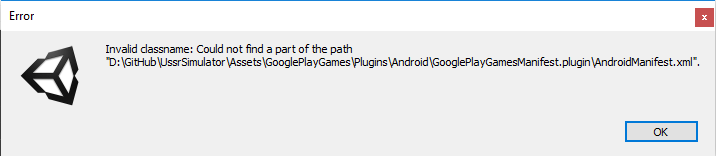
 hippogamesunity
on 13 Oct 2017
hippogamesunity
on 13 Oct 2017
@DerLasseHenrich yes I do and after that the leaderboard won't open anymore until I reinstall the game :/, after reinstalling I don't find any scores in the leaderboard :(
public void AddNewScore()
{
if (PlayGamesPlatform.Instance.localUser.authenticated)
{
Debug.Log("[mdbg] reporting " + ScoreManager.instance.score);
Social.ReportScore(ScoreManager.instance.score, LeaderBoardData.leaderboard_best_scores, (bool success) => {
if (success)
Debug.Log("[mdbg]Score reported");
else
Debug.Log("[mdbg]Score report failure");
});
}
else
{
Debug.Log("user not logged in !");
}
}
@saywow95 Are you sure that everything is right with your Score? Or maybe you should try Social.localUser instead of PlayGamesPlatform.Instance.localUser.
DerLasseHenrich
on 14 Oct 2017
@DerLasseHenrich thank you for your time, for some reason it isn't working at all now, did you add your game to the store (alpha/beta or production) before being able to use it? can you share with me the guide that you followed to get it to work? thank you !
mybouhssina
on 15 Oct 2017
@saywow95 My game was in beta (now it's in production and it does work as well). If you are in beta, make sure you're in the list of beta testers. I followed multiple guides, but the last one was from theAppGuruz and it worked after implementing the code of @supersolid-Justy to the manifest. Is your wohle game not working or just the leaderboard? And does it crash or just does nothing or anything lese?
DerLasseHenrich
on 15 Oct 2017
Finally I solved the issue. When I bulid up APK, in Unity, i changed minimum api level 5-> 6 in Build setting. Because I didnt installl level 5 android sdk. after that I success.
 OSORIPD
on 30 Oct 2017
OSORIPD
on 30 Oct 2017
I'm having this same behaviour, but as I see from the manifest file it already has been updated so this fix wont do it for me.
What i noticed was the following:
if i build the app in unity as a app bundle and then release it as internal/closed track on Google Play (with the necessary emails set as testers): I am able to login but doesnt show the leaderboard.
If i just build an .apk file and run it directly on my phone it logins AND shows the leaderboard perfectly.
Is there any problem of this plugin when is built a as an app bundle? Or maybe does GPGS only supposed to work when its actually a production release and not internal/closed/open testing?
 serge144
on 26 Feb 2021
serge144
on 26 Feb 2021
Related issues
 RafikTSG
·
3Comments
RafikTSG
·
3Comments
 ivribalko
·
3Comments
ivribalko
·
3Comments
 Kseniya
·
4Comments
Kseniya
·
4Comments
 easycg
·
3Comments
easycg
·
3Comments
 toxikman
·
4Comments
toxikman
·
4Comments
Most helpful comment
try adding:
  <activity android:name="com.google.games.bridge.NativeBridgeActivity"
            android:theme="@android:style/Theme.Translucent.NoTitleBar.Fullscreen" />
to the android manifest.