Play-games-plugin-for-unity: Upgraded to 0.9.41 and won't build
Just upgraded the plugin to try and solve this "false authentication" issue i've been having.
Unity fails to build a package, showing the following 2 errors. I have tried deleting the Temp folder. I have setup Android in Unity, it was complaining about no manifest.xml file, but i copied one over to the project and it fixed that issue at least...
https://pastebin.com/31Ffs7hC
https://pastebin.com/XAe30i7w
Help please!
 terids
All 13 comments
Remember to make backup before.
Try to completely remove the plugin and delete these folders:
Assets / GPGIds.cs
Assets / GPGIds.cs.meta
Assets / GooglePlayGames
Assets / GooglePlayGames.meta
Assets / PlayServicesResolver
Assets / PlayServicesResolver.meta
Assets / Plugins
Assets / Plugins.meta
ProjectSettings / AndroidResolverDependencies.xml
ProjectSettings / GooglePlayGameSettings.txt
ProjectSettings / GvhProjectSettings.xml
Then follow the steps to install and try to build.
I have this problem and after these steps I was able to build
 renanrider
on 25 Sep 2017
renanrider
on 25 Sep 2017
Thanks for the reply.
I tried this but it's still not building. I keep getting "Failed to re-package resources" :/
terids
on 25 Sep 2017
Based on your log @terids, it seem like you have multiple duplicated play-services files; make sure to only have 1 version of each, and all of them need to be in the same version.
play-services-base-10.2.6
play-services-base-8.3.0
play-services-basement-10.2.6
play-services-basement-8.3.0
play-services-drive-10.2.6
play-services-drive-8.3.0
play-services-games-10.2.6
play-services-games-8.3.0
play-services-nearby-10.2.6
play-services-nearby-8.3.0
 Spyispie120
on 26 Sep 2017
Spyispie120
on 26 Sep 2017
I delete all the duplicates inside the Plugin folder, delete GooglePlayGames folder and the PlayServicesResolver folder. Re-installed plugin 0.9.40. Now I'm getting a new error: CommandInvokationFailure: Unable to convert classes into dex format.
I can't see any of those error files listed anywhere on my hard-drive after a thorough search. Completely stumped!
terids
on 26 Sep 2017
Alright good, we are getting somewhere, can you upload a picture of what you have in your Pluggin/Android folder. This is what i have (it might be a little bit different since i have other pluggin installed)
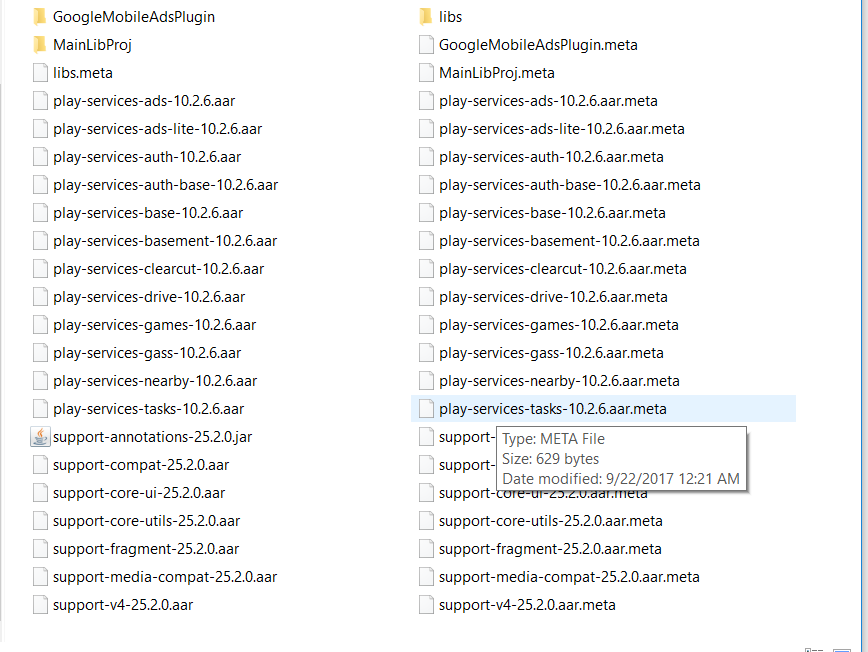
Spyispie120
on 26 Sep 2017
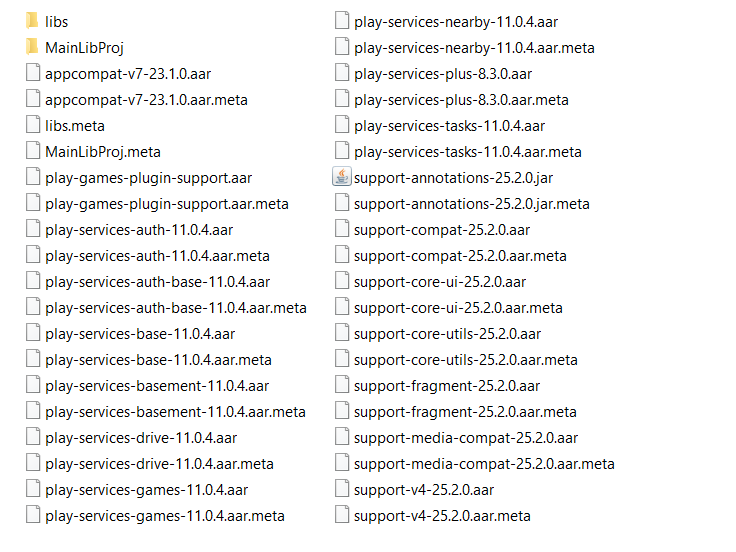
Yep.. I have tried checking for duplicate .jar files in here but there doesn't seem to be any.
terids
on 26 Sep 2017
play-services-plus is not the same version as the other play-services; make sure it is in version 11.0.4 like the other ones.
Spyispie120
on 26 Sep 2017
I just noticed that myself. I'll see if I can find the later version!
terids
on 26 Sep 2017
Sadly it has not fixed it. No change.
terids
on 26 Sep 2017
@terids Hmm because from my experience the error "CommandInvokationFailure: Unable to convert classes into dex format." mean that some ".aar" file is duplicated. Can you double check to make sure no ".aar" files in your Plugin folder is duplicated.
Spyispie120
on 26 Sep 2017
100% there are no duplicate files in that folder. I might have to just create a new project and start over.
terids
on 26 Sep 2017
Tried rolling back to 0.39a, nuking my plugins folder and adding this plugin again from scratch. I am STILL getting this DEX error. Completely out of ideas.
terids
on 26 Sep 2017
Finally got it to build again. I didn't realise a .aar and .jar would conflict with each other.
In this instance my problem files were:
Assets\Plugins\Android\play-games-plugin-support.aar
Assets\Plugins\Android\MainLibProj\libs
I deleted the former.
Thanks for all the assistance, it's appreciated! :)
terids
on 26 Sep 2017
Related issues
 hippogamesunity
·
5Comments
hippogamesunity
·
5Comments
 marcus13345
·
3Comments
marcus13345
·
3Comments
 bibbis
·
4Comments
bibbis
·
4Comments
 lolmourne
·
3Comments
lolmourne
·
3Comments
 parkJeongOck
·
4Comments
parkJeongOck
·
4Comments
Most helpful comment
Finally got it to build again. I didn't realise a .aar and .jar would conflict with each other.
In this instance my problem files were:
Assets\Plugins\Android\play-games-plugin-support.aar
Assets\Plugins\Android\MainLibProj\libs
I deleted the former.
Thanks for all the assistance, it's appreciated! :)